续前[【RA4E2开发板评测】【RA4E2开发板评测】电压检测器 ThreadX显示量程0-3300 mV+rtc
本次将使用D_key2击和shell_aDCreado_cmd作为量程切换。开发板打印出来aDC 电压
rasc部分
没有改变配置
编写keil部分代码
保存配置文件,生成项目代码。
在Project\src会多出几个*Task_entry.c文件,这些文件是留给我们写线程具体功能的。‘在hal_entry.c不需要加入任何代码,所有与os有关代码由[瑞萨]在生成项目时完成了.’
新增加一个量程标志volatile bool V33_15V_flag = false;
编辑各线程程序:
在Key_Switch_Task.c中的 /* TODO: add your own code here */变更代码
case 2:

							    tx_mutex_get(&AppPrintfSemp, TX_WAIT_FOREVER);
 			printf("D_key    2 \r\n");

    tx_mutex_put(&AppPrintfSemp);
	3V3_15V_flag=!3V3_15V_flag;
        break;
在printf_Task_Task.c 中:
在/* pvParameters contains TaskHandle_t */新增加代码:
extern volatile bool V33_15V_flag = false;
死循环ADC中printf代码
printf("$%d %d;", num, 200);
tx_mutex_put(&AppPrintfSemp);
if (scan_0_3V3_flag)
{a0 = (double)(num*3.3/4095);
}
else
{a0 = (double)(num*16.5/4095);
}
tx_mutex_get(&AppPrintfSemp, TX_WAIT_FOREVER);
printf("ADC:%.3f V\r\n", a0);
tx_mutex_put(&AppPrintfSemp);
新增加shell_aDCreado_cmd中代码
void shell_aDCreado_cmd(char argc, char *argv)
{ uint16_t value; // ???
char* str
if (!strcmp("-a", &argv[argv[1]]))
{ 3V3_15V_flag=!3V3_15V_flag
else{
long int i = strtol((&argv[argv[1]]),&str, 16)
printf("%d\r\n", i)
double a0
for(int l=0
{
if(0==(i%10))R_IWDT_Refresh(&g_wdt0_ctrl)
value = Read_ADC_Voltage_Value()
tx_mutex_get(&AppPrintfSemp, TX_WAIT_FOREVER)
printf("$%d %d;", value, 200)
tx_mutex_put(&AppPrintfSemp)
if (3V3_15V_flag)
{a0 = (double)(num*3.3/4095)
}
else
{a0 = (double)(num*16.5/4095)
}
// a0 = (double)(num*3.3/4095)
tx_mutex_get(&AppPrintfSemp, TX_WAIT_FOREVER)
printf("ADC:%.3f V\r\n", a0)
tx_mutex_put(&AppPrintfSemp)
}
}
}
NR_SHELL_CMD_EXPORT(aDCreado, shell_aDCreado_cmd)
‘在hal_entry.c不需要加入任何代码,所有与os有关代码由[瑞萨]在生成项目时完成了.’
输入增加电路如下:
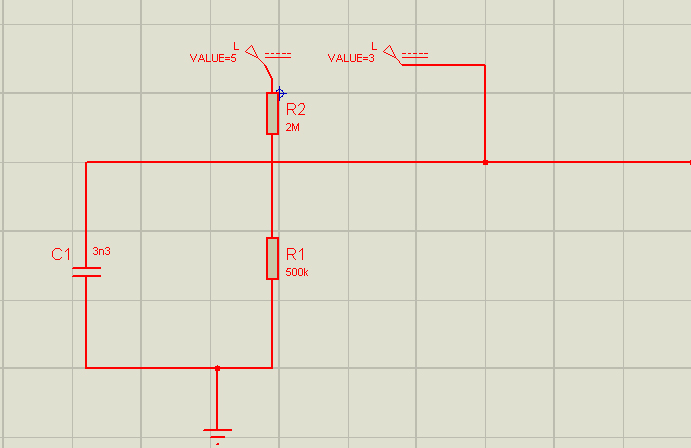
分别对应两量程0-15000mV和0-3300mV。
lcd显示U 0-3300mV
显示v 0-15000mV
这次编译没有出错:
74 warnings generated.
compiling printf_Task_entry.c...
linking...
Program Size: Code=31088 RO-data=2616 RW-data=2768 ZI-data=13744
FromELF: creating hex file...
After Build - User command #1: cmd /c ""E:\lst\ra4l1\ra4-e2-64\FSP_Project\rasc_launcher.bat" "E:\lst\ra4l1\ra4-e2-64\FSP_Project\rasc_version.txt" -nosplash --launcher.suppressErrors --gensmartbundle --compiler ARMv6 --devicefamily ra "E:\lst\ra4l1\ra4-e2-64\FSP_Project\configuration.xml" "E:\lst\ra4l1\ra4-e2-64\FSP_Project\Objects\FSP_Project.axf" 2> "%TEMP%\rasc_stderr.out""
[INFO] Input file "E:\lst\ra4l1\ra4-e2-64\FSP_Project\Objects\FSP_Project.axf" is newer than output file "E:\lst\ra4l1\ra4-e2-64\FSP_Project\Objects\FSP_Project.sbd". Proceeding with RASC invocation...
Generating Smart Bundle..
".\Objects\FSP_Project.axf" - 0 Error(s), 107 Warning(s).
Build Time Elapsed:  00:00:28
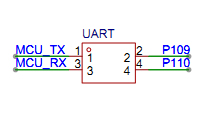
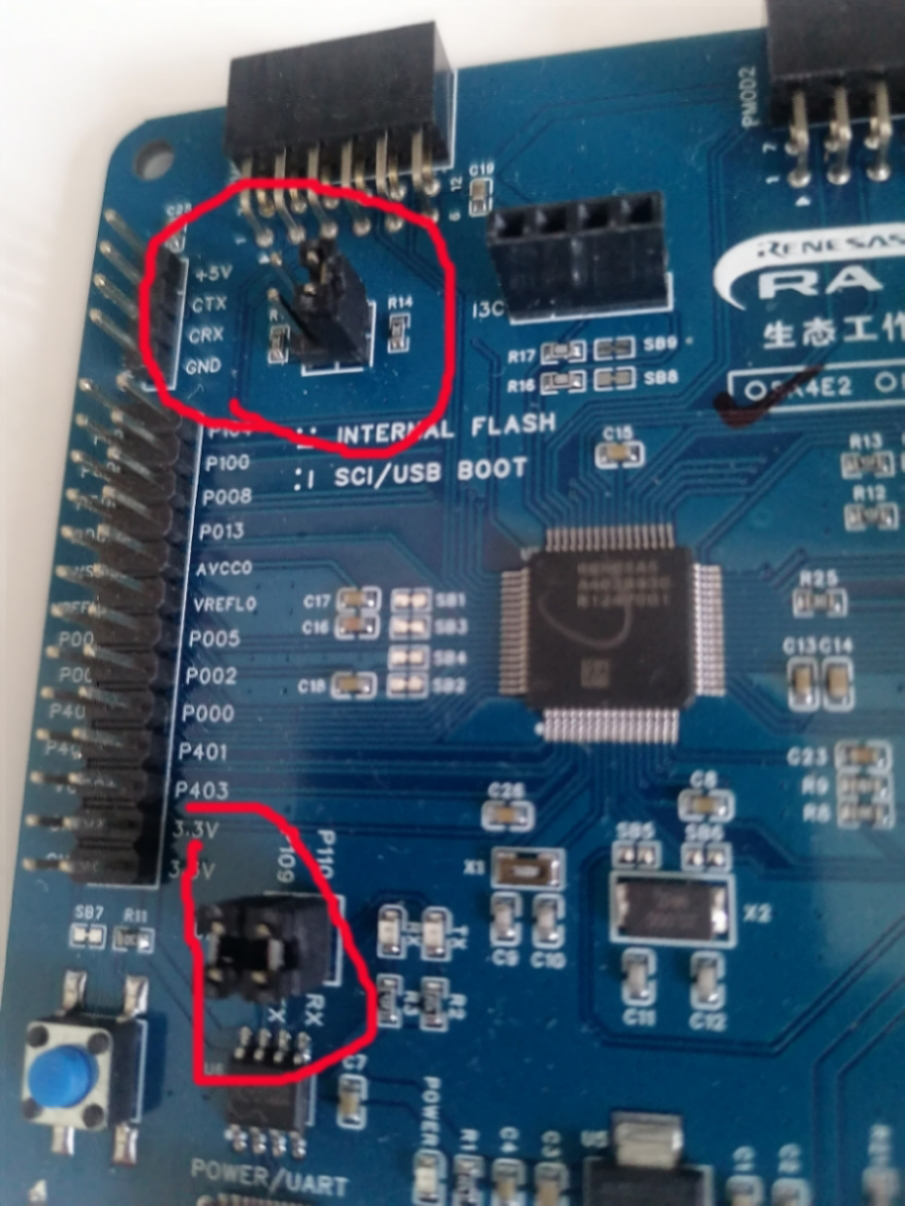
rfp-cli.exe命令行烧录部分 :* MODE CONFIG**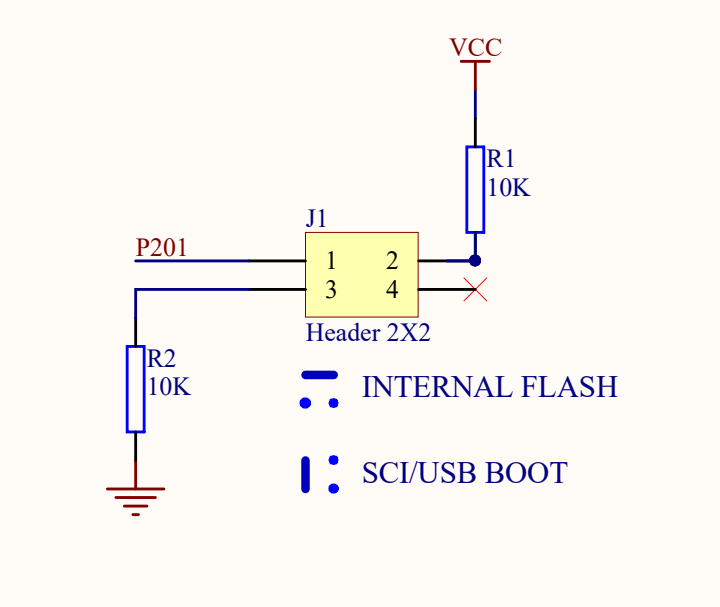 配置成sci boot模式* 连接带自己USB-com接口tx,rx到usb
 *
*  *找到编译后hex文件\FSP_Project\Objects\FSP_Project.hex并copy到Renesas Flash软件安后目录用type-c usb 连接线连接开发板和电脑,在设备管理器找到com口号为com5在Renesas Flash软件安后目录打开命令窗口,每次发送命令前最好按一下复位。运行各命令。命令rfp-cli -d RA -lp 查看可以用com口```
rfp-cli.exe命令行烧录部分 :
- MODE CONFIG**配置成sci boot模式
- 连接带自己USB-com接口tx,rx到usb
*找到编译后hex文件\FSP_Project\Objects\FSP_Project.hex并copy到Renesas Flash软件安后目录
用type-c usb 连接线连接开发板和电脑,在设备管理器找到com口号为com5
在Renesas Flash软件安后目录打开命令窗口,每次发送命令前最好按一下复位。运行各命令。
命令rfp-cli -d RA -lp 查看可以用com口
Renesas Flash Programmer CLI V1.12

Module Version: V3.19.00.000

[Port]

COM5

COM6

COM7
命令 rfp-cli -d RA -port COM5 -ls查看可以用速度
Renesas Flash Programmer CLI V1.12

Module Version: V3.19.00.000

Connecting the tool (COM port)

Tool: COM5

Interface: 2 wire UART

Connecting the target device

Disconnecting the tool[Speed]

9600

115200
命令 rfp-cli -d RA -port COM5 -sig查看目标信息
Renesas Flash Programmer CLI V1.12

Module Version: V3.19.00.000

Connecting the tool (COM port)

Tool: COM5

Interface: 2 wire UART

Connecting the target device

Speed: 115,200 bps

Connected to R7FA4E2B93CFM

Signature:

Device: R7FA4E2B93CFM

Boot Firmware Version: V7.0.0

Device Unique ID: 4E4B2D5C5B634B533539393742037771

Device Code: 05

Memory Info:

00000000 - 0000FFFF: Code Flash 1 (Block Size: 8 KB)

00010000 - 0001FFFF: Code Flash 1 (Block Size: 32 KB)

08000000 - 08000FFF: Data Flash 1 (Block Size: 64)

0100A100 - 0100A2FF: Config Area 1 (Block Size: 512)

Disconnecting the tool

Operation successful
命令rfp-cli -d RA -port COM5 -file lu.hex -p 烧录
Renesas Flash Programmer CLI V1.12

Module Version: V3.19.00.000

Load: "E:\\\\Renesas Electronics\\\\Programming Tools\\\\Renesas Flash Programmer V3.19\\\\FSP_Project.hex" (Size=42459, CRC=68D14AFE)

Connecting the tool (COM port)

Tool: COM5

Interface: 2 wire UART

Connecting the target device

Speed: 115,200 bps

Connected to R7FA4E2B93CFM

Erasing the target device

[Code Flash 1]       00000000 - 00003FFF

Writing data to the target device

[Code Flash 1]       00000000 - 0000397F

[Config Area 1]      0100A100 - 0100A17F

[Config Area 1]      0100A200 - 0100A2FF

Disconnecting the tool

Operation successful
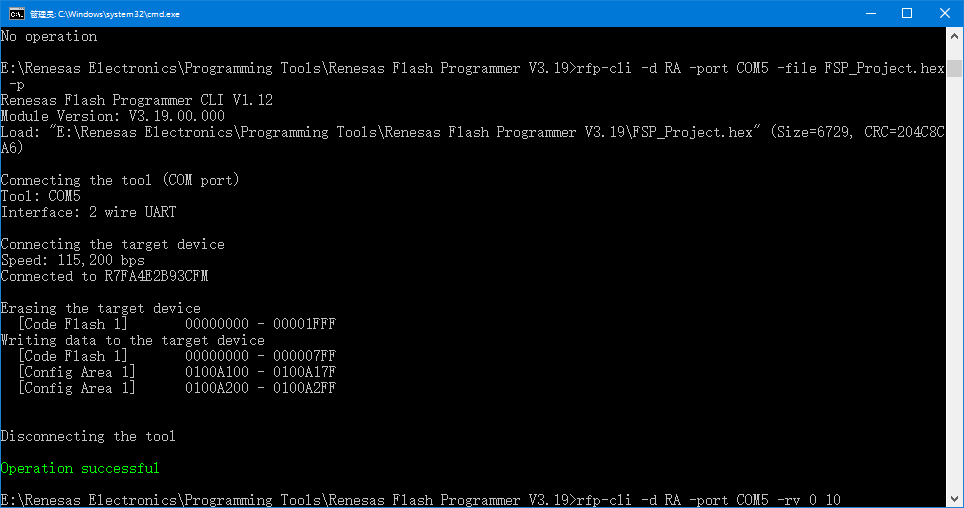
命令rfp-cli -d RA -port COM5 -rv 0 10 读取目标地址 数量数据
Renesas Flash Programmer CLI V1.12

Module Version: V3.19.00.000

Connecting the tool (COM port)

Tool: COM5

Interface: 2 wire UART

Connecting the target device

Speed: 115,200 bps

Connected to R7FA4E2B93CFM

Reading data from the device

[Code Flash 1]       00000000 - 00000009

Address  | 00 01 02 03 04 05 06 07 08 09 0A 0B 0C 0D 0E 0F

---------+------------------------------------------------

00000000 | 40 60 00 20 91 0C 00 00 85 03

Disconnecting the tool

Operation successful
- 文件前16字节:40600020910C000085030000B3020000
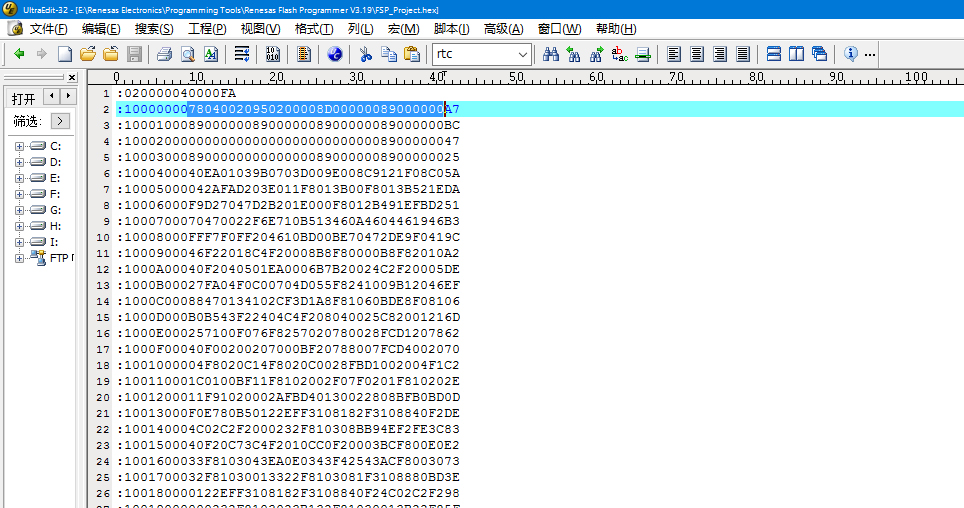
*烧录数据正确,成功
MODE CONFIG* *
配置成flash模式,运行成功,
达到预期状态。

 /9
/9 



 工商网监
湘ICP备2023018690号
工商网监
湘ICP备2023018690号


 13805
13805

 淘帖
淘帖 2692
2692










