【RA-Eco-RA4E2-64PIN-V1.0 开发板】步进电机的串口控制
本文介绍了 RA-Eco-RA4E2-64PIN-V1.0 开发板通过串口指令实现 28BYJ-48 步进电机旋转角度和速度的精确控制的项目设计。
项目介绍
- 硬件连接:28BYJ-48 步进电机、ULN2003 驱动板、Jlink 调试器、供电电源等;
- 工程创建:部署 GPIO 、 UART 、串口中断等配置;
- 工程代码:包括主函数、步进电机驱动代码、串口配置代码等;
- 测试效果:包括串口发送指令、步进电机旋转控制、串口打印状态信息等。
硬件连接
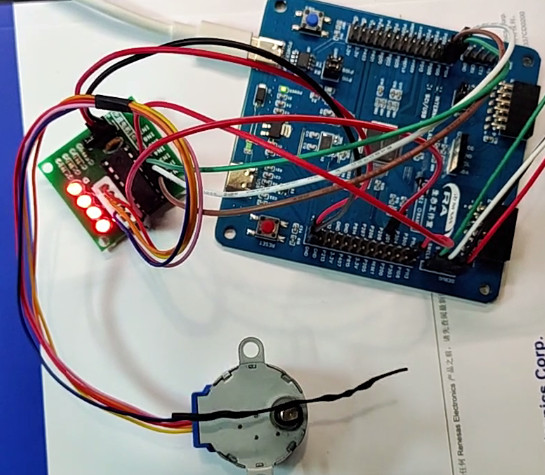
接线方式如下
| ULN2003 驱动板 |
RA4E2 |
说明 |
|---|
| IN1 |
P100 |
步进脉冲 A |
| IN2 |
P101 |
步进脉冲 B |
| IN3 |
P104 |
步进脉冲 C |
| IN4 |
P112 |
步进脉冲 D |
| VCC |
5V |
驱动板电源 |
| GND |
GND |
共地 |
串口通信使用板载 USB 转 TTL 工具,对应 P109 (TXD9) 和 P110 (RXD9) 引脚。
实物图
工程创建
- 打开 e^2^ studio 软件;
- 依次点击
文件 - 新建 - 瑞萨 C/C++ 项目 - Renesas RA ;
- 依次进行工程命名,路径设置,FSP版本,目标开发板选择,Device 选择
R7FA4E2B93CFM ,工具链选择 GNU ARM Embedded ,调试器选择 J-Link ,完成工程创建 ;
串口配置
- 进入 FSP 配置界面,打开 Pins 标签页,根据原理图或开发板丝印,将 P109 和 P110 引脚分别配置为 TXD9 和 RXD9 串口模式;
- 新建串口通信堆栈
New Stack - Connectivity - UART (r_sci_uart) ;
- 串口属性配置,General 标签下的 Channel 改为 9,名称改为
g_uart9,中断回调函数命名为 user_uart_callback;
- 进入 BSP 标签页,配置 RA Common 属性,RA Common 标签下的 Heap size 改为
0x1000 ,Main Stack Size 设置为 0x2000 以确保堆栈空间充足;
GPIO 配置
- 进入 FSP 配置界面,打开 Pins 标签页,选中 P100 引脚,模式配置为初始低电平的输出模式;
- 同理,将 P101、P104 和 P112 管脚也配置为初始低电平的输出模式;
- 点击
Generate Project Content 按钮,生成工程代码。
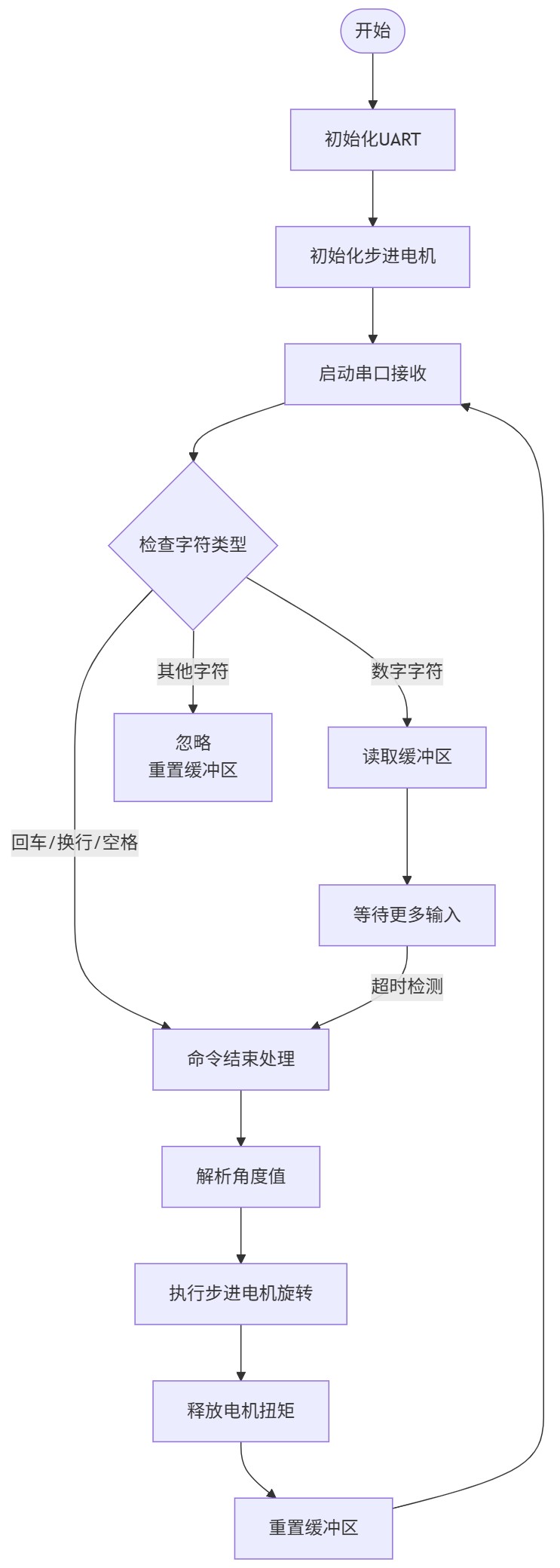
流程图
工程代码
在左侧的项目目录中,打开 src/hal_entry.c 文件,添加如下关键代码
hal_entry.c
#include "hal_data.h"
#include "stepper_motor.h"
#include <stdio.h>
FSP_CPP_HEADER
void R_BSP_WarmStart(bsp_warm_start_event_t event);
FSP_CPP_FOOTER
fsp_err_t err = FSP_SUCCESS;
volatile bool uart_send_complete_flag = false;
void user_uart_callback(uart_callback_args_t * p_args) {
if (p_args->event == UART_EVENT_TX_COMPLETE) {
uart_send_complete_flag = true;
}
else if (p_args->event == UART_EVENT_RX_CHAR) {
stepper_motor_uart_callback(p_args);
}
}
#ifdef __GNUC__
#define PUTCHAR_PROTOTYPE int __io_putchar(int ch)
#else
#define PUTCHAR_PROTOTYPE int __io_putchar(int ch)
#endif
PUTCHAR_PROTOTYPE {
err = R_SCI_UART_Write(&g_uart9_ctrl, (uint8_t *)&ch, 1);
if (FSP_SUCCESS != err) __BKPT();
while(uart_send_complete_flag == false) {}
uart_send_complete_flag = false;
return ch;
}
int _write(int fd, char *pBuffer, int size) {
for (int i = 0; i < size; i++) {
__io_putchar(*pBuffer++);
}
return size;
}
void hal_entry(void)
{
err = R_SCI_UART_Open(&g_uart9_ctrl, &g_uart9_cfg);
assert(FSP_SUCCESS == err);
if (FSP_SUCCESS != err) {
printf("UART open failed: 0x%x\r\n", err);
return;
}
printf("RA4E2 - Stepper Motor - UART Debug\r\n");
stepper_motor_init();
uint8_t dummy;
err = R_SCI_UART_Read(&g_uart9_ctrl, &dummy, 1);
if (err != FSP_SUCCESS) {
printf("UART read start failed: 0x%x\r\n", err);
}
g_uart9_ctrl.p_callback = user_uart_callback;
__enable_irq();
printf("Ready to receive angle values.\r\n");
printf("Send numbers like: 90, -45, 180, 360\r\n");
printf("Waiting for UART data...\r\n");
uint32_t counter = 0;
while (1) {
if (counter % 100 == 0) {
}
if (g_uart_received) {
printf("Data received! Processing...\r\n");
stepper_motor_process_command();
}
if (g_uart_buffer_index > 0 && !g_uart_received) {
printf("Buffer content: ");
for (uint16_t i = 0; i < g_uart_buffer_index; i++) {
printf("%c(0x%02X) ", g_uart_buffer[i], g_uart_buffer[i]);
}
printf("\r\n");
}
R_BSP_SoftwareDelay(100, BSP_DELAY_UNITS_MILLISECONDS);
counter++;
}
#if BSP_TZ_SECURE_BUILD
R_BSP_NonSecureEnter();
#endif
}
stepper_motor.h
新建 stepper_motor.h 头文件,添加如下代码
#ifndef STEPPER_MOTOR_H_
#define STEPPER_MOTOR_H_
#include "hal_data.h"
#include <stdbool.h>
#define MOTOR_PIN_IN1 BSP_IO_PORT_01_PIN_00
#define MOTOR_PIN_IN2 BSP_IO_PORT_01_PIN_01
#define MOTOR_PIN_IN3 BSP_IO_PORT_01_PIN_04
#define MOTOR_PIN_IN4 BSP_IO_PORT_01_PIN_12
#define STEPS_PER_REVOLUTION 509.0f
#define UART_BUFFER_SIZE 32
extern char g_uart_buffer[UART_BUFFER_SIZE];
extern volatile uint16_t g_uart_buffer_index;
extern volatile bool g_uart_received;
void stepper_motor_init(void);
void stepper_motor_rotate_steps(int32_t steps);
void stepper_motor_rotate_degrees(float degrees);
void stepper_motor_set_velocity(uint32_t velocity_ms);
void stepper_motor_stop(void);
void stepper_motor_show_help(void);
void stepper_motor_uart_callback(uart_callback_args_t *p_args);
void stepper_motor_process_command(void);
float parse_angle_command(const char *command);
#endif
stepper_motor.c
新建 stepper_motor.c 源文件,添加如下代码
#include "stepper_motor.h"
#include <stdio.h>
#include <stdlib.h>
#include <string.h>
#include <math.h>
const uint8_t STEP_SEQ[8][4] = {
{1, 0, 0, 1}, {1, 0, 0, 0}, {1, 1, 0, 0}, {0, 1, 0, 0},
{0, 1, 1, 0}, {0, 0, 1, 0}, {0, 0, 1, 1}, {0, 0, 0, 1}
};
static uint32_t g_step_delay_ms = 1;
void stepper_motor_init(void) {
R_IOPORT_PinWrite(&g_ioport_ctrl, MOTOR_PIN_IN1, BSP_IO_LEVEL_LOW);
R_IOPORT_PinWrite(&g_ioport_ctrl, MOTOR_PIN_IN2, BSP_IO_LEVEL_LOW);
R_IOPORT_PinWrite(&g_ioport_ctrl, MOTOR_PIN_IN3, BSP_IO_LEVEL_LOW);
R_IOPORT_PinWrite(&g_ioport_ctrl, MOTOR_PIN_IN4, BSP_IO_LEVEL_LOW);
printf("Stepper motor initialized.\r\n");
}
static void set_coil_state(uint8_t in1, uint8_t in2, uint8_t in3, uint8_t in4) {
R_IOPORT_PinWrite(&g_ioport_ctrl, MOTOR_PIN_IN1, in1 ? BSP_IO_LEVEL_HIGH : BSP_IO_LEVEL_LOW);
R_IOPORT_PinWrite(&g_ioport_ctrl, MOTOR_PIN_IN2, in2 ? BSP_IO_LEVEL_HIGH : BSP_IO_LEVEL_LOW);
R_IOPORT_PinWrite(&g_ioport_ctrl, MOTOR_PIN_IN3, in3 ? BSP_IO_LEVEL_HIGH : BSP_IO_LEVEL_LOW);
R_IOPORT_PinWrite(&g_ioport_ctrl, MOTOR_PIN_IN4, in4 ? BSP_IO_LEVEL_HIGH : BSP_IO_LEVEL_LOW);
}
void stepper_motor_rotate_steps(int32_t steps) {
if (steps == 0) {
printf("No steps to rotate.\r\n");
return;
}
int8_t direction = (steps >= 0) ? 1 : -1;
uint32_t absolute_steps = (uint32_t)abs(steps);
printf("Rotating %s, steps: %lu, delay: %lums\r\n",
(direction > 0) ? "CW" : "CCW", absolute_steps, g_step_delay_ms);
for (uint32_t i = 0; i < absolute_steps; i++) {
if (direction > 0) {
for (int phase = 0; phase < 8; phase++) {
set_coil_state(STEP_SEQ[phase][0], STEP_SEQ[phase][1],
STEP_SEQ[phase][2], STEP_SEQ[phase][3]);
R_BSP_SoftwareDelay(g_step_delay_ms, BSP_DELAY_UNITS_MILLISECONDS);
}
} else {
for (int phase = 7; phase >= 0; phase--) {
set_coil_state(STEP_SEQ[phase][0], STEP_SEQ[phase][1],
STEP_SEQ[phase][2], STEP_SEQ[phase][3]);
R_BSP_SoftwareDelay(g_step_delay_ms, BSP_DELAY_UNITS_MILLISECONDS);
}
}
if ((i + 1) % 100 == 0) {
printf("Progress: %lu/%lu steps\r\n", i + 1, absolute_steps);
}
}
printf("Rotation completed.\r\n");
}
void stepper_motor_rotate_degrees(float degrees) {
float steps_float = degrees * (STEPS_PER_REVOLUTION / 360.0f);
int32_t steps = (int32_t)steps_float;
printf("Angle: %.1f° -> Steps calculation:\r\n", degrees);
stepper_motor_rotate_steps(steps);
}
void stepper_motor_set_velocity(uint32_t velocity_ms) {
g_step_delay_ms = velocity_ms;
}
void stepper_motor_stop(void) {
set_coil_state(0, 0, 0, 0);
printf("Motor stopped.\r\n");
}
void stepper_motor_show_help(void) {
printf("=== Stepper Motor Simple Control ===\r\n");
printf("Send angle values via UART:\r\n");
printf(" Examples:\r\n");
printf(" 90 - Rotate 90 degrees clockwise\r\n");
printf(" -45 - Rotate 45 degrees counter-clockwise\r\n");
printf(" 180 - Rotate 180 degrees\r\n");
printf(" 360 - Rotate full circle\r\n");
printf(" Fixed speed: 1ms/step\r\n");
printf("====================================\r\n");
}
stepper_motor_uart.c
新建 stepper_motor_uart.c 源文件,添加如下代码
#include "stepper_motor.h"
#include <stdio.h>
#include <string.h>
#include <stdlib.h>
#include <ctype.h>
#include <math.h>
char g_uart_buffer[UART_BUFFER_SIZE];
volatile uint16_t g_uart_buffer_index = 0;
volatile bool g_uart_received = false;
static uint32_t g_fixed_velocity = 1;
void stepper_motor_uart_callback(uart_callback_args_t *p_args) {
if (p_args->event == UART_EVENT_RX_CHAR) {
uint8_t received_char = (uint8_t)p_args->data;
if (received_char == '\r' || received_char == '\n') {
if (g_uart_buffer_index > 0) {
g_uart_buffer[g_uart_buffer_index] = '\0';
g_uart_received = true;
}
g_uart_buffer_index = 0;
}
else if (g_uart_buffer_index < UART_BUFFER_SIZE - 1) {
g_uart_buffer[g_uart_buffer_index++] = received_char;
}
else {
g_uart_buffer_index = 0;
}
}
}
float parse_angle_command(const char *command) {
if (command == NULL || strlen(command) == 0) {
printf("Empty command\r\n");
return 0.0f;
}
printf("Received command: %s\r\n", command);
char *endptr;
float angle = strtof(command, &endptr);
if (endptr == command) {
printf("Invalid number format: %s\r\n", command);
return 0.0f;
}
while (*endptr != '\0') {
if (!isspace(*endptr)) {
printf("Extra characters in command: %s\r\n", endptr);
break;
}
endptr++;
}
printf("Parsed angle: %.1f°\r\n", angle);
return angle;
}
void stepper_motor_process_command(void) {
if (g_uart_received) {
char local_buffer[UART_BUFFER_SIZE];
strncpy(local_buffer, g_uart_buffer, UART_BUFFER_SIZE);
printf("Processing command: %s\r\n", local_buffer);
float angle = parse_angle_command(local_buffer);
if (fabsf(angle) > 0.1f) {
printf("Executing: %.1f° at fixed speed: %lums/step\r\n", angle, g_fixed_velocity);
stepper_motor_set_velocity(g_fixed_velocity);
stepper_motor_rotate_degrees(angle);
stepper_motor_stop();
printf("Execution completed.\r\n");
} else if (fabsf(angle) > 0.0f) {
printf("Angle too small: %.1f°\r\n", angle);
}
g_uart_received = false;
g_uart_buffer_index = 0;
memset(g_uart_buffer, 0, sizeof(g_uart_buffer));
}
}
- 保存代码,右键项目 - 构建程序;
- 右键项目 - 调试项目 - 上传固件至开发板。
测试效果
- 28 BYJ-48 步进电机、ULN2003 驱动板、RA4E2 开发板接线硬件连接完成;
- TypeC - USB 数据线连接开发板串口和电脑;
- 打开串口调试助手,配置对应的波特率等参数;
- 打开串口,即可接收芯片发送的字符串;
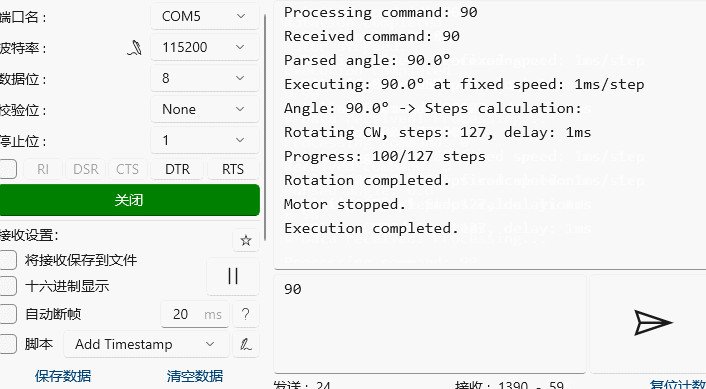
同时串口打印输出步进电机状态
» 90
« Data received! Processing...
Processing command: 90
Received command: 90
Parsed angle: 90.0°
Executing: 90.0° at fixed speed: 1ms/step
Angle: 90.0° -> Steps calculation:
Rotating CW, steps: 127, delay: 1ms
Progress: 100/127 steps
Rotation completed.
Motor stopped.
Execution completed.
动态效果见底部视频。
总结
本文介绍了 RA-Eco-RA4E2-64PIN-V1.0 开发板通过串口指令实现 28BYJ-48 步进电机旋转角度和速度的精确控制的项目设计,包括硬件连接、工程创建、工程代码、测试效果等流程,为 Renesas RA 系列产品在工业自动化、科研仪器控制等相关领域的开发设计和应用提供了参考。

 电子发烧友论坛
 /9
/9 



 工商网监
湘ICP备2023018690号
工商网监
湘ICP备2023018690号


 2666
2666


 评论
评论
 淘帖
淘帖 1229
1229


 赞
赞










