米尔RK3506有用于音频播放的Jack Audio接口。连接外部音箱或者耳机即可进行音频的播放功能。ALSA(Advanced Linux Sound Architecture)属于Linux内核的音频的子系统,在用户空间试用alsa-utils工具可以查看音频系统的组成、设置音频参数以及播放音频文件。同时,也可以通过编程调用alsa的API实现自定义应用。
1、ALSA编程接口
ALSA编程接口可以分为以下几类:
- Information interface,提供音频设备信息以及用于控制音频设备的信息;
- Control interface,调节音量以及其他声卡支持的控制功能;
- Mixer interface,用于多个应用程序共享音频设备,这是ALSA的主要功能之一;
- PCM interface,通过配置机制定义虚拟设备和硬件设备,是数字音频应用中的常用接口;
- Raw MIDI interface,用于控制MIDI的底层接口,直接处理MIDI事件;
- Sequencer interface,用于应用程控制MIDI接口;
- Timer interface,用于使用声卡硬件中的定时器,同步不同的声卡事件;
米尔提供的开发SDK中的buildroot/dl/alas-lib/文件夹中有alsa-lib的源码,也可以从Github上拉取最新的alsa-lib的release代码。
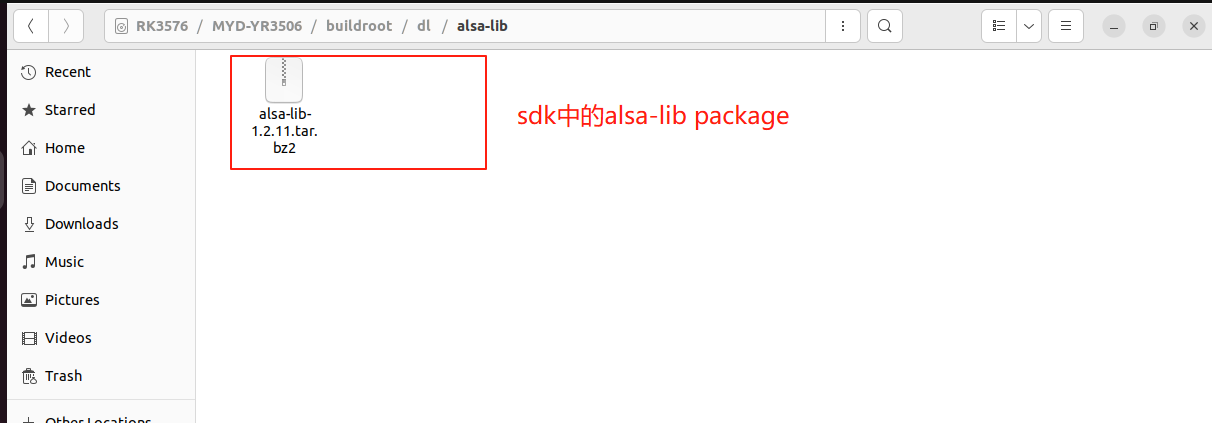
tar -vxjf alsa-lib-1.2.11.tar.bz2
进入解压出来的文件夹,对源码进行配置
cd alsa-lib-1.2.11
./configure --host=arm-buildroot-linux-gnueabihf --prefix=/home/ept/alsalib --with-configdir=/usr/share/alsalib
--host指定编译使用的交叉编译器,--prefix指定存放编译好的lib文件,--with-configdir指定系统配置文件夹。完成上述操作后,执行编译和安装指令
make

sudo make install
在执行sudo make install时会出现下列错误
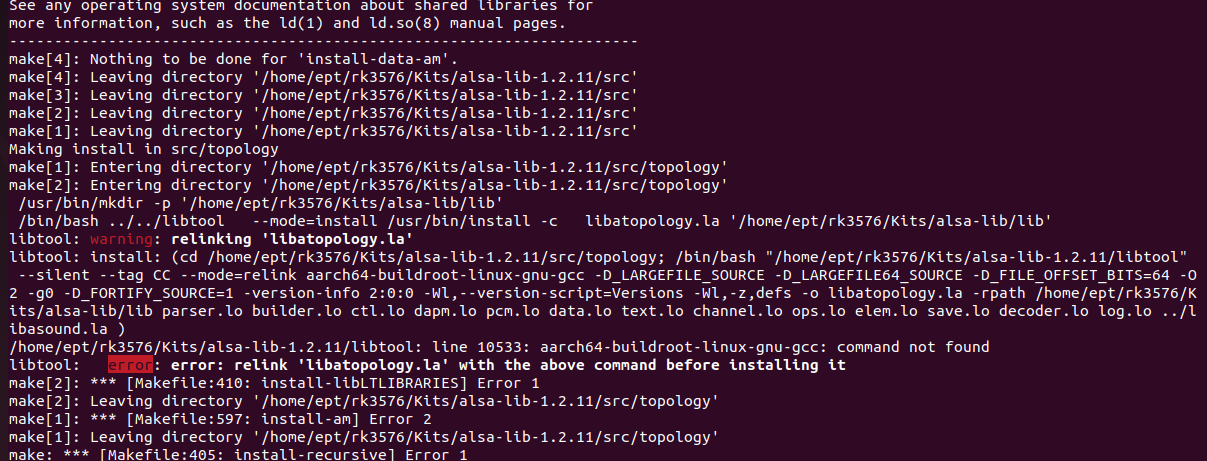
出现问题的原因是在root用户下无法找到工具链中的编译器,需要在root用户下配置工具链,执行buildroot输出工具链中的environment_setup脚本即可,配置后重新执行make install。
su
source /<工具链路径>/environment_setup
make install
安装完成后在--prefix指定的文件夹中lib文件夹中,有一个pkgconfig文件夹,其中的文件是用于管理alsa-lib库的。在PKG_CONFIG_PATH环境变量中添加这一pkgconfig的路径。这样在makefile中就可以引用alsa-lib库。
PKG_CONFIG_PATH=$PKG_CONFIG_PATH:<Lib的安装位置>/alsa-lib/lib/pkgconfig
export PKG_CONFIG_PATH
2、获取音频设备信息
获取音频设备信息由多个步骤构成,首先需要确定硬件声卡,该操作通过使用Control Interface实现。主要使用以下各函数:
- snd_card_next
- snd_ctl_open
- snd_ctl_pcm_next_device
- snd_ctl_card_info_get_id
- snd_ctl_card_info_get_name
声卡由整数编号0开始识别。使用snd_card_next获取下一个声卡设备编号,第一个声卡设备使用-1作为函数输入获得。传递声卡名称(比如hw:0,hw:1)到snd_ctl_open来打卡声卡,打开的声卡使用handle进行管理。进而,handle用于调用函数来向结构体snd_ctl_card_info中填充声卡信息,结构中的成员信息通过使用比如snd_ctl_card_info_get_name来提取相关信息。比如:
card 0: PCH(HDA Intel PCH)
进一步获取相关的信息,需要使用声卡相关的PCM接口来获取。用于存储PCM信息的结构体为 snd_pcm_info_t 。调用的函数为snd_pcm_info_get_id和 snd_pcm_info_get_name 。
以下为发现和显示声卡硬件信息的代码 device-hardware
#include <stdio.h>
#include <stdlib.h>
#include <alsa/asoundlib.h>
void info(char *dev_name, snd_pcm_stream_t stream) {
snd_pcm_hw_params_t *hw_params;
int err;
snd_pcm_t *handle;
unsigned int max;
unsigned int min;
unsigned int val;
unsigned int dir;
snd_pcm_uframes_t frames;
if ((err = snd_pcm_open (&handle, dev_name, stream, 0)) < 0) {
fprintf (stderr, "cannot open audio device %s (%s)\\n",
dev_name,
snd_strerror (err));
return;
}
if ((err = snd_pcm_hw_params_malloc (&hw_params)) < 0) {
fprintf (stderr, "cannot allocate hardware parameter structure (%s)\\n",
snd_strerror (err));
exit (1);
}
if ((err = snd_pcm_hw_params_any (handle, hw_params)) < 0) {
fprintf (stderr, "cannot initialize hardware parameter structure (%s)\\n",
snd_strerror (err));
exit (1);
}
if ((err = snd_pcm_hw_params_get_channels_max(hw_params, &max)) < 0) {
fprintf (stderr, "cannot (%s)\\n",
snd_strerror (err));
exit (1);
}
printf("max channels %d\\n", max);
if ((err = snd_pcm_hw_params_get_channels_min(hw_params, &min)) < 0) {
fprintf (stderr, "cannot get channel info (%s)\\n",
snd_strerror (err));
exit (1);
}
printf("min channels %d\\n", min);
if ((err = snd_pcm_hw_params_get_rate_min(hw_params, &val, &dir)) < 0) {
fprintf (stderr, "cannot get min rate (%s)\\n",
snd_strerror (err));
exit (1);
}
printf("min rate %d hz\\n", val);
if ((err = snd_pcm_hw_params_get_rate_max(hw_params, &val, &dir)) < 0) {
fprintf (stderr, "cannot get max rate (%s)\\n",
snd_strerror (err));
exit (1);
}
printf("max rate %d hz\\n", val);
if ((err = snd_pcm_hw_params_get_period_time_min(hw_params, &val, &dir)) < 0) {
fprintf (stderr, "cannot get min period time (%s)\\n",
snd_strerror (err));
exit (1);
}
printf("min period time %d usecs\\n", val);
if ((err = snd_pcm_hw_params_get_period_time_max(hw_params, &val, &dir)) < 0) {
fprintf (stderr, "cannot get max period time (%s)\\n",
snd_strerror (err));
exit (1);
}
printf("max period time %d usecs\\n", val);
if ((err = snd_pcm_hw_params_get_period_size_min(hw_params, &frames, &dir)) < 0) {
fprintf (stderr, "cannot get min period size (%s)\\n",
snd_strerror (err));
exit (1);
}
printf("min period size in frames %lu\\n", frames);
if ((err = snd_pcm_hw_params_get_period_size_max(hw_params, &frames, &dir)) < 0) {
fprintf (stderr, "cannot get max period size (%s)\\n",
snd_strerror (err));
exit (1);
}
printf("max period size in frames %lu\\n", frames);
if ((err = snd_pcm_hw_params_get_periods_min(hw_params, &val, &dir)) < 0) {
fprintf (stderr, "cannot get min periods (%s)\\n",
snd_strerror (err));
exit (1);
}
printf("min periods per buffer %d\\n", val);
if ((err = snd_pcm_hw_params_get_periods_max(hw_params, &val, &dir)) < 0) {
fprintf (stderr, "cannot get min periods (%s)\\n",
snd_strerror (err));
exit (1);
}
printf("max periods per buffer %d\\n", val);
if ((err = snd_pcm_hw_params_get_buffer_time_min(hw_params, &val, &dir)) < 0) {
fprintf (stderr, "cannot get min buffer time (%s)\\n",
snd_strerror (err));
exit (1);
}
printf("min buffer time %d usecs\\n", val);
if ((err = snd_pcm_hw_params_get_buffer_time_max(hw_params, &val, &dir)) < 0) {
fprintf (stderr, "cannot get max buffer time (%s)\\n",
snd_strerror (err));
exit (1);
}
printf("max buffer time %d usecs\\n", val);
if ((err = snd_pcm_hw_params_get_buffer_size_min(hw_params, &frames)) < 0) {
fprintf (stderr, "cannot get min buffer size (%s)\\n",
snd_strerror (err));
exit (1);
}
printf("min buffer size in frames %lu\\n", frames);
if ((err = snd_pcm_hw_params_get_buffer_size_max(hw_params, &frames)) < 0) {
fprintf (stderr, "cannot get max buffer size (%s)\\n",
snd_strerror (err));
exit (1);
}
printf("max buffer size in frames %lu\\n", frames);
}
int main (int argc, char *argv[])
{
int i;
int err;
int buf[128];
FILE *fin;
size_t nread;
unsigned int rate = 44100;
if (argc != 2) {
fprintf(stderr, "Usage: %s card\\n", argv[0]);
exit(1);
}
printf("*********** CAPTURE ***********\\n");
info(argv[1], SND_PCM_STREAM_CAPTURE);
printf("*********** PLAYBACK ***********\\n");
info(argv[1], SND_PCM_STREAM_PLAYBACK);
exit (0);
}
编写以下Makefile
LDLIBS = $(shell pkg-config --libs alsa) -lm

CFLAGS = -g $(shell pkg-config --cflags alsa)

SRC = device-hardware
EXE = device-hardware

clean:
	rm $(EXE)
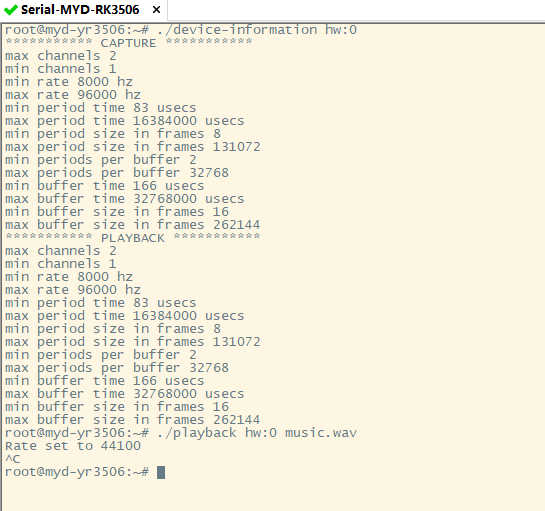
导入buildroot构建的工具链的environment-setup配置,并执行Make指令,得到可执行文件,将可执行文件传输到开发板运行,可以得到以下的输出。
3、播放音频文件
开发板的音频输出接口外接音箱可以实现音频播放功能。以下为使用alsa-lib的函数播放音乐的代码。
#include <stdio.h>
#include <stdlib.h>
#include <alsa/asoundlib.h>
int main(int argc, char *argv[])
{
int i;
int err;
int buf[128];
snd_pcm_t *playback_handle;
snd_pcm_hw_params_t *hw_params;
FILE *fin;
size_t nread;
unsigned int rate = 44100;
if (argc != 3) {
fprintf(stderr, "Usage: %s card file\\n", argv[0]);
exit(1);
}
if ((err = snd_pcm_open (&playback_handle, argv[1], SND_PCM_STREAM_PLAYBACK, 0)) < 0) {
fprintf (stderr, "cannot open audio device %s (%s)\\n",
argv[1],
snd_strerror (err));
exit (1);
}
if ((err = snd_pcm_hw_params_malloc (&hw_params)) < 0) {
fprintf (stderr, "cannot allocate hardware parameter structure (%s)\\n",
snd_strerror (err));
exit (1);
}
if ((err = snd_pcm_hw_params_any (playback_handle, hw_params)) < 0) {
fprintf (stderr, "cannot initialize hardware parameter structure (%s)\\n",
snd_strerror (err));
exit (1);
}
if ((err = snd_pcm_hw_params_set_access (playback_handle, hw_params, SND_PCM_ACCESS_RW_INTERLEAVED)) < 0) {
fprintf (stderr, "cannot set access type (%s)\\n",
snd_strerror (err));
exit (1);
}
if ((err = snd_pcm_hw_params_set_format (playback_handle, hw_params, SND_PCM_FORMAT_S16_LE)) < 0) {
fprintf (stderr, "cannot set sample format (%s)\\n",
snd_strerror (err));
exit (1);
}
if ((err = snd_pcm_hw_params_set_rate_near (playback_handle, hw_params, &rate, 0)) < 0) {
fprintf (stderr, "cannot set sample rate (%s)\\n",
snd_strerror (err));
exit (1);
}
printf("Rate set to %d\\n", rate);
if ((err = snd_pcm_hw_params_set_channels (playback_handle, hw_params, 2)) < 0) {
fprintf (stderr, "cannot set channel count (%s)\\n",
snd_strerror (err));
exit (1);
}
if ((err = snd_pcm_hw_params (playback_handle, hw_params)) < 0) {
fprintf (stderr, "cannot set parameters (%s)\\n",
snd_strerror (err));
exit (1);
}
snd_pcm_hw_params_free (hw_params);
if ((fin = fopen(argv[2], "r")) == NULL) {
fprintf(stderr, "Can't open %s for reading\\n", argv[2]);
exit(1);
}
while ((nread = fread(buf, sizeof(int), 128, fin)) > 0) {
if ((err = snd_pcm_writei (playback_handle, buf, nread)) != nread) {
fprintf (stderr, "write to audio interface failed (%s)\\n",
snd_strerror (err));
snd_pcm_prepare(playback_handle);
}
}
snd_pcm_drain(playback_handle);
snd_pcm_close (playback_handle);
exit (0);
}
保存为playback.c,并编写以下Makefile文件
LDLIBS = $(shell pkg-config --libs alsa) -lm

CFLAGS = -g $(shell pkg-config --cflags alsa)

SRC = playback.c
EXE = playback

clean:
	rm $(EXE)
执行Make得到可执行文件,传输到开发板执行,播放音乐文件的效果如视频所示。

 电子发烧友论坛
 /9
/9 



 工商网监
湘ICP备2023018690号
工商网监
湘ICP备2023018690号


 1257
1257


 评论
评论
 淘帖
淘帖 837
837
 10
10










