继续在CH585EVT\EVT\EXAM\BLE\Peripheral进行扩展
一、ADC采集片上温度
在peripheral.C增加adc_temperature函数,代码从ADC示例中获取,只保留到整数位,精度不高。
uint32_t adc_temperature(void)
{
    int i;
    uint32_t temperature=0;
    /* 温度采样并输出 */
    ADC_InterTSSampInit();

    ADC_ExcutSingleConver();//时间足够时建议再次转换并丢弃首次ADC数据
    for(i = 0; i < 20; i++)
    {
        adcBuff[i] = ADC_ExcutSingleConver(); // 连续采样20次
    }
    for(i = 0; i < 20; i++)
    {
        //uint32_t C25 = 0;
        //C25 = (*((PUINT32)ROM_CFG_TMP_25C));
        //PRINT("%d %d %d \\n", adc_to_temperature_celsius(adcBuff[i]),adcBuff[i],C25);
        temperature+=adc_to_temperature_celsius(adcBuff[i]);
    }
    return temperature/20;
}
二、BLE notify采集的温度数值
performPeriodicTask函数中,增加notiData[0]=adc_temperature();,这样所有订阅该特征值的用户可以收到温度值。
static void performPeriodicTask(void)
{
    uint8_t notiData[SIMPLEPROFILE_CHAR4_LEN] = {0x88};
    notiData[0]=adc_temperature();
    peripheralChar4Notify(notiData, SIMPLEPROFILE_CHAR4_LEN);
}
三、编写一个HTML
<!DOCTYPE html>
<html lang="zh-CN">
<head>
<meta charset="UTF-8">
<meta name="viewport" content="width=device-width, initial-scale=1.0">
<title>BLE数据曲线监控</title>
<script src="https://cdnjs.cloudflare.com/ajax/libs/Chart.js/2.9.4/Chart.js"></script>
<style>
body {
font-family: Arial, sans-serif;
max-width: 1000px;
margin: 0 auto;
padding: 20px;
}
.panel {
margin-bottom: 20px;
padding: 15px;
border: 1px solid #ddd;
border-radius: 5px;
}
.chart-container {
position: relative;
height: 400px;
width: 100%;
}
button {
background-color: #4285f4;
color: white;
border: none;
border-radius: 4px;
padding: 10px 15px;
margin: 5px;
cursor: pointer;
}
button:hover {
background-color: #3367d6;
}
button:disabled {
background-color: #cccccc;
cursor: not-allowed;
}
.status {
font-weight: bold;
padding: 5px;
border-radius: 3px;
display: inline-block;
}
.connected {
background-color: #e6f4ea;
color: #34a853;
}
.disconnected {
background-color: #fce8e6;
color: #d93025;
}
.control-group {
margin: 15px 0;
}
.value-display {
font-family: monospace;
font-size: 16px;
margin: 10px 0;
}
</style>
</head>
<body>
<h1>BLE数据曲线监控</h1>
<div class="panel">
<h2>设备连接</h2>
<div>
<span class="status disconnected" id="connection-status">未连接</span>
</div>
<div class="control-group">
<button id="connect-btn">连接设备</button>
<button id="disconnect-btn" disabled>断开连接</button>
</div>
</div>
<div class="panel">
<h2>服务配置</h2>
<div class="control-group">
<label for="service-uuid">服务UUID: </label>
<input type="text" id="service-uuid" placeholder="0000ffe0-0000-1000-8000-00805f9b34fb" value="0000ffe0-0000-1000-8000-00805f9b34fb" size="40">
</div>
<div class="control-group">
<label for="characteristic-uuid">特征值UUID: </label>
<input type="text" id="characteristic-uuid" placeholder="0000ffe4-0000-1000-8000-00805f9b34fb" value="0000ffe4-0000-1000-8000-00805f9b34fb" size="40">
</div>
<div class="control-group">
<button id="get-characteristic-btn" disabled>获取特征值</button>
</div>
</div>
<div class="panel">
<h2>数据监控</h2>
<div class="control-group">
<button id="start-monitor-btn" disabled>开始监控</button>
<button id="stop-monitor-btn" disabled>停止监控</button>
</div>
<div class="value-display">
当前值: <span id="current-value">-</span>
历史记录: <span id="history-count">0</span> 条
</div>
<div class="chart-container">
<canvas id="data-chart"></canvas>
</div>
</div>
<script>
let device = null;
let characteristic = null;
let chart = null;
let monitorInterval = null;
let dataPoints = [];
const maxDataPoints = 100;
const connectBtn = document.getElementById('connect-btn');
const disconnectBtn = document.getElementById('disconnect-btn');
const getCharacteristicBtn = document.getElementById('get-characteristic-btn');
const startMonitorBtn = document.getElementById('start-monitor-btn');
const stopMonitorBtn = document.getElementById('stop-monitor-btn');
const connectionStatus = document.getElementById('connection-status');
const currentValue = document.getElementById('current-value');
const historyCount = document.getElementById('history-count');
const sampleInterval = document.getElementById('sample-interval');
function initChart() {
const ctx = document.getElementById('data-chart').getContext('2d');
chart = new Chart(ctx, {
type: 'line',
data: {
labels: [],
datasets: [{
label: '特征值数据',
data: [],
borderColor: 'rgb(75, 192, 192)',
tension: 0.1,
fill: false
}]
},
options: {
responsive: true,
maintainAspectRatio: false,
scales: {
y: {
beginAtZero: false
}
},
animation: {
duration: 0
}
}
});
}
function updateChart(value, timestamp) {
dataPoints.push({
x: timestamp || new Date().toLocaleTimeString(),
y: value
});
if (dataPoints.length > maxDataPoints) {
dataPoints.shift();
}
chart.data.labels = dataPoints.map(point => point.x);
chart.data.datasets[0].data = dataPoints.map(point => point.y);
chart.update();
currentValue.textContent = value;
historyCount.textContent = dataPoints.length;
}
connectBtn.addEventListener('click', async () => {
try {
connectionStatus.textContent = "正在连接...";
connectionStatus.className = "status";
device = await navigator.bluetooth.requestDevice({
acceptAllDevices: true,
optionalServices: ['0000ffe0-0000-1000-8000-00805f9b34fb']
});
const server = await device.gatt.connect();
connectionStatus.textContent = "已连接";
connectionStatus.className = "status connected";
connectBtn.disabled = true;
disconnectBtn.disabled = false;
getCharacteristicBtn.disabled = false;
device.addEventListener('gattserverdisconnected', onDisconnected);
if (!chart) {
initChart();
}
} catch (error) {
console.error("连接失败:", error);
connectionStatus.textContent = "连接失败";
connectionStatus.className = "status disconnected";
}
});
disconnectBtn.addEventListener('click', () => {
if (device && device.gatt.connected) {
device.gatt.disconnect();
}
});
function onDisconnected() {
connectionStatus.textContent = "未连接";
connectionStatus.className = "status disconnected";
connectBtn.disabled = false;
disconnectBtn.disabled = true;
getCharacteristicBtn.disabled = true;
startMonitorBtn.disabled = true;
stopMonitorBtn.disabled = true;
stopMonitoring();
device = null;
characteristic = null;
}
getCharacteristicBtn.addEventListener('click', async () => {
const serviceUuid = document.getElementById('service-uuid').value.trim();
const characteristicUuid = document.getElementById('characteristic-uuid').value.trim();
if (!serviceUuid || !characteristicUuid) {
alert("请输入服务UUID和特征值UUID");
return;
}
try {
const server = await device.gatt.connect();
const service = await server.getPrimaryService(serviceUuid);
characteristic = await service.getCharacteristic(characteristicUuid);
const properties = [];
if (characteristic.properties.read) properties.push('读');
if (characteristic.properties.notify) properties.push('通知');
alert(`特征值获取成功,支持: ${properties.join(', ')}`);
startMonitorBtn.disabled = false;
} catch (error) {
console.error("获取特征值失败:", error);
alert("获取特征值失败,请检查UUID是否正确");
}
});
startMonitorBtn.addEventListener('click', () => {
startMonitoring();
startMonitorBtn.disabled = true;
stopMonitorBtn.disabled = false;
});
stopMonitorBtn.addEventListener('click', () => {
stopMonitoring();
startMonitorBtn.disabled = false;
stopMonitorBtn.disabled = true;
});
function startMonitoring() {
if (!characteristic) return;
if (!characteristic.properties.notify) {
alert("该特征值不支持Notify特性");
return;
}
characteristic.startNotifications()
.then(() => {
console.log("已启用通知");
characteristic.addEventListener('characteristicvaluechanged',
handleNotifications);
startMonitorBtn.disabled = true;
stopMonitorBtn.disabled = false;
})
.catch(error => {
console.error("启用通知失败:", error);
});
}
function stopMonitoring() {
if (characteristic) {
characteristic.stopNotifications()
.then(() => {
characteristic.removeEventListener('characteristicvaluechanged',
handleNotifications);
console.log("已停止通知");
startMonitorBtn.disabled = false;
stopMonitorBtn.disabled = true;
})
.catch(error => {
console.error("停止通知失败:", error);
});
}
}
function handleNotifications(event) {
const value = event.target.value;
const numericValue = value.getUint8(0);
const timestamp = new Date().toLocaleTimeString();
updateChart(numericValue, timestamp);
}
async function readCharacteristicValue() {
if (!characteristic) return;
try {
const value = await characteristic.readValue();
const numericValue = value.getUint8(0);
const timestamp = new Date().toLocaleTimeString();
updateChart(numericValue, timestamp);
} catch (error) {
console.error("读取特征值失败:", error);
stopMonitoring();
startMonitorBtn.disabled = false;
stopMonitorBtn.disabled = true;
}
}
initChart();
</script>
</body>
</html>
运行的效果是这样的:
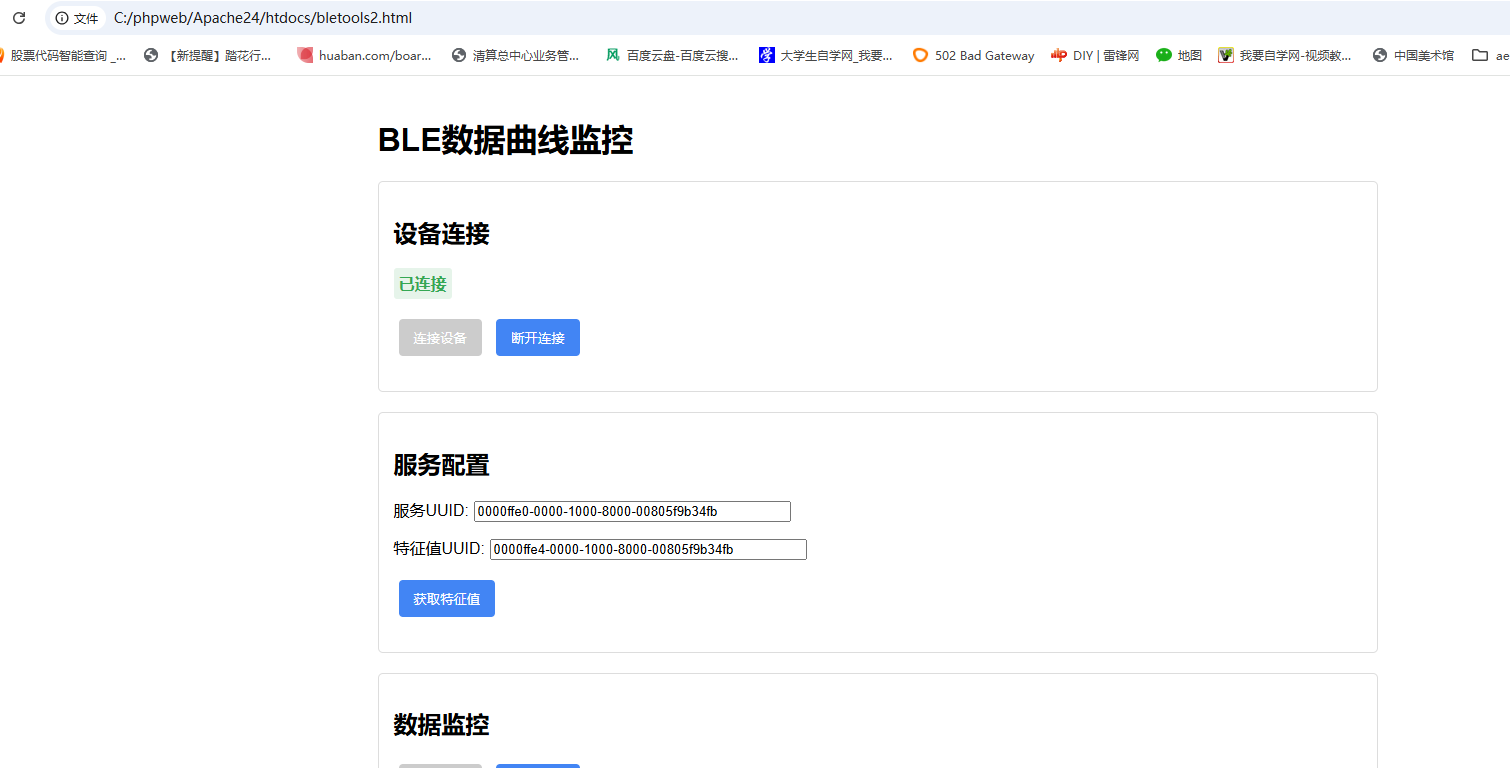
录制的时候,温度一直很稳定26度,看不出变化
 0
0





 工商网监
湘ICP备2023018690号
工商网监
湘ICP备2023018690号


 886
886

 淘帖
淘帖





