在UART交互中,开源免费的shell有很多,这里向大家介绍如何移植开源的micro_shell
【下载】
开源网址:nr_micro_shell: shell for MCU. 单片机命令行交互。
【代码添加】
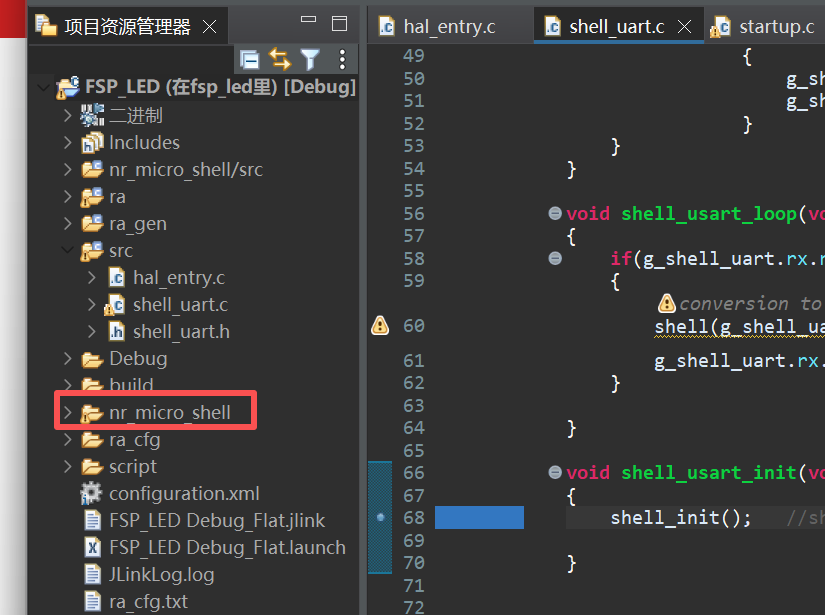
1、在e2studio中,把下载到的文件夹移入工程中
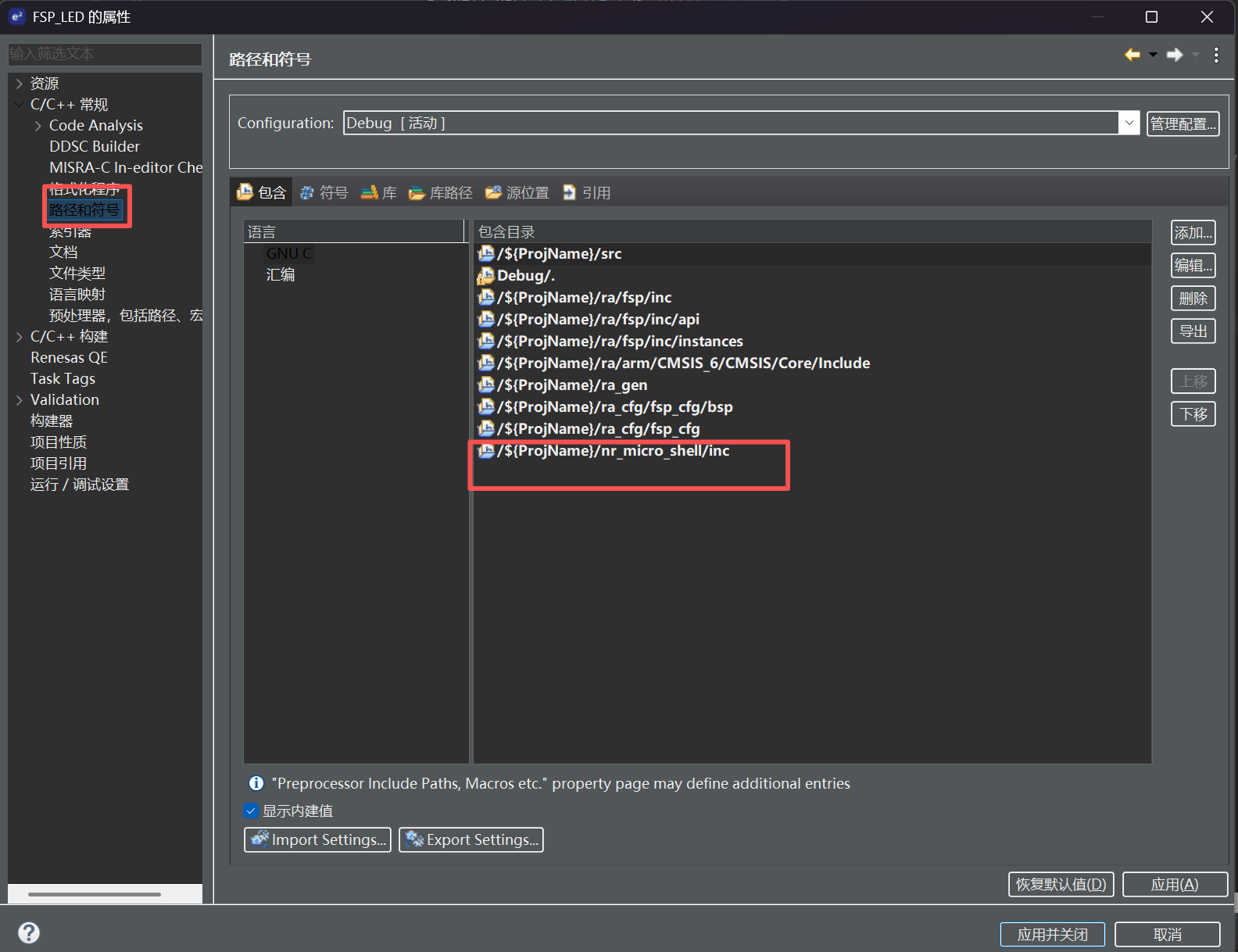
2、打开工程属性,添加头文件的路径:
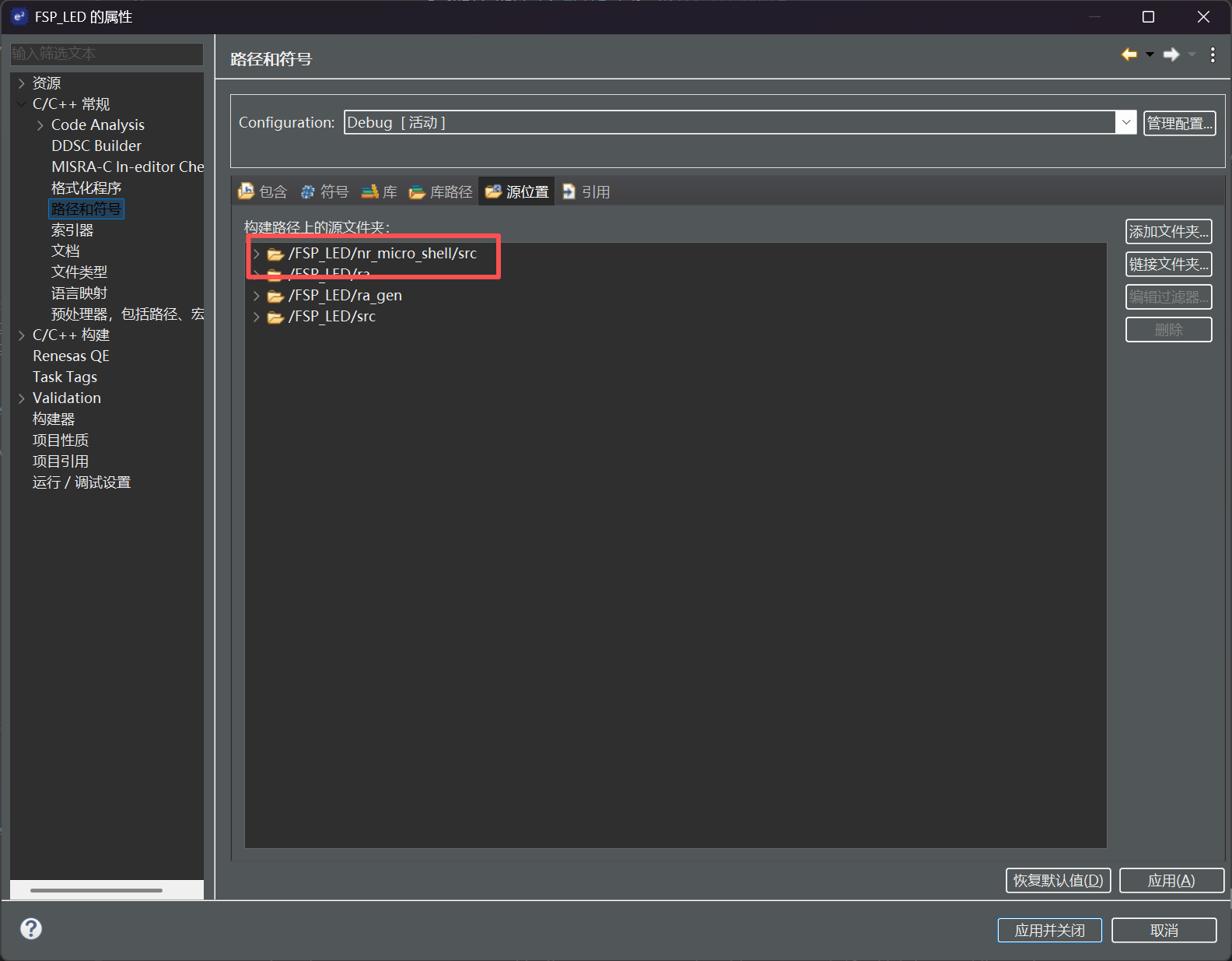
3、添加源文件的路径:
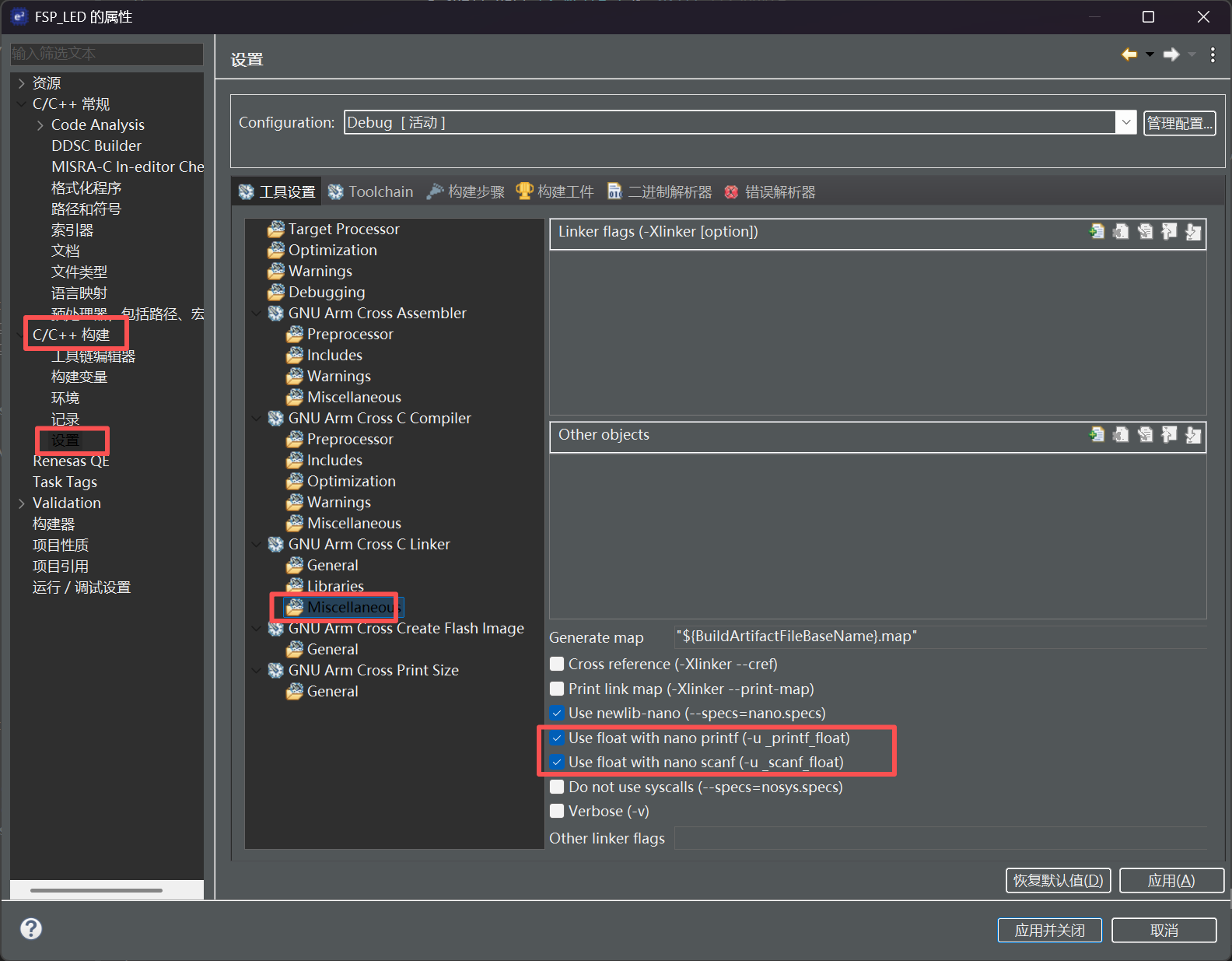
4、同时为了可以打印浮点数,还需要添加printf的浮点选项
【工程配置】
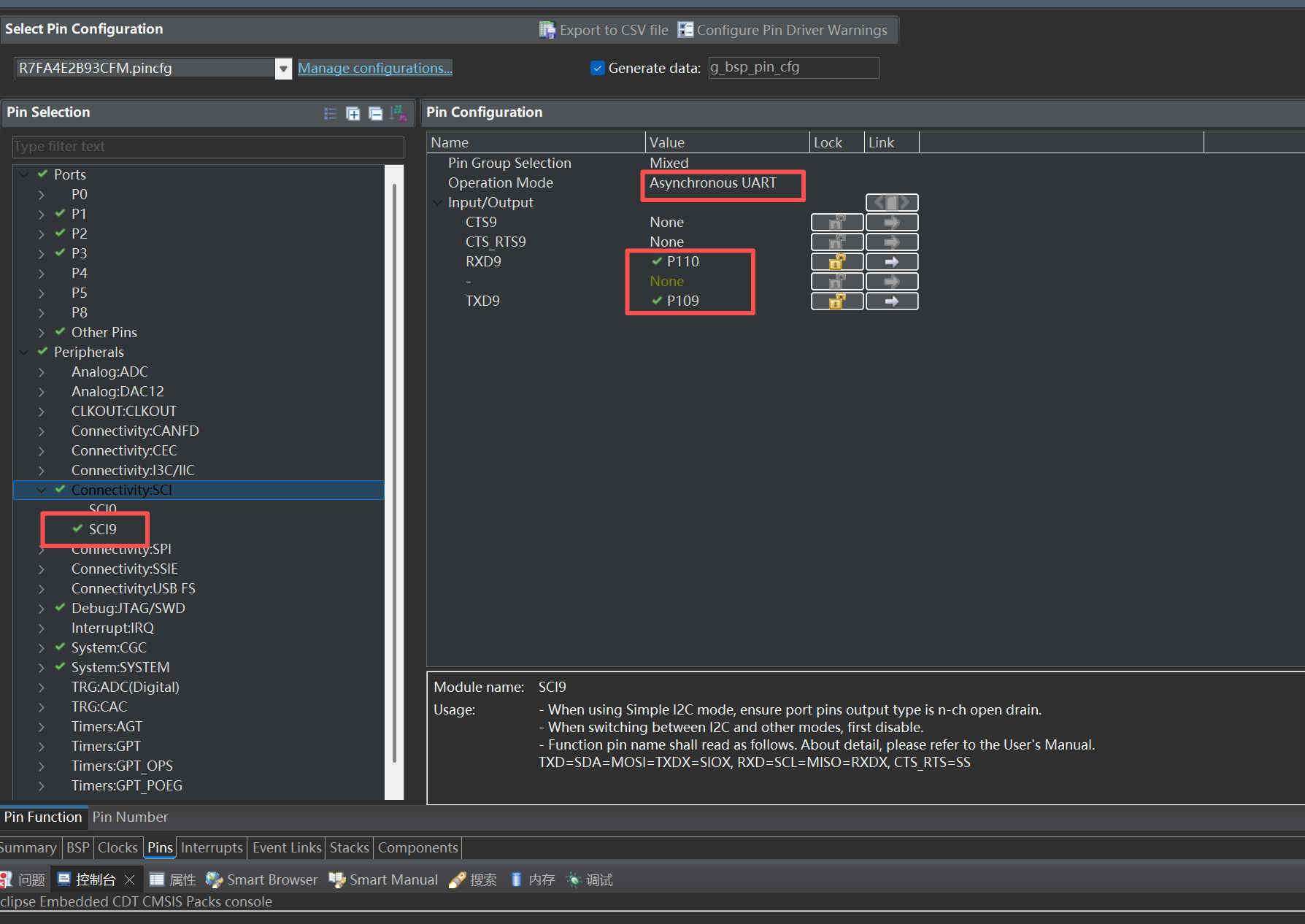
1、添加uart到工程中,配置P109、P110为串口输出:
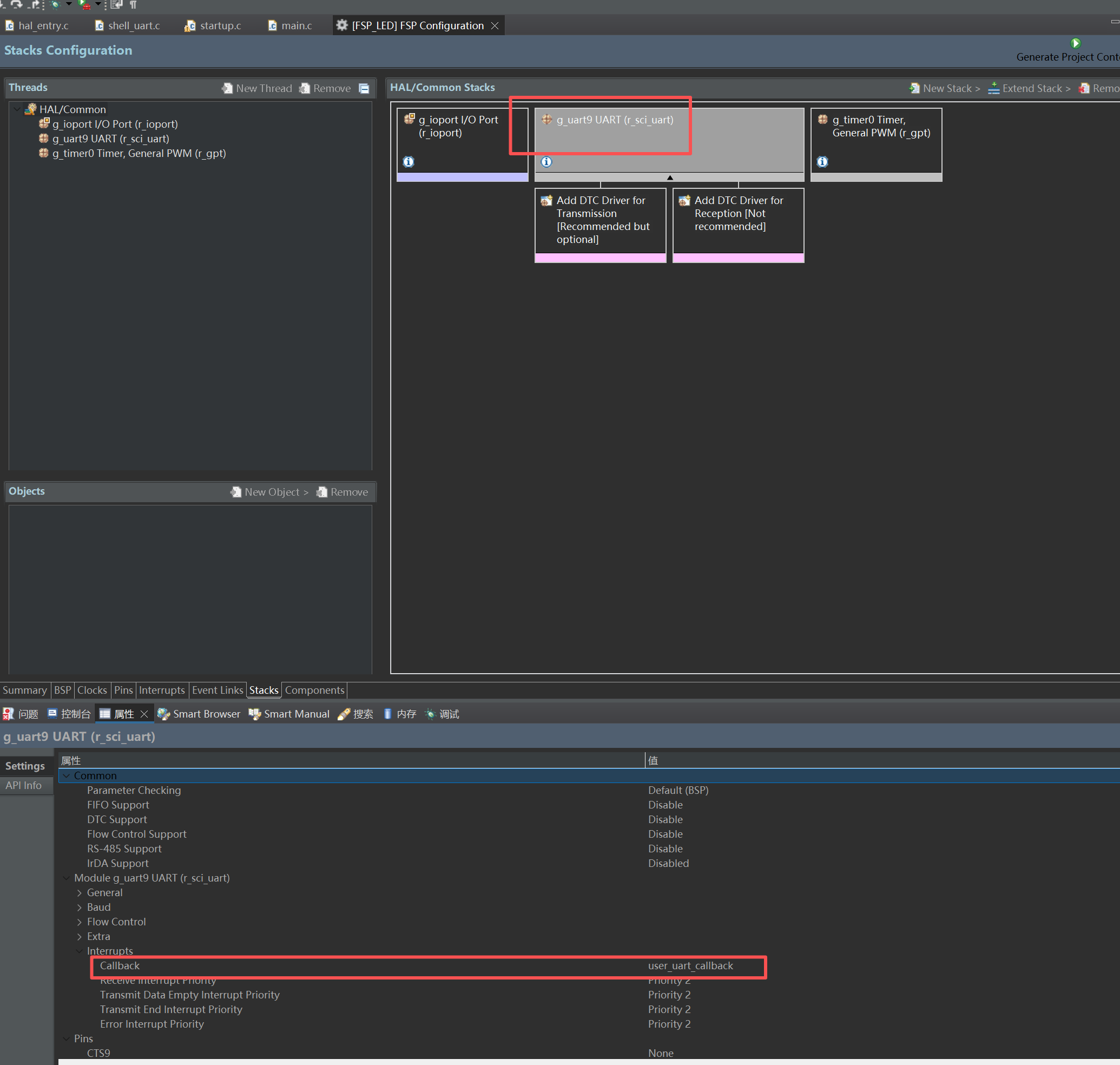
2、添加stack的ra_uart到工程中,添加中断回调函数:
【用户自定义代码添加】
1、生成工程后回到代码编辑中,在src中添加shell_uart.h/c代码如下:
#ifndef __SHELL_UART_H__
#define__SHELL_UART_H__
#include"stdio.h"
#include"stdint.h"
#include<sys/stat.h>
#include<unistd.h>
#include<errno.h>
#ifdef __cplusplus
extern"C"
{
#endif
#defineUART_SHELL 2
#ifdef UART_SHELL
#if UART_SHELL == 1
#include"shell_port.h"
#elif UART_SHELL == 2
#include"nr_micro_shell.h"
#else
#endif
#endif
typedefstructfifo_buffer_t
{
volatileuint32_tread_i;
volatileuint32_twrite_i;
uint8_tbuff[512];
}fifo_buffer_t;
typedefstructshell_uart_buffer_t
{
fifo_buffer_ttx;
fifo_buffer_trx;
volatileuint32_ttx_cpl:1;
}shell_uart_buffer_t;
externshell_uart_buffer_t g_shell_uart;
voidshell_usart_init(void);
voidshell_usart_loop(void);
voidUSART_PutChar(uint8_tch);
uint8_tUSART_GetChar(void);
#ifdef __cplusplus
}
#endif
#endif
2、uart_shell.c:
#include "shell_uart.h"
#include "hal_data.h"
#include <stdio.h>
extern shell_uart_buffer_t g_shell_uart;
fsp_err_t err = FSP_SUCCESS;
volatile bool uart_send_complete_flag = false;
volatile bool uart_receive_complete_flag = false;
int RxLine=0;
int Rx_flag=0;
shell_uart_buffer_t g_shell_uart=
{
.tx.read_i = 0,
.tx.write_i = 0,
.rx.read_i = 0,
.rx.write_i = 0,
.tx_cpl = 0,
};
void user_uart_callback (uart_callback_args_t * p_args)
{
if(p_args->event == UART_EVENT_TX_COMPLETE)
{
uart_send_complete_flag = true;
}
if(p_args->event == UART_EVENT_RX_CHAR)
{
if(((g_shell_uart.rx.write_i+1)&0x1ff) != g_shell_uart.rx.read_i)
{
g_shell_uart.rx.buff[g_shell_uart.rx.write_i++] = (p_args->data) & 0xff;
g_shell_uart.rx.write_i &= 0x1ff;
}
}
}
void shell_usart_loop(void)
{
if(g_shell_uart.rx.read_i != g_shell_uart.rx.write_i)
{
shell(g_shell_uart.rx.buff[g_shell_uart.rx.read_i++]);
g_shell_uart.rx.read_i &= 0x1ff;
}
}
void shell_usart_init(void)
{
shell_init();
}
#include "string.h"
#include "ctype.h"
static void list_cmd(void)
{
unsigned int i = 0;
for (i = 0; nr_shell.static_cmd[i].fp != NULL; i++)
{
shell_printf("%s\t\t", nr_shell.static_cmd[i].cmd);
if (nr_shell.static_cmd[i].description != NULL)
shell_printf("\"%s\"\t\t", nr_shell.static_cmd[i].description);
shell_printf("\r\n");
}
}
void shell_ls_cmd(char argc, char *argv)
{
if (argc > 1)
{
if (!strcmp("cmd", &argv[argv[1]]))
{
list_cmd();
}
else if (!strcmp("-v", &argv[argv[1]]))
{
shell_printf("ls version 1.0.\r\n");
}
else
{
goto exit_lable;
}
return;
}
shell_printf("ls need more arguments!\r\n\r\n");
exit_lable:
shell_printf("useage: ls [options]\r\n");
shell_printf("options: \r\n");
shell_printf("\t -h \t: show help\r\n");
shell_printf("\t -v \t: show version\r\n");
shell_printf("\t cmd \t: show all commands\r\n");
}
void shell_help_cmd(char argc, char *argv)
{
list_cmd();
}
void shell_test_cmd(char argc, char *argv)
{
unsigned int i;
shell_printf("test command:\r\n");
for (i = 0; i < argc; i++)
{
shell_printf("paras %d: %s\r\n", i, &(argv[argv[i]]));
}
}
void shell_led_cmd(char argc, char *argv)
{
if(argc == 2)
{
if(!strcmp("LED", &argv[argv[0]]) )
{
if(!strcmp("on", &argv[argv[1]]))
{
R_IOPORT_PinWrite(&g_ioport_ctrl, BSP_IO_PORT_02_PIN_07, BSP_IO_LEVEL_HIGH);
shell_printf("LED on\r\n");
}
else if(!strcmp("off", &argv[argv[1]]))
{
R_IOPORT_PinWrite(&g_ioport_ctrl, BSP_IO_PORT_02_PIN_07, BSP_IO_LEVEL_LOW);
shell_printf("LED off\r\n");
}
else
{
shell_printf("ERRO CMD:led %s\r\n", &argv[1]);
}
}
else
{
shell_printf("ERRO CMD:led %s\r\n", &argv[0]);
}
}
}
void timer0_callback(timer_callback_args_t *p_args)
{
if (TIMER_EVENT_CYCLE_END == p_args->event)
{
if(Rx_flag==1)
{
Rx_flag=0;
}
}
}
#ifdef NR_SHELL_USING_EXPORT_CMD
NR_SHELL_CMD_EXPORT(help, shell_help_cmd, "help");
NR_SHELL_CMD_EXPORT(ls, shell_ls_cmd, "list cmd");
NR_SHELL_CMD_EXPORT(test, shell_test_cmd, "test cmd");
#else
const static_cmd_st static_cmd[] =
{
{"help", shell_help_cmd, "list cmd"},
{"ls", shell_ls_cmd, "list cmd"},
{"test", shell_test_cmd, "test cmd"},
{"LED", shell_led_cmd, "LED on/off"},
{"\0", NULL}};
#endif
#if defined __GNUC__ && !defined __clang__
int _write(int fd, char *pBuffer, int size);
int _read(int fd, char *pBuffer, int size);
int _write(int fd, char *pBuffer, int size)
{
(void) fd;
R_SCI_UART_Write (&g_uart9_ctrl, (uint8_t*) pBuffer, (uint32_t) size);
while (uart_send_complete_flag == false)
;
uart_send_complete_flag = false;
return size;
}
int _read(int fd, char *pBuffer, int size)
{
(void) fd;
R_SCI_UART_Read (&g_uart9_ctrl, (uint8_t*) pBuffer, (uint32_t) size);
while (uart_receive_complete_flag == false)
;
uart_receive_complete_flag = false;
R_SCI_UART_Write (&g_uart9_ctrl, (uint8_t*) pBuffer, (uint32_t) size);
return size;
}
#else
int fputc(int ch, FILE *f)
{
(void)f;
R_SCI_UART_Write(&g_uart9_ctrl, (uint8_t *)&ch, 1);
while(uart_send_complete_flag == false);
uart_send_complete_flag = false;
return ch;
}
#endif
int _isatty(int fd);
int _close(int fd);
int _lseek(int fd, int ptr, int dir);
int _fstat(int fd, struct stat *st);
__attribute__((weak)) int _isatty(int fd)
{
if (fd >= STDIN_FILENO && fd <= STDERR_FILENO)
return 1;
errno = EBADF;
return 0;
}
__attribute__((weak)) int _close(int fd)
{
if (fd >= STDIN_FILENO && fd <= STDERR_FILENO)
return 0;
errno = EBADF;
return -1;
}
__attribute__((weak)) int _lseek(int fd, int ptr, int dir)
{
(void) fd;
(void) ptr;
(void) dir;
errno = EBADF;
return -1;
}
__attribute__((weak)) int _fstat(int fd, struct stat *st)
{
if (fd >= STDIN_FILENO && fd <= STDERR_FILENO)
{
st->st_mode = S_IFCHR;
return 0;
}
errno = EBADF;
return 0;
}
编译后下载到开发,执行LED on/off便可以控制开发板的上LED了


 /9
/9 



 工商网监
湘ICP备2023018690号
工商网监
湘ICP备2023018690号


 2804
2804

 淘帖
淘帖 1711
1711










