测试开发板串口printf打印输出。
一、硬件部分电路
开发板上有USB转串口部分电路,可以直接连接USB实现串口通信功能。
USB转串口部分电路图如下:
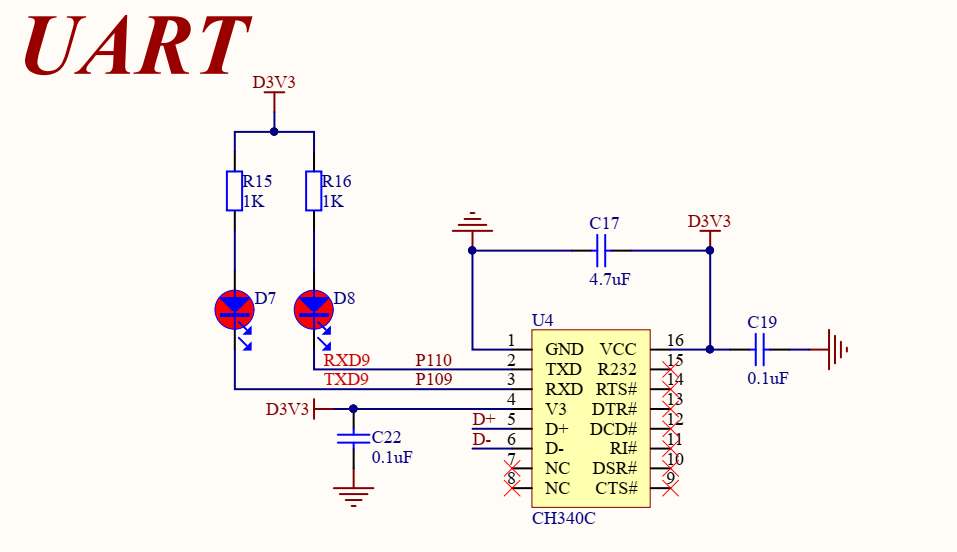
串口使用了UART9的通信端口。
二、配置串口
2.1、使能串口9端口
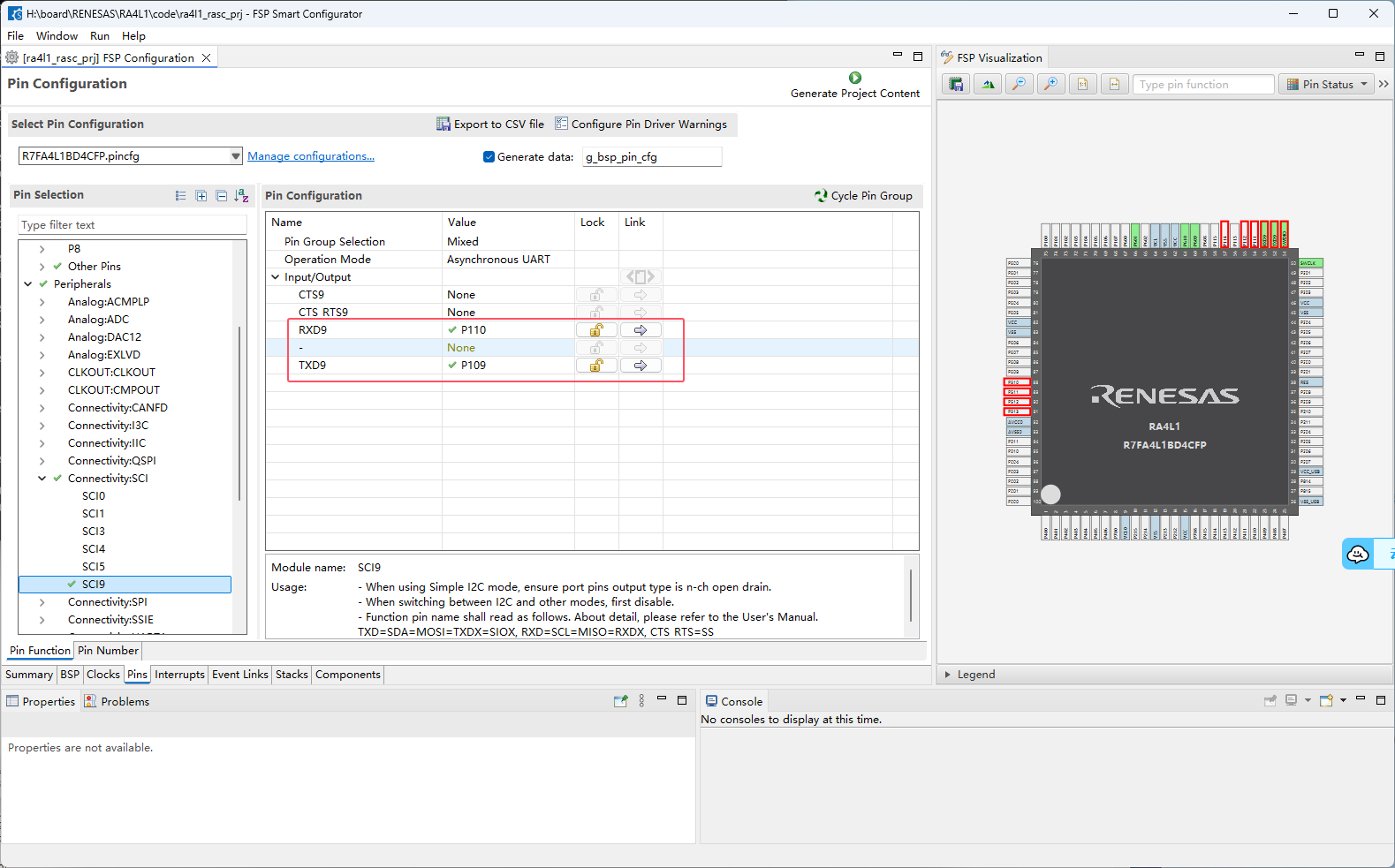
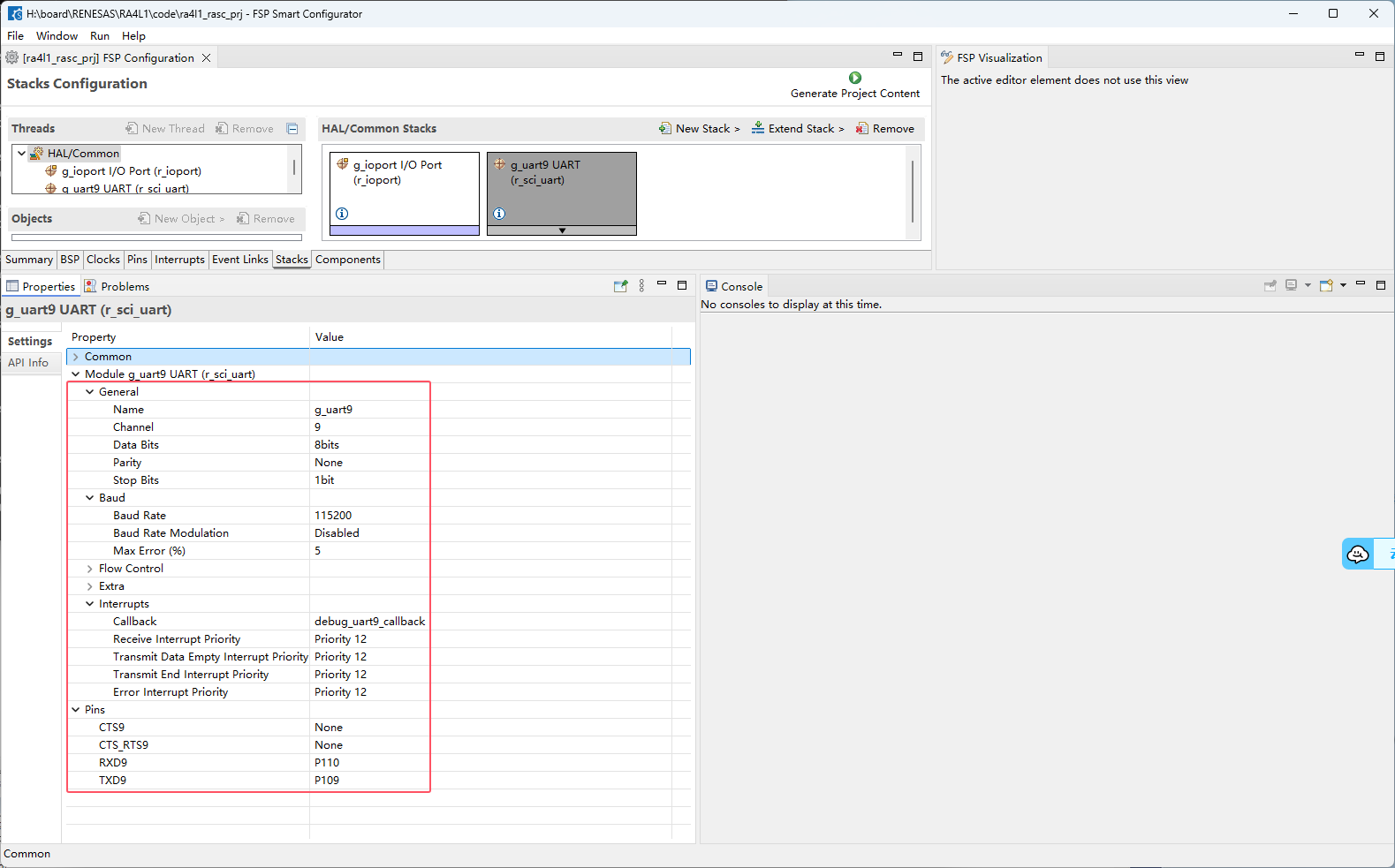
2.2、配置串口9
设置串口参数和串口回调函数
三、代码
3.1、fun_uart.c
#include "hal_data.h"
#include "stdio.h"
volatile bool uart_send_complete_flag = false;
void debug_uart9_callback (uart_callback_args_t * p_args)
{
switch (p_args->event)
{
case UART_EVENT_RX_CHAR:
{
R_SCI_UART_Write(&g_uart9_ctrl, (uint8_t *)&(p_args->data), 1);
break;
}
case UART_EVENT_TX_COMPLETE:
{
uart_send_complete_flag = true;
break;
}
default:
break;
}
}
#if defined __GNUC__ && !defined __clang__
int _write(int fd, char *pBuffer, int size);
int _write(int fd, char *pBuffer, int size)
{
(void)fd;
R_SCI_UART_Write(&g_uart4_ctrl, (uint8_t *)pBuffer, (uint32_t)size);
while(uart_send_complete_flag == false);
uart_send_complete_flag = false;
return size;
}
#else
int fputc(int ch, FILE *f)
{
(void)f;
R_SCI_UART_Write(&g_uart9_ctrl, (uint8_t *)&ch, 1);
while(uart_send_complete_flag == false);
uart_send_complete_flag = false;
return ch;
}
#endif
void init_uart9(void)
{
fsp_err_t err = FSP_SUCCESS;
err = R_SCI_UART_Open (&g_uart9_ctrl, &g_uart9_cfg);
assert(FSP_SUCCESS == err);
}
3.2、fun_uart.h
#ifndef FUN_UART_H_
#define FUN_UART_H_

#include "stdio.h"

void init_uart9(void);

#endif
3.3、hal_entry.c
#include "hal_data.h"

#include "uart/fun_uart.h"

FSP_CPP_HEADER
void R_BSP_WarmStart(bsp_warm_start_event_t event);
FSP_CPP_FOOTER

/*******************************************************************************************************************//**
 * main() is generated by the RA Configuration editor and is used to generate threads if an RTOS is used.  This function
 * is called by main() when no RTOS is used.
 **********************************************************************************************************************/
void hal_entry(void)
{
	init_uart9();
	while(1)
	{
		printf("RA4L1 UART TEST!\\r\\n");
		R_IOPORT_PinWrite(&g_ioport_ctrl, BSP_IO_PORT_06_PIN_01, BSP_IO_LEVEL_HIGH);
		R_IOPORT_PinWrite(&g_ioport_ctrl, BSP_IO_PORT_06_PIN_10, BSP_IO_LEVEL_HIGH);
		R_IOPORT_PinWrite(&g_ioport_ctrl, BSP_IO_PORT_06_PIN_09, BSP_IO_LEVEL_HIGH);

		R_BSP_SoftwareDelay (100, BSP_DELAY_UNITS_MILLISECONDS);

		R_IOPORT_PinWrite(&g_ioport_ctrl, BSP_IO_PORT_06_PIN_01, BSP_IO_LEVEL_LOW);
		R_IOPORT_PinWrite(&g_ioport_ctrl, BSP_IO_PORT_06_PIN_10, BSP_IO_LEVEL_LOW);
		R_IOPORT_PinWrite(&g_ioport_ctrl, BSP_IO_PORT_06_PIN_09, BSP_IO_LEVEL_LOW);
		R_BSP_SoftwareDelay (100, BSP_DELAY_UNITS_MILLISECONDS);
	}


#if BSP_TZ_SECURE_BUILD
    /* Enter non-secure code */
    R_BSP_NonSecureEnter();
#endif
}

/*******************************************************************************************************************//**
 * This function is called at various points during the startup process.  This implementation uses the event that is
 * called right before main() to set up the pins.
 *
 * @param[in]  event    Where at in the start up process the code is currently at
 **********************************************************************************************************************/
void R_BSP_WarmStart (bsp_warm_start_event_t event)
{
    if (BSP_WARM_START_RESET == event)
    {
#if BSP_FEATURE_FLASH_LP_VERSION != 0

        /* Enable reading from data flash. */
        R_FACI_LP->DFLCTL = 1U;

        /* Would normally have to wait tDSTOP(6us) for data flash recovery. Placing the enable here, before clock and
         * C runtime initialization, should negate the need for a delay since the initialization will typically take more than 6us. */
#endif
    }

    if (BSP_WARM_START_POST_C == event)
    {
        /* C runtime environment and system clocks are setup. */

        /* Configure pins. */
        R_IOPORT_Open(&IOPORT_CFG_CTRL, &IOPORT_CFG_NAME);

#if BSP_CFG_SDRAM_ENABLED

        /* Setup SDRAM and initialize it. Must configure pins first. */
        R_BSP_SdramInit(true);
#endif
    }
}

#if BSP_TZ_SECURE_BUILD

FSP_CPP_HEADER
BSP_CMSE_NONSECURE_ENTRY void template_nonsecure_callable ();

/* Trustzone Secure Projects require at least one nonsecure callable function in order to build (Remove this if it is not required to build). */
BSP_CMSE_NONSECURE_ENTRY void template_nonsecure_callable ()
{

}
FSP_CPP_FOOTER

#endif
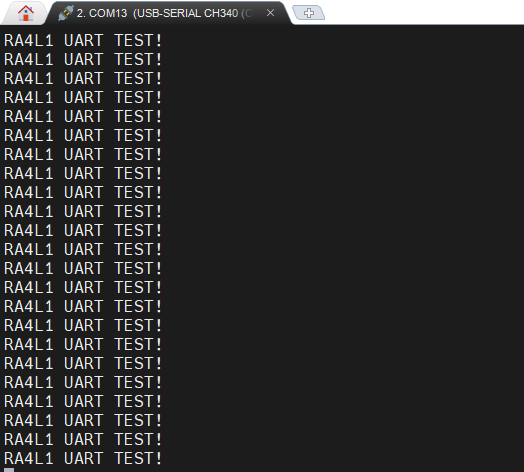
四、运行结果
下载程序后,串口输出
| 
 电子发烧友论坛
 0
0
 /9
/9 



 工商网监
湘ICP备2023018690号
工商网监
湘ICP备2023018690号


 892
892
 淘帖
淘帖










