本篇讲述实现按键功能。
一.硬件原理
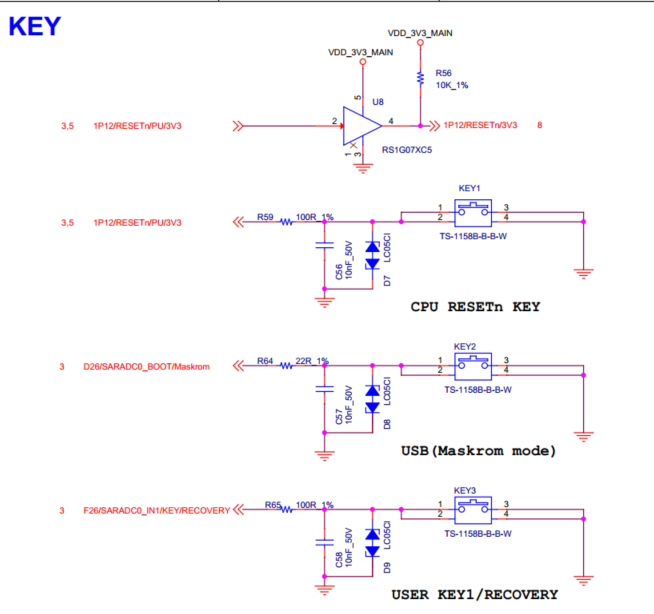
开发板底板有三颗按键,分别为RESET复位按键、Maskroom烧录按键和USER1用户按键。这里使用 用户按键。原理图如下
二.代码准备
代码如下:
#include <stdio.h>
#include <stdbool.h>
#include <libgen.h>
#include <signal.h>
#include <stdlib.h>
#include <string.h>
#include <assert.h>
#include <unistd.h>
#include <errno.h>
#include <fcntl.h>
#include <getopt.h>
#include <sys/select.h>
#include <linux/input.h>
#define INADEQUATE_CONDITIONS 3
typedef enum { KEY_CODE_NONE = 0, KEY_CODE_USER0, KEY_CODE_USER1 } KeyCode;
volatile bool g_quit = false;
static const char g_shortopts [] = ":d:vh";
static const struct option g_longopts [] = {
{ "device", required_argument, NULL, 'd' },
{ "version", no_argument, NULL, 'v' },
{ "help", no_argument, NULL, 'h' },
{ 0, 0, 0, 0 }
};
static void usage(FILE *fp, int argc, char **argv) {
fprintf(fp,
"Usage: %s [options]\n\n"
"Options:\n"
" -d | --device Device \n"
" -v | --version Display version information\n"
" -h | --help Show help content\n\n"
"", basename(argv[0]));
}
static void opt_parsing_err_handle(int argc, char **argv, int flag) {
int state = 0;
if (argc < 2) {
printf("No input parameters are entered, please check the input.\n");
state = -1;
} else {
if (optind < argc || flag) {
printf("Error: Parameter parsing failed\n");
if (flag)
printf("\tunrecognized option '%s'\n", argv[optind-1]);
while (optind < argc) {
printf("\tunrecognized option '%s'\n", argv[optind++]);
}
state = -1;
}
}
if (state == -1) {
printf("Tips: '-h' or '--help' to get help\n\n");
exit(2);
}
}
void sig_handle(int arg) {
g_quit = true;
}
static int check_button_pressed(int fd) {
assert(fd >= 0);
fd_set input;
FD_ZERO(&input);
FD_SET(fd, &input);
int ret = select(fd + 1, &input, NULL, NULL, NULL);
if (ret < 0) {
printf("%s", strerror(errno));
return -1;
}
struct input_event buf;
if (read(fd, &buf, sizeof(struct input_event)) < 0) {
printf("%s", strerror(errno));
return -1;
}
switch (buf.code) {
case KEY_PROG1:
if (buf.value == 1)
return KEY_CODE_USER0;
break;
case KEY_PROG2:
if (buf.value == 1)
return KEY_CODE_USER1;
break;
default:
return KEY_CODE_NONE;
break;
}
return KEY_CODE_NONE;
}
int main(int argc, char **argv) {
int c = 0;
int flag = 0;
char *dev = NULL;
while ((c = getopt_long(argc, argv, g_shortopts, g_longopts, NULL)) != -1) {
switch (c) {
case 'd':
dev = optarg;
break;
case 'v':
printf("version : 1.0\n");
exit(0);
case 'h':
usage(stdout, argc, argv);
exit(0);
default :
flag = 1;
break;
}
}
opt_parsing_err_handle(argc, argv, flag);
signal(SIGINT, sig_handle);
int fd = open(dev, O_RDONLY);
if (fd < 0) {
printf("Error: Failed to open device\n");
return INADEQUATE_CONDITIONS;
}
printf("Please press the key to test.\n");
while (!g_quit) {
int key_code = check_button_pressed(fd);
if (key_code < 0)
continue;
switch (key_code) {
case KEY_CODE_USER0:
case KEY_CODE_USER1:
printf("User key pressed!\n");
break;
default:
break;
}
}
close(fd);
return 0;
}
1.定义按键
typedef enum { KEY_CODE_NONE = 0, KEY_CODE_USER0, KEY_CODE_USER1 } KeyCode;
2.按键监听事件
check_button_pressed
3.主函数实现循环监听
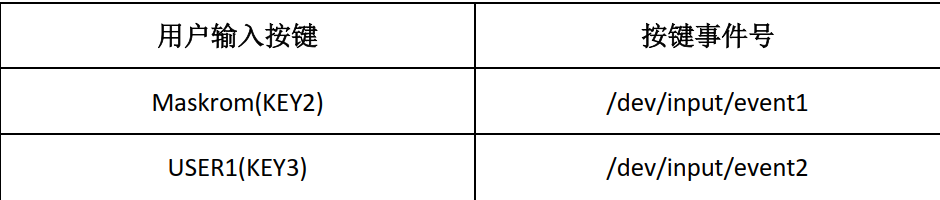
4.用户按键与按键事件号如下对应。
三.运行测验
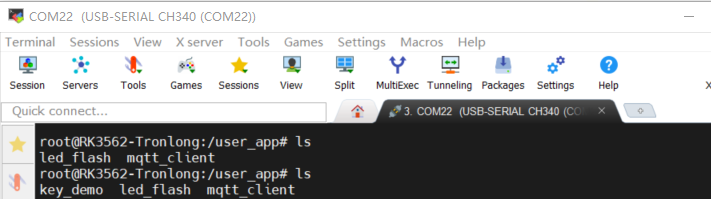
1.将可执行文件拷贝到开发板
scp key_demo root@192.168.3.218:/user_app/
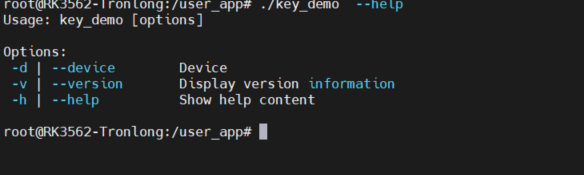
2.查看运行命令格式
./key_demo --help
3.命令输入,检测用户按键事件。
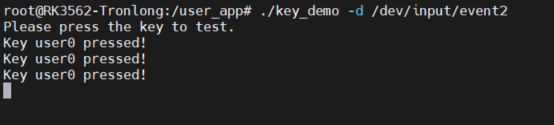
./key_demo -d /dev/input/event2
这里按开发板上用户按键,可看到事件触发,并打按键状态信息。
至此,实现按键功能。

 电子发烧友论坛
 /9
/9 



 工商网监
湘ICP备2023018690号
工商网监
湘ICP备2023018690号


 683
683

 评论
评论
 淘帖
淘帖 894
894










