TLDR: We test LLMs to figure out how helpful they are for designing a circuit board. We focus on utility of frontier models (GPT4o, Claude 3 Opus, Gemini 1.5) across a set of design tasks, to find where they are and are not useful. They look pretty good for building skills, writing code, and getting useful data out of datasheets.
TLDRN'T: We do not explore any proprietary copilots, or how to apply a things like a diffusion model to the place and route problem.
Introduction
Can an AI-powered chatbot help with a task as precise as circuit board design? These LLMs (Large Language Models) are famous for hallucinating details, and missing a single important detail can sink a design. Determinism is hard but super important for electronics design!
Today, several shallow product offerings are making AI for electronics design look mostly like hype. But I think there is real utility to be found here, if we can take a better approach.
In this article, we set LLMs to unfair tasks that expert human circuit board designers handle day to day. We're not looking for basic help, rather pushing on what it takes to help an expert do their job better.
It would be ridiculous (today) to expect great performance from these general purpose AIs on this expert task, especially because it is probably not well represented in the training data.
To test performance on difficult design tasks, we work with three of today's leading models:
And explore prompting strategies to get the best performance out of all the models on each task. As part of the prompt, we also look for opportunities to improve the performance by asking the LLMs to write code to design circuit boards where possible.
The best results are reported for each model and for each task. Let's dig in!
Asking stupid questions
There is a lot to know in circuit board design, and nobody has mastered every relevant domain. Asking an LLM stupid questions is a great way to learn.
For example an RF engineer will know their own specialty quite well, but might not be a master of supply chain, power supply design, or how to shape copper reliefs to get high yields at the factory.
( Some RF engineers will scoff at this, but realistically the world contains people trying to learn things.)
To simulate someone new to a domain, I avoid prompt engineering, and use of precise expert vocabulary. I asked the LLMs a simple question: What is the delay per unit length of a trace on a circuit board?
Claude 3 Opus was the clear winner here. Notice that it brought in the relevant concepts (microstrip, stripline, dielectric), got the answer right, and pointed out critical gotchas:

Notice the gotchas here! The speed of a signal changes based on which layer of a circuit board you route it on, and what the materials are.
You would never know that looking at a most PCB CAD tools, (e.g. Kicad, Altium) because all of their delay matching is in units of length. e.g. 'both these traces have to be 50 mm long' is a constraint you enter with a GUI. But that's not correct if you want your board to work - delay depends on which layer they are routed on, and what materials are in your board.
Getting that right: A+ answer for Claude here.
Google Gemini 1.5 performed the worst on this question. Maybe because it brought in a bunch of sources from the internet, and most of the writing in this discipline is dreck generated by SEO content mills. Incorporating AI summarization of lower quality writing seems to make the answers consistently worse.
Finding Parts
One of the superpowers of an experienced engineer is knowing things like: "A DAC + DSP system good enough for this audio pipeline should be about this big, and cost $1.40 in production". They'll then go do some turbo googling and find it.
How well can an AI that's been fed the entire internet do?
For this example I chose find parts for something cool: a robot (instead of the usual ). I want smaller cables, hundreds of possible devices, and compact cables that can survive IRL twisting and jostling.
You can see a communication layer like this as the daisy-chained black cabling in this picture from HEBI:
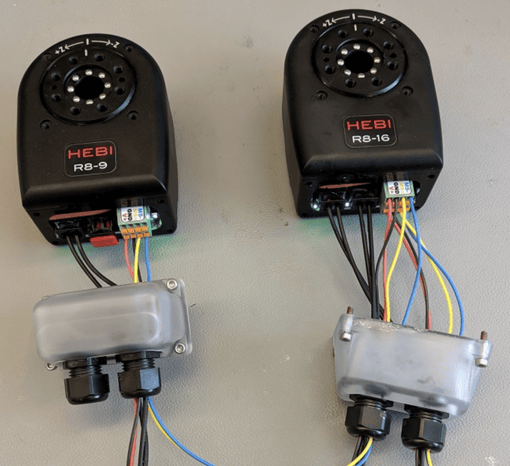
Time to use AI to find the parts should I use for the ethernet switch, and the optical transceivers.
Here's the prompt:
I want to design a daisy-chained communications layer for a motor driver, using 100M optical Ethernet. Each motor controller will have a microcontroller that interfaces to the Ethernet network over RGMII. It needs to be compact, robust to mechanical vibration and shock, and handle temperatures up to 60 degrees Celsius. Please help me choose parts for the optical connectors, transceivers, and Ethernet networking device.
- Think step by step as an expert electrical engineer.
- Carefully consider how component choices relate to the requirements.
- I'll give you a digital cookie if you get the answer correct.
Here I'm pulling more prompt engineering tricks to boost the performance of the model, and being careful in detailed specifications to really get this to work.
My initial guess for these parts would be:
- Use a small three port ethernet switch to for the daisy chain, hopefully something from Micrel (now Microchip) like the KSZ8863MLL.
- For the optical connector/transceiver I would go with the OptoLock part on the example system from Hebi. Very small and robust choice.
It would be amazing to get new suggestions for parts and architectures here. Something going beyond superficial advice into something practical would have huge impact!
Instead, performance across all models was uniformly bad and no amount of prompting or follow ups could fix it. It felt a lot like trying to get AI to solve a variant of the wolf, sheep, cabbage problem. It's got the answer locked in, and it's hard to get out of that basin.
Here's a representative conclusion from Gemini 1.5:
Example Part Selection
- Optical Connectors: LC Duplex connectors (Amphenol or similar)
- Optical Transceivers: 100Base-FX SFP transceivers (Finisar, Cisco, or other reputable brands) with industrial temperature ratings
- Ethernet Networking Device: Microchip LAN8742A or Texas Instruments DP83848
Digital Cookie Time! ?
I hope this detailed breakdown helps you choose the right parts for your daisy-chained motor control system. Please let me know if you have any other questions.
Grading this:
- All models missed that to get the daisy chain you need a three port ethernet switch. They instead recommend an Ethernet Phy, which isn't going to do it.
- All models recommend using a huge SFP transceiver. These are usually found on big datacenter boards, and are not known for being shoved into tiny spaces in a robot joint, and then getting kicked around by Boston Dynamics employees.
Overall the generative models don't demonstrate a solid grasp on what the motor controller communication network is, or what application-specific considerations need to be made.
Without that the part selections are way off. This is a consistent experience. The LLMs will always suggest something, but it will be the 'average' application and miss a lot of the important subtlety. i.e. fiber optic ethernet happens in the mostly in the datacenter, so an average application for fiber optic means a datacenter device.
Trying to get them to choose an ADC, or sensor, or connector, shows similar 'average' results.
Maybe this speaks to the difficulty of the domain. If you're not within 10% or so of the global optimal performance in EE, your suggestions have near-zero value.
Parsing datasheets
Sadly, most of the data you need to design a circuit board is baked away in PDF datasheets, instead of being available via APIs. Directly trying to parse PDFs with python tends to not go well, but LLMs should be pretty good at pulling data from these human-structured documents.
I tested three different way of pulling information out:
- Copy/paste from the PDF, stuff it into a prompt.
- Capture a portion as an image, have the LLM interpret the image
- Upload the entire PDF
I'll be using the data available for the Nordic nRF5340 WLCSP for the experiment. A little 4.0 x 4.4 mm Bluetooth chip, with an 820 page datasheet.

Observations on this part:
- This is by no means the largest datasheet for a electrical component but has many typical features including pin tables, mechanical drawings, application specific notes, graphs, etc
- This datasheet has significantly more content than you might expects for simpler components - like OpAmps or digital logic gates. If the LLMs are useful here, they will likely be useful for smaller cases.
- This datasheet is about 570k tokens, a little more than half the huge context window available from Gemini.
Make a symbol and footprint
First step is a to make a linked symbol and footprint (landpattern) for our component.
The most effective method here was to load the entire datasheet into the LLM via the chat file upload mechanism, and then query it interactively to get the details right. Gemini 1.5 was the most reliable for this task.
Here's the prompt to get the pin table (after uploading the datasheet):
Please write the the pin table for the wlcsp version of the nRF5340 as code using the following format:
- One line for each pin
- Each line structured as " [ pin-name | pad-number | direction | bank ]", where pin-name is the name of a pin e.g. GND, pad-number is the number of the pad that maps to that pin, e.g, 28, direction is Left is the pin is an input, and Right otherwise, bank indicates the function, e.g. gpio.
- Wrap numbers following letters in square brackets, e.g. K3 becomes K[3], C1 becomes C[1], F10 becomes F[10]
- Replace periods with square brackets, e.g. P0.20 becomes P0[20]
The AI then returns a block of text with our pin list in a usable format:
[ XC1 | A1 | Left | analog_input ]
[ XC2 | A2 | Left | analog_input ]
[ VDD | A3 | Right | power ]
[ VSS | A5 | Left | power ]
[ DECD | A7 | Right | power ]
[ DCCD | A9 | Right | power ]
[ D-| A11 | Left | usb ]
[ D+ | A12 | Left | usb ]
[ DECRF | B1 | Right | power ]
[ VSS | B2 | Left | power ]
[ DECR | B4 | Right | power ]
[ DECN | B5 | Right | power ]
... (continued)
It got this list exactly correct, impressive for 95 rows of data buried in an 820 page datasheet. Usually I have to get a model to write a little code to reach that level of accuracy, but that was unnecessary here.
Next I gave it some example code for a BGA footprint and had it generate a new version based on the datasheet information. Here's the resulting code:
; This test is based on the Nordic Semiconductor, nRF5340
; Datasheet:
; https://infocenter.nordicsemi.com/pdf/nRF5340_PS_v1.4.pdf
;
; Drawing:
; https://infocenter.nordicsemi.com/pdf/nRF5340_PS_v1.4.pdf
;
; NSMD
val rows = 12
val cols = 8
val grid = Grid-Numbering(rows, cols)
val missing = to-pad-island(grid, "A[1] B[1] B[3] C[1] C[3] D[3] D[4] D[5] D[6] D[7] D[8] D[9] E[1] E[9] F[4] F[6] F[7] F[9] G[1] G[4] G[9] H[4] H[5] H[6] H[7] H[8] H[9]")
val planner = Full-Matrix-Planner(
; Several pads are not present
inactive = missing,
pad-config = PadConfig-D(
copper-D-adj = ipc-bga-copper(
NonSolderMaskDefined,
density-level = DensityLevelC
),
mask-D-adj = 0.0,
)
)
val body = PackageBody(
width = 4.390 +/- 0.047,
length = 3.994 +/- 0.047,
height = 0.71 +/- [0.06, 0.0]
)
val pkg = BGA(
num-leads = 95,
rows = rows,
columns = cols,
lead-diam = 0.35,
pitch = 0.35,
package-body = body,
lead-numbering = grid,
pad-planner = planner,
density-level = DensityLevelB
)
A few more misses here than in the pin table, but close overall. I have to go in and separately prompt for the depopulated balls in the grid, as well as correct the dimensions in the PackageBody.
(Note that I'm generating JITX code because it has a text-native representation. I bet that you could get the model to emit something like a Kicad symbol/footprint with a little more nudging in the prompt.)
Running the generated code (which you can find here), we get our footprint and symbols:

I really like the combination of code and scraped data here because of precision and flexibility.
I would much rather trust a hand-coded BGA footprint generator for the details, and have the LLM tell me which pads to omit. The backstop of the LLM generating the list of pins and the missing pins , then forcing them both to line up to line up in the code is a nice touch. I can also dig in and edit parameters directly if I want to customize.
Past the standard component model with a symbol and footprint, the LLM can also pull most of the useful data from the PDF. e.g. here is a generated parameterization for the IO pin levels for checking correctness of connections in a design:
property(P0[0].digital_io) = DigitalIO(CMOSOutput(VSS + 0.4, VDD - 0.4), 0.3*VDD, 0.7*VDD, "VDD", "VSS", 0)
If you don't have the AI return an answer as code, it tends to spread the data you want across multiple paragraphs, and it is easier to get the answer you want by just reading the datasheet instead.
It can even read a bit of the reference schematic and turn it into a netlist:
<img src="https://blog.jitx.com/hs-fs/hubfs/image-png-4.png?width=1104&height=1426&name=image-png-4.png" loading="lazy" width="1104" height="1426" srcset="https://blog.jitx.com/hs-fs/hubfs/image-png-4.png?width=552&height=713&name=image-png-4.png 552w, https://blog.jitx.com/hs-fs/hubfs/image-png-4.png?width=1104&height=1426&name=image-png-4.png 1104w, https://blog.jitx.com/hs-fs/hubfs/image-png-4.png?width=1656&height=2139&name=image-png-4.png 1656w, https://blog.jitx.com/hs-fs/hubfs/image-png-4.png?width=2208&height=2852&name=image-png-4.png 2208w, https://blog.jitx.com/hs-fs/hubfs/image-png-4.png?width=2760&height=3565&name=image-png-4.png 2760w, https://blog.jitx.com/hs-fs/hubfs/image-png-4.png?width=3312&height=4278&name=image-png-4.png 3312w" sizes="(max-width: 1104px) 100vw, 1104px"/>
* Power Supply Nets:
net (nrf.VDD C4.p[1])
net (nrf.VDD C10.p[1])
net (nrf.VDD C11.p[1])
net (nrf.VDD C12.p[1])
net (nrf.VDD C13.p[1])
net (nrf.VDD C15.p[1])
net (nrf.VDD C17.p[1])
.... (continued)
It hallucinated this task a little bit, inventing resistors here and there.
Using LLMs to pull data from challenging sources and turn it into useful code was a helpful automation technique (and personally the one I use most). Accuracy can be boosted further by using extraction techniques to cross-reference the data.
Designing circuits
We've seen that LLMs can understand an image of a schematic well enough to (mostly) turn it into a netlist. Can they take on a much more challenging task and design the circuit itself?
As shown earlier, LLMs generated kinda-right, but actually very wrong suggestions for key components. To avoid that dependency, we tested our AIs on an analog circuit design task. This test is more about doing some math, and correctly arranging resistors and capacitors.
The task is to design an pre-amplifier for an electret microphone -- boosting and filtering an audio signal for sampling by an ADC. We start with a basic architecture exploration. Here's the prompt:
I want to design a microphone pre-amp where I need to bias the electret microphone and create a single-ended signal out to drive the ADC of a microcontroller. Include a bandpass filter with a gain of 20dB, corner frequencies at 100Hz and 20kHz. Help me select an architecture for this amplifier. Propose different filter architectures and describe their pros and cons for this application.
- Think step by step as an expert electrical engineer
- Carefully consider the requirements
- If you get the answer right you get a digital cookie.
Claude 3 Opus came back with the best answer of the three contenders. I'll analyze it piece by piece.
Okay, let's think through this step-by-step as an expert electrical engineer:
- Microphone biasing: Electret microphones typically require a DC bias voltage, usually between 1.5V to 10V, applied through a bias resistor. The value of this resistor impacts the microphone's output impedance and noise. A common range is 2.2kΩ to 10kΩ. We'll need to check the microphone's datasheet for specifics.
- Amplifier architecture: For a single-ended output to drive an ADC, we can use a single-supply op-amp configuration. Some good options are:
a) Non-inverting amplifier: Simple, high input impedance which is good for the high-impedance mic signal. Gain is set by the feedback resistor ratio.
b) Inverting amplifier: Also simple, but lower input impedance. Gain is also set by resistor ratio.
c) Push-pull: Combines inverting and non-inverting amps for more output current drive, but more complex. For simplicity and good mic interfacing, a non-inverting amp seems best here.
Claude did a good job calling out the need to bias the microphone, nice to have that called out explicitly.
The proposals for non-inverting, and inverting amplifiers are reasonable. The proposal for push-pull configurations is nonsense. A Push-Pull configuration describes the transistors inside the op-amp at the output stage. It doesn't have anything to do with the architecture of the op amp circuit.
Moving on to the filter suggestions:
- Bandpass filter: We need a 100Hz to 20kHz passband with 20dB gain. Some filter options:
a) Passive RC: Simple, but requires large component values for low frequencies, and loading affects cutoff frequencies. Gain must come from amp.
b) Active 1st-order: Sallen-Key or Multiple-Feedback topologies. Each is 1st-order, so we'd cascade a low-pass and high-pass for the bandpass response. Easy to integrate gain. Cutoff frequencies affected by component tolerance.
c) Active 2nd-order: Single stage 2nd-order bandpass like a Dual-Amplifier Bandpass (DABP). More complex, but more efficient than cascaded 1st-order. More stable cutoff frequencies.
d) Switched-capacitor: Uses a clock to set cutoff frequencies. Very stable, but requires a clock signal.
The comments on the Passive RC filter are reasonable.
The Sallen-Key analysis is wrong - Sallen-Key is a second order filter and can be unstable with this much gain.
The suggestion for the DABP isn't wrong per se, but it is missing some nuance. It doesn't allow for very high gain (limit of 2.0). The complexity of a DABP justified when you need to handle higher frequencies and higher Q levels. This application doesn't require that, so it's a weird choice.
A switched capacitor filter would be bonkers -- complex, noise-sensitive, and requiring exotic components.
Moving on:
For this application, an active 2nd-order filter like a DABP seems a good balance of simplicity, stability, and easy gain integration.
- Amplifier gain: The filter will have 20dB gain, which is a factor of 10. We can implement this with a non-inverting amp by setting the feedback resistor ratio to 9. For example, if R1 = 1kΩ, then R2 = 9kΩ.
- Component values: We'll need to calculate the exact resistor and capacitor values for the DABP filter based on the desired cutoff frequencies and gain. There are online calculators to help with this.
So in summary, I propose a non-inverting op-amp configuration for the microphone, followed by a 2nd-order DABP active filter with 20dB gain. The exact component values will depend on the specific microphone chosen and the filter design equations.
How's that? Let me know if you have any other questions!
Here, Claude chooses the DABP and estimates some reasonablish values given that choice. (Usually you would choose values greater than 10k and less than 1M in op amp circuit design, to make assumptions about input and output impedance hold better). The wording is a bit confusing but it could be interpreted as a non-inverting op-amp for the gain stage, followed by a DABP filter with a lower gain. Which can work! Technically!
It's making slightly strange decisions across the board, but let's proceed with creating a complete design.
With a little more prompting, we can get Claude to write some code to do the detailed design and generate the circuit:
Great! Let's dive into the calculations and generate the netlists. We'll assume a 3.3V power supply and a microphone bias of 2.5V. We'll use an ideal op-amp model for simplicity.
; Microphone Bias Circuit:
; - Let's choose a bias resistor of 2.2kΩ.
; - Assuming negligible current draw from the op-amp, the mic bias will be very<br/>``; close to 2.5V.
; Netlist:
inst mic : electret-mic
inst rbias : chip-resistor(2200.0)
inst c1 : ceramic-cap(1.0e-6) ; Decoupling cap, assuming 1uF
net (vdd rbias.p[1])
net (rbias.p[2] mic.vdd c1.p[1])
net (gnd mic.gnd c1.p[2])
The decoupling cap in the bias circuit here really hampers the high-frequency performance of the circuit. What the circuit actually needs is a coupling cap , shown in the human.mic circuit here:
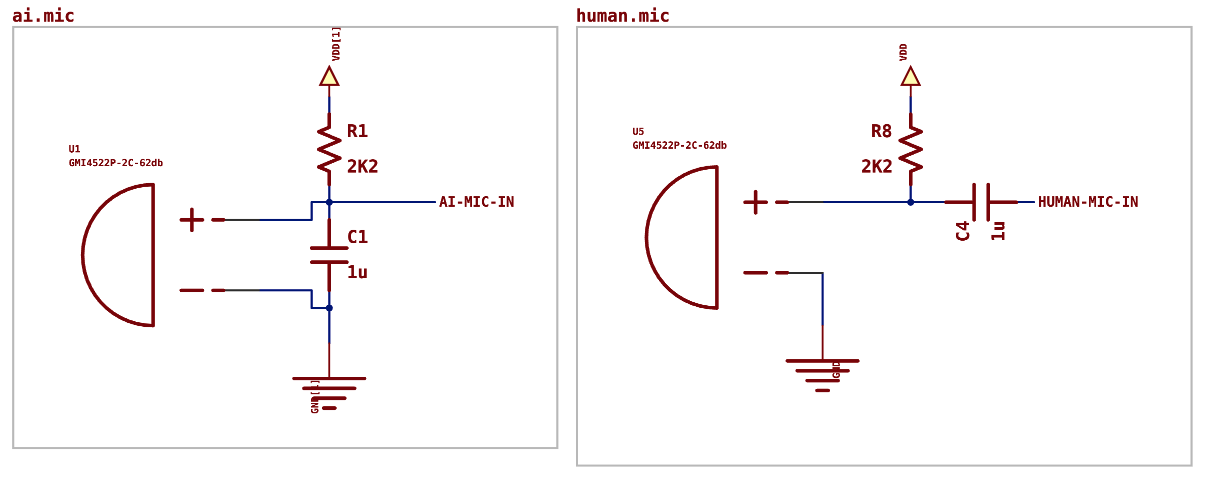
Presumably in the training corpus, many articles and datasheets write extensively about decoupling caps. Maybe the "average" recommendation wins out here, and once it sees a positive and negative pin it slaps a capacitor across them right away. In our tests (and most product demos), LLMs loved to give naive advice about decoupling, which usually isn't as actively harmful as it is here.
Moving on to the amplifier:
; Non-Inverting Amplifier:<br/><br/>; - Let's set the gain to 10 (20dB).<br/>; - Choose R1 = 1kΩ, then R2 = 9kΩ.<br/><br/>; Netlist: <br/>inst amp : op-amp <br/>inst r1 : chip-resistor(1000.0) <br/>inst r2 : chip-resistor(9000.0) <br/>net (mic.out r1.p[1]) <br/>net (r1.p[2] amp.v- r2.p[1]) <br/>net (amp.out r2.p[2])
The AI describes the amplifier as non-inverting, but then feeds the signal into the inverting input. It's also missing a few other parts and nets that would make for a working circuit. Easier to see in the generated schematic:
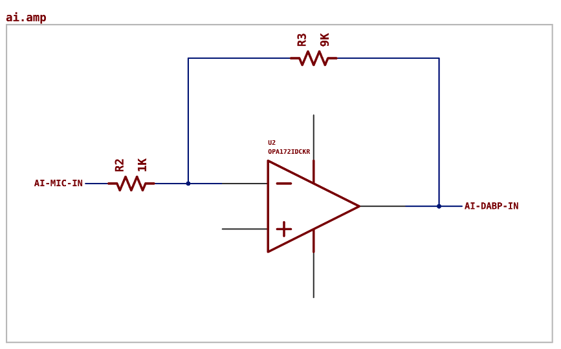 (Cue EE eye twitching)
Moving on to the DABP filter implementation:
; DABP Bandpass Filter:<br/><br/>; - Cutoff frequencies: fl = 100Hz, fh = 20kHz<br/>; - Gain at center frequency: G0 = 10 (20dB)<br/>; - Quality factor: Let's choose Q = 1 for a fairly wide passband<br/>; - Center frequency: f0 = sqrt(fl * fh) ≈ 1.414kHz<br/>; - Let's choose C1 = C2 = 10nF<br/>; - R1 = R2 = 1 / (2 * pi * f0 * C1) ≈ 11.2kΩ, let's use 11kΩ<br/>; - R3 = R1 / (2 * Q * G0) ≈ 550Ω, let's use 560Ω<br/>; - R4 = 2 * Q * R1 / G0 ≈ 2.2kΩ<br/><br/>; Netlist: <br/>inst op1 : op-amp <br/>inst op2 : op-amp <br/>inst r1 : chip-resistor(11000.0) <br/>inst r2 : chip-resistor(11000.0) <br/>inst r3 : chip-resistor(560.0) <br/>inst r4 : chip-resistor(2200.0) <br/>inst c1 : ceramic-cap(10.0e-9) <br/>inst c2 : ceramic-cap(10.0e-9) <br/>net (amp.out op1.v+ r1.p[1] c1.p[1]) <br/>net (op1.v- op2.out r1.p[2] c1.p[2]) <br/>net (op1.out r3.p[1]) <br/>net (r3.p[2] op2.v- r2.p[1] c2.p[1]) <br/>net (op2.v+ r2.p[2] c2.p[2] r4.p[1]) <br/>net (r4.p[2] gnd)
 Generated circuit (left), versus reference from ADI (right).
A few more misses on the netlist here, and about as correct as the amplifier (which is to say, not very). We also see the weirdly strong default of attaching capacitors across positive and negative pins. I guess LLMs are high decouplers.
And to round it off, we've got another reminder to add decoupling caps, and a reasonable note about what to watch out for:
The output of op2 is the final output of the pre-amp circuit. This should give you a good starting point. Remember to add decoupling capacitors and power supply connections as needed. Also, the actual component values may need to be adjusted based on the real specs of your chosen op-amp and the exact requirements of your ADC. Let me know if you have any other questions!
Comparing against ground truth
This reference design from Texas Instruments is a good implementation of the requirements we asked these LLMs to design to. It uses passive RC filters (which the AI considered and avoided), and a single op-amp. I did a quick implementation of this in JITX (code here) to compare the AI generated circuit (code here) to the TI version.
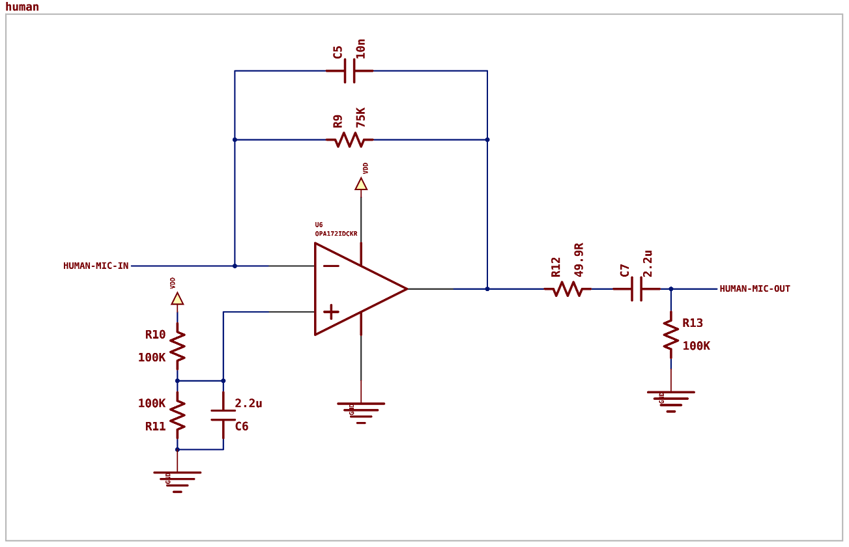
The AI generated circuit was three times the cost and size of the design created by that expert engineer at TI. It is also missing many of the necessary connections.
I found this breakdown surprising - it had no problems generating code in general, and was able to generate a syntactically correct netlist. The code runs! It's just that the pins are not in the right net statements and the resulting circuit is not correct.
Testing higher level code
In fairness, it's rare to write code like this to design a circuit board. In practice you're primarily calling higher level functions, e.g. selecting an op-amp, configuring a filter with parameters, then using a parametric pre-amp circuit:
val OpAmpType = components/STMicroelectronics/TS971ILT/component
val bandpass = BandpassConfig(gain = 34.0, low-cut = 100.0, high-pass = 20.0e3)
val preampType = ocdb/modules/amplifiers/microphone-preamp(OpAmpType, bandpass)
inst amp : preampType
Would LLMs do better if we try to get them to define and use higher-level functions instead?
Gemini 1.5 did the best here, inventing some reasonable APIs to functions that would exist in a library of helpful circuits:
# Modules
amp = inverting_amplifier("amp1", gain=-20.0)
filt = sallen_key_filter("filt1", low_cutoff=100.0, high_cutoff=20.0e3)
# Connections
net (mic.pos r_bias.p[1]) # Microphone to bias resistor
net (r_bias.p[2] c1.p[1] amp.in) # Bias resistor to amp through coupling capacitor
(Still misses on the netlist generation though.)
Our experiments with code generation reveal an interesting pattern: the LLMs are not great at generating detailed code for a netlist to implement a circuit design . That was a little surprising because as shown in the datasheet parsing section, they can write a 95% correct netlist matching an uploaded image of a schematic. This difference suggests that LLMs excel at information extraction and transformation tasks, but struggle with original design synthesis.
Having the LLMs generate higher-level code worked better than raw netlist generation, and seems like a promising path forward. This suggests a hybrid approach where human experts create parametric implementations of common circuits, which LLMs can then utilize and adapt, potentially increasing overall reliability.
Future research could either explore fine-tuning models specifically for netlist generation tasks, or (this being generative AI) wait a month and see how well the next generation of models does on this problem.
Conclusion
Circuit board design requires a lot of precision to get all the details correct -- for unsupervised AI techniques, I think there is a data problem here.
The context and meaning of a design -- What does this do? How do you know if it's good? -- are usually absent from schematic and board design data. Maybe there's a little text comment on the schematic with filter calculations, but that's usually it, and the rest lives in the engineer's head.
An electrical engineer looks at a schematic, understands a portion as a Sallen-Key filter, knows the limitations and function of that circuit, and composes that understanding with the rest of the design. A tremendous amount of context, which is not in any of the design data you can scrape from the internet.
Our experiments show that generative AI models can be useful for circuit board design, if you use them to write code. With that approach, there were still significant differences across Gemini 1.5, Claude 3 Opus, and GPT-4o for circuit board design.
Claude 3 was most helpful for answering questions to learn new domains. There's a risk of hallucinations, but those usually fall away if you interrogate the model until it's consistent. Certainly Claude is better and more helpful than the average article on circuit board design you would find via web search (there are very good articles, but they can be hard to find).
Gemini's huge context window was very helpful for pulling component data out of datasheets. It was the one area where the AI 'just worked' and we got way more usability than we expected.
I'm interested in further testing to find the limits of this technique. Google has done a lot of work on the "Text Haystack" problem to pull tiny pieces of information accurately out of a massive corpus of data, and that's serving them well here.
 From the Gemini 1.5 Report
Surprisingly GPT-4o didn't have the most useful answer in any of the categories we tested. It feels wrong to not include any outputs from the model in this summary article, so here's how GPT-4o feels about coming in third:

Overall we have some promising directions. Using LLMs for circuit board design looks a lot like using them for other complex tasks. They work well for pulling concrete data out of human-shaped data sources, they can do slightly more difficult tasks if they can solve that task by writing code, but eventually their capabilities break down in domains too far out of the training distribution.
We only tested the frontier models in this work, but I predict similar results from the open-source Llama or Mistral models. Some fine tuning on netlist creation would likely make the generation capabilities more useful.
Our work shows both the potential and limitations of current LLMs in specialized fields like circuit design. They're excellent at retrieving information and generating code, but struggle with the nuanced decision-making needed for complex designs. Future LLMs will likely improve here, but for the current model generation, they're best used as tools to assist human experts rather than as standalone designers.

 /9
/9 



 工商网监
湘ICP备2023018690号
工商网监
湘ICP备2023018690号


 4598
4598

 评论
评论
 淘帖
淘帖 4567
4567
 0
0










