一、数字图片准备
先准备几张数字图片









通过lvgl官方提供的在线图片转换代码工具转换:Image Converter — LVGL

得到类似如下的C语言文件:
0x00, 0x00, 0xff, 0x07, 0xff, 0x07, 0xff, 0x07, 0x00, 0x00, 0x00, 0x00, 0x00, 0x00, 0xff, 0x07, 0xff, 0x07, 0xff, 0x07, 0xff, 0x07, 0xff, 0x07, 0xff, 0x07, 0xff, 0x07, 0xff, 0x07, 0xff, 0x07, 0xff, 0x07, 0xff, 0x07, 0xff, 0x07, 0xff, 0x07, 0xff, 0x07, 0xff, 0x07, 0xff, 0x07, 0xff, 0x07, 0xff, 0x07, 0xff, 0x07, 0xff, 0x07, 0xff, 0x07, 0xff, 0x07, 0xff, 0x07, 0xff, 0x07, 0xff, 0x07, 0xff, 0x07, 0xff, 0x07, 0xff, 0x07, 0xff, 0x07, 0xff, 0x07, 0xff, 0x07, 0xff, 0x07, 0xff, 0x07, 0xff, 0x07, 0xff, 0x07, 0xff, 0x07, 0xff, 0x07, 0xff, 0x07, 0xff, 0x07, 0xff, 0x07, 0xff, 0x07, 0xff, 0x07, 0xff, 0x07, 0xff, 0x07, 0xff, 0x07, 0xff, 0x07, 0xff, 0x07, 0xff, 0x07, 0xff, 0x07, 0xff, 0x07, 0xff, 0x07, 0xff, 0x07, 0xff, 0x07, 0xff, 0x07, 0xff, 0x07, 0xff, 0x07, 0xff, 0x07, 0xff, 0x07, 0xff, 0x07, 0xff, 0x07, 0xff, 0x07, 0xff, 0x07, 0xff, 0x07, 0xff, 0x07, 0xff, 0x07, 0xff, 0x07, 0x00, 0x00, 0x00, 0x00, 0x00, 0x00, 0xff, 0x07, 0xff, 0x07, 0xff, 0x07, 0x00, 0x00,
  0x00, 0x00, 0xff, 0x07, 0xff, 0x07, 0x00, 0x00, 0x00, 0x00, 0xff, 0x07, 0xff, 0x07, 0xff, 0x07, 0xff, 0x07, 0xff, 0x07, 0xff, 0x07, 0xff, 0x07, 0xff, 0x07, 0xff, 0x07, 0xff, 0x07, 0xff, 0x07, 0xff, 0x07, 0xff, 0x07, 0xff, 0x07, 0xff, 0x07, 0xff, 0x07, 0xff, 0x07, 0xff, 0x07, 0xff, 0x07, 0xff, 0x07, 0xff, 0x07, 0xff, 0x07, 0xff, 0x07, 0xff, 0x07, 0xff, 0x07, 0xff, 0x07, 0xff, 0x07, 0xff, 0x07, 0xff, 0x07, 0xff, 0x07, 0xff, 0x07, 0xff, 0x07, 0xff, 0x07, 0xff, 0x07, 0xff, 0x07, 0xff, 0x07, 0xff, 0x07, 0xff, 0x07, 0xff, 0x07, 0xff, 0x07, 0xff, 0x07, 0xff, 0x07, 0xff, 0x07, 0xff, 0x07, 0xff, 0x07, 0xff, 0x07, 0xff, 0x07, 0xff, 0x07, 0xff, 0x07, 0xff, 0x07, 0xff, 0x07, 0xff, 0x07, 0xff, 0x07, 0xff, 0x07, 0xff, 0x07, 0xff, 0x07, 0xff, 0x07, 0xff, 0x07, 0xff, 0x07, 0xff, 0x07, 0xff, 0x07, 0xff, 0x07, 0xff, 0x07, 0xff, 0x07, 0xff, 0x07, 0xff, 0x07, 0xff, 0x07, 0xff, 0x07, 0xff, 0x07, 0x00, 0x00, 0x00, 0x00, 0x00, 0x00, 0xff, 0x07, 0xff, 0x07, 0x00, 0x00,
  0x00, 0x00, 0xff, 0x07, 0x00, 0x00, 0x00, 0x00, 0xff, 0x07, 0xff, 0x07, 0xff, 0x07, 0xff, 0x07, 0xff, 0x07, 0xff, 0x07, 0xff, 0x07, 0xff, 0x07, 0xff, 0x07, 0xff, 0x07, 0xff, 0x07, 0xff, 0x07, 0xff, 0x07, 0xff, 0x07, 0xff, 0x07, 0xff, 0x07, 0xff, 0x07, 0xff, 0x07, 0xff, 0x07, 0xff, 0x07, 0xff, 0x07, 0xff, 0x07, 0xff, 0x07, 0xff, 0x07, 0xff, 0x07, 0xff, 0x07, 0xff, 0x07, 0xff, 0x07, 0xff, 0x07, 0xff, 0x07, 0xff, 0x07, 0xff, 0x07, 0xff, 0x07, 0xff, 0x07, 0xff, 0x07, 0xff, 0x07, 0xff, 0x07, 0xff, 0x07, 0xff, 0x07, 0xff, 0x07, 0xff, 0x07, 0xff, 0x07, 0xff, 0x07, 0xff, 0x07, 0xff, 0x07, 0xff, 0x07, 0xff, 0x07, 0xff, 0x07, 0xff, 0x07, 0xff, 0x07, 0xff, 0x07, 0xff, 0x07, 0xff, 0x07, 0xff, 0x07, 0xff, 0x07, 0xff, 0x07, 0xff, 0x07, 0xff, 0x07, 0xff, 0x07, 0xff, 0x07, 0xff, 0x07, 0xff, 0x07, 0xff, 0x07, 0xff, 0x07, 0xff, 0x07, 0xff, 0x07, 0xff, 0x07, 0xff, 0x07, 0xff, 0x07, 0xff, 0x07, 0xff, 0x07, 0x00, 0x00, 0x00, 0x00, 0x00, 0x00, 0xff, 0x07, 0x00, 0x00,
  0x00, 0x00, 0x00, 0x00, 0x00, 0x00, 0xff, 0x07, 0xff, 0x07, 0xff, 0x07, 0xff, 0x07, 0xff, 0x07, 0xff, 0x07, 0xff, 0x07, 0xff, 0x07, 0xff, 0x07, 0xff, 0x07, 0xff, 0x07, 0xff, 0x07, 0xff, 0x07, 0xff, 0x07, 0xff, 0x07, 0xff, 0x07, 0xff, 0x07, 0xff, 0x07, 0xff, 0x07, 0xff, 0x07, 0xff, 0x07, 0xff, 0x07, 0xff, 0x07, 0xff, 0x07, 0xff, 0x07, 0xff, 0x07, 0xff, 0x07, 0xff, 0x07, 0xff, 0x07, 0xff, 0x07, 0xff, 0x07, 0xff, 0x07, 0xff, 0x07, 0xff, 0x07, 0xff, 0x07, 0xff, 0x07, 0xff, 0x07, 0xff, 0x07, 0xff, 0x07, 0xff, 0x07, 0xff, 0x07, 0xff, 0x07, 0xff, 0x07, 0xff, 0x07, 0xff, 0x07, 0xff, 0x07, 0xff, 0x07, 0xff, 0x07, 0xff, 0x07, 0xff, 0x07, 0xff, 0x07, 0xff, 0x07, 0xff, 0x07, 0xff, 0x07, 0xff, 0x07, 0xff, 0x07, 0xff, 0x07, 0xff, 0x07, 0xff, 0x07, 0xff, 0x07, 0xff, 0x07, 0xff, 0x07, 0xff, 0x07, 0xff, 0x07, 0xff, 0x07, 0xff, 0x07, 0xff, 0x07, 0xff, 0x07, 0xff, 0x07, 0xff, 0x07, 0xff, 0x07, 0xff, 0x07, 0xff, 0x07, 0xff, 0x07, 0x00, 0x00, 0x00, 0x00, 0x00, 0x00,
  0x00, 0x00, 0x00, 0x00, 0x00, 0x00, 0xff, 0x07, 0xff, 0x07, 0xff, 0x07, 0xff, 0x07, 0xff, 0x07, 0xff, 0x07, 0xff, 0x07, 0xff, 0x07, 0xff, 0x07, 0xff, 0x07, 0xff, 0x07, 0xff, 0x07, 0xff, 0x07, 0xff, 0x07, 0xff, 0x07, 0xff, 0x07, 0xff, 0x07, 0xff, 0x07, 0xff, 0x07, 0xff, 0x07, 0xff, 0x07, 0xff, 0x07, 0xff, 0x07, 0xff, 0x07, 0xff, 0x07, 0xff, 0x07, 0xff, 0x07, 0xff, 0x07, 0xff, 0x07, 0xff, 0x07, 0xff, 0x07, 0xff, 0x07, 0xff, 0x07, 0xff, 0x07, 0xff, 0x07, 0xff, 0x07, 0xff, 0x07, 0xff, 0x07, 0xff, 0x07, 0xff, 0x07, 0xff, 0x07, 0xff, 0x07, 0xff, 0x07, 0xff, 0x07, 0xff, 0x07, 0xff, 0x07, 0xff, 0x07, 0xff, 0x07, 0xff, 0x07, 0xff, 0x07, 0xff, 0x07, 0xff, 0x07, 0xff, 0x07, 0xff, 0x07, 0xff, 0x07, 0xff, 0x07, 0xff, 0x07, 0xff, 0x07, 0xff, 0x07, 0xff, 0x07, 0xff, 0x07, 0xff, 0x07, 0xff, 0x07, 0xff, 0x07, 0xff, 0x07, 0xff, 0x07, 0xff, 0x07, 0xff, 0x07, 0xff, 0x07, 0xff, 0x07, 0xff, 0x07, 0xff, 0x07, 0xff, 0x07, 0xff, 0x07, 0x00, 0x00, 0x00, 0x00, 0x00, 0x00,
};

const lv_image_dsc_t digit_blue_0 = {
  .header.cf = LV_COLOR_FORMAT_RGB565,
  .header.magic = LV_IMAGE_HEADER_MAGIC,
  .header.w = 80,
  .header.h = 132,
  .data_size = 10560 * 2,
  .data = digit_blue_0_map,
};
对所有图片文件定义,并建立数组
LV_IMG_DECLARE(digit_blue_0)
LV_IMG_DECLARE(digit_blue_1)
LV_IMG_DECLARE(digit_blue_2)
LV_IMG_DECLARE(digit_blue_3)
LV_IMG_DECLARE(digit_blue_4)
LV_IMG_DECLARE(digit_blue_5)
LV_IMG_DECLARE(digit_blue_6)
LV_IMG_DECLARE(digit_blue_7)
LV_IMG_DECLARE(digit_blue_8)
LV_IMG_DECLARE(digit_blue_9)
LV_IMG_DECLARE(digit_blue_dot)
constlv_img_dsc_t *digit_blue_frame_group[] = {

     &digit_blue_0,
     &digit_blue_1,
     &digit_blue_2,
     &digit_blue_3,
     &digit_blue_4,
     &digit_blue_5,
     &digit_blue_6,
     &digit_blue_7,
     &digit_blue_8,
     &digit_blue_9,
     &digit_blue_dot,
};
建立用于显示的数字对象
lv_obj_t* digits1;
lv_obj_t* digits2;
lv_obj_t* digits3;
lv_obj_t* digits4;
lv_obj_t* digits5;
lv_obj_t* digits6;
lv_obj_t* adc_digit[6];
数字对象初始化,建立每个对象,设置属性,并用adc_digit指向各对象
void digit_blue_disp(void)
{
    digits1=lv_img_create(lv_scr_act());
    adc_digit[0]=digits1;
    lv_img_set_src(digits1, &digit_blue_6);
    lv_obj_set_width(digits1, LV_SIZE_CONTENT);
    lv_obj_set_height(digits1, LV_SIZE_CONTENT);
    lv_obj_set_x(digits1, 0);
    lv_obj_set_y(digits1, 0);
    lv_obj_add_flag(digits1, LV_OBJ_FLAG_ADV_HITTEST );
    lv_obj_clear_flag(digits1, LV_OBJ_FLAG_SCROLLABLE );

    digits2=lv_img_create(lv_scr_act());
    adc_digit[1]=digits2;
    lv_img_set_src(digits2, &digit_blue_7);
    lv_obj_set_width(digits2, LV_SIZE_CONTENT);
    lv_obj_set_height(digits2, LV_SIZE_CONTENT);
    lv_obj_set_x(digits2, 80);
    lv_obj_set_y(digits2, 0);
    lv_obj_add_flag(digits2, LV_OBJ_FLAG_ADV_HITTEST );
    lv_obj_clear_flag(digits2, LV_OBJ_FLAG_SCROLLABLE );

    digits3=lv_img_create(lv_scr_act());
    adc_digit[2]=digits3;
    lv_img_set_src(digits3, &digit_blue_8);
    lv_obj_set_width(digits3, LV_SIZE_CONTENT);
    lv_obj_set_height(digits3, LV_SIZE_CONTENT);
    lv_obj_set_x(digits3, 160);
    lv_obj_set_y(digits3, 0);
    lv_obj_add_flag(digits3, LV_OBJ_FLAG_ADV_HITTEST );
    lv_obj_clear_flag(digits3, LV_OBJ_FLAG_SCROLLABLE );

    digits4=lv_img_create(lv_scr_act());
    adc_digit[3]=digits4;
    lv_img_set_src(digits4, &digit_blue_9);
    lv_obj_set_width(digits4, LV_SIZE_CONTENT);
    lv_obj_set_height(digits4, LV_SIZE_CONTENT);
    lv_obj_set_x(digits4, 240);
    lv_obj_set_y(digits4, 0);
    lv_obj_add_flag(digits4, LV_OBJ_FLAG_ADV_HITTEST );
    lv_obj_clear_flag(digits4, LV_OBJ_FLAG_SCROLLABLE );

    digits5=lv_img_create(lv_scr_act());
    adc_digit[4]=digits5;
    lv_img_set_src(digits5, &digit_blue_4);
    lv_obj_set_width(digits5, LV_SIZE_CONTENT);
    lv_obj_set_height(digits5, LV_SIZE_CONTENT);
    lv_obj_set_x(digits5, 320);
    lv_obj_set_y(digits5, 0);
    lv_obj_add_flag(digits5, LV_OBJ_FLAG_ADV_HITTEST );
    lv_obj_clear_flag(digits5, LV_OBJ_FLAG_SCROLLABLE );

    digits6=lv_img_create(lv_scr_act());
    adc_digit[5]=digits6;
    lv_img_set_src(digits6, &digit_blue_5);
    lv_obj_set_width(digits6, LV_SIZE_CONTENT);
    lv_obj_set_height(digits6, LV_SIZE_CONTENT);
    lv_obj_set_x(digits6, 400);
    lv_obj_set_y(digits6, 0);
    lv_obj_add_flag(digits6, LV_OBJ_FLAG_ADV_HITTEST );
    lv_obj_clear_flag(digits6, LV_OBJ_FLAG_SCROLLABLE );

}
更新显示
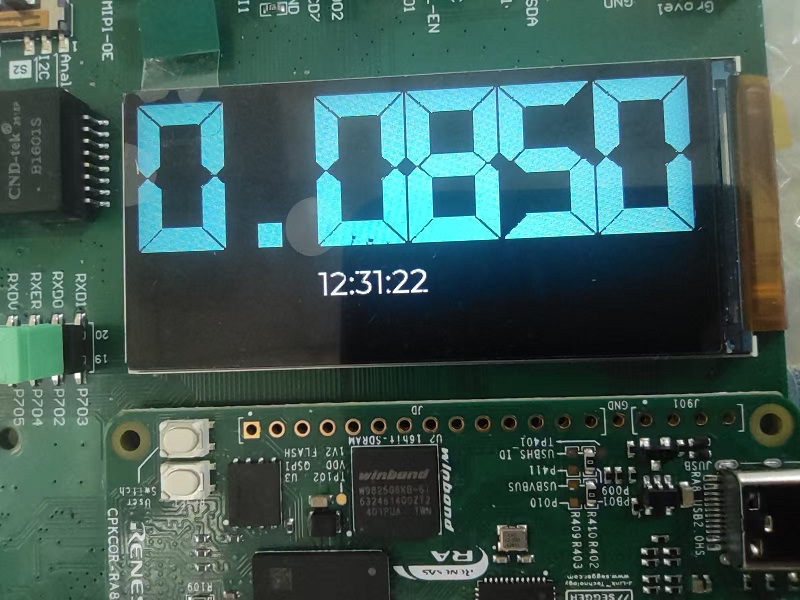
void update_blue_disp(char* adc)
{
uint8_t i;
for(i = 0; i < 6; i++)
{
if(adc[i] == '.'){
lv_img_set_src(adc_digit[i], digit_blue_frame_group[10]);
}
else if(adc[i] >= '0' && adc[i] <= '9'){
lv_img_set_src(adc_digit[i], digit_blue_frame_group[adc[i] - '0']);
}
else {
lv_img_set_src(adc_digit[i], digit_blue_frame_group[0]);
}
}
}
横屏显示:
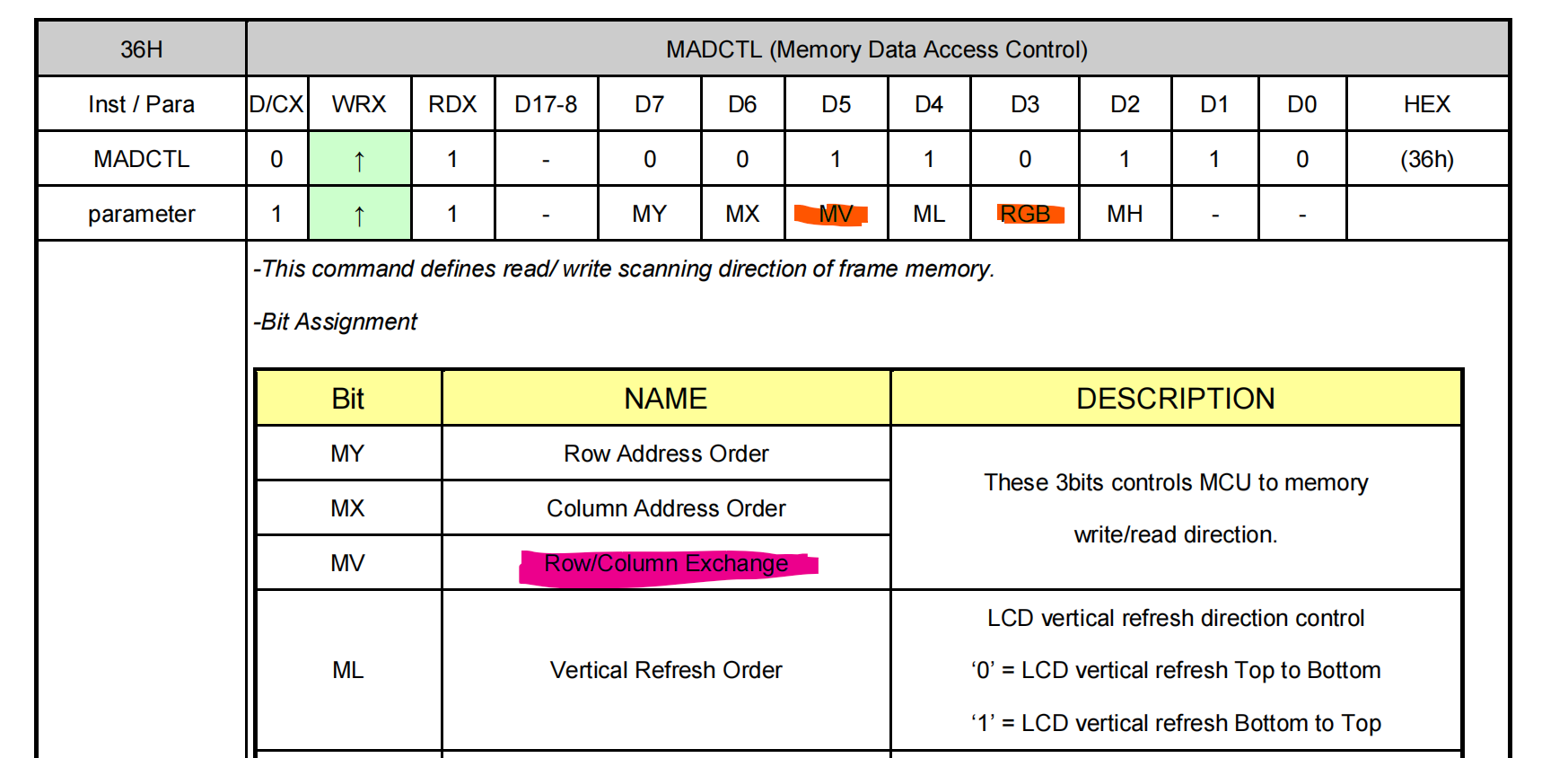
所以将036设置为0x28或0xe8为横屏显示
{2, {0x36, 0x28}, MIPI_DSI_CMD_ID_DCS_SHORT_WRITE_1_PARAM, MIPI_DSI_CMD_FLAG_LOW_POWER},
二、ADC取样
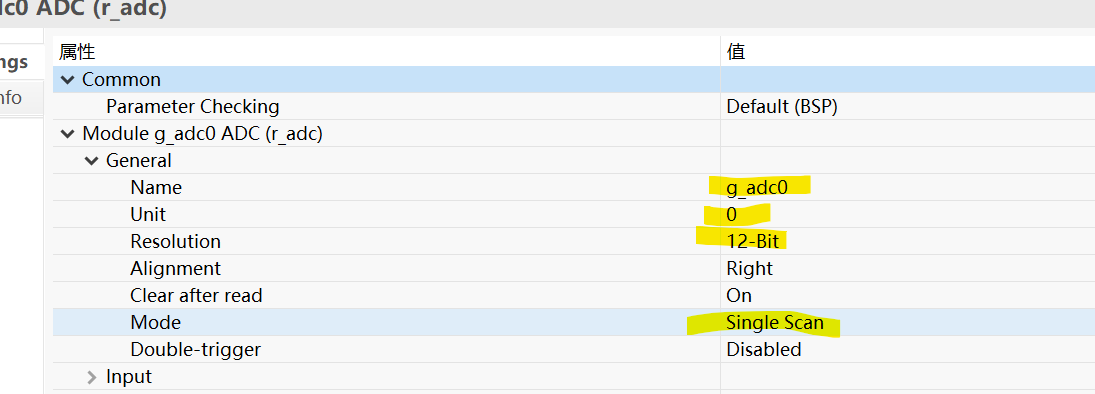
使用adc0
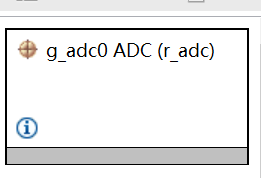
adc基本属性:
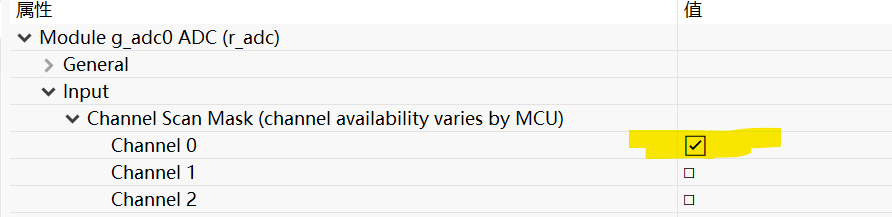
通道0:
中断设置
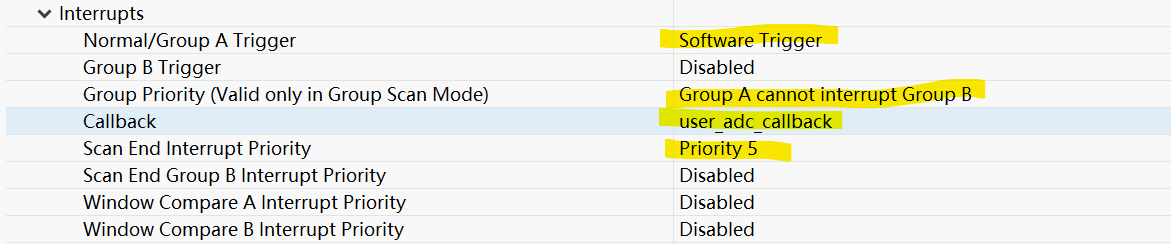
通道0对应P004

采集函数:
void adc_sample(void)
{
float adc_val;
char adc_str[6]={0};
R_ADC_ScanStart(&g_adc0_ctrl);
while(false == adc_complete_flag);
adc_complete_flag = false;
R_ADC_Read(&g_adc0_ctrl, ADC_CHANNEL_0, &adc_result);
uint32_t adc_mv = adc_result * 3300 / 4096;
sprintf(adc_str, "%d.%04d", adc_mv / 1000, adc_mv % 1000);
update_blue_disp(adc_str);
}
ADC中断函数,修改采集标识
void user_adc_callback(adc_callback_args_t *p_args)
{
if(ADC_EVENT_SCAN_COMPLETE == p_args->event)
{
adc_complete_flag = true;
}
}
三、主程序
void hal_entry(void)
{
lv_init();
board_init();
static lv_style_t style_screen;
lv_style_init(&style_screen);
lv_style_set_bg_color(&style_screen, lv_color_hex(0x000000));
lv_style_set_bg_opa(&style_screen, LV_OPA_COVER);
lv_obj_add_style(lv_scr_act(), &style_screen, 0);
digit_blue_disp();
rtc_init();
g_set_time.tm_hour=12;
g_set_time.tm_min=30;
g_set_time.tm_sec=30;
g_set_time.tm_year=2025;
g_set_time.tm_mon=10;
g_set_time.tm_yday=11;
R_RTC_CalendarTimeSet(&g_rtc0_ctrl, &g_set_time);
set_rtc_periodic_rate();
R_ADC_Open(&g_adc0_ctrl, &g_adc0_cfg);
R_ADC_ScanCfg(&g_adc0_ctrl, &g_adc0_channel_cfg);
lv_obj_t *scr = lv_scr_act();
label= lv_label_create(scr);
while (1)
{
lv_timer_handler();
if(g_periodic_irq_flag==SET_FLAG)
{
g_periodic_irq_flag=RESET_FLAG;
update_Time_disp();
}
R_BSP_SoftwareDelay(3, BSP_DELAY_UNITS_MILLISECONDS);
}
#if BSP_TZ_SECURE_BUILD
R_BSP_NonSecureEnter();
#endif
}
update_Time_disp函数:
void update_Time_disp(void)
{
R_RTC_CalendarTimeGet(&g_rtc0_ctrl, &g_present_time);
rtc_date_readability_update(&g_present_time);
adc_sample();
lv_label_set_text_fmt(label, "%02d:%02d:%02d",g_present_time.tm_hour,g_present_time.tm_min,g_present_time.tm_sec);
lv_obj_set_size(label, 160, 30);
lv_obj_align(label, LV_ALIGN_TOP_MID, 0, 150);
static lv_style_t style;
lv_style_init(&style);
lv_style_set_text_font(&style, &lv_font_montserrat_28);
lv_style_set_text_color(&style, lv_color_hex(0xFFFFFF));
lv_obj_add_style(label, &style, 0);
}

 电子发烧友论坛
 0
0
 /9
/9 



 工商网监
湘ICP备2023018690号
工商网监
湘ICP备2023018690号


 1228
1228

 淘帖
淘帖










