前面有用到以太网连网与shell命令点灯。本篇主要实现点灯编译文件传输及运行及程序开机自启动。
一.文件传输
1.开发板以太网连上网络
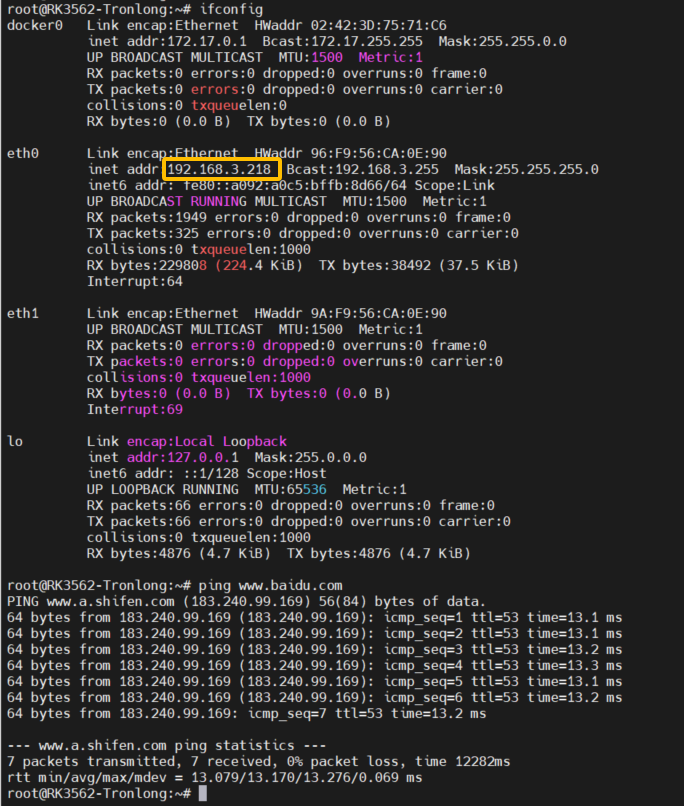
可以看到开发板ip.
2.执行文件拷贝到开发板
(1)在开发板环境创建user_app文件夹,用来存放可执行文件。
mkdir user_app
chmod 775 -R user_app/
(2)在ubuntu控制台切换到led_flash可执行文件路径下,运行如下指令
scp led_flash root@192.168.3.218:/user_app/
(3)在开发板环境,查询可以看到user_app下已经拷贝到可执行文件led_flash

二.点灯
1.代码
代码以入参led灯数目,通过脚本命令控制led灯亮灭
#include <stdio.h>
#include <stdlib.h>
#include <stdint.h>
#include <stdbool.h>
#include <string.h>
#include <getopt.h>
#include <signal.h>
#include <unistd.h>
#include <errno.h>
#include <libgen.h>
#define ARRAY_SIZE(array) sizeof(array) / sizeof(array[0])
static char *g_leds[] = {
"/sys/class/leds/user-led0",
"/sys/class/leds/user-led1",
"/sys/class/leds/user-led2",
"/sys/class/leds/user-led3"
};
volatile bool g_quit = false;
static const char g_shortopts [] = ":n:vh";
static const struct option g_longopts [] = {
{ "number", required_argument, NULL, 'n' },
{ "version", no_argument, NULL, 'v' },
{ "help", no_argument, NULL, 'h' },
{ 0, 0, 0, 0 }
};
static void usage(FILE *fp, int argc, char **argv) {
fprintf(fp,
"Usage: %s [options]\n\n"
"Options:\n"
" -n | --number Number of LEDs, range of 1 to 4 \n"
" -v | --version Display version information\n"
" -h | --help Show help content\n\n"
"", basename(argv[0]));
}
static void opt_parsing_err_handle(int argc, char **argv, int flag) {
int state = 0;
if (argc < 2) {
printf("No input parameters are entered, please check the input.\n");
state = -1;
} else {
if (optind < argc || flag) {
printf("Error: Parameter parsing failed\n");
if (flag)
printf("\tunrecognized option '%s'\n", argv[optind-1]);
while (optind < argc) {
printf("\tunrecognized option '%s'\n", argv[optind++]);
}
state = -1;
}
}
if (state == -1) {
printf("Tips: '-h' or '--help' to get help\n\n");
exit(EXIT_FAILURE);
}
}
void sig_handle(int arg) {
g_quit = true;
}
int main(int argc, char **argv) {
int i = 0;
int c = 0;
int num = 0;
int flag = 0;
char cmd[64] = {0};
while ((c = getopt_long(argc, argv, g_shortopts, g_longopts, NULL)) != -1) {
switch (c) {
case 'n':
num = atoi(optarg);
break;
case 'v':
printf("version : 1.0\n");
exit(EXIT_SUCCESS);
case 'h':
usage(stdout, argc, argv);
exit(EXIT_SUCCESS);
default :
flag = 1;
break;
}
}
opt_parsing_err_handle(argc, argv, flag);
if ((num > ARRAY_SIZE(g_leds)) || (num < 1)) {
printf("Error: The number of LEDs entered exceeds the preset range(1-4)\n");
exit(EXIT_FAILURE);
}
signal(SIGINT, sig_handle);
printf("\nSystem leds :\n");
system("find /sys/class/leds/*");
printf("\nFlashing leds :\n");
for (i = 0; i < num; i++)
printf("%s\n",g_leds[i]);
while (!g_quit) {
for (i = 0; i < num; i++) {
snprintf(cmd, 64, "echo 1 > %s/brightness", g_leds[i]);
if (system(cmd) != 0) {
fprintf(stderr, "Error: Failed to turn on %s\n", g_leds[i]);
exit(EXIT_FAILURE);
}
}
usleep(500 * 1000);
for (i = 0; i < num; i++) {
snprintf(cmd, 64, "echo 0 > %s/brightness", g_leds[i]);
if (system(cmd) != 0) {
fprintf(stderr, "Error: Failed to turn off %s\n", g_leds[i]);
exit(EXIT_FAILURE);
}
}
usleep(500 * 1000);
}
printf("Exit\n");
return 0;
}
2.运行
./led_flash -n 2
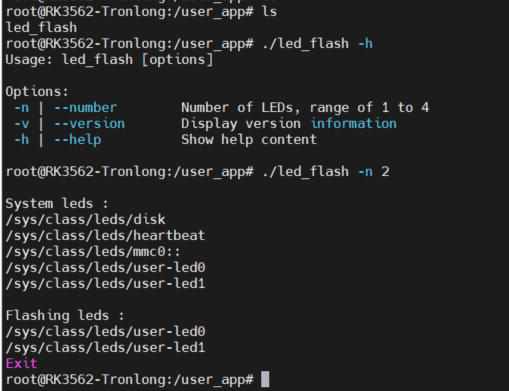
可以看到开发板上LED1、LED2闪烁,但是断电后不保存。

 电子发烧友论坛
 /9
/9 



 工商网监
湘ICP备2023018690号
工商网监
湘ICP备2023018690号


 538
538


 评论
评论
 淘帖
淘帖 894
894










