
JS早已进化出可以控制笔记本电脑蓝牙设备的能力,所以编写一个HTML就可以完成BLE点灯工作。
示例中有一个BLE从机程序
CH585EVT\EVT\EXAM\BLE\Peripheral
在此基础上添加点灯部分
初始化PA0:
GPIOA_ModeCfg(GPIO_Pin_0, GPIO_ModeOut_PP_5mA);
在peripheral.C中,第一个特征值SIMPLEPROFILE_CHAR1写入事件发生时,增加判断,如果输入为0x20则点亮PA0,否则熄灭PA0
static void simpleProfileChangeCB(uint8_t paramID, uint8_t *pValue, uint16_t len)
{
    switch(paramID)
    {
        case SIMPLEPROFILE_CHAR1:
        {
            uint8_t newValue[SIMPLEPROFILE_CHAR1_LEN];
            tmos_memcpy(newValue, pValue, len);
            PRINT("profile ChangeCB CHAR1.. \n");
            if(newValue[0]==0x20)
            {
                GPIOA_ResetBits(GPIO_Pin_0);
            }else {
                GPIOA_SetBits(GPIO_Pin_0);
            }
            break;
        }
<!DOCTYPE html>
<html lang="zh-CN">
<head>
    <meta charset="UTF-8">
    <meta name="viewport" content="width=device-width, initial-scale=1.0">
    <title>智能灯控制面板</title>
    <style>
        body {
            font-family: 'Arial', sans-serif;
            background-color: #f5f5f5;
            display: flex;
            justify-content: center;
            align-items: center;
            height: 100vh;
            margin: 0;
        }
        .control-panel {
            background: white;
            border-radius: 20px;
            box-shadow: 0 10px 30px rgba(0,0,0,0.1);
            padding: 30px;
            width: 300px;
            text-align: center;
        }
        h1 {
            color: #333;
            margin-bottom: 30px;
        }
        .btn {
            background: #4285f4;
            color: white;
            border: none;
            border-radius: 50px;
            padding: 15px 30px;
            margin: 10px;
            font-size: 18px;
            cursor: pointer;
            width: 80%;
            transition: all 0.3s;
            box-shadow: 0 4px 6px rgba(0,0,0,0.1);
        }
        .btn:hover {
            transform: translateY(-2px);
            box-shadow: 0 6px 10px rgba(0,0,0,0.15);
        }
        .btn:active {
            transform: translateY(0);
        }
        .btn.on {
            background: #34a853;
        }
        .btn.off {
            background: #ea4335;
        }
        .connection-status {
            margin: 20px 0;
            font-weight: bold;
        }
        .connected {
            color: #34a853;
        }
        .disconnected {
            color: #ea4335;
        }
        .advanced-toggle {
            color: #4285f4;
            text-decoration: underline;
            cursor: pointer;
            margin-top: 20px;
            display: inline-block;
        }
        .advanced-settings {
            display: none;
            margin-top: 20px;
            text-align: left;
        }
    </style>
</head>
<body>
    <div class="control-panel">
        <h1>智能灯控制</h1>

        <div class="connection-status disconnected" id="connection-status">设备未连接</div>

        <button class="btn connect" id="connect-btn">连接设备</button>

        <div id="control-buttons" style="display:none;">
            <button class="btn on" id="on-btn">开灯</button>
            <button class="btn off" id="off-btn">关灯</button>
            <button class="btn" id="disconnect-btn">断开连接</button>
        </div>

        <div class="advanced-toggle" id="advanced-toggle">显示高级设置</div>

        <div class="advanced-settings" id="advanced-settings">
            <h3>高级设置</h3>
            <div>
                <label>服务UUID: <input type="text" id="service-uuid" value="0000ffe0-0000-1000-8000-00805f9b34fb"></label>
            </div>
            <div>
                <label>特征值UUID: <input type="text" id="characteristic-uuid" value="0000ffe1-0000-1000-8000-00805f9b34fb"></label>
            </div>
            <div>
                <label>开灯指令: <input type="text" id="on-command" value="20"></label>
            </div>
            <div>
                <label>关灯指令: <input type="text" id="off-command" value="10"></label>
            </div>
        </div>
    </div>

    <script>
        // 设备配置 (可以在后台预设)
        const defaultConfig = {
            serviceUUID: '0000ffe0-0000-1000-8000-00805f9b34fb',
            characteristicUUID: '0000ffe1-0000-1000-8000-00805f9b34fb',
            onCommand: '20',
            offCommand: '10'
        };

        // DOM元素
        const connectBtn = document.getElementById('connect-btn');
        const onBtn = document.getElementById('on-btn');
        const offBtn = document.getElementById('off-btn');
        const disconnectBtn = document.getElementById('disconnect-btn');
        const connectionStatus = document.getElementById('connection-status');
        const controlButtons = document.getElementById('control-buttons');
        const advancedToggle = document.getElementById('advanced-toggle');
        const advancedSettings = document.getElementById('advanced-settings');

        // 设备变量
        let device = null;
        let characteristic = null;
        let isConnected = false;

        // 初始化UI
        document.getElementById('service-uuid').value = defaultConfig.serviceUUID;
        document.getElementById('characteristic-uuid').value = defaultConfig.characteristicUUID;
        document.getElementById('on-command').value = defaultConfig.onCommand;
        document.getElementById('off-command').value = defaultConfig.offCommand;

        // 连接设备
        connectBtn.addEventListener('click', async () => {
            try {
                connectionStatus.textContent = "正在连接...";

                device = await navigator.bluetooth.requestDevice({
					acceptAllDevices: true,
                    //optionalServices: ['generic_access'] // 默认包含的服务
					optionalServices: ['0000ffe0-0000-1000-8000-00805f9b34fb']
                    //filters: [
					//{ namePrefix: 'simple' }
					//],
                });

                const server = await device.gatt.connect();
                const service = await server.getPrimaryService(defaultConfig.serviceUUID);
                characteristic = await service.getCharacteristic(defaultConfig.characteristicUUID);

                device.addEventListener('gattserverdisconnected', onDisconnected);

                isConnected = true;
                connectionStatus.textContent = "设备已连接";
                connectionStatus.className = "connection-status connected";
                connectBtn.style.display = "none";
                controlButtons.style.display = "block";

            } catch (error) {
                console.error("连接失败:", error);
                connectionStatus.textContent = "连接失败";
                connectionStatus.className = "connection-status disconnected";
            }
        });

        // 断开连接
        disconnectBtn.addEventListener('click', () => {
            if (device && isConnected) {
                device.gatt.disconnect();
            }
        });

        // 断开连接处理
        function onDisconnected() {
            isConnected = false;
            device = null;
            characteristic = null;
            connectionStatus.textContent = "设备未连接";
            connectionStatus.className = "connection-status disconnected";
            connectBtn.style.display = "block";
            controlButtons.style.display = "none";
        }

        // 开灯
        onBtn.addEventListener('click', async () => {
            if (!isConnected) return;

            try {
                const command = document.getElementById('on-command').value.trim();
                const data = hexStringToArrayBuffer(command);
                await characteristic.writeValue(data);
                console.log("开灯指令发送成功");
            } catch (error) {
                console.error("发送开灯指令失败:", error);
            }
        });

        // 关灯
        offBtn.addEventListener('click', async () => {
            if (!isConnected) return;

            try {
                const command = document.getElementById('off-command').value.trim();
                const data = hexStringToArrayBuffer(command);
                await characteristic.writeValue(data);
                console.log("关灯指令发送成功");
            } catch (error) {
                console.error("发送关灯指令失败:", error);
            }
        });

        // 切换高级设置
        advancedToggle.addEventListener('click', () => {
            if (advancedSettings.style.display === 'none') {
                advancedSettings.style.display = 'block';
                advancedToggle.textContent = '隐藏高级设置';
            } else {
                advancedSettings.style.display = 'none';
                advancedToggle.textContent = '显示高级设置';
            }
        });

        // 辅助函数: 十六进制字符串转ArrayBuffer
        function hexStringToArrayBuffer(hexString) {
            hexString = hexString.replace(/\s/g, '');
            if (hexString.length % 2 !== 0) {
                throw new Error('十六进制字符串长度必须为偶数');
            }
            const bytes = new Uint8Array(hexString.length / 2);
            for (let i = 0; i < hexString.length; i += 2) {
                bytes[i/2] = parseInt(hexString.substr(i, 2), 16);
            }
            return bytes.buffer;
        }
    </script>
</body>
</html>
执行HTML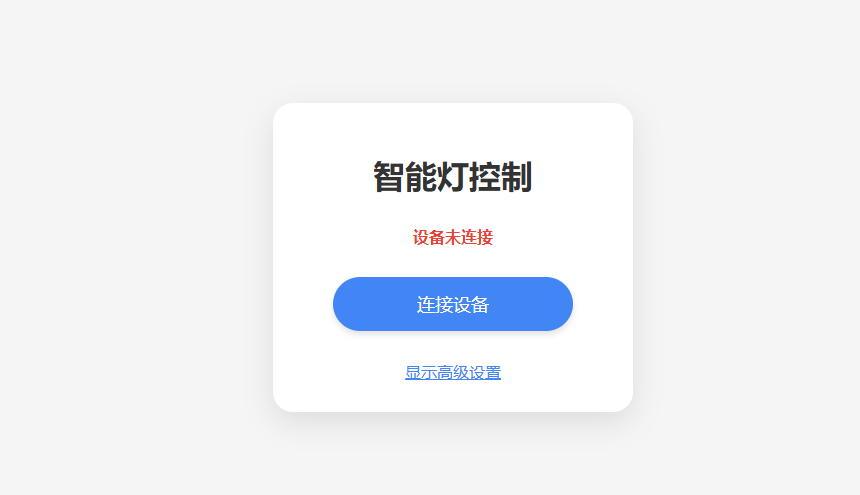
为了体现卓然不同的气质,起了一个非常中二的名称"智能灯控制"
更多回帖
 长按上方图片保存到相册


 复制链接
复制链接