【上海晶珩睿莓1开发板试用体验】人脸检测
本文介绍了上海晶珩睿莓 1 开发板结合 UltrFace 模型实现人脸检测的项目设计,包括模型介绍、板端推理和摄像头动态检测两部分,并通过流程图、工程代码、效果演示等完成相关测试。
项目介绍
- 准备工作:UltraFace 模型介绍、模型下载、Weston 桌面使用等;
- 板端推理:读取本地图片并实现板端推理,包括流程图、工程代码、效果演示等;
- 动态检测:调用 USB 摄像头资源,实现动态画面捕获和实时人脸检测。
准备工作
包括 UltraFace 轻量级人脸检测模型介绍、模型下载、Weston 桌面使用等,为后续工作的顺利进行作准备。
UltraFace 模型
模型是针对边缘计算设备设计的轻量人脸检测模型。
- 在模型大小上,默认FP32精度下(.pth)文件大小为 1.04~1.1MB,推理框架int8量化后大小为 300KB 左右。
- 在模型计算量上,320x240的输入分辨率下 90~109 MFlops左右。
- 模型有两个版本,version-slim(主干精简速度略快),version-RFB(加入了修改后的RFB模块,精度更高)。
- 提供320x240、640x480不同输入分辨率下使用widerface训练的预训练模型,更好的工作于不同的应用场景。
- 支持onnx导出。
模型精度对比
在WIDER FACE val集测试精度(单尺度输入分辨率:VGA 640*480 或按最大边长640等比缩放 )
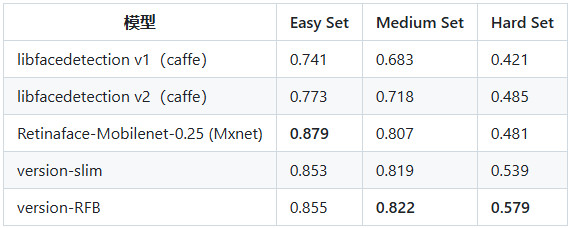
详见:Ultra-Light-Fast-Generic-Face-Detector .
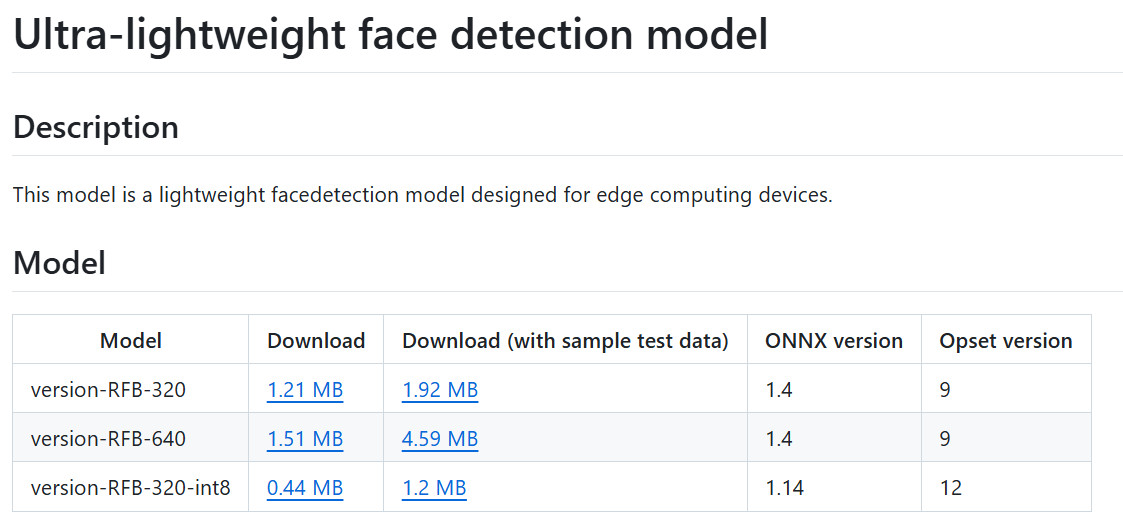
模型下载
人脸检测模型下载:ultraface - onnx/models .
Weston 桌面
Wayland 是一套 display server (Wayland compositor) 与 client 间的通信协议;
它定位于在 Linux 上替换 X 图形系统,应用程序可以使用该协议与显示服务器进行对话,以使自己可以并同时获得用户的输入;
Wayland 的显示服务器被称为合成器,应用程序就是 Wayland 的客户端;
weston 是一个 Wayland 合成器的参考实现,提供了一个基本的桌面应用环境;
睿莓 1 的 weston 桌面实现了图形硬解码;
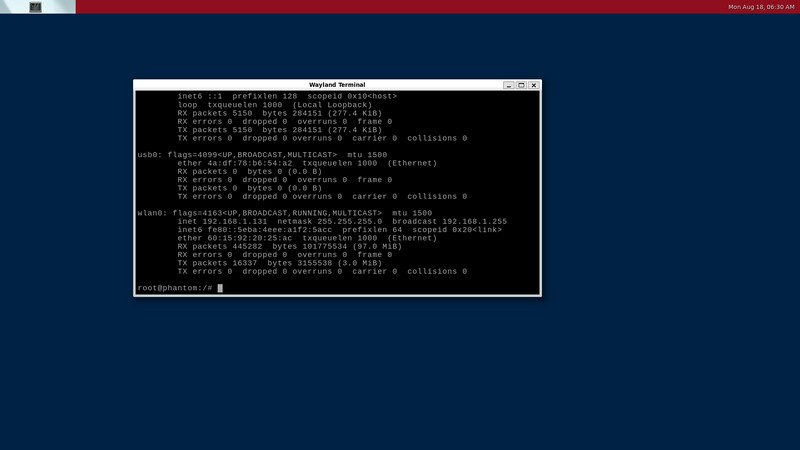
终端输入指令启动 Weston 桌面
sudo systemctl start weston
sudo systemctl stop weston
sudo systemctl restart weston
将 HDMI 数据线连接开发板和显示器,获得输出画面
板端推理
这里首先介绍单张图片输入并实现板端推理的流程,包括流程图、工程代码、效果演示。
流程图

代码
终端执行 touch face_detection.py 新建文件,并添加如下代码
import cv2
import numpy as np
import onnxruntime
from pathlib import Path
import argparse
class FaceONNXDetector:
def __init__(self, model_path: str):
"""初始化UltraFace检测器"""
if not Path(model_path).exists():
raise FileNotFoundError(f"模型文件不存在: {model_path}")
sess_options = onnxruntime.SessionOptions()
sess_options.graph_optimization_level = onnxruntime.GraphOptimizationLevel.ORT_ENABLE_ALL
sess_options.log_severity_level = 3
providers = ['CPUExecutionProvider']
self.session = onnxruntime.InferenceSession(model_path, sess_options, providers=providers)
self.input_name = self.session.get_inputs()[0].name
self.input_shape = self.session.get_inputs()[0].shape
print(f"模型输入形状: {self.input_shape}")
print(f"模型输出数量: {len(self.session.get_outputs())}")
self.output_dir = 'out'
Path(self.output_dir).mkdir(exist_ok=True)
def detect_faces(self, image: np.ndarray, conf_threshold: float = 0.7) -> list:
"""检测人脸"""
input_tensor = self._preprocess(image)
outputs = self.session.run(None, {self.input_name: input_tensor})
return self._postprocess(outputs, image.shape, conf_threshold)
def _preprocess(self, image: np.ndarray) -> np.ndarray:
"""预处理图像 - UltraFace专用"""
h, w = self.input_shape[2], self.input_shape[3]
img = cv2.resize(image, (w, h))
img = cv2.cvtColor(img, cv2.COLOR_BGR2RGB)
img = img.astype(np.float32)
img = (img - 127.0) / 128.0
img = np.transpose(img, (2, 0, 1))
img = np.expand_dims(img, axis=0)
return img
def _postprocess(self, outputs: list, img_shape: tuple, conf_threshold: float) -> list:
"""修正后的后处理方法"""
boxes = []
img_h, img_w = img_shape[:2]
scores = outputs[0][0]
bboxes = outputs[1][0]
face_probs = scores[:, 1]
for i in range(len(face_probs)):
if face_probs[i] > conf_threshold:
x1 = int(bboxes[i][0] * img_w)
y1 = int(bboxes[i][1] * img_h)
x2 = int(bboxes[i][2] * img_w)
y2 = int(bboxes[i][3] * img_h)
x1 = max(0, min(x1, img_w - 1))
y1 = max(0, min(y1, img_h - 1))
x2 = max(0, min(x2, img_w - 1))
y2 = max(0, min(y2, img_h - 1))
if x2 > x1 and y2 > y1:
boxes.append([x1, y1, x2, y2, face_probs[i]])
return self.non_max_suppression(boxes)
@staticmethod
def non_max_suppression(boxes: list, iou_threshold: float = 0.3) -> list:
"""非极大值抑制"""
if not boxes:
return []
boxes = sorted(boxes, key=lambda x: x[4], reverse=True)
keep = []
while boxes:
current = boxes.pop(0)
keep.append(current)
boxes = [box for box in boxes
if FaceONNXDetector.calculate_iou(current, box) < iou_threshold]
return keep
@staticmethod
def calculate_iou(box1, box2):
"""计算IOU"""
x1 = max(box1[0], box2[0])
y1 = max(box1[1], box2[1])
x2 = min(box1[2], box2[2])
y2 = min(box1[3], box2[3])
inter = max(0, x2 - x1) * max(0, y2 - y1)
area1 = (box1[2] - box1[0]) * (box1[3] - box1[1])
area2 = (box2[2] - box2[0]) * (box2[3] - box2[1])
return inter / (area1 + area2 - inter)
def visualize(self, image: np.ndarray, boxes: list) -> np.ndarray:
"""可视化检测结果"""
for box in boxes:
x1, y1, x2, y2, conf = box
x1, y1, x2, y2 = map(int, [x1, y1, x2, y2])
color = (0, 255, 0) if conf > 0.9 else (0, 0, 255)
thickness = 2 if conf > 0.9 else 1
cv2.rectangle(image, (x1, y1), (x2, y2), color, thickness)
label = f"{conf:.2f}"
(w, h), _ = cv2.getTextSize(label, cv2.FONT_HERSHEY_SIMPLEX, 0.5, 1)
cv2.rectangle(image, (x1, y1 - h - 5), (x1 + w, y1), color, -1)
cv2.putText(image, label, (x1, y1 - 5),
cv2.FONT_HERSHEY_SIMPLEX, 0.5, (0, 0, 0), 1)
return image
def main():
parser = argparse.ArgumentParser(description='UltraFace人脸检测')
parser.add_argument('model', help='UltraFace ONNX模型路径')
parser.add_argument('image', help='要检测的图像路径')
parser.add_argument('--conf', type=float, default=0.7,
help='置信度阈值 (默认: 0.7)')
args = parser.parse_args()
try:
detector = FaceONNXDetector(args.model)
image = cv2.imread(args.image)
if image is None:
raise ValueError("无法读取图像文件")
print("\n正在检测人脸...")
boxes = detector.detect_faces(image, args.conf)
print(f"\n检测到 {len(boxes)} 张人脸:")
for i, box in enumerate(boxes, 1):
print(f"{i}. 位置: {list(map(int, box[:4]))}, 置信度: {box[4]:.4f}")
result_img = detector.visualize(image.copy(), boxes)
output_path = f"{detector.output_dir}/{Path(args.image).stem}_out.jpg"
cv2.imwrite(output_path, result_img)
print(f"\n结果已保存到: {output_path}")
except Exception as e:
print(f"错误: {str(e)}")
exit(1)
if __name__ == "__main__":
main()
保存代码;
效果
终端执行如下指令,运行人脸检测程序
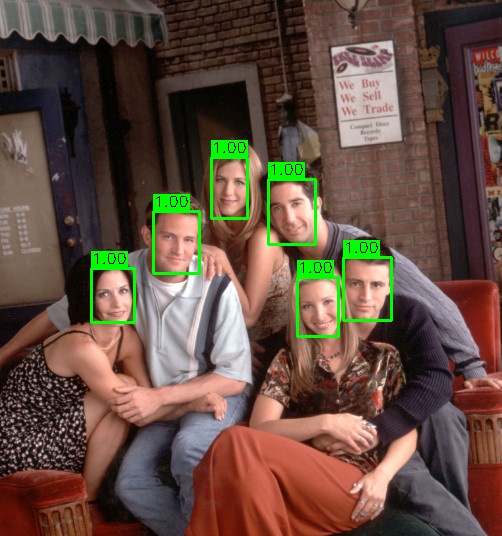
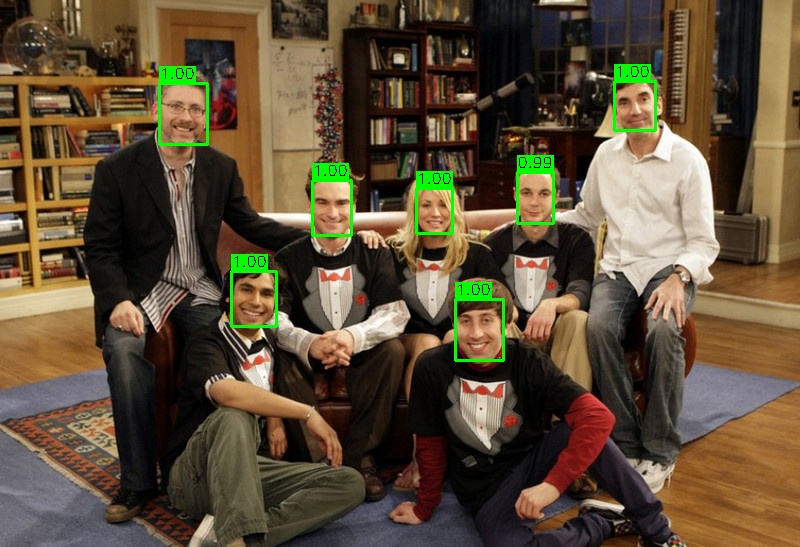
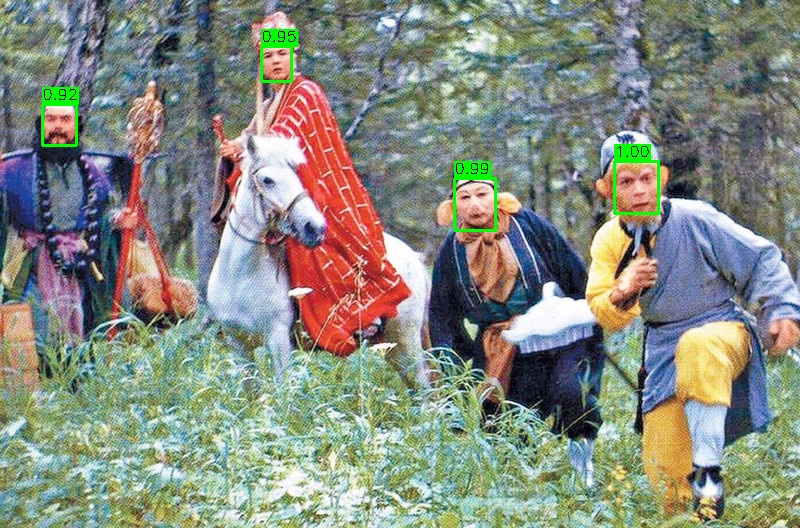
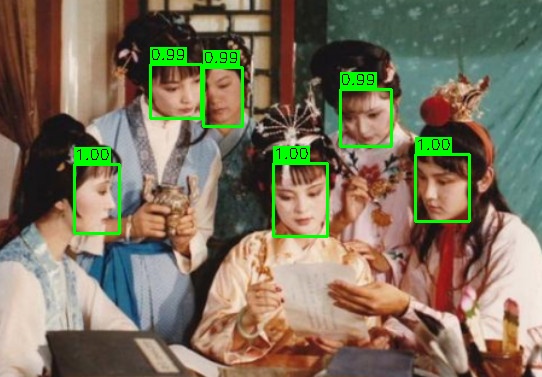
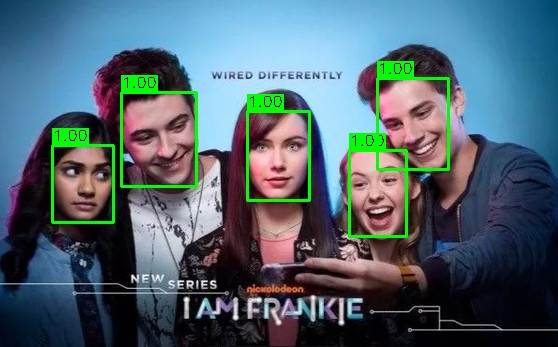
python face_detection.py model/version-RFB-320.onnx image/friends.jpg
加载模型和目标图片,处理后打印识别结果

Friends
The Big Bang Theory, TBBT
The Journey to the West, JTTW
The Dream of Red Mansion, DRM
Frankie
动态检测
在实现板端推理的基础上,调用 USB 摄像头资源,实现动态画面捕获和实时人脸检测。
流程图

代码
终端执行 touch face_detection_camera.py 新建文件,并添加如下代码
import cv2
import numpy as np
import onnxruntime
import argparse
import os
os.environ['TF_CPP_MIN_LOG_LEVEL'] = '3'
import logging
logging.getLogger('onnxruntime').setLevel(logging.ERROR)
class FaceDetector:
def __init__(self, model_path: str):
sess_options = onnxruntime.SessionOptions()
sess_options.log_severity_level = 3
sess_options.graph_optimization_level = onnxruntime.GraphOptimizationLevel.ORT_ENABLE_ALL
self.session = onnxruntime.InferenceSession(
model_path,
sess_options,
providers=['CUDAExecutionProvider', 'CPUExecutionProvider']
)
self.input_name = self.session.get_inputs()[0].name
self.input_shape = self.session.get_inputs()[0].shape
print(f"模型加载成功 | 输入尺寸: {self.input_shape}")
def detect(self, frame):
input_tensor = self._preprocess(frame)
outputs = self.session.run(None, {self.input_name: input_tensor})
boxes = self._postprocess(outputs, frame.shape)
return boxes
def _preprocess(self, frame):
h, w = self.input_shape[2], self.input_shape[3]
img = cv2.resize(frame, (w, h))
img = cv2.cvtColor(img, cv2.COLOR_BGR2RGB)
img = img.astype(np.float32)
img = (img - 127.0) / 128.0
img = np.transpose(img, (2, 0, 1))
img = np.expand_dims(img, axis=0)
return img
def _postprocess(self, outputs, img_shape):
boxes = []
img_h, img_w = img_shape[:2]
scores = outputs[0][0][:, 1]
bboxes = outputs[1][0]
for i in range(len(scores)):
conf = float(scores[i])
if conf > 0.7:
x1 = int(bboxes[i][0] * img_w)
y1 = int(bboxes[i][1] * img_h)
x2 = int(bboxes[i][2] * img_w)
y2 = int(bboxes[i][3] * img_h)
x1, y1 = max(0, x1), max(0, y1)
x2, y2 = min(img_w-1, x2), min(img_h-1, y2)
if x2 > x1 and y2 > y1:
boxes.append([x1, y1, x2, y2, conf])
return self._nms(boxes)
def _nms(self, boxes, iou_thresh=0.3):
if len(boxes) == 0:
return []
boxes = sorted(boxes, key=lambda x: x[4], reverse=True)
keep = []
while boxes:
current = boxes.pop(0)
keep.append(current)
boxes = [box for box in boxes
if self._iou(current, box) < iou_thresh]
return keep
def _iou(self, box1, box2):
x1 = max(box1[0], box2[0])
y1 = max(box1[1], box2[1])
x2 = min(box1[2], box2[2])
y2 = min(box1[3], box2[3])
inter = max(0, x2-x1) * max(0, y2-y1)
area1 = (box1[2]-box1[0])*(box1[3]-box1[1])
area2 = (box2[2]-box2[0])*(box2[3]-box2[1])
return inter / (area1 + area2 - inter + 1e-6)
def main():
parser = argparse.ArgumentParser(description='实时人脸检测')
parser.add_argument('model', help='ONNX模型路径')
parser.add_argument('--camera', type=int, default=0, help='摄像头索引')
args = parser.parse_args()
detector = FaceDetector(args.model)
cap = cv2.VideoCapture(args.camera)
cap.set(cv2.CAP_PROP_FRAME_WIDTH, 640)
cap.set(cv2.CAP_PROP_FRAME_HEIGHT, 480)
try:
while True:
ret, frame = cap.read()
if not ret:
print("无法获取摄像头画面")
break
boxes = detector.detect(frame)
for box in boxes:
x1, y1, x2, y2, conf = box
color = (0, 255, 0) if conf > 0.9 else (0, 0, 255)
cv2.rectangle(frame, (x1, y1), (x2, y2), color, 2)
cv2.putText(frame, f"{conf:.2f}", (x1, y1-10),
cv2.FONT_HERSHEY_SIMPLEX, 0.6, color, 2)
cv2.imshow('Face Detection', frame)
if cv2.waitKey(1) & 0xFF == ord('q'):
break
finally:
cap.release()
cv2.destroyAllWindows()
print("检测已停止")
if __name__ == "__main__":
main()
PS:高置信度 (>0.9) 显示绿色框,低置信度显示红色框。
效果
终端执行如下指令,运行摄像头实时人脸检测
python face_detection_camera.py model/version-RFB-320.onnx
指定摄像头
python face_detection.py model/ultraface.onnx --camera 1
按键盘 Q 键退出检测。
终端打印输出

摄像头采集画面和人脸检测效果
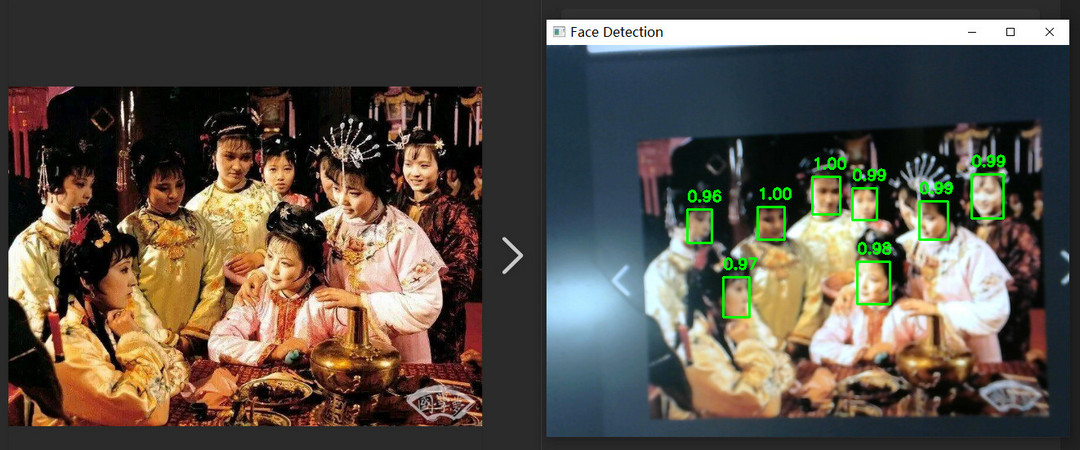
动态演示见底部视频。
总结
本文介绍了上海晶珩睿莓 1 开发板结合 UltrFace 模型实现人脸检测的项目设计,包括模型介绍、板端推理和摄像头动态检测两部分,并通过流程图、工程代码、效果演示等完成相关测试,为该产品在人工智能领域的快速开发和应用提供了参考。

 电子发烧友论坛
 /9
/9 



 工商网监
湘ICP备2023018690号
工商网监
湘ICP备2023018690号


 505
505


 评论
评论
 淘帖
淘帖 2127
2127










