【上海晶珩睿莓1开发板试用体验】物体识别的板端推理
本文介绍了上海晶珩睿莓 1 开发板结合 YOLOv5n 模型实现物体识别的项目设计,包括项目介绍、环境部署、模型下载、工程代码、流程图、效果演示等。
项目介绍
- 准备工作:环境部署、YOLOv5 介绍、模型下载;
- 项目工程:工程代码、流程图;
- 效果演示:测试不同场景图片的物体识别效果。
识别效果见顶部视频。
准备工作
包括所需 python 库和工具软件的安装部署、YOLOv5 介绍、ONNX 模型下载等。
环境部署
终端执行指令
pip install opencv-python
pip install onnxruntime
安装 opencv 和 onnxruntime 库

由于板载 eMMC 资源有限,需清除安装缓存
pip cache purge
也可直接安装没有缓存的 pip 软件包,
pip install <package_name> --no-cache-dir
ONNX 模型
YOLOv5 提供了各种模型尺寸,每种模型在速度和准确性之间都有不同的平衡。
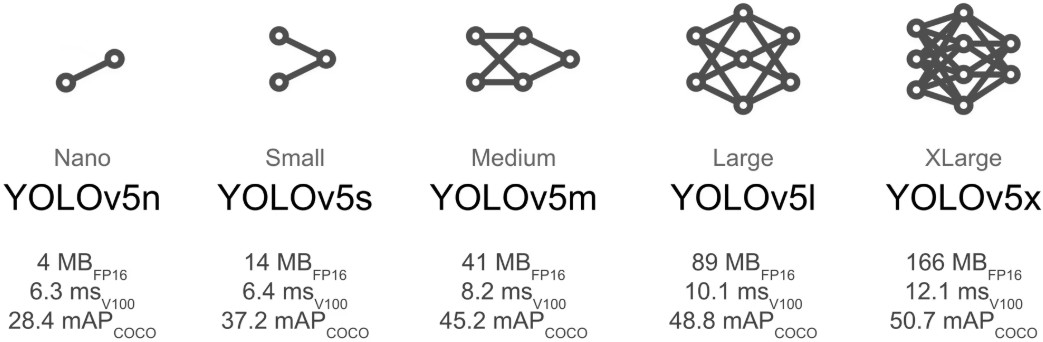
这里选择体积最小的 yolov5n.onnx 模型。
通过 Netron 网站在线加载 ONNX 模型,可实现神经网络模型的可视化
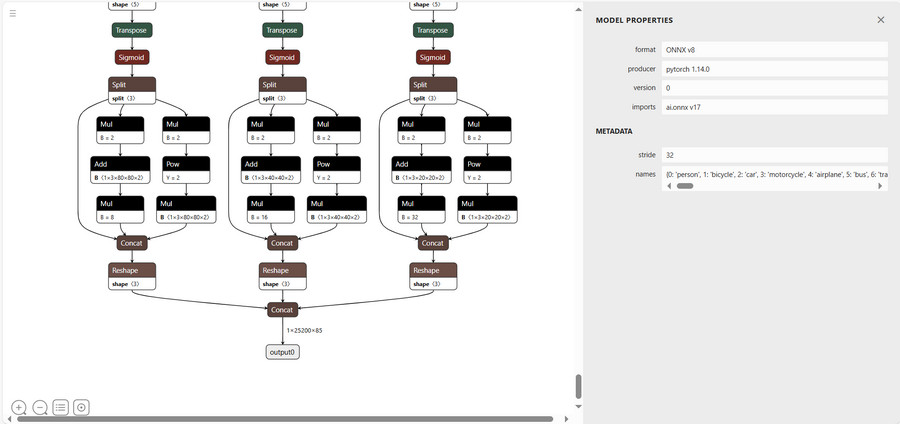
ONNX 模型获取:yolov5 - ONNX .
详见:YOLOv5 - Ultralytics YOLO 文档 .
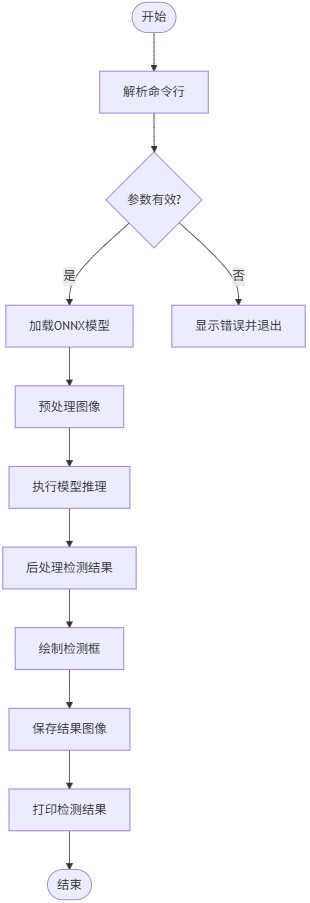
流程图
工程代码
终端执行 touch or.py 新建文件,并添加如下代码
import os
import cv2
import numpy as np
import onnxruntime
import argparse
from pathlib import Path
class YOLOONNXDetector:
def __init__(self, model_path: str, conf_threshold: float = 0.5, iou_threshold: float = 0.5):
"""
初始化YOLO ONNX物体检测器
参数:
model_path: ONNX模型路径
conf_threshold: 置信度阈值
iou_threshold: 非极大值抑制IOU阈值
"""
if not os.path.exists(model_path):
raise FileNotFoundError(f"模型文件不存在: {model_path}")
self.session = onnxruntime.InferenceSession(model_path)
self.input_name = self.session.get_inputs()[0].name
self.output_names = [output.name for output in self.session.get_outputs()]
self.input_shape = self.session.get_inputs()[0].shape[2:]
self.input_dtype = self.session.get_inputs()[0].type
self.conf_threshold = conf_threshold
self.iou_threshold = iou_threshold
self.output_dir = 'out'
os.makedirs(self.output_dir, exist_ok=True)
self.class_names = self.load_class_names() or [str(i) for i in range(1000)]
def load_class_names(self, class_file: str = None) -> list:
"""加载类别名称文件"""
if class_file is None:
model_dir = Path(self.session._model_path).parent
possible_files = ['coco.names', 'classes.txt']
for file in possible_files:
if (model_dir / file).exists():
class_file = str(model_dir / file)
break
if class_file and os.path.exists(class_file):
with open(class_file, 'r') as f:
return [line.strip() for line in f.readlines()]
return None
def preprocess(self, image: np.ndarray) -> tuple:
"""预处理输入图像"""
h, w = image.shape[:2]
scale = min(self.input_shape[0] / h, self.input_shape[1] / w)
new_h, new_w = int(h * scale), int(w * scale)
resized = cv2.resize(image, (new_w, new_h), interpolation=cv2.INTER_LINEAR)
canvas = np.full((self.input_shape[0], self.input_shape[1], 3), 114, dtype=np.uint8)
canvas[:new_h, :new_w] = resized
canvas = canvas.transpose(2, 0, 1)
canvas = canvas[::-1]
if 'float16' in self.input_dtype:
canvas = canvas.astype(np.float16) / 255.0
else:
canvas = canvas.astype(np.float32) / 255.0
canvas = np.ascontiguousarray(canvas)
canvas = np.expand_dims(canvas, axis=0)
return canvas, scale, (h, w)
def detect(self, image_path: str) -> tuple:
"""检测图像中的物体,打印结果"""
image = cv2.imread(image_path)
if image is None:
raise ValueError(f"无法读取图像: {image_path}")
input_tensor, scale, orig_shape = self.preprocess(image)
outputs = self.session.run(self.output_names, {self.input_name: input_tensor})
boxes, scores, class_ids = self.postprocess(outputs, scale, orig_shape)
self.print_detections(boxes, scores, class_ids)
return boxes, scores, class_ids, image
def print_detections(self, boxes: np.ndarray, scores: np.ndarray, class_ids: np.ndarray):
"""打印检测到的物体信息"""
if len(boxes) == 0:
print("未检测到任何物体")
return
print("\n检测结果摘要:")
print("=" * 50)
print(f"{'序号':<5} {'类别':<15} {'置信度':<10} {'位置(x1,y1,x2,y2)':<25}")
print("-" * 50)
for i, (box, score, class_id) in enumerate(zip(boxes, scores, class_ids), 1):
class_name = self.class_names[class_id] if class_id < len(self.class_names) else str(class_id)
box_int = box.astype(int)
print(f"{i:<5} {class_name:<15} {score:.4f} {str(box_int):<25}")
print("=" * 50)
print(f"共检测到 {len(boxes)} 个物体")
def postprocess(self, outputs: list, scale: float, orig_shape: tuple) -> tuple:
"""
后处理YOLO模型输出
参数:
outputs: 模型原始输出
scale: 预处理时的缩放因子
orig_shape: 原始图像形状 (h, w)
返回:
boxes: 检测框坐标 (x1, y1, x2, y2)
scores: 置信度分数
class_ids: 类别ID
"""
predictions = np.squeeze(outputs[0])
scores = predictions[:, 4]
mask = scores > self.conf_threshold
predictions = predictions[mask]
scores = scores[mask]
if len(predictions) == 0:
return np.array([]), np.array([]), np.array([])
class_ids = np.argmax(predictions[:, 5:], axis=1)
boxes = predictions[:, :4]
boxes = self.xywh2xyxy(boxes)
boxes /= scale
boxes[:, 0] = np.clip(boxes[:, 0], 0, orig_shape[1])
boxes[:, 1] = np.clip(boxes[:, 1], 0, orig_shape[0])
boxes[:, 2] = np.clip(boxes[:, 2], 0, orig_shape[1])
boxes[:, 3] = np.clip(boxes[:, 3], 0, orig_shape[0])
indices = self.non_max_suppression(boxes, scores, self.iou_threshold)
return boxes[indices], scores[indices], class_ids[indices]
@staticmethod
def xywh2xyxy(boxes: np.ndarray) -> np.ndarray:
"""将xywh格式转换为xyxy格式"""
x, y, w, h = boxes[:, 0], boxes[:, 1], boxes[:, 2], boxes[:, 3]
x1 = x - w / 2
y1 = y - h / 2
x2 = x + w / 2
y2 = y + h / 2
return np.stack([x1, y1, x2, y2], axis=1)
@staticmethod
def non_max_suppression(boxes: np.ndarray, scores: np.ndarray, iou_threshold: float) -> np.ndarray:
"""非极大值抑制"""
sorted_indices = np.argsort(scores)[::-1]
keep_boxes = []
while sorted_indices.size > 0:
best_idx = sorted_indices[0]
keep_boxes.append(best_idx)
ious = []
for idx in sorted_indices[1:]:
iou = YOLOONNXDetector.calculate_iou(boxes[best_idx], boxes[idx])
ious.append(iou)
sorted_indices = sorted_indices[1:][np.array(ious) < iou_threshold]
return np.array(keep_boxes)
@staticmethod
def calculate_iou(box1: np.ndarray, box2: np.ndarray) -> float:
"""计算两个框的IOU"""
x1 = max(box1[0], box2[0])
y1 = max(box1[1], box2[1])
x2 = min(box1[2], box2[2])
y2 = min(box1[3], box2[3])
intersection = max(0, x2 - x1) * max(0, y2 - y1)
area1 = (box1[2] - box1[0]) * (box1[3] - box1[1])
area2 = (box2[2] - box2[0]) * (box2[3] - box2[1])
union = area1 + area2 - intersection
return intersection / union if union > 0 else 0
def draw_detections(self, image: np.ndarray, boxes: np.ndarray, scores: np.ndarray, class_ids: np.ndarray) -> np.ndarray:
"""在图像上绘制检测结果"""
for box, score, class_id in zip(boxes, scores, class_ids):
x1, y1, x2, y2 = map(int, box)
color = self.get_color(class_id)
cv2.rectangle(image, (x1, y1), (x2, y2), color, 2)
label = f"{self.class_names[class_id]}: {score:.2f}"
(label_width, label_height), _ = cv2.getTextSize(
label, cv2.FONT_HERSHEY_SIMPLEX, 0.5, 1)
cv2.rectangle(
image,
(x1, y1 - label_height - 10),
(x1 + label_width, y1),
color,
cv2.FILLED
)
cv2.putText(
image,
label,
(x1, y1 - 5),
cv2.FONT_HERSHEY_SIMPLEX,
0.5,
(0, 0, 0),
1,
cv2.LINE_AA
)
return image
@staticmethod
def get_color(class_id: int) -> tuple:
"""根据类别ID生成颜色"""
colors = [
(255, 0, 0), (0, 255, 0), (0, 0, 255),
(255, 255, 0), (0, 255, 255), (255, 0, 255)
]
return colors[class_id % len(colors)]
def process_image(self, image_path: str) -> bool:
"""处理单张图像并保存结果"""
if not os.path.exists(image_path):
raise FileNotFoundError(f"图片文件不存在: {image_path}")
print(f"\n处理图片: {image_path}")
try:
boxes, scores, class_ids, image = self.detect(image_path)
result_image = self.draw_detections(image.copy(), boxes, scores, class_ids)
original_name = Path(image_path).stem
output_path = os.path.join(self.output_dir, f"{original_name}_out.jpg")
cv2.imwrite(output_path, result_image)
print(f"检测结果已保存到: {output_path}")
return True
except Exception as e:
print(f"处理图像 {image_path} 时出错: {str(e)}")
return False
def parse_arguments():
"""解析命令行参数"""
parser = argparse.ArgumentParser(description='YOLO ONNX物体检测')
parser.add_argument('model_path', type=str, help='ONNX模型路径')
parser.add_argument('image_path', type=str, help='目标检测图片的路径')
parser.add_argument('--conf', type=float, default=0.5, help='置信度阈值 (默认: 0.5)')
parser.add_argument('--iou', type=float, default=0.5, help='IOU阈值 (默认: 0.5)')
return parser.parse_args()
if __name__ == "__main__":
args = parse_arguments()
try:
detector = YOLOONNXDetector(
model_path=args.model_path,
conf_threshold=args.conf,
iou_threshold=args.iou
)
detector.process_image(args.image_path)
except Exception as e:
print(f"错误: {str(e)}")
exit(1)
保存代码;
类别标签文件 classes.txt 可由 Netron 解析结果得到,包括 80 种常见物体。
person
bicycle
car
motorcycle
airplane
bus
...
详见:yolov5 80个类别对照表 .
效果演示
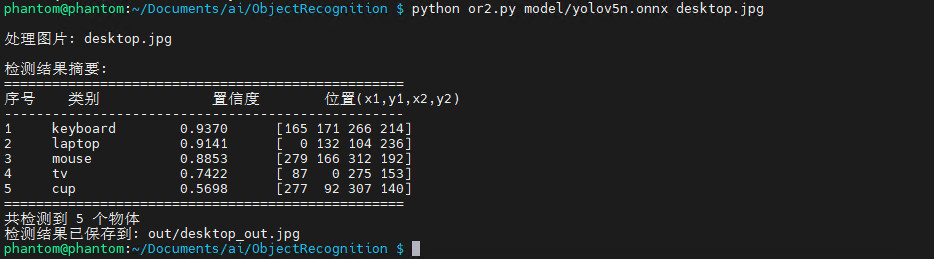
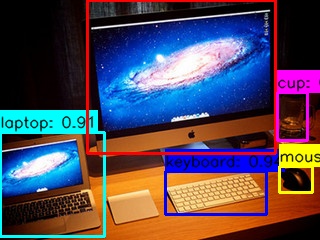
终端执行如下指令,运行物体识别程序
python or.py model/yolov5n.onnx desktop.jpg
加载模型和目标图片,处理后打印识别结果
下载保存路径中输出的识别结果图片
更多场景
包括动物、路口、水果、运动、卧室、餐厅、办公桌、户外等
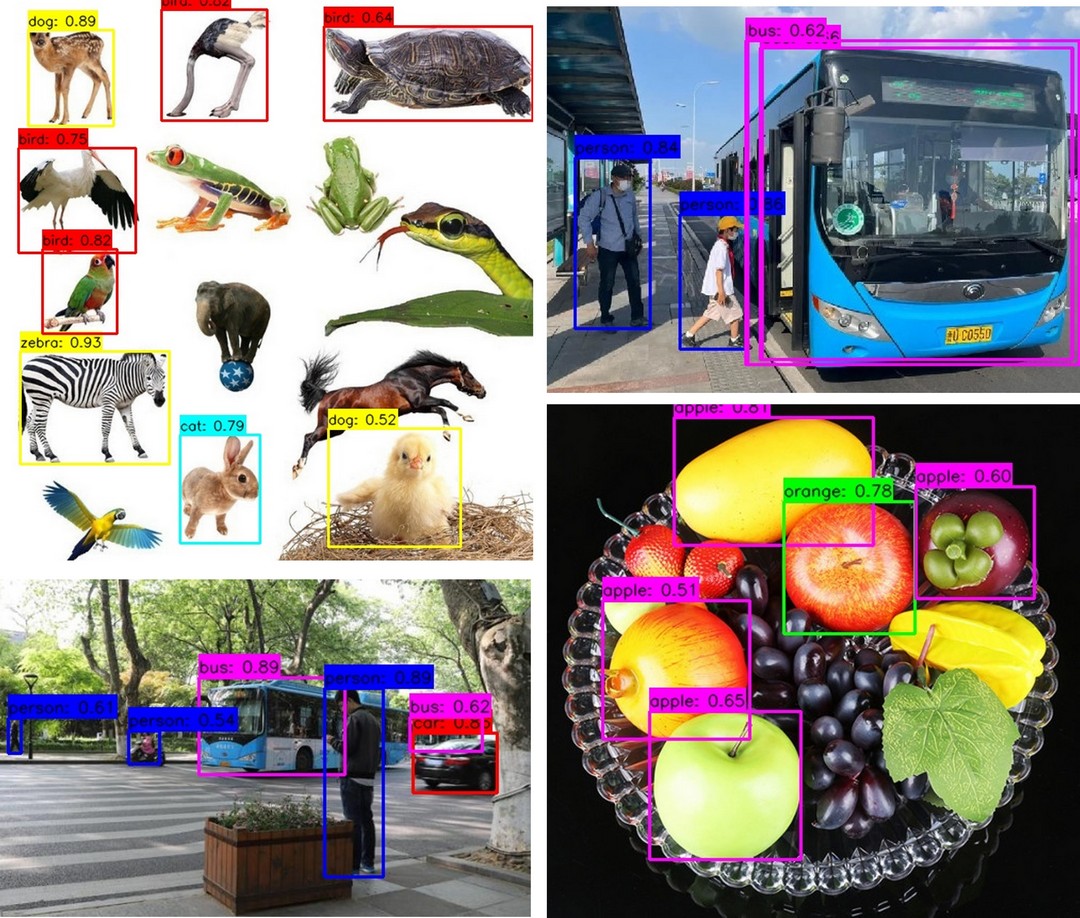
桌面、运动、水果、家居、动物
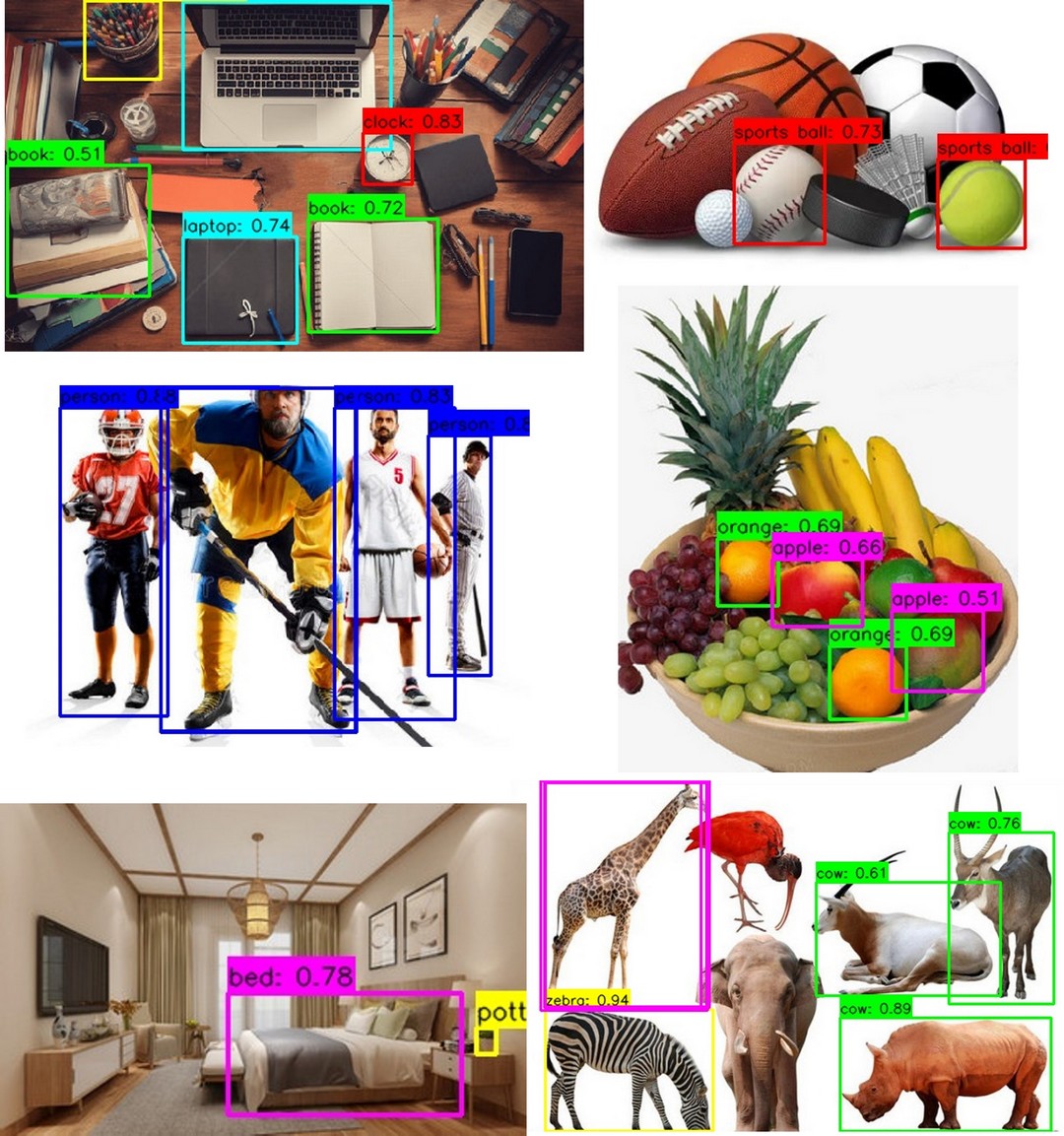
水果、路口、桌面、动物、运动
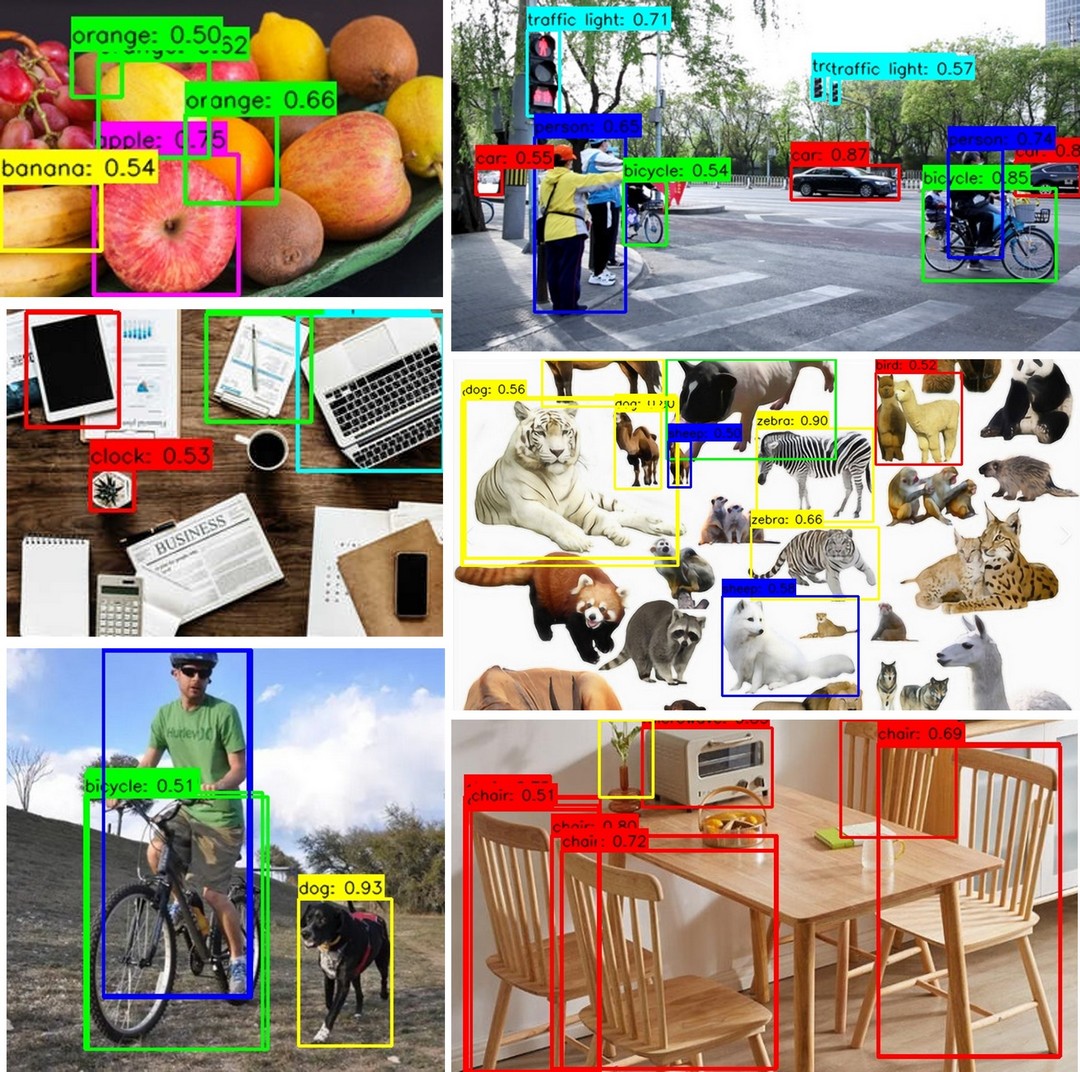
动态演示见底部视频。
总结
本文介绍了上海晶珩睿莓 1 开发板结合 YOLOv5n 模型实现物体识别的项目设计,包括项目介绍、环境部署、模型下载、工程代码、流程图、效果演示等,为该产品在人工智能领域的快速开发部署和应用设计提供了参考。

 电子发烧友论坛
 /9
/9 



 工商网监
湘ICP备2023018690号
工商网监
湘ICP备2023018690号


 26420
26420


 评论
评论
 淘帖
淘帖 848
848










