一、CoreMark简介
EEMBC 的 CoreMark® 评分是一种比较通用的基准测试方式,用于测量嵌入式系统中使用的微控制器(MCU)和中央处理单元(CPU)的性能,可以帮助人们比较不同的 CPU 架构的性能表现。

CoreMark 基准评分特点
CRC 算法具有双重功能,在链表元素中包含的数据上执行16位CRC,以验证操作正确,保证操作正确并提供自我检查机制。
为了确保编译器不能在编译时预先计算结果,基准测试中的每个操作都会产生一个在编译时不可用的值。此外,基准测试中定时部分使用的所有代码都是基准测试本身的一部分(没有库调用)。
CoreMark 是一种基于 C 语言的 CPU 性能评测工具,其目标是为了提供一个可重复、可移植且各平台间性能得分可比较的基准测试。CoreMark 包含多个小型测试,旨在模拟实际应用程序中常见的操作和趋势。
二、源码下载&编译
有鉴于Milk-V Duo S 开发板固件没带GCC,所以懒得去部署了,还是在WSL上交叉编译吧。
(一)源码下载
直接从github上拉源码,git clone https://github.com/eembc/coremark.git。

(二)环境设置
因为之前刷的Milk-V Duo S 开发板固件是ARM版,本来想下载个A53兼容的gcc来编译,后来想想demo直接配置了开发环境,为什么不能拿来用呢,机智!
将源码拷贝至demo目录下,然后配置环境,简单。
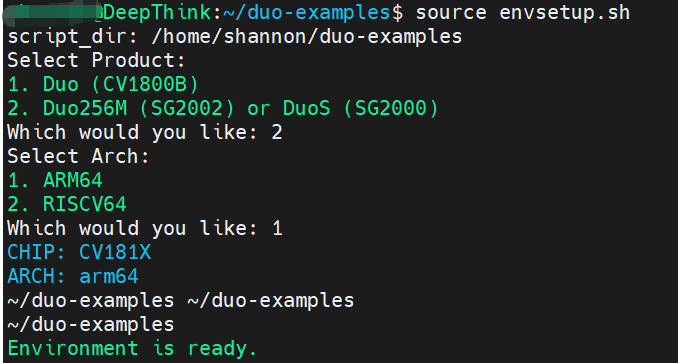
(三)源码编译
环境好了,那就直接编译。
~/duo-examples/coremark$ make
make XCFLAGS=" -DPERFORMANCE_RUN=1" load run1.log
make[1]: Entering directory '/home/duo-examples/coremark'
make port_prebuild
make[2]: Entering directory '/home/duo-examples/coremark'
make[2]: Nothing to be done for 'port_prebuild'.
make[2]: Leaving directory '/home/duo-examples/coremark'
make link
make[2]: Entering directory '/home/duo-examples/coremark'
/home/duo-examples/host-tools/gcc/gcc-linaro-7.3.1-2018.05-x86_64_aarch64-linux-gnu/bin/aarch64-linux-gnu-gcc -O2 -Ilinux -Iposix -I. -DFLAGS_STR=\""-O2 -DPERFORMANCE_RUN=1  -lrt"\" -DITERATIONS=0 -DPERFORMANCE_RUN=1 core_list_join.c core_main.c core_matrix.c core_state.c core_util.c posix/core_portme.c -o ./coremark.exe -lrt
Link performed along with compile
make[2]: Leaving directory '/home/duo-examples/coremark'
make port_postbuild
make[2]: Entering directory '/home/duo-examples/coremark'
make[2]: Nothing to be done for 'port_postbuild'.
make[2]: Leaving directory '/home/duo-examples/coremark'
make port_preload
make[2]: Entering directory '/home/duo-examples/coremark'
make[2]: Nothing to be done for 'port_preload'.
make[2]: Leaving directory '/home/duo-examples/coremark'
echo Loading done ./coremark.exe
Loading done ./coremark.exe
make port_postload
make[2]: Entering directory '/home/duo-examples/coremark'
make[2]: Nothing to be done for 'port_postload'.
make[2]: Leaving directory '/home/duo-examples/coremark'
make port_prerun
make[2]: Entering directory '/home/duo-examples/coremark'
make[2]: Nothing to be done for 'port_prerun'.
make[2]: Leaving directory '/home/duo-examples/coremark'
./coremark.exe  0x0 0x0 0x66 0 7 1 2000 > ./run1.log
/bin/sh: 1: ./coremark.exe: Exec format error
make[1]: *** [Makefile:113: run1.log] Error 126
make[1]: Leaving directory '/home/shannon/duo-examples/coremark'
make: *** [Makefile:100: rerun] Error 2
有错误不要管,因为是在WSL下执行coremark的err,WSL是X86,交叉编译出来的持续是AARCH64的,必须不能运行嘛~
看看文件:
~/duo-examples/coremark$ file coremark.exe
coremark.exe: ELF 64-bit LSB executable, ARM aarch64, version 1 (SYSV), dynamically linked, interpreter /lib/ld-linux-aarch64.so.1, for GNU/Linux 3.7.0, BuildID[sha1]=2a7dfaad13295a2148a8f8d754d3582cfe099dc7, with debug_info, not stripped
三、运行测试
将编译出来的文件传输至Milk-V Duo S 开发板,添加可执行属性。
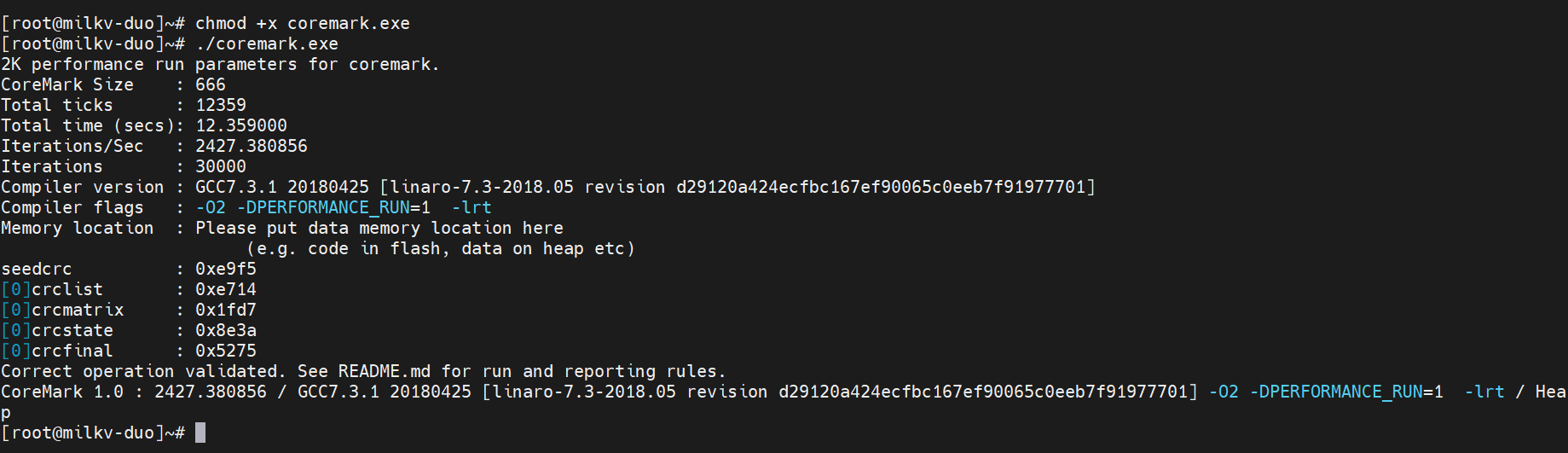
单核得分CoreMark 1.0 : 2427.380856。
四、对比
来对比下。
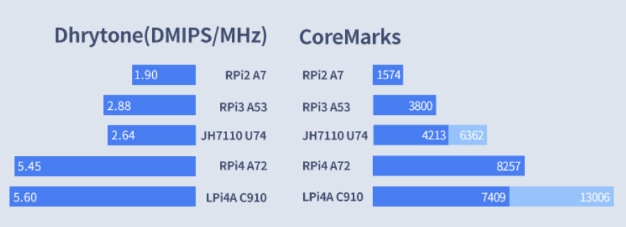
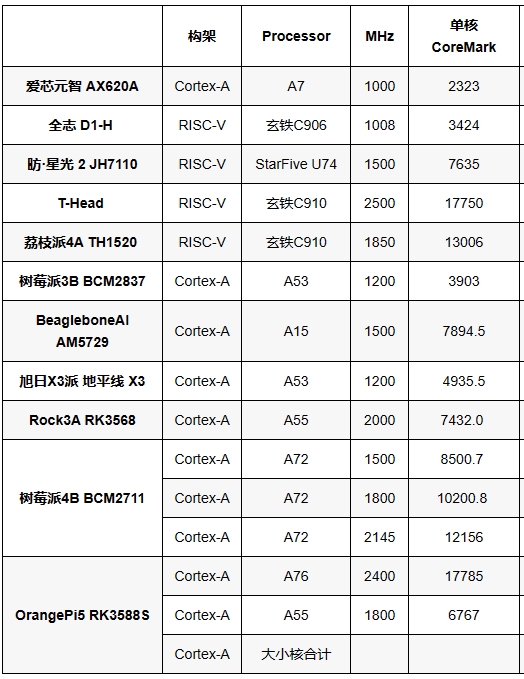
对比起来还是挺不错的,再来看看常见开发板的跑分情况。

 0
0
 /9
/9 



 工商网监
湘ICP备2023018690号
工商网监
湘ICP备2023018690号


 1195
1195
 淘帖
淘帖









