
OCR(Optical Character Recognition,光学字符识别)是一种将图像中的文字内容转换为可编辑、可搜索文本的技术。其核心在于通过图像预处理、字符分割、特征提取与模式匹配等步骤,将扫描文档、照片或截图中的文字准确识别并数字化。OCR广泛应用于文档电子化、车牌识别、票据处理、历史档案保存等领域,极大地提升了信息处理的效率与准确性。随着深度学习的发展,现代OCR系统已能应对复杂背景、多语言及手写体等高难度场景。本次使用K230开发板上实现OCR的功能。
from libs.PipeLine import PipeLine, ScopedTiming
from libs.AIBase import AIBase
from libs.AI2D import Ai2d
import os
import ujson
from media.media import *
from media.sensor import *
import utime
import nncase_runtime as nn
import ulab.numpy as np
import image
import aicube
import random
import gc
import sys

# 自定义OCR检测类
class OCRDetectionApp(AIBase):
    def __init__(self,kmodel_path,model_input_size,mask_threshold=0.5,box_threshold=0.2,rgb888p_size=[224,224],display_size=[1920,1080],debug_mode=0):
        super().__init__(kmodel_path,model_input_size,rgb888p_size,debug_mode)
        self.kmodel_path=kmodel_path
        # 模型输入分辨率
        self.model_input_size=model_input_size
        # 分类阈值
        self.mask_threshold=mask_threshold
        self.box_threshold=box_threshold
        # sensor给到AI的图像分辨率
        self.rgb888p_size=[ALIGN_UP(rgb888p_size[0],16),rgb888p_size[1]]
        # 显示分辨率
        self.display_size=[ALIGN_UP(display_size[0],16),display_size[1]]
        self.debug_mode=debug_mode
        # Ai2d实例,用于实现模型预处理
        self.ai2d=Ai2d(debug_mode)
        # 设置Ai2d的输入输出格式和类型
        self.ai2d.set_ai2d_dtype(nn.ai2d_format.NCHW_FMT,nn.ai2d_format.NCHW_FMT,np.uint8, np.uint8)
    def config_preprocess(self,input_image_size=None):
        with ScopedTiming("set preprocess config",self.debug_mode > 0):
            ai2d_input_size=input_image_size if input_image_size else self.rgb888p_size
            top,bottom,left,right=self.get_padding_param()
            self.ai2d.pad([0,0,0,0,top,bottom,left,right], 0, [0,0,0])
            self.ai2d.resize(nn.interp_method.tf_bilinear, nn.interp_mode.half_pixel)
            self.ai2d.build([1,3,ai2d_input_size[1],ai2d_input_size[0]],[1,3,self.model_input_size[1],self.model_input_size[0]])

    # 自定义当前任务的后处理
    def postprocess(self,results):
        with ScopedTiming("postprocess",self.debug_mode > 0):
            # chw2hwc
            hwc_array=self.chw2hwc(self.cur_img)
            # 这里使用了aicube封装的接口ocr_post_process做后处理,返回的det_boxes结构为[[crop_array_nhwc,[p1_x,p1_y,p2_x,p2_y,p3_x,p3_y,p4_x,p4_y]],...]
            det_boxes = aicube.ocr_post_process(results[0][:,:,:,0].reshape(-1), hwc_array.reshape(-1),self.model_input_size,self.rgb888p_size, self.mask_threshold, self.box_threshold)
            return det_boxes

    # 计算padding参数
    def get_padding_param(self):
        # 右padding或下padding
        dst_w = self.model_input_size[0]
        dst_h = self.model_input_size[1]
        input_width = self.rgb888p_size[0]
        input_high = self.rgb888p_size[1]
        ratio_w = dst_w / input_width
        ratio_h = dst_h / input_high
        if ratio_w < ratio_h:
            ratio = ratio_w
        else:
            ratio = ratio_h
        new_w = (int)(ratio * input_width)
        new_h = (int)(ratio * input_high)
        dw = (dst_w - new_w) / 2
        dh = (dst_h - new_h) / 2
        top = (int)(round(0))
        bottom = (int)(round(dh * 2 + 0.1))
        left = (int)(round(0))
        right = (int)(round(dw * 2 - 0.1))
        return  top, bottom, left, right

    # chw2hwc
    def chw2hwc(self,features):
        ori_shape = (features.shape[0], features.shape[1], features.shape[2])
        c_hw_ = features.reshape((ori_shape[0], ori_shape[1] * ori_shape[2]))
        hw_c_ = c_hw_.transpose()
        new_array = hw_c_.copy()
        hwc_array = new_array.reshape((ori_shape[1], ori_shape[2], ori_shape[0]))
        del c_hw_
        del hw_c_
        del new_array
        return hwc_array

# 自定义OCR识别任务类
class OCRRecognitionApp(AIBase):
    def __init__(self,kmodel_path,model_input_size,dict_path,rgb888p_size=[1920,1080],display_size=[1920,1080],debug_mode=0):
        super().__init__(kmodel_path,model_input_size,rgb888p_size,debug_mode)
        # kmodel路径
        self.kmodel_path=kmodel_path
        # 识别模型输入分辨率
        self.model_input_size=model_input_size
        self.dict_path=dict_path
        # sensor给到AI的图像分辨率,宽16字节对齐
        self.rgb888p_size=[ALIGN_UP(rgb888p_size[0],16),rgb888p_size[1]]
        # 视频输出VO分辨率,宽16字节对齐
        self.display_size=[ALIGN_UP(display_size[0],16),display_size[1]]
        # debug模式
        self.debug_mode=debug_mode
        self.dict_word=None
        # 读取OCR的字典
        self.read_dict()
        self.ai2d=Ai2d(debug_mode)
        self.ai2d.set_ai2d_dtype(nn.ai2d_format.RGB_packed,nn.ai2d_format.NCHW_FMT,np.uint8, np.uint8)

    # 配置预处理操作,这里使用了pad和resize,Ai2d支持crop/shift/pad/resize/affine,具体代码请打开/sdcard/libs/AI2D.py查看
    def config_preprocess(self,input_image_size=None,input_np=None):
        with ScopedTiming("set preprocess config",self.debug_mode > 0):
            ai2d_input_size=input_image_size if input_image_size else self.rgb888p_size
            top,bottom,left,right=self.get_padding_param(ai2d_input_size,self.model_input_size)
            self.ai2d.pad([0,0,0,0,top,bottom,left,right], 0, [0,0,0])
            self.ai2d.resize(nn.interp_method.tf_bilinear, nn.interp_mode.half_pixel)
            # 如果传入input_np,输入shape为input_np的shape,如果不传入,输入shape为[1,3,ai2d_input_size[1],ai2d_input_size[0]]
            self.ai2d.build([input_np.shape[0],input_np.shape[1],input_np.shape[2],input_np.shape[3]],[1,3,self.model_input_size[1],self.model_input_size[0]])

    # 自定义后处理,results是模型输出的array列表
    def postprocess(self,results):
        with ScopedTiming("postprocess",self.debug_mode > 0):
            preds = np.argmax(results[0], axis=2).reshape((-1))
            output_txt = ""
            for i in range(len(preds)):
                # 当前识别字符不是字典的最后一个字符并且和前一个字符不重复(去重),加入识别结果字符串
                if preds[i] != (len(self.dict_word) - 1) and (not (i > 0 and preds[i - 1] == preds[i])):
                    output_txt = output_txt + self.dict_word[preds[i]]
            return output_txt

    # 计算padding参数
    def get_padding_param(self,src_size,dst_size):
        # 右padding或下padding
        dst_w = dst_size[0]
        dst_h = dst_size[1]
        input_width = src_size[0]
        input_high = src_size[1]
        ratio_w = dst_w / input_width
        ratio_h = dst_h / input_high
        if ratio_w < ratio_h:
            ratio = ratio_w
        else:
            ratio = ratio_h
        new_w = (int)(ratio * input_width)
        new_h = (int)(ratio * input_high)
        dw = (dst_w - new_w) / 2
        dh = (dst_h - new_h) / 2
        top = (int)(round(0))
        bottom = (int)(round(dh * 2 + 0.1))
        left = (int)(round(0))
        right = (int)(round(dw * 2 - 0.1))
        return  top, bottom, left, right

    def read_dict(self):
        if self.dict_path!="":
            with open(self.dict_path, 'r') as file:
                line_one = file.read(100000)
                line_list = line_one.split("\r\n")
            self.dict_word = {num: char.replace("\r", "").replace("\n", "") for num, char in enumerate(line_list)}


class OCRDetRec:
    def __init__(self,ocr_det_kmodel,ocr_rec_kmodel,det_input_size,rec_input_size,dict_path,mask_threshold=0.25,box_threshold=0.3,rgb888p_size=[1920,1080],display_size=[1920,1080],debug_mode=0):
        # OCR检测模型路径
        self.ocr_det_kmodel=ocr_det_kmodel
        # OCR识别模型路径
        self.ocr_rec_kmodel=ocr_rec_kmodel
        # OCR检测模型输入分辨率
        self.det_input_size=det_input_size
        # OCR识别模型输入分辨率
        self.rec_input_size=rec_input_size
        # 字典路径
        self.dict_path=dict_path
        # 置信度阈值
        self.mask_threshold=mask_threshold
        # nms阈值
        self.box_threshold=box_threshold
        # sensor给到AI的图像分辨率,宽16字节对齐
        self.rgb888p_size=[ALIGN_UP(rgb888p_size[0],16),rgb888p_size[1]]
        # 视频输出VO分辨率,宽16字节对齐
        self.display_size=[ALIGN_UP(display_size[0],16),display_size[1]]
        # debug_mode模式
        self.debug_mode=debug_mode
        self.ocr_det=OCRDetectionApp(self.ocr_det_kmodel,model_input_size=self.det_input_size,mask_threshold=self.mask_threshold,box_threshold=self.box_threshold,rgb888p_size=self.rgb888p_size,display_size=self.display_size,debug_mode=0)
        self.ocr_rec=OCRRecognitionApp(self.ocr_rec_kmodel,model_input_size=self.rec_input_size,dict_path=self.dict_path,rgb888p_size=self.rgb888p_size,display_size=self.display_size)
        self.ocr_det.config_preprocess()

    # run函数
    def run(self,input_np):
        # 先进行OCR检测
        det_res=self.ocr_det.run(input_np)
        boxes=[]
        ocr_res=[]
        for det in det_res:
            # 对得到的每个检测框执行OCR识别
            self.ocr_rec.config_preprocess(input_image_size=[det[0].shape[2],det[0].shape[1]],input_np=det[0])
            ocr_str=self.ocr_rec.run(det[0])
            ocr_res.append(ocr_str)
            boxes.append(det[1])
            gc.collect()
        return boxes,ocr_res

    # 绘制OCR检测识别效果
    def draw_result(self,pl,det_res,rec_res):
        pl.osd_img.clear()
        if det_res:
            # 循环绘制所有检测到的框
            for j in range(len(det_res)):
                # 将原图的坐标点转换成显示的坐标点,循环绘制四条直线,得到一个矩形框
                for i in range(4):
                    x1 = det_res[j][(i * 2)] / self.rgb888p_size[0] * self.display_size[0]
                    y1 = det_res[j][(i * 2 + 1)] / self.rgb888p_size[1] * self.display_size[1]
                    x2 = det_res[j][((i + 1) * 2) % 8] / self.rgb888p_size[0] * self.display_size[0]
                    y2 = det_res[j][((i + 1) * 2 + 1) % 8] / self.rgb888p_size[1] * self.display_size[1]
                    pl.osd_img.draw_line((int(x1), int(y1), int(x2), int(y2)), color=(255, 0, 0, 255),thickness=5)
                pl.osd_img.draw_string_advanced(int(x1),int(y1),32,rec_res[j],color=(0,0,255))


if __name__=="__main__":

    # 显示模式,可以选择"hdmi"、"lcd3_5"(3.5寸mipi屏)和"lcd2_4"(2.4寸mipi屏)

    display="lcd3_5"

    if display=="hdmi":
        display_mode='hdmi'
        display_size=[1920,1080]

    elif display=="lcd3_5":
        display_mode= 'st7701'
        display_size=[800,480]

    elif display=="lcd2_4":
        display_mode= 'st7701'
        display_size=[640,480]

    rgb888p_size=[640,360] #特殊尺寸定义

    # OCR检测模型路径
    ocr_det_kmodel_path="/sdcard/examples/kmodel/ocr_det_int16.kmodel"
    # OCR识别模型路径
    ocr_rec_kmodel_path="/sdcard/examples/kmodel/ocr_rec_int16.kmodel"
    # 其他参数
    dict_path="/sdcard/examples/utils/dict.txt"

    ocr_det_input_size=[640,640]
    ocr_rec_input_size=[512,32]
    mask_threshold=0.25
    box_threshold=0.3
    pl=PipeLine(rgb888p_size=rgb888p_size,display_size=display_size,display_mode=display_mode)
    if display =="lcd2_4":
        pl.create(Sensor(width=1280, height=960))  # 创建PipeLine实例,画面4:3

    else:
        pl.create(Sensor(width=1920, height=1080))  # 创建PipeLine实例
    ocr=OCRDetRec(ocr_det_kmodel_path,ocr_rec_kmodel_path,det_input_size=ocr_det_input_size,rec_input_size=ocr_rec_input_size,dict_path=dict_path,mask_threshold=mask_threshold,box_threshold=box_threshold,rgb888p_size=rgb888p_size,display_size=display_size)
    last_tick = utime.ticks_ms()
    frame_cnt = 0
    while True:
        frame_cnt += 1
        now = utime.ticks_ms()
        if utime.ticks_diff(now, last_tick) >= 1000:
            print('FPS:', frame_cnt)
            frame_cnt = 0
            last_tick = now

        img=pl.get_frame()                  # 获取当前帧
        det_res,rec_res=ocr.run(img)        # 推理当前帧
        ocr.draw_result(pl,det_res,rec_res) # 绘制当前帧推理结果
        print(det_res,rec_res)              # 打印结果
        pl.show_image()                     # 展示当前帧推理结果
        gc.collect()
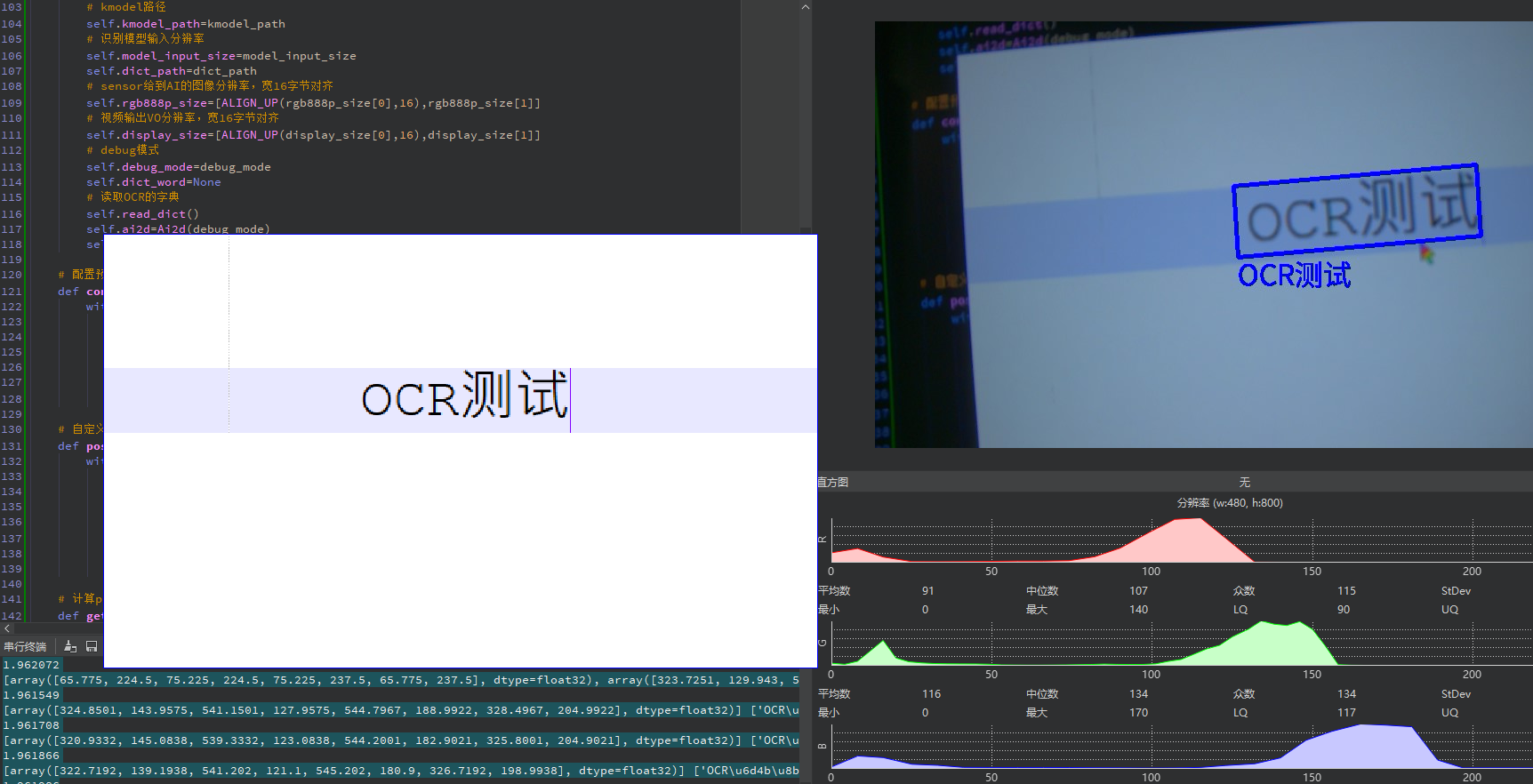
效果如下所示,在文本文档中添加OCR测试字符,运行代码,测试如下,正确识别。
更多回帖


