
本章介绍如何制作电子相册。
通过samba将图片从mac上传到vf2,并用lcd循环显示图片。
功能
1. 同局域网可以访问vf2并存放图片
2. 使用lcd循环播放相册内的图片
使用场所:
1. 户外广告屏幕
2. 家庭电子相册
3. 场馆收集观众照片
官方lcd源码:https://doc.rvspace.org/VisionFive2/Application_Notes/VisionFive2_AN_P_Using_SPI_LCD/VisionFive_Using_GPIO_LED_AN/demo_source_code_spi_lcd.html
部分依赖库安装:
https://bbs.elecfans.com/jishu_2493562_1_1.html
1. 刷vf2的img到sd卡并开机
2. 将vf2插入网线接入局域网
3. 连接上lcd屏st7735
sudo ln -sf /usr/share/zoneinfo/Asia/Shanghai /etc/localtime
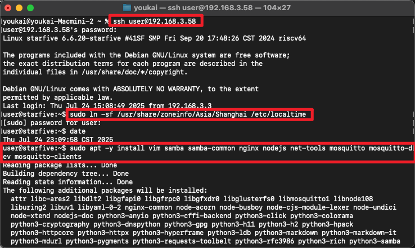
sudo apt -y install vim samba samba-common nginx nodejs net-tools mosquitto mosquitto-dev mosquitto-clients

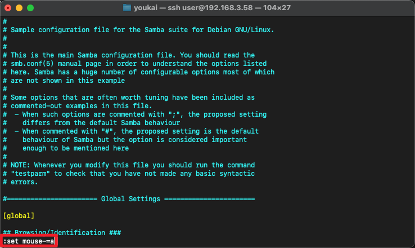
# vim需要右键输入
:set mouse-=a

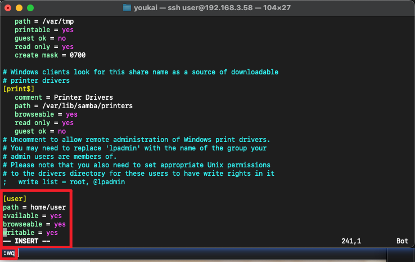
sudo vim /etc/samba/smb.conf

[user]
path = home/user
available = yes
browseable = yes
writable = yes

sudo smbpasswd -a user

sudo service smbd restart

# 使用lcd
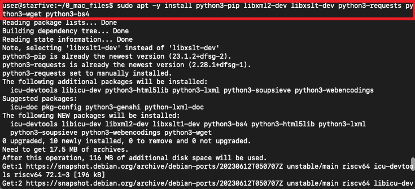
sudo apt -y install python3-pip libxml2-dev libxslt-dev python3-requests python3-wget python3-bs4 python3-pillow python3-numpy

wget https://files.pythonhosted.org/packages/2e/00/16326e8e01a268ce997b72e70240d7249a550222af82955d9b4a52f8a320/VisionFive.gpio-1.3.3-cp311-cp311-any.whl
mv VisionFive.gpio-1.3.3-cp311-cp311-any.whl VisionFive.gpio-1.3.3-cp311-cp311-linux_riscv64.whl
sudo python3 -m pip install VisionFive.gpio-1.3.3-cp311-cp311-linux_riscv64.whl --break-system-packages

pip show VisionFive.gpio

创建1.8inch_LCD_demo.py文件、lib/LCD2inch4_lib.py库文件以及picture文件夹。
代码在下一章节
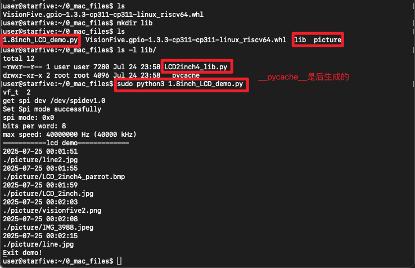
1.8inch_LCD_demo.py
#!/usr/bin/python
"""
Please make sure the 2.4inch LCD Moudle is connected to the correct pins.
The following table describes how to connect the 2.4inch LCD Module to the 40-pin header.
-------------------------------------------------
__2.4inch LCD Module___Pin Number_____Pin Name
    VCC                  17           3.3 V Power
    GND                  39             GND
    DIN                  19           SPI MOSI
    CLK                  23           SPI SCLK
    CS                   13            GPIO43   y
    DC                   11            GPIO42   y   -
    RST                  07            GPIO55   y   -
    BL                   15            GPIO47   y
-------------------------------------------------
"""

import os
import sys
import time
import logging
from PIL import Image

sys.path.append("..")

import VisionFive.boardtype as board_t
from lib import LCD2inch4_lib

"""
Demo modification ans new function description
------------------------------------------------------------
  I.   add the clear() function to fill LCD screen with white
  II.  give a hexadecimal value of white
  III. cycle through multiple pictures
---------------------------------------------------------------
"""

"""
--------------------------------------------------------------- {
                            Init
"""
WHITE = 0xffff

# 初始化lcd
# Determining cpu Type: 1 means visionfive1; 2 means visionfive 2
vf_t = board_t.boardtype()

print("vf_t ",vf_t)

if vf_t == 1:
    SPI_DEVICE = "/dev/spidev0.0"
elif vf_t == 2:
    SPI_DEVICE = "/dev/spidev1.0"
else:
    print("This module can only be run on a VisionFive board!")
    # return 0

"""The initialization settings of 2inch and 2.4inch are distinguished"""
disp = LCD2inch4_lib.LCD_2inch4(7, 11, SPI_DEVICE)

# disp.lcd_init()
disp.lcd_init_2inch4()

# 获取文件夹中图片名称
folder_path = "./picture"
items = os.listdir(folder_path)
file_paths = []
for item in items:
    item_path = os.path.join(folder_path, item)
    if os.path.isfile(item_path) and "._" not in item:
    # if os.path.isfile(item_path):  # 只保留文件
        file_paths.append(item_path)
"""
} ---------------------------------------------------------------
"""

def show_img(image_path):

    image = Image.open(image_path)
    new_size = (128, 160)
    resized_image = image.resize(new_size)
    disp.lcd_ShowImage(resized_image, 0, 0)
    time.sleep(2)

def test_clear():
    # print("clear write")
    # time.sleep(2)

    disp.lcd_clear(WHITE)
    print("clear screen")
    time.sleep(2)

    Black=0x001f
    disp.lcd_clear(Black)
    print("clear screen")
    time.sleep(2)

def main():
    print("-----------lcd demo-------------")

    # """add the part of displaying pictures circularly"""
    # while True:
    #     try:

    for path in file_paths:

        print(time.strftime("%Y-%m-%d %H:%M:%S", time.localtime(time.time())))
        path_tmp = path
        print(path_tmp)
        show_img(path_tmp)
        time.sleep(2)

        # except KeyboardInterrupt:
        #     break

    print("Exit demo!")

if __name__ == '__main__':
    main()
LCD2inch4_lib.py
import os
import sys
import time
import logging
import VisionFive.spi as spi
import VisionFive.gpio as gpio
import numpy as np
from PIL import Image, ImageDraw, ImageFont


class LCD_2inch4:
    width = 160
    height = 128

    def __init__(self, rst_pin, dc_pin, dev):
        gpio.setmode(gpio.BOARD)

        self.rstpin = rst_pin
        self.dcpin = dc_pin
        self.spidev = dev

        print("get spi dev", self.spidev)

        spi.getdev(self.spidev)

        """Reset the maximum clock frequency of communication"""
        """The display speed of the picture is positively correlated with the clock frequency"""
        # spi.setmode(500000, 0, 8)
        spi.setmode(40000000, 0, 8)
        gpio.setup(self.rstpin, gpio.OUT)
        gpio.setup(self.dcpin, gpio.OUT)

    def __del__(self):
        spi.freedev()

    """add a short delay for each change of electrical level"""

    def lcd_reset(self):
        gpio.output(self.rstpin, gpio.HIGH)
        time.sleep(0.500)
        gpio.output(self.rstpin, gpio.LOW)
        time.sleep(0.500)
        gpio.output(self.rstpin, gpio.HIGH)
        time.sleep(0.500)

    def lcd_spisend(self, data):
        spi.transfer(data)

    def lcd_sendcmd(self, cmd):
        gpio.output(self.dcpin, gpio.LOW)
        spi.transfer(cmd)

    def lcd_senddata(self, data):
        gpio.output(self.dcpin, gpio.HIGH)
        spi.transfer(data)

    """write multiple bytes"""

    def lcd_sendnbytes(self, data):
        gpio.output(self.dcpin, gpio.HIGH)
        spi.write(data)

    """common registers' initialization of 2.4inch LCD module"""

    def lcd_init_2inch4(self):
        self.lcd_reset()

        self.lcd_sendcmd(0x01)  # sw reset
        time.sleep(0.150)

        self.lcd_sendcmd(0x11)  # sw reset
        time.sleep(0.500)

        self.lcd_sendcmd(0xB1)
        self.lcd_senddata(0x05)
        self.lcd_senddata(0x3C)
        self.lcd_senddata(0x3C)

        self.lcd_sendcmd(0xB2)
        self.lcd_senddata(0x05)
        self.lcd_senddata(0x3C)
        self.lcd_senddata(0x3C)

        self.lcd_sendcmd(0xB3)
        self.lcd_senddata(0x05)
        self.lcd_senddata(0x3C)
        self.lcd_senddata(0x3C)
        self.lcd_senddata(0x05)
        self.lcd_senddata(0x3C)
        self.lcd_senddata(0x3C)

        self.lcd_sendcmd(0xB4)
        self.lcd_senddata(0x03)

        # ST7735s Power Sequence
        self.lcd_sendcmd(0xC0)
        self.lcd_senddata(0x28)
        self.lcd_senddata(0x08)
        self.lcd_senddata(0x04)

        self.lcd_sendcmd(0xC1)
        self.lcd_senddata(0xC0)

        self.lcd_sendcmd(0xC2)
        self.lcd_senddata(0x0D)
        self.lcd_senddata(0x00)

        self.lcd_sendcmd(0xC3)
        self.lcd_senddata(0x8D)
        self.lcd_senddata(0x2A)

        self.lcd_sendcmd(0xC4)
        self.lcd_senddata(0x8D)
        self.lcd_senddata(0xEE)

        self.lcd_sendcmd(0xC5)
        self.lcd_senddata(0x1A)

        self.lcd_sendcmd(0x36)
        self.lcd_senddata(0xC0)

        # gamma
        self.lcd_sendcmd(0xE0)
        self.lcd_senddata(0x04)
        self.lcd_senddata(0x22)
        self.lcd_senddata(0x07)
        self.lcd_senddata(0x0A)
        self.lcd_senddata(0x2E)
        self.lcd_senddata(0x30)
        self.lcd_senddata(0x25)
        self.lcd_senddata(0x2A)
        self.lcd_senddata(0x28)
        self.lcd_senddata(0x26)
        self.lcd_senddata(0x2E)
        self.lcd_senddata(0x3A)
        self.lcd_senddata(0x00)
        self.lcd_senddata(0x01)
        self.lcd_senddata(0x03)
        self.lcd_senddata(0x13)

        self.lcd_sendcmd(0xE1)
        self.lcd_senddata(0x04)
        self.lcd_senddata(0x16)
        self.lcd_senddata(0x06)
        self.lcd_senddata(0x0D)
        self.lcd_senddata(0x2D)
        self.lcd_senddata(0x26)
        self.lcd_senddata(0x23)
        self.lcd_senddata(0x27)
        self.lcd_senddata(0x27)
        self.lcd_senddata(0x25)
        self.lcd_senddata(0x2D)
        self.lcd_senddata(0x3B)
        self.lcd_senddata(0x00)
        self.lcd_senddata(0x01)
        self.lcd_senddata(0x04)
        self.lcd_senddata(0x13)

        self.lcd_sendcmd(0x3A)
        self.lcd_senddata(0x05)

        self.lcd_sendcmd(0x29)  # Display on


    def lcd_setPos(self, Xstart, Ystart, Xend, Yend):
        self.lcd_sendcmd(0x2A)  # Column
        self.lcd_senddata(Xstart >> 8)
        self.lcd_senddata(Xstart & 0xFF)
        self.lcd_senddata((Xend - 1) >> 8)
        self.lcd_senddata((Xend - 1) & 0xFF)
        self.lcd_sendcmd(0x2B)  # Row
        self.lcd_senddata(Ystart >> 8)
        self.lcd_senddata(Ystart & 0xFF)
        self.lcd_senddata((Yend - 1) >> 8)
        self.lcd_senddata((Yend - 1) & 0xFF)
        self.lcd_sendcmd(0x2C)  # memory write

    def lcd_clear(self, color):
        """Clear contents of image buffer"""

        # print(self.width, self.height)

        _buffer = [color] * (self.width * self.height * 2)

        self.lcd_setPos(0, 0, self.height, self.width)
        # self.lcd_setPos(0, 0, self.width, self.height)
        gpio.output(self.dcpin, gpio.HIGH)

        """modify the original single byte write to multi byte write"""
        # for i in range(0,len(_buffer)):
        #    self.lcd_spisend(_buffer[i])
        self.lcd_sendnbytes(_buffer)

    def lcd_ShowImage(self, Image, Xstart, Ystart):
        """Set buffer to value of Python Imaging Library image."""
        """Write display buffer to physical display"""
        imwidth, imheight = Image.size

        # print(imwidth, imheight)

        if imwidth == self.height and imheight == self.width:

            # print("match width&height")

            img = np.asarray(Image)
            pix = np.zeros((self.width, self.height, 2), dtype=np.uint8)
            # RGB888 >> RGB565
            pix[..., [0]] = np.add(np.bitwise_and(img[..., [0]], 0xF8), np.right_shift(img[..., [1]], 5))
            pix[..., [1]] = np.add(np.bitwise_and(np.left_shift(img[..., [1]], 3), 0xE0), np.right_shift(img[..., [2]], 3), )
            pix = pix.flatten().tolist()

            self.lcd_sendcmd(0x36)  # define read/write scanning direction of frame memory
            self.lcd_senddata(0xC0)
            self.lcd_setPos(0, 0, self.height, self.width)

            gpio.output(self.dcpin, gpio.HIGH)

            """modify the original single byte write to multi byte write"""
            # for i in range(0,len(pix),1):
            #   self.lcd_spisend(pix[i])
            self.lcd_sendnbytes(pix)
        else:

            # print("unmatch width&height")

            img = np.asarray(Image)
            pix = np.zeros((imheight, imwidth, 3), dtype=np.uint8)

            pix[..., [0]] = np.add(np.bitwise_and(img[..., [0]], 0xF8), np.right_shift(img[..., [1]], 5))
            pix[..., [1]] = np.add(np.bitwise_and(np.left_shift(img[..., [1]], 3), 0xE0), np.right_shift(img[..., [2]], 3), )

            pix = pix.flatten().tolist()

            self.lcd_sendcmd(0x36)
            self.lcd_senddata(0xC0)
            self.lcd_setPos(0, 0, self.width, self.height)

            gpio.output(self.dcpin, gpio.HIGH)

            """modify the original single byte write to multi byte write"""
            # for i in range(0,len(pix)):
            #    self.lcd_spisend(pix[i])
            self.lcd_sendnbytes(pix)
更多回帖


