
RA4L1带有RTC时钟功能,用于为设备提供时钟基准。配合段码屏外设,可以实现时钟显示功能。
之前介绍如何移植官方的串口例程以及段码屏程序。
【RA4L1-SENSOR】1、开箱、Keil环境开发和官方示例移植 - 瑞萨单片机论坛 - 电子技术论坛 - 广受欢迎的专业电子论坛! https://bbs.elecfans.com/jishu_2492367_1_1.html
【RA4L1-SENSOR】2、段码屏显示和ADC检测 - 瑞萨单片机论坛 - 电子技术论坛 - 广受欢迎的专业电子论坛! https://bbs.elecfans.com/jishu_2492780_1_1.html
在FSP配置工具中添加RTC模块,并设置相应的模块参数。
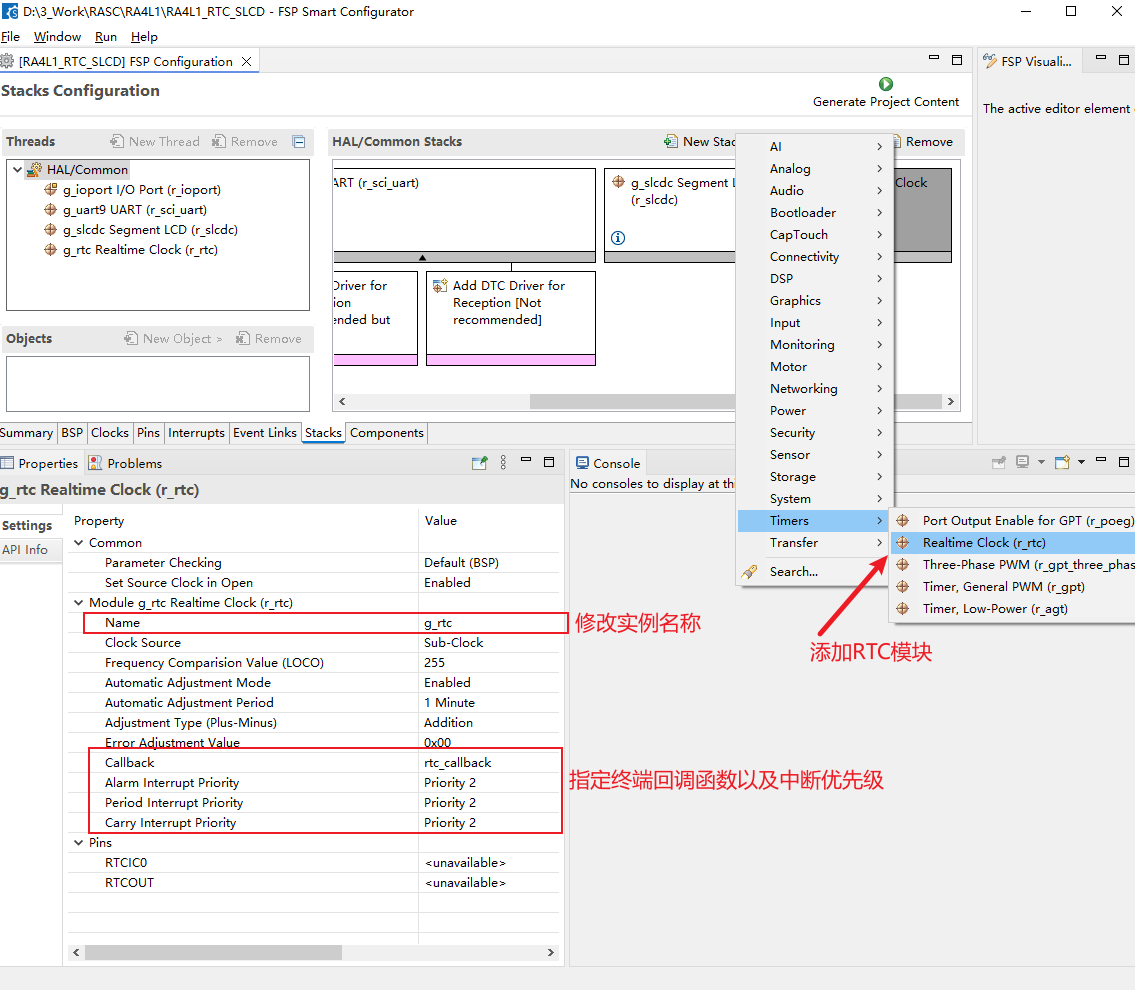
保存文件并生成相应的驱动代码。
添加用于指定RTC初始时间的宏定义,以及用于年和月转换为可读数据的宏定义
/* These are the Hard coded User configurable Time which can changed as required
 * The Application Project start with this Default RTC time and runs
 * ie Date 07/04/2025   Time : 11:59:00 AM
 */
#define USER_DATA_SECONDS           (00)      /* Range 0-59 */
#define USER_DATA_MINUTES           (59)      /* Range 0-59 */
#define USER_DATA_HOUR              (11)      /* Range 0-23 */
#define USER_DATA_DAY_OF_THE_MONTH  (04)      /* Range 1-31 */
#define USER_DATA_MONTH_OF_THE_YEAR (06)      /* Range 0-11 */
#define USER_DATA_YEAR              (125)     /* 1900 + 125 = 2025 */


/*MACROs to adjust month and year values */
#define MON_ADJUST_VALUE            (1)
#define YEAR_ADJUST_VALUE           (1900)
RTC模块的初始化以及设定初始时间信息的函数如下
/*******************************************************************************************************************//**
 * [url=home.php?mod=space&uid=2666770]@Brief[/url]       This functions initializes RTC module.
 * @param[IN]   None
 * @retval      FSP_SUCCESS                  Upon successful open of RTC module
 * @retval      Any Other Error code apart from FSP_SUCCESS  Unsuccessful open
 **********************************************************************************************************************/
fsp_err_t rtc_init(void)
{
    fsp_err_t err = FSP_SUCCESS;     // Error status

    /* Open RTC module */
    err = R_RTC_Open(&g_rtc_ctrl, &g_rtc_cfg);

    /* Handle error */
    if (FSP_SUCCESS != err)
    {
        APP_ERR_PRINT ("\r\nRTC module open failed.\r\nRestart the Application\r\n");
    }

    err = R_RTC_PeriodicIrqRateSet (&g_rtc_ctrl, RTC_PERIODIC_IRQ_SELECT_1_SECOND);

    /* Handle error */
    if (FSP_SUCCESS != err)
    {
        APP_ERR_PRINT ("\r\nRTC Periodic Irq set  failed.\r\nRestart the Application\r\n");
    }

    return err;
}


/*******************************************************************************************************************//**
 * @brief       This functions sets the Calendar time provided by user.
 * @param[IN]   None
 * @retval      FSP_SUCCESS                  Upon successful Calendar time set
 * @retval      Any Other Error code apart from FSP_SUCCESS  Unsuccessful Calendar time set
 **********************************************************************************************************************/
fsp_err_t set_rtc_calendar_time_with_user_configured_time(void)
{
    fsp_err_t err = FSP_SUCCESS;     // Error status

    APP_PRINT ("\r\nSetting RTC Date and Time \r\n");

    err = R_RTC_CalendarTimeSet(&g_rtc_ctrl, &g_set_time);

    /* Handle error */
    if (FSP_SUCCESS != err)
    {
        APP_ERR_PRINT("\r\nCalendarTime Set failed.\r\n");
        return err;
    }

    /* Get the current Calendar time */
    err = R_RTC_CalendarTimeGet(&g_rtc_ctrl, &g_present_time);

    /* Handle error */
    if (FSP_SUCCESS != err)
    {
        APP_ERR_PRINT("\r\nCalendarTime Get failed.\r\n");
        return err;
    }
    /* Modify the date in standard format to user readable format */
    rtc_date_readability_update(&g_present_time);

    g_lcd_present_time = g_present_time;

    APP_PRINT("\r\n RTC calendar set to  Date : %2d/%2d/%4d \n Time  : %2d : %2d : %2d \r\n\n", g_present_time.tm_mday,
            g_present_time.tm_mon, g_present_time.tm_year, g_present_time.tm_hour,
            g_present_time.tm_min, g_present_time.tm_sec);

    set_time_flag = SET_FLAG;

    return err;
}
获取RTC时间信息、转化为可读的时间数据的函数如下
/*******************************************************************************************************************//**
 * @brief       This functions gets the current RTC time.
 * @param[IN]   None
 * @retval      FSP_SUCCESS                  Upon successful current RTC time get
 * @retval      Any Other Error code apart from FSP_SUCCESS  Unsuccessful current RTC time get
 **********************************************************************************************************************/
fsp_err_t get_rtc_calendar_time(void)
{
    fsp_err_t err = FSP_SUCCESS;     // Error status

    /* Get the current RTC Calendar time */
    err = R_RTC_CalendarTimeGet(&g_rtc_ctrl, &g_present_time);

    /* Handle error */
    if (FSP_SUCCESS != err)
    {
        APP_ERR_PRINT("\r\nGetting RTC Calendar time failed.\r\n");
        return err;
    }

    /* Modify the date in standard format to user readable format */
    rtc_date_readability_update(&g_present_time);

    g_lcd_present_time = g_present_time;

    APP_PRINT("\r\n RTC  Date : %d/%d/%d     Time : %d : %d : %d   ", g_present_time.tm_mday,
            g_present_time.tm_mon , g_present_time.tm_year, g_present_time.tm_hour,
            g_present_time.tm_min, g_present_time.tm_sec);

    return err;
}

/*******************************************************************************************************************//**
 * @brief       This functions modifies the date in readable format to the user.
 * @param[IN]   time                    date to be modified
 * @retval      None
 **********************************************************************************************************************/
void rtc_date_readability_update(rtc_time_t * time)
{
    time->tm_mon  +=  MON_ADJUST_VALUE;
    time->tm_year +=  YEAR_ADJUST_VALUE;
}
在RTC的终端回调函数中,检测周期中断,并置位全局的中断标志变量,用于控制SLCD信息更新。
/*******************************************************************************************************************//**
 * @brief RTC callback function.
 * @param[in]  p_args
 * @retval     None
 **********************************************************************************************************************/
void rtc_callback(rtc_callback_args_t *p_args)
{
    if(RTC_EVENT_PERIODIC_IRQ == p_args->event)
    {
        g_periodic_irq_flag = SET_FLAG;
    }
    else
    {
        g_periodic_irq_flag = RESET_FLAG;
    }
}
在主函数中调用以上函数,在检查到RTC中断事件后,在段码屏上显示事件信息
fsp_err_t update_rtc_time_info_to_lcd(void);
extern  rtc_time_t g_lcd_present_time;

volatile uint32_t g_periodic_irq_flag = RESET_FLAG;    /* flag to check occurrence of periodic interrupt */

void hal_entry(void)
{
    /* Initialize RTC driver */
    err = rtc_init ();
    if (FSP_SUCCESS != err)
    {
        /* RTC module init failed */
        APP_ERR_PRINT("\r\n ** RTC INIT FAILED ** \r\n");
        APP_ERR_TRAP(err);
    }
    APP_PRINT("\r\nRTC  initialized and started");

    /* Sets the User Time to the RTC */
    err = set_rtc_calendar_time_with_user_configured_time ();
    if (FSP_SUCCESS != err)
    {
        /* set_rtc_calendar_time_with_user_configured_time failed */
        APP_ERR_PRINT("\r\n ** Setting the RTC Calendar Time with User Configured time : FAILED ** \r\n");
        APP_ERR_TRAP(err);
    }

    while(true)
    {
        if(g_periodic_irq_flag)
        {
            err = update_rtc_time_info_to_lcd();
            if (FSP_SUCCESS != err)
            {
                /* update_rtc_time_info_to_lcd  failed */
                APP_ERR_PRINT("\r\n ** Updating RTC time to LCD  : FAILED ** \r\n");
                APP_ERR_TRAP(err);
            }

            g_periodic_irq_flag = RESET_VALUE;
				}
    }
}

/*******************************************************************************************************************//**
 * @brief       This functions updates the RTC time to the LCD. .
 * @param[IN]   None
 * @retval      None
 * @retval      Any Other Error code apart from FSP_SUCCESS for Unsuccessful getting calendar time, setting the segment.
 **********************************************************************************************************************/
fsp_err_t update_rtc_time_info_to_lcd(void)
{
    fsp_err_t err = FSP_SUCCESS;
    uint32_t time_value_hr = RESET_VALUE;
    uint32_t time_value_mn = RESET_VALUE;
		uint32_t time_value_s = RESET_VALUE;

    err = get_rtc_calendar_time ();
    if (FSP_SUCCESS != err)
    {
        /* RTC Calendar time read  failed */
        APP_ERR_PRINT("\r\n ** RTC READ FAILED ** \r\n");
        APP_ERR_TRAP(err);
    }

    time_value_hr = (uint32_t) (g_lcd_present_time.tm_hour);
    time_value_mn = (uint32_t) (g_lcd_present_time.tm_min);
		time_value_s	=	(uint32_t) (g_lcd_present_time.tm_sec);

   /* Concatenate the Minutes and Seconds for the LCD Display purpose*/
    time_value_hr = (time_value_hr * 10000) + (uint32_t) (time_value_mn*100)+time_value_s;

		err = set_segments_medium_digits (time_value_hr, SET_COLON);
		err = set_segments_medium_digits (time_value_hr, SET_DP);

		return(err);
}
完整的工程可以查看附件。
程序的实际运行效果如下,通过串口和段码屏显示RTC的当前时钟信息。
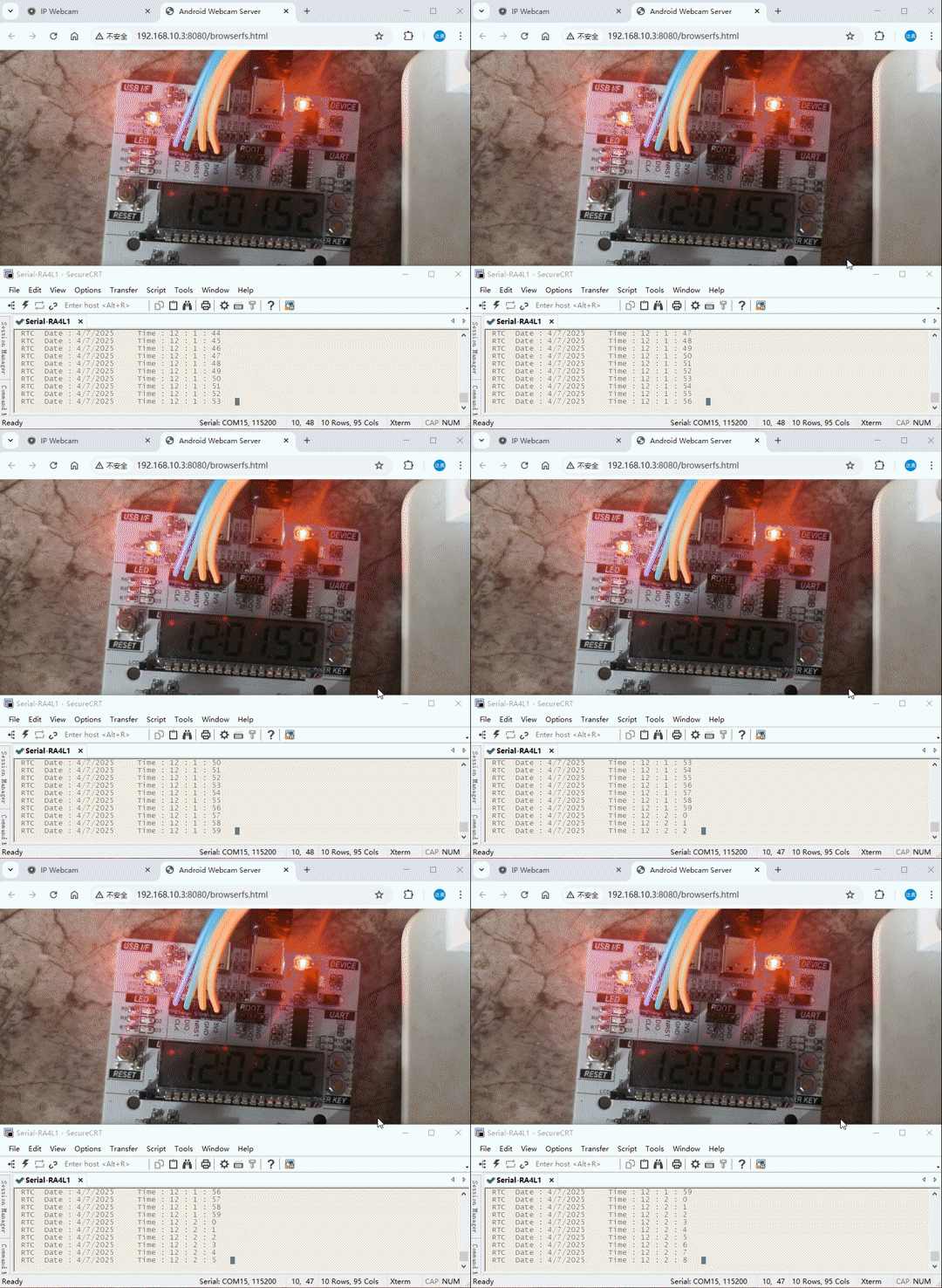
RA4L1的官方资料有很多,在示例代码的基础上,可以修改其中的代码快速实现需要的功能。
*附件:RA4L1_RTC_SLCD.7z
更多回帖


