你好@ fandrei,
我一直在与其他一些安装专家交谈,结果发现我们之前见过其他一些类似问题的用户,问题是因为如果任何版本的Vivado安装程序无法在Windows上启动,那么你就是
需要检查“服务器”服务状态的服务设置。
我们的安装程序似乎需要运行此服务。
你能否仔细检查一下你的箱子是否正常运行?
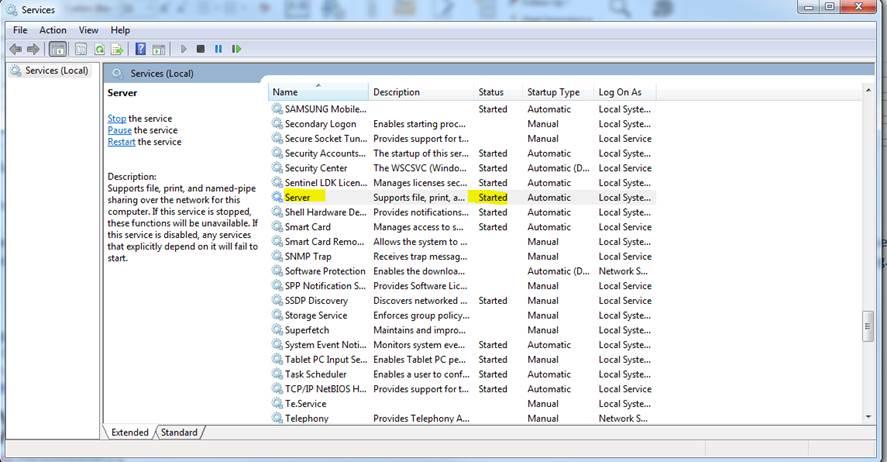
请参阅下面的截图。
如果它没有运行,你可以启动它,然后看看安装程序是否可以成功启动吗?
谢谢
亲切的问候,
阿纳托利柯伦
亲切的问候,Anatoli Curran,Xilinx技术支持-----------------------------------------
--------------------------------不要忘记回复,工作,并接受解决方案.----
--------------------------------------------------
-------------------
在原帖中查看解决方案
以上来自于谷歌翻译
以下为原文
Hello @fandrei,
I have been talking to some other install experts and it turns out that we have seen some other users with the similar issue before and the issue was due to the fact that if the Vivado installer of any versions cannot be launched on Windows, you’d need to check the services settings for the status of 'Server' service. It seems our installer need this service running.
Can you please double check if this is up and running in your case? See my screenshot below.
If it's not running, can you start this up and then see if the installer can successfully be started then? Thanks
Kind Regards,
Anatoli Curran
Kind Regards,
Anatoli Curran,
Xilinx Technical Support
-------------------------------------------------------------------------
Don’t forget to reply, kudo, and accept as solution.
-------------------------------------------------------------------------View solution in original post
你好@ fandrei,
我一直在与其他一些安装专家交谈,结果发现我们之前见过其他一些类似问题的用户,问题是因为如果任何版本的Vivado安装程序无法在Windows上启动,那么你就是
需要检查“服务器”服务状态的服务设置。
我们的安装程序似乎需要运行此服务。
你能否仔细检查一下你的箱子是否正常运行?
请参阅下面的截图。
如果它没有运行,你可以启动它,然后看看安装程序是否可以成功启动吗?
谢谢
亲切的问候,
阿纳托利柯伦
亲切的问候,Anatoli Curran,Xilinx技术支持-----------------------------------------
--------------------------------不要忘记回复,工作,并接受解决方案.----
--------------------------------------------------
-------------------
在原帖中查看解决方案
以上来自于谷歌翻译
以下为原文
Hello @fandrei,
I have been talking to some other install experts and it turns out that we have seen some other users with the similar issue before and the issue was due to the fact that if the Vivado installer of any versions cannot be launched on Windows, you’d need to check the services settings for the status of 'Server' service. It seems our installer need this service running.
Can you please double check if this is up and running in your case? See my screenshot below.
If it's not running, can you start this up and then see if the installer can successfully be started then? Thanks
Kind Regards,
Anatoli Curran
Kind Regards,
Anatoli Curran,
Xilinx Technical Support
-------------------------------------------------------------------------
Don’t forget to reply, kudo, and accept as solution.
-------------------------------------------------------------------------View solution in original post

 举报
举报


