你好,
我最近开始使用planahead来处理在6系列设备上运行的一些传统设计。
确切地说,我使用synplify进行综合,然后使用planahead来实现。
我的问题是关于约束。
基本上我的planahead项目有两个源文件(至少),一个edif网表和一个UCF约束文件(都是由synplify生成的)。
虽然planahead运行良好并且似乎使用添加的UCF约束(跟踪报告显示与UCF内容匹配的周期要求,设计符合时间等),如果在实施之后,这都是在批处理模式下完成,我打开planahead项目文件(
PPR),约束似乎丢失了。
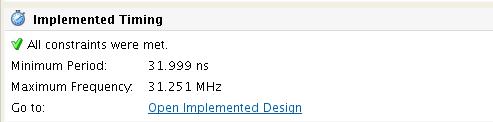
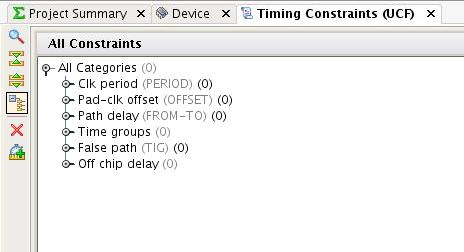
例如,如果单击“编辑时序约束”,则不显示约束,如果单击“报告时钟交互”,则不显示任何信息,矩阵为空,项目摘要报告的频率与我的设计频率不符
,它报告31MHz,而我的设计运行在150MHz(至少大部分)。
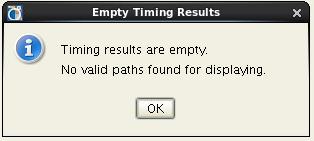
此外,如果我运行跟踪,它似乎从.twx文件打开以前生成的报告,如果我在运行它时更改了一些设置,它表示没有要显示的路径...
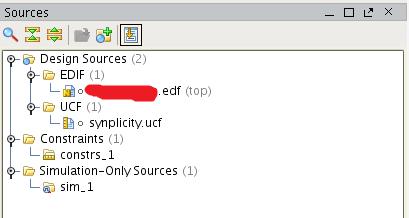
似乎planAhead不知道设计中的任何约束,即使实现运行有效地使用了这些约束,它们也会丢失......正如您所看到的,我的设计有效地将约束文件作为源:
我真的需要能够打开planahead项目,例如,运行更详细的跟踪报告,或查看gui中的时钟交互报告等。
怎么可能出错?
以上来自于谷歌翻译
以下为原文
Hello,
I have recently started using planahead for some legacy designs running on 6-series devices. To be precise, I use synplify to synthesize and then planahead to implement. My ques
tion is about constraints.
Basically my planahead project has two source files (at least), an edif netlist and a UCF constraints file (both generated by synplify). While planahead works well and seems to use the added UCF constraints (trace reports shows period requirements that match the UCF contents, the design meets timing, etc) if after implementing, which is all done in batch mode, I open the planahead project file (PPR), constraints seem to be lost. For example, if I click on "Edit timing constraints", no constraints are shown, if I click on "Report clock interaction" no information is shown, the matrix is empty, the project summary reports a frequency which does not match my designs frequency, it reports 31MHz, while my design runs at 150MHz (at least most of it).
Also if I run trace, it seems to open the previously generated report from the
.twx file, and if I change some setting when running it, it says that there are not paths to display...
It seems as though planAhead has no idea of any constraints in the design, even though the implementation run effectively used those constraints they somehow get lost... As you can see my design effectively has a constraints file as source:
I really need to be able to open the planahead project and, for example, run a more detailed trace report, or view the clock interaction report in the gui, etc.
What could be going wrong?


 举报
举报


