【前言】
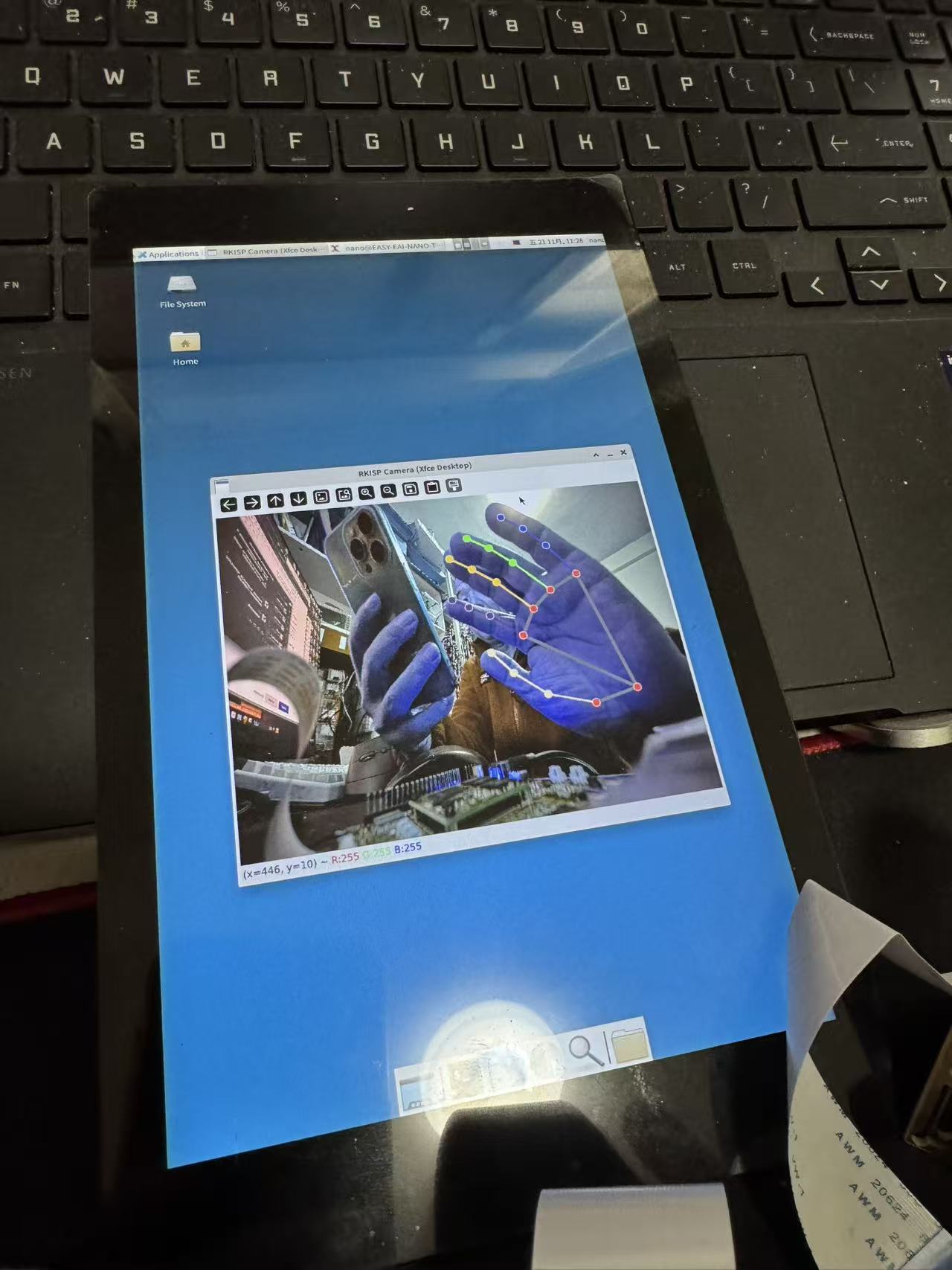
在前面的几篇帖子中,我处理好了桌面显示,驱动了摄像头。本篇将摄像头获取到的图像,通过AI来识别手部21个关键点的识别。
【步骤】
1、安装mediapipe
这次灵眸官网给出的操作系统为ubuntu22,因此我们可以直接什么pip3 install mediapipe 直接就顺利的安装好这个库。
2、编写手部21个关键点的检测代码。
当我们读取到一幅图像时首先要加载MediaPipe Hands
with mp_hands.Hands(
model_complexity=0,
min_detection_confidence=0.5,
min_tracking_confidence=0.5) as hands:
3、识别手部关键点:
results = hands.process(imgRGB)
4、然后判断是否识别成功,如果成功测显示到图像中。
整体代码如下:
import os
import warnings
import numpy as np
os.environ["QT_QPA_PLATFORM"] = "xcb"
os.environ["CV2_DISABLE_QT"] = "0"
warnings.filterwarnings('ignore')
import cv2
import mediapipe as mp
mp_hands = mp.solutions.hands
mp_drawing = mp.solutions.drawing_utils
mp_drawing_styles = mp.solutions.drawing_styles
CAMERA_DEVICE = "/dev/video30"
cap = cv2.VideoCapture(CAMERA_DEVICE, cv2.CAP_V4L2)
if not cap.isOpened():
print(f"❌ 无法打开 {CAMERA_DEVICE}!")
print("临时授权:sudo chmod 666 /dev/video30")
print("永久授权:sudo usermod -aG video nano && 注销重登")
exit()
cap.set(cv2.CAP_PROP_FRAME_WIDTH, 640)
cap.set(cv2.CAP_PROP_FRAME_HEIGHT, 480)
cap.set(cv2.CAP_PROP_FPS, 20)
ret, frame = cap.read()
if not ret:
print("⚠️ 读取画面失败,检查摄像头硬件!")
cap.release()
exit()
height, width = frame.shape[:2]
channels = frame.shape[-1] if len(frame.shape) >= 3 else 1
print(f"? 摄像头配置:{width}x{height} | 通道数:{channels}")
print("✅ 画面已显示,按以下按键操作:")
print(" - 'q':退出程序")
print(" - 's':保存当前帧到当前目录(capture.jpg)")
print(" - 'f':切换全屏/窗口模式")
fullscreen = False
with mp_hands.Hands(
model_complexity=0,
min_detection_confidence=0.5,
min_tracking_confidence=0.5) as hands:
while True:
ret, frame = cap.read()
if not ret:
print("⚠️ 帧读取失败,跳过")
continue
if channels == 3:
try:
frame_bgr = cv2.cvtColor(frame, cv2.COLOR_YUV2BGR_NV12)
except:
try:
frame_bgr = cv2.cvtColor(frame, cv2.COLOR_YUV2BGR_YV12)
except:
frame_bgr = cv2.cvtColor(frame, cv2.COLOR_RGB2BGR)
frame_rgb = cv2.cvtColor(frame_bgr, cv2.COLOR_BGR2RGB)
frame_rgb = cv2.flip(frame_rgb, 1)
results = hands.process(frame_rgb)
frame_bgr = cv2.cvtColor(frame_rgb, cv2.COLOR_RGB2BGR)
if results.multi_hand_landmarks:
for hand_landmarks in results.multi_hand_landmarks:
mp_drawing.draw_landmarks(
frame_bgr,
hand_landmarks,
mp_hands.HAND_CONNECTIONS,
mp_drawing_styles.get_default_hand_landmarks_style(),
mp_drawing_styles.get_default_hand_connections_style())
cv2.imshow("RKISP Camera (Xfce Desktop)", frame_bgr)
key = cv2.waitKey(1) & 0xFF
if key == ord('q'):
break
elif key == ord('s'):
cv2.imwrite("capture.jpg", frame_bgr)
print("? 图片已保存为 capture.jpg")
elif key == ord('f'):
fullscreen = not fullscreen
flag = cv2.WINDOW_FULLSCREEN if fullscreen else cv2.WINDOW_NORMAL
cv2.setWindowProperty("RKISP Camera (Xfce Desktop)", cv2.WND_PROP_FULLSCREEN, flag)
cap.release()
cv2.destroyAllWindows()
print("✅ 程序正常退出,摄像头已释放")
演示效果:
【总结】
通过外接摄像头,可以非常准确的识别手部的21个关键点。在实际应用中,可以通过这21个关键点来判断手势等等。
| 
 0
0
 /9
/9 



 工商网监
湘ICP备2023018690号
工商网监
湘ICP备2023018690号


 2178
2178
 淘帖
淘帖










