
本文介绍了正点原子 STM32MP257 开发板实现物体识别的项目设计。
下载 MobileNet 模型,并通过 ST Edge AI 在线工具,将其转化为 nb 模型;
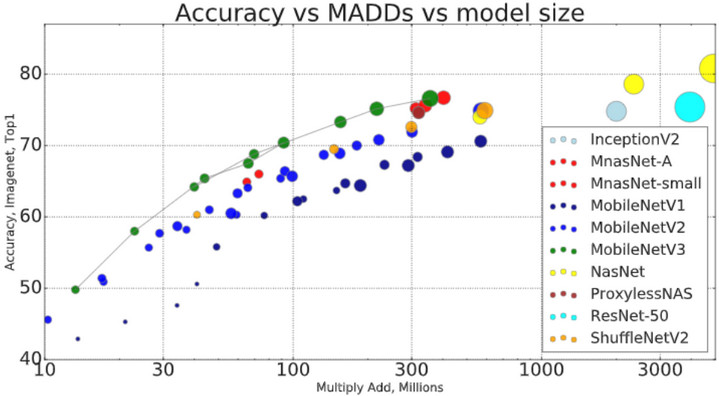
转换过程参考:【正点原子STM32MP257开发板试用】数字识别 .
模型下载:mobilenet - tensorflow .
包括基于 MobileNet 模型实现物体识别的 USB 摄像头动态帧识别和板端推理的静态图片识别。
采用 USB 摄像头获取动态画面,调用 nb 模型实现物体识别。
终端执行 touch mobilenet_camera.py 指令,新建 python 文件,添加如下代码
import os
import cv2
import numpy as np
import time
from stai_mpu import stai_mpu_network

class ObjectDetector:
    def __init__(self, model_path):
        try:
            # 加载模型
            self.model = stai_mpu_network(model_path=model_path)
            print(f"Model loaded successfully from {model_path}")

            # 确定输入形状
            self.input_shape = self.determine_input_shape()
            print(f"Input shape: {self.input_shape}")

            # 加载标签
            label_path = os.path.join(os.path.dirname(model_path), "labels_imagenet_2012.txt")
            self.class_labels = self.load_labels(label_path)

        except Exception as e:
            print(f"Error initializing model: {str(e)}")
            raise

    def determine_input_shape(self):
        """确定模型输入形状"""
        # MobileNet通常使用224x224
        return (1, 224, 224, 3)

    def load_labels(self, label_path):
        """兼容性更好的标签加载方法"""
        labels = {}
        try:
            if os.path.exists(label_path):
                with open(label_path, 'r') as f:
                    for line_num, line in enumerate(f, 1):
                        line = line.strip()
                        if not line:
                            continue

                        parts = line.split(maxsplit=1)

                        if len(parts) == 1:
                            class_id = len(labels)
                            class_name = parts[0]
                        else:
                            try:
                                class_id = int(parts[0])
                                class_name = parts[1]
                            except ValueError:
                                class_id = len(labels)
                                class_name = line

                        labels[class_id] = class_name
                print(f"Loaded {len(labels)} labels")
            else:
                print("Warning: Using default ImageNet labels")
                labels = {i: str(i) for i in range(1000)}
        except Exception as e:
            print(f"Label loading error: {str(e)}")
            labels = {i: str(i) for i in range(1000)}
        return labels

    def preprocess(self, frame):
        """图像预处理"""
        # 确保3通道
        if len(frame.shape) == 2:
            frame = cv2.cvtColor(frame, cv2.COLOR_GRAY2BGR)

        # 调整尺寸
        img = cv2.resize(frame, (self.input_shape[2], self.input_shape[1]))
        img = cv2.cvtColor(img, cv2.COLOR_BGR2RGB)

        # 归一化 (适用于int8量化模型)
        img = img.astype(np.float32)
        img = (img / 127.5) - 1.0

        return np.expand_dims(img, axis=0)

    def detect(self, frame):
        """执行检测"""
        try:
            input_data = self.preprocess(frame)
            self.model.set_input(0, input_data)

            start_time = time.perf_counter()
            self.model.run()
            inference_time = (time.perf_counter() - start_time) * 1000

            output = self.model.get_output(0)
            if hasattr(output, 'numpy'):
                output = output.numpy()

            return output, inference_time
        except Exception as e:
            print(f"Detection error: {str(e)}")
            return None, 0

def main():
    # 配置摄像头后端
    os.environ['OPENCV_VIDEOIO_PRIORITY_V4L2'] = '1'

    # 模型路径
    MODEL_DIR = "/home/root/AI_inference/MobileNet/model"
    MODEL_NAME = "mobilenet_v2_1.0_224_int8_per_tensor.nb"
    MODEL_PATH = os.path.join(MODEL_DIR, MODEL_NAME)

    if not os.path.exists(MODEL_PATH):
        print(f"Error: Model file not found at {MODEL_PATH}")
        return

    try:
        detector = ObjectDetector(MODEL_PATH)
    except Exception as e:
        print(f"Failed to initialize detector: {str(e)}")
        return

    # 打开摄像头
    cap = cv2.VideoCapture(7, cv2.CAP_V4L2)
    if not cap.isOpened():
        print("Error: Could not open camera using V4L2")
        return

    try:
        while True:
            ret, frame = cap.read()
            if not ret:
                print("Camera read failed")
                break

            # 执行检测
            outputs, inference_time = detector.detect(frame)

            if outputs is not None:
                # 获取top1结果
                class_id = np.argmax(outputs)
                label = detector.class_labels.get(class_id, str(class_id))
                confidence = outputs[0][class_id]

                # 显示结果
                cv2.putText(frame, f"{label}: {confidence:.2f}",
                           (20, 40), cv2.FONT_HERSHEY_SIMPLEX, 1, (0, 255, 0), 2)
                cv2.putText(frame, f"FPS: {1000/(inference_time+1):.1f}",
                           (20, 80), cv2.FONT_HERSHEY_SIMPLEX, 0.7, (0, 0, 255), 2)

            cv2.imshow('Object Detection', frame)
            if cv2.waitKey(1) & 0xFF == ord('q'):
                break

    finally:
        cap.release()
        cv2.destroyAllWindows()

if __name__ == '__main__':
    main()
终端执行 python3 mobilenet_camera.py 输出推理结果
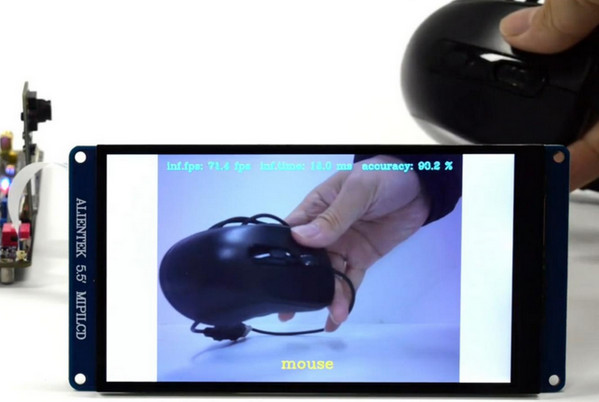
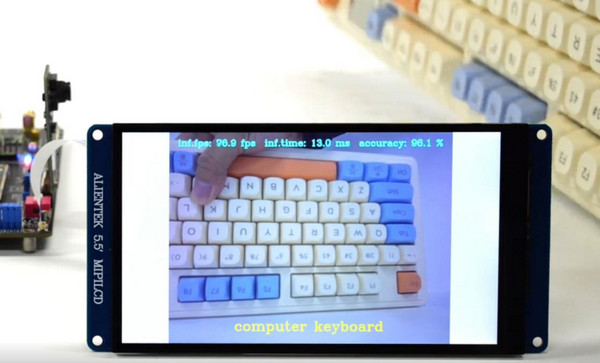
执行程序后,USB 摄像头采集环境画面,芯片执行推理和分析算法程序,将识别结果显示在板载屏幕上。
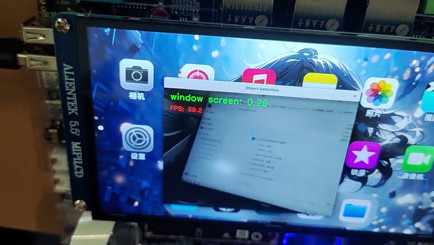
动态识别效果见顶部视频。
为了更清晰准确地获得识别结果,采用板端推理的方案进行测试。
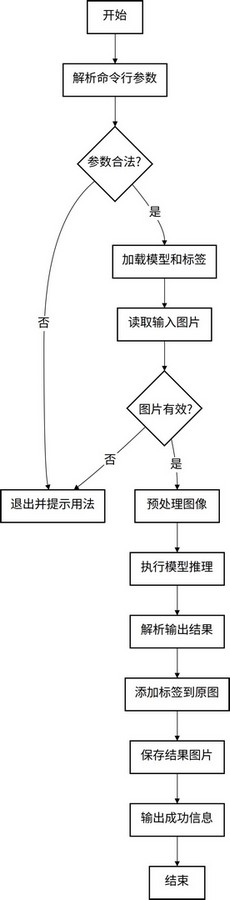
终端执行 touch mobilenet_object_inference.py 指令,新建 python 文件,添加如下代码
import os
import cv2
import numpy as np
import sys
from stai_mpu import stai_mpu_network

class ObjectDetector:
    def __init__(self, model_dir="model"):
        # 模型文件路径
        self.model_path = os.path.join(model_dir, "mobilenet_v2_1.0_224_int8_per_tensor.nb")
        self.label_path = os.path.join(model_dir, "labels_imagenet_2012.txt")

        try:
            # 加载模型
            self.model = stai_mpu_network(model_path=self.model_path)
            print(f"[Success] Loaded model: {os.path.basename(self.model_path)}")

            # 设置输入尺寸 (MobileNet默认224x224)
            self.input_shape = (1, 224, 224, 3)

            # 加载标签
            self.class_labels = self.load_labels()

        except Exception as e:
            print(f"[Error] Initialization failed: {str(e)}")
            raise

    def load_labels(self):
        """加载类别标签"""
        labels = {}
        try:
            if os.path.exists(self.label_path):
                with open(self.label_path, 'r') as f:
                    for line in f:
                        line = line.strip()
                        if line:
                            parts = line.split(maxsplit=1)
                            if len(parts) == 1:
                                labels[len(labels)] = parts[0]
                            else:
                                try:
                                    labels[int(parts[0])] = parts[1]
                                except ValueError:
                                    labels[len(labels)] = line
                print(f"[Info] Loaded {len(labels)} labels")
            else:
                print("[Warning] Using default labels (0-999)")
                labels = {i: str(i) for i in range(1000)}
        except Exception as e:
            print(f"[Error] Loading labels: {str(e)}")
            labels = {i: str(i) for i in range(1000)}
        return labels

    def process_image(self, image_path):
        """处理单张图片"""
        if not os.path.exists(image_path):
            print(f"[Error] Image not found: {image_path}")
            return False

        # 读取图片
        image = cv2.imread(image_path)
        if image is None:
            print(f"[Error] Cannot read image: {image_path}")
            return False

        # 预处理
        img = cv2.resize(image, (self.input_shape[2], self.input_shape[1]))
        img = cv2.cvtColor(img, cv2.COLOR_BGR2RGB)
        img = (img.astype(np.float32) / 127.5) - 1.0
        input_data = np.expand_dims(img, axis=0)

        # 推理
        self.model.set_input(0, input_data)
        self.model.run()
        outputs = self.model.get_output(0)
        if hasattr(outputs, 'numpy'):
            outputs = outputs.numpy()

        # 获取预测结果
        class_id = np.argmax(outputs)
        confidence = outputs[0][class_id]
        label = self.class_labels.get(class_id, str(class_id))

        # 在原始图像上添加标签
        result = self.add_simple_label(image, label, confidence)

        # 保存结果 (与.py文件同目录)
        output_name = f"result_{os.path.basename(image_path)}"
        cv2.imwrite(output_name, result)
        print(f"[Success] Result saved to: {os.path.abspath(output_name)}")
        return True

    def add_simple_label(self, image, label, confidence):
        """添加简单文本标签"""
        label_text = f"{label}: {confidence:.2f}"

        # 设置文本样式
        font = cv2.FONT_HERSHEY_SIMPLEX
        font_scale = 1.0
        thickness = 2
        color = (0, 0, 255)  # 红色文本

        # 计算文本位置 (左上角)
        (text_w, text_h), _ = cv2.getTextSize(label_text, font, font_scale, thickness)
        margin = 10
        pos = (margin, margin + text_h)

        # 添加文本
        cv2.putText(image, label_text, pos, font, font_scale, color, thickness)
        return image

def main():
    if len(sys.argv) != 2:
        print("Usage: python3 detect.py ./model/xxx.jpg")
        return

    image_path = sys.argv[1]
    if not image_path.startswith("./model/"):
        print("[Error] Image must be in ./model/ directory")
        return

    try:
        detector = ObjectDetector()
        detector.process_image(image_path)
    except Exception as e:
        print(f"[Fatal Error] {str(e)}")

if __name__ == '__main__':
    main()
终端执行指令 python3 mobilenet_object_inference.py ./model/test.jpg 完成后输出测试结果图片并保存至程序目录。

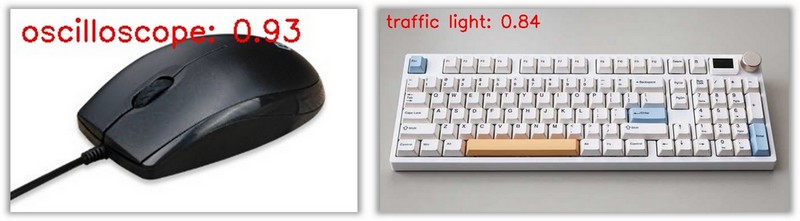
识别结果与实际情况存在误差。
下面介绍官方教程实现物体与图像识别的 Demo 例程。
将 05、开发工具/01、出厂系统交叉编译器 路径下的 atk-image-openstlinux- weston-stm32mp2.rootfs-x86_64-toolchain-5.0.3-snapshot-20250115-v1.x.sh 执行文件复制到 Ubuntu 系统;
依次执行指令
chmod +x atk-image-openstlinux-weston-stm32mp2.rootfs-x86_64-toolchain-5.0.3-snapshot-20250115-v1.0.sh
./atk-image-openstlinux-weston-stm32mp2.rootfs-x86_64-toolchain-5.0.3-snapshot-20250115-v1.0.sh
修改文件权限并执行,期间需要确认默认安装路径、输入系统密码,解压 SDK 等待 5 分钟;
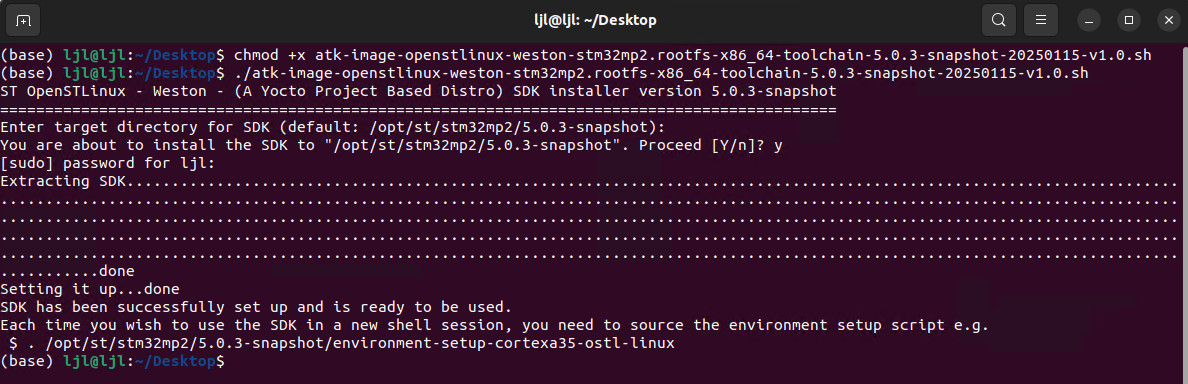
根据安装完成后的提示,每次在新的终端使用编译器,均需要执行指令
source /opt/st/stm32mp2/5.0.3-snapshot/environment-setup-cortexa35-ostl-linux
执行指令 aarch64-ostl-linux-gcc -v 查看编译器版本。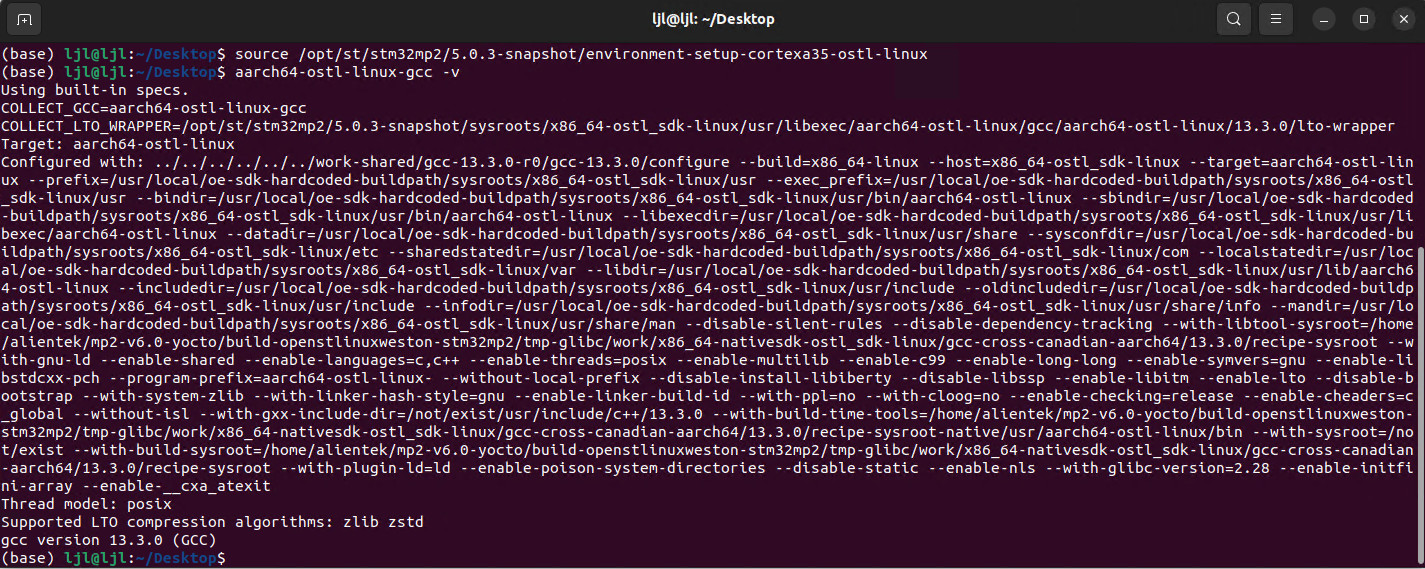
完成工具链交叉编译后,下载图像识别例程 01、程序源码/05、AI例程源码/03、mobilenet 压缩文件;
模型来源:mobilenet - tensorflow .
./aidemo-build-mp257.sh 完成编译;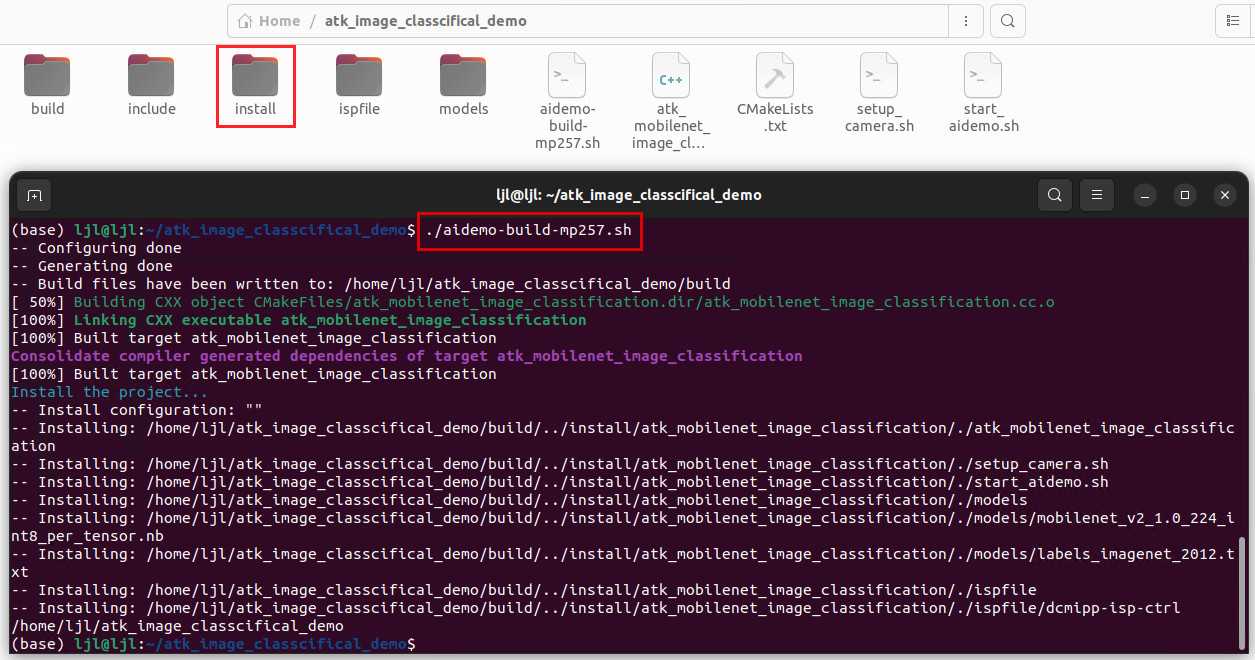
install 文件夹包含模型和可执行文件以及标签文件;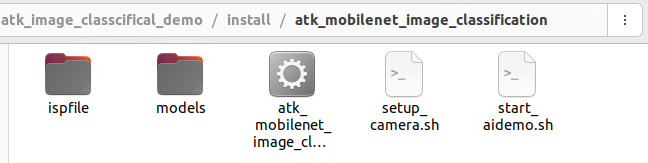
cd /atk_mobilenet_image_classification
chmod +x start_aidemo.sh setup_camera.sh atk_mobilenet_image_classification
./start_aidemo.sh
鼠标 mouse
键盘 keyboard
本文介绍了正点原子 STM32MP257 开发板基于 MobileNet 模型实现图像和物体识别的项目设计,包括准备工作、工程调试、动态识别和板端静态推理、程序优化、SDK编译等流程,为该开发板在人工智能等相关领域的开发、产品的设计和应用等方面提供了参考。
 1
1
 举报
举报
更多回帖


