TI论坛
直播中

贾飞世

8年用户 1887经验值
私信 关注
[问答]

用PPS生成的代码写入AIC3254只听到杂音,没有声音输入是哪里出了问题?


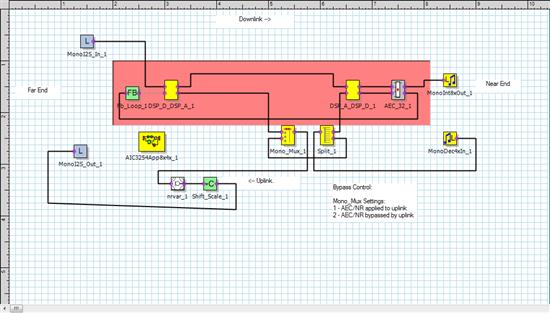
  • 我用PPS生成的代码写入AIC3254只听到杂音,没有声音输入,我用的是CC3200AUDBOOST这块板子做测试,请您帮我看看哪里出了问题。

    下面的配置写入预置模式就有声音输入输出,写入PPS生成的minDsp代码就只能听到一点杂音。
    reg_value REG_Section_program[] = {
    { 0,0x00},
    // # reg[ 0][ 1] = 0x01 ; Initialize the device through software reset
    { 1,0x01},

    { 0,0x00},
    // 0x00 16bit, I2S, BCLK is input to the device
    { 27,0x00},


    { 0,0x01},
    // # reg[ 1][ 2] = 0xa9 ; Power up AVDD LDO
    { 2,0x01},
    // # reg[ 1][ 1] = 0x08 ; Disable weak AVDD to DVDD connection
    { 1,0x08},
    // # reg[ 1][ 2] = 0xa1 ; Enable Master Analog Power Control, AVDD LDO Powered
    { 2,0x01},
    // # reg[ 1][ 71] = 0x32 ; Set the input power-up time to 3.1ms
    { 71,0x32},
    // # reg[ 1][123] = 0x05 ; Force REF charging time to 40ms
    {123,0x01},


    // miniDSP_D programming mode
    {255,0x00},
    {255,0x01},


    { 0,0x00},
    // # reg[ 0][ 60] = 0x00 ; Use miniDSP_D for signal processing
    { 60,0x00},
    // # reg[ 0][ 61] = 0x00 ; Use miniDSP_A for signal processing
    { 61,0x00},
    // # reg[ 0][ 17] = 0x08 ; 8x Interpolation
    { 17,0x08},
    // # reg[ 0][ 23] = 0x04 ; 4x Decimation
    { 23,0x04},
    //
    { 15,0x18},
    //
    { 16,0x00},
    //
    { 21,0x03},
    //
    { 22,0x88},

    /*
    //miniDSP 预置模式
    { 0,0x00},
    { 60,0x02},

    { 0,0x2c},
    { 1,0x04},
    */

    { 0,0x08},
    // # reg[ 8][ 1] = 0x04 ; adaptive mode for ADC
    { 1,0x04},


    { 0,0x00},
    // # reg[ 0][ 5] = 0x94 ; // PLL is powered up, P=1, R=4
    { 5,0x94},
    // # reg[ 0][ 6] = 0x2A ;J=42
    { 6,0x2A},
    // # reg[ 0][ 7] = 0x00 ; D=0000 (MSB)
    { 7,0x00},
    // # reg[ 0][ 8] = 0x00 ; D=0000 (LSB)
    { 8,0x00},
    // # reg[ 0][ 4] = 0x03 ; PLL Clock is CODEC_CLKIN
    { 4,0x03},
    // # reg[ 0][254] = 0x0a ; Delay 10ms for PLL to lock
    {254,0x0A},
    // # reg[ 0][ 12] = 0x82 ; MDAC = 14, divider powered on
    { 12,0x8E},
    // # reg[ 0][ 13] = 0x01 ; DOSR = 384(MSB)
    { 13,0x01},
    // # reg[ 0][ 14] = 0x80 ; DOSR = 384(LSB)
    { 14,0x80},
    // # reg[ 0][ 18] = 0x82 ; // NADC divider powered up, NADC = 2
    { 18,0x82},
    // # reg[ 0][ 19] = 0x95 ; MADC = 21, divider powered on
    { 19,0x95},
    // # reg[ 0][ 20] = 0x00 ; AOSR = 256
    { 20,0x00},
    // # reg[ 0][ 11] = 0x8E ; NDAC = 2, divider powered on
    { 11,0x82},

    //clk output set
    { 25,0x04}, // DAC_CLK
    { 26,0x81},
    { 55,0x06}, // MOSI OUTPUT CLK

    { 0,0x01},
    // # reg[ 1][ 51] = 0x40 ; // MICBIAS powered up ON Board Mic
    { 51,0x40},
    // # reg[ 1][ 52] = 0x00 ; not routed to Left MICPGA
    { 52,0x00},
    // # reg[ 1][ 54] = 0x04 ; IN3R is routed to Left MICPGA with 10k resistance
    { 54,0x04},
    // # reg[ 1][ 55] = 0x04 ; IN3R is routed to Right MICPGA with 10k resistance
    { 55,0x54},
    // # reg[ 1][ 57] = 0x40 ; CM is routed to Right MICPGA via CM1R with 10k resistance
    { 57,0x40},
    // IN3R input is weakly driven to common mode.
    { 58,0x04},
    // # reg[ 1][ 59] = 0x5E ; //make channel gain 0dB, since 20K input //impedance is used single ended
    { 59,0x00},
    // # reg[ 1][ 60] = 0x00 ; Enable MicPGA_R Gain Control, 0dB
    { 60,0x00},
    { 83,0x68},
    { 84,0x68},

    { 0,0x00},
    // # reg[ 0][ 81] = 0xc0 ; Power up LADC/RADC
    { 81,0xC0},
    // # reg[ 0][ 82] = 0x00 ; Unmute LADC/RADC
    { 82,0x00},


    { 0,0x01},
    // # reg[ 1][ 20] = 0x25 ; De-pop: 5 time constants, 6k resistance
    { 20,0x25},
    // # reg[ 1][ 12] = 0x08 ; Route LDAC to HPL
    { 12,0x08},
    // # reg[ 1][ 13] = 0x08 ; Route RDAC to HPR
    { 13,0x08},
    // # reg[ 1][ 14] = 0x08 ; Route LDAC to LOL
    { 14,0x08},
    // # reg[ 1][ 15] = 0x08 ; Route LDAC to LOR
    { 15,0x08},
    { 9,0x3C},

    { 0,0x01},
    // # reg[ 1][ 16] = 0x00 ; Unmute HPL driver, 27dB Gain
    { 16,0x1B},
    // # reg[ 1][ 17] = 0x00 ; Unmute HPR driver, 27dB Gain
    { 17,0x1B},
    // # reg[ 1][ 18] = 0x00 ; Unmute LOL driver, 28dB Gain
    { 18,0x1c},
    // # reg[ 1][ 19] = 0x00 ; Unmute LOR driver, 28dB Gain
    { 19,0x1c},
    // # reg[ 1][ 20] = 0x25 ; // Headphone ramps power up time is determined with 6k resistance,


    { 0,0x00},
    { 61,0x02},


    { 0,0x00},
    // # Digital Volume Control = 64.0dB
    { 65,0x93},
    // # Digital Volume Control = 64.0dB
    { 66,0x93},

    { 0,0x00},
    // # reg[ 0][ 63] = 0xd4 ; Power up LDAC/RDAC w/ soft stepping
    { 63,0xD6},
    { 64,0x00},


    { 0,0x00},
    { 86,0x20},
    // # reg[0][87] = 254
    { 87,0xFE},
    // # reg[0][88] = 0
    { 88,0x00},
    // # reg[0][89] = 104
    { 89,0x68},
    // # reg[0][90] = 168
    { 90,0xA8},
    // # reg[0][91] = 6
    { 91,0x06},
    // # reg[0][92] = 0
    { 92,0x00},


    };

回帖(1)

手托初梦

2024-10-30 17:05:07
根据您的描述,您在使用PPS生成的代码写入AIC3254时遇到了问题,只能听到杂音而没有声音输入。您提到使用CC3200AUDBOOST板子进行测试,并且在预置模式下有声音输入输出。以下是一些建议和可能的问题所在:

1. 检查PPS生成的代码配置:首先,请确保PPS生成的代码配置正确。您可以尝试将预置模式的配置与PPS生成的代码进行比较,看看是否有任何差异。如果发现有差异,请将预置模式的配置应用到PPS生成的代码中。

2. 检查I2S接口:请确保您的CC3200AUDBOOST板子的I2S接口配置正确。您需要检查I2S接口的时钟设置、数据格式和通道配置等。确保这些设置与AIC3254的要求相匹配。

3. 检查电源和地线:请检查CC3200AUDBOOST板子的电源和地线连接是否正确。确保AIC3254的AVDD和IOVDD电源电压稳定,并且地线连接良好。

4. 检查外部音频输入:请确保您的外部音频输入设备(如麦克风)连接正确,并且工作正常。您可以尝试使用不同的音频输入设备进行测试,以排除设备故障的可能性。

5. 检查PPS生成的minDsp代码:请检查PPS生成的minDsp代码是否有错误或不兼容的问题。您可以尝试使用预置模式的minDsp代码进行测试,看看是否能解决问题。

6. 检查固件版本:请确保您的CC3200AUDBOOST板子和AIC3254的固件版本是最新的。如果固件版本过旧,可能会导致兼容性问题。

7. 检查硬件连接:请检查CC3200AUDBOOST板子与AIC3254之间的硬件连接是否正确。确保所有引脚连接正确,并且没有短路或断路的问题。

通过以上步骤,您应该能够找到问题所在并解决杂音问题。如果问题仍然存在,建议您联系AIC3254和CC3200AUDBOOST的技术支持,以获取更专业的帮助。
举报

更多回帖

发帖
×
20
完善资料,
赚取积分