瑞芯微Rockchip开发者社区
登录
直播中
王莉
8年用户
1367经验值
私信
关注
[问答]
如何利用RK3399 opencv4.5.0编译Gstreamer访问摄像头?
开启该帖子的消息推送
python
RK3399
如何利用RK3399 opencv4.5.0编译Gstreamer访问摄像头?
回帖
(1)
李敏
2022-3-7 14:11:50
1、下载opencv源码
我下载的是4.5.0版本的,开发板直接git的话,下载很慢。我选择用电脑下好再传给开发板,
2、安装所需的库,python版本是3.6
sudo apt-get install build-essential cmake git libgtk2.0-dev pkg-config libavcodec-dev libavformat-dev libswscale-dev python3.6-dev python3.6-numpy libtbb2 libtbb-dev libjpeg-dev libpng-dev libtiff-dev libjasper-dev libdc1394-22-dev
sudo apt install gstreamer1.0*
sudo apt install ubuntu-restricted-extras
sudo apt install libgstreamer1.0-dev libgstreamer-plugins-base1.0-dev
3、解压编译
cd opencv-4.5.0
mkdir build
cd build
# python版本改成对应的,找到python和numpy的路径,和opencv关联起来
export PY_NAME=$(python3.6 -c 'from sys import version_info as v; print("python%d.%d" % v[:2])')
export PY_NUMPY_DIR=$(python3.6 -c 'import os.path, numpy.core; print(os.path.dirname(numpy.core.__file__))')
cmake -DCMAKE_BUILD_TYPE=RELEASE
-DCMAKE_INSTALL_PREFIX=/usr/local
-DPYTHON_DEFAULT_EXECUTABLE=$(which python3.6)
-DPYTHON3_EXECUTABLE=$(which python3.6)
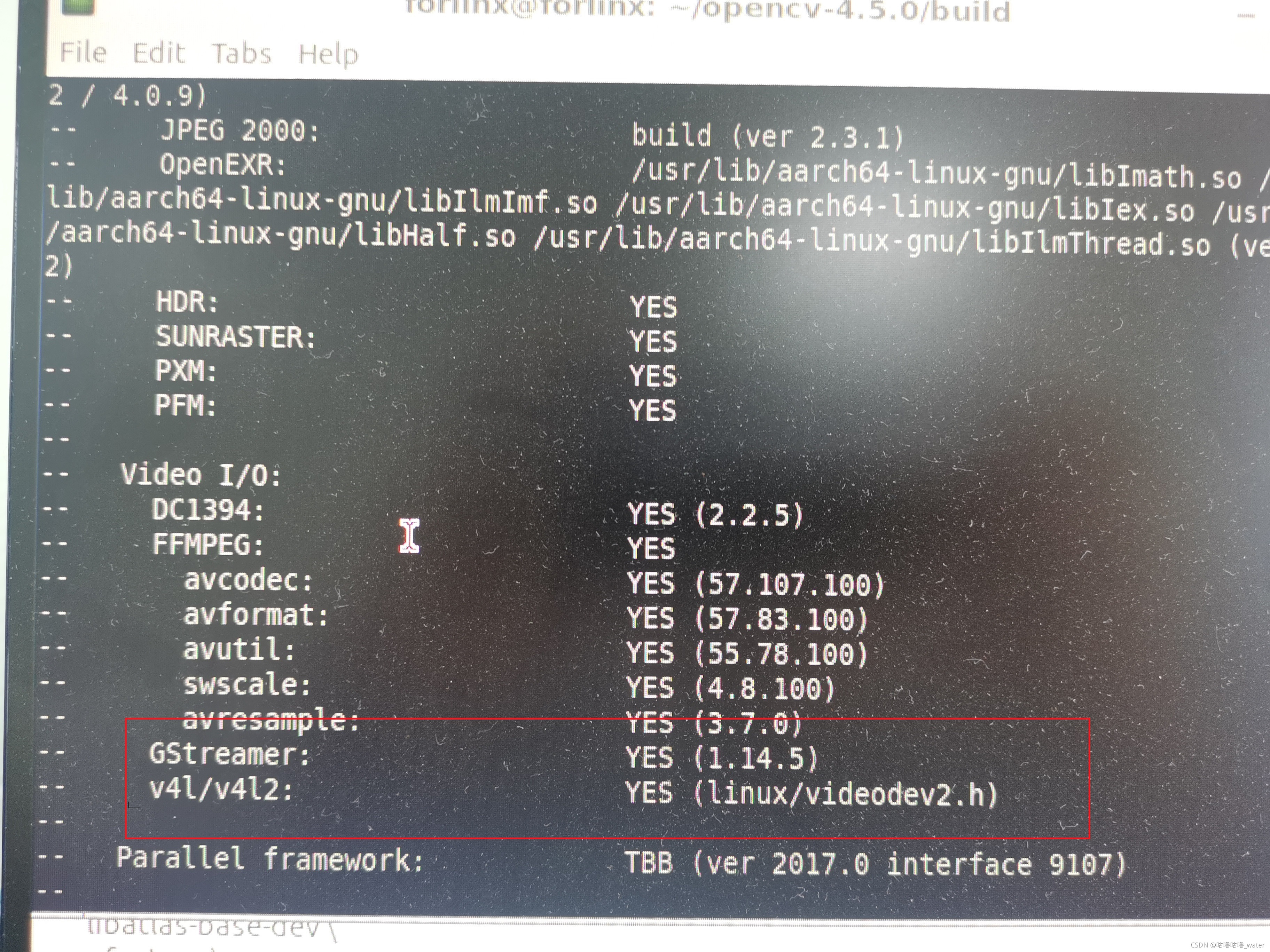
-D WITH_GSTREAMER = ON #这个一定要打开
-DPYTHON3_INCLUDE_DIR=/usr/include/$PY_NAME
-DPYTHON3_INCLUDE_DIR2=/usr/include/aarch64-linux-gnu/$PY_NAME
-DPYTHON3_LIBRARY=/usr/lib/aarch64-linux-gnu/lib$PY_NAME.so
-DPYTHON3_NUMPY_INCLUDE_DIRS=/usr/lib/$PY_NAME/dist-packages/numpy/core/include/
-DBUILD_DOCS=OFF
-DBUILD_EXAMPLES=OFF
-DBUILD_TESTS=OFF
-DBUILD_PERF_TESTS=OFF
..
build完成后
make&install
make -j6 #根据芯片的核数
sudo make install
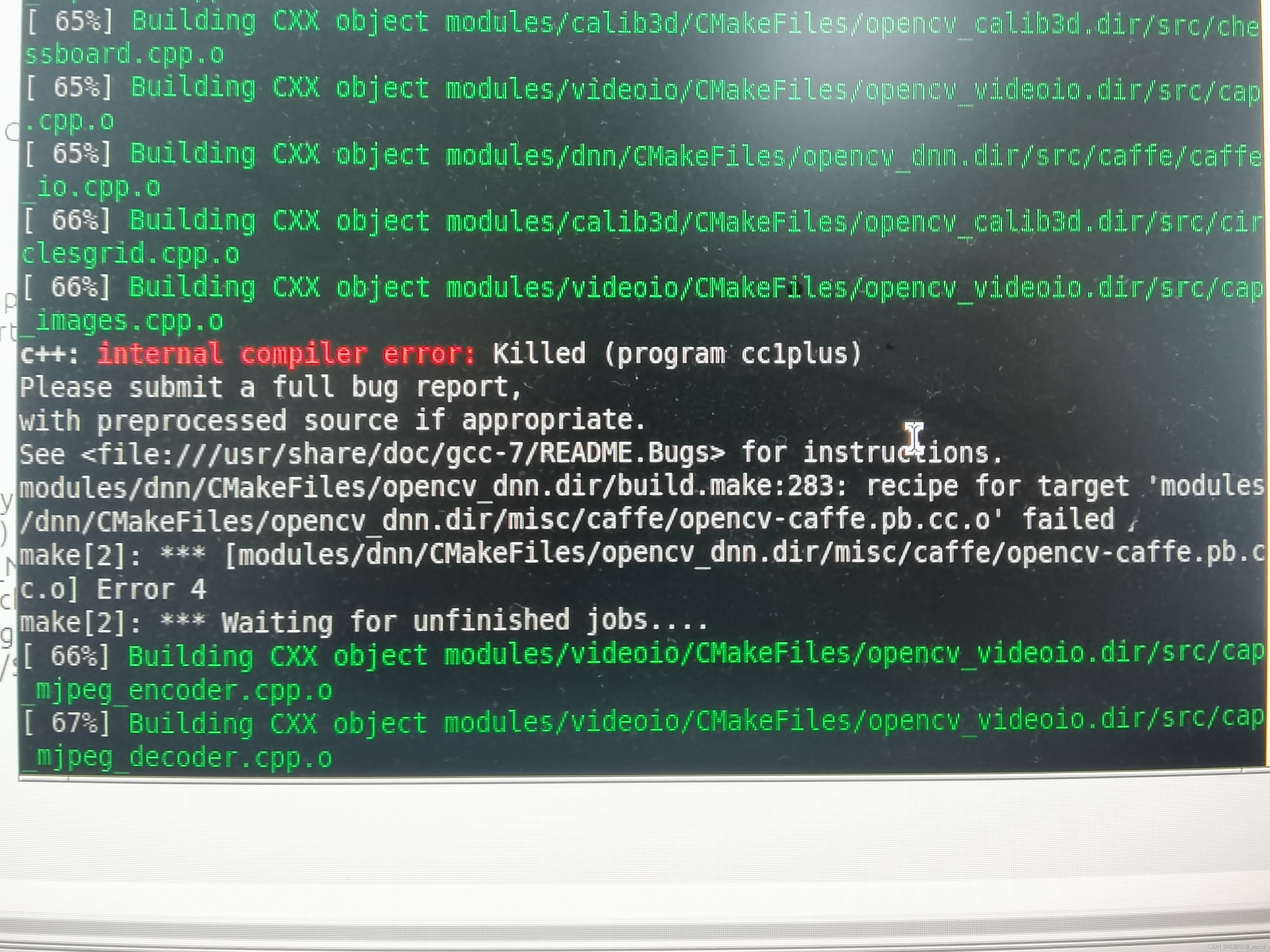
然后就是等待编译结束,大概一个小时左右,编译期间可能会报内存不足,先是报下面这个错误,然后往上翻
解决方案:
使用swap创建临时分区
#count的大小就是增加的swap空间的大小,64M是块大小,所以空间大小是bs*count=1536MB
sudo dd if=/dev/zero of=/swapfile bs=64M count=24
#把刚才空间格式化成swap格式
sudo mkswap /swapfile
#该目录权限,不改的话,在下一步启动时会报“swapon: /swapfile: insecure permissions 0644, 0600 suggested.”错误
chmod 0600 /swapfile
#使用刚才创建的swap空间
sudo swapon /swapfile
#编译完成把临时空间关闭
swapoff -a
#详细的用法可以:swapoff --help
#查看当前内存使用情况:free -m
4、Python 通过Gstreamer调用摄像头
官方给的文档是通过shell脚本来访问的
$ gst-launch-1.0 v4l2src device=/dev/video1 ! video/x-raw, format=NV12, width=640, height=480, framerate=30/1 ! waylandsink
在opencv中构建gstreamer的pipeline需要调整为:
'v4l2src device=/dev/video1 ! video/x-raw, format=NV12, width=640, height=480, framerate=30/1 ! videoconvert ! appsink'
测试代码
import numpy as np
import cv2 as cv
import os
import time
cap = cv.VideoCapture('v4l2src device=/dev/video1 ! video/x-raw, format=NV12, width=640, height=480, framerate=30/1 ! videoconvert ! appsink', cv.CAP_GSTREAMER)
if not cap.isOpened():
print("Cannot capture from camera. Exiting.")
os._exit()
last_time = time.time()
while(True):
ret, frame = cap.read()
this_time = time.time()
print (str((this_time-last_time)*1000)+'ms')
last_time = this_time;
cv.imshow('frame', frame)
if cv.waitKey(1) & 0xFF == ord('q'):
break
cap.release()
cv.destroyAllWindows()
最终效果图
1、下载opencv源码
我下载的是4.5.0版本的,开发板直接git的话,下载很慢。我选择用电脑下好再传给开发板,
2、安装所需的库,python版本是3.6
sudo apt-get install build-essential cmake git libgtk2.0-dev pkg-config libavcodec-dev libavformat-dev libswscale-dev python3.6-dev python3.6-numpy libtbb2 libtbb-dev libjpeg-dev libpng-dev libtiff-dev libjasper-dev libdc1394-22-dev
sudo apt install gstreamer1.0*
sudo apt install ubuntu-restricted-extras
sudo apt install libgstreamer1.0-dev libgstreamer-plugins-base1.0-dev
3、解压编译
cd opencv-4.5.0
mkdir build
cd build
# python版本改成对应的,找到python和numpy的路径,和opencv关联起来
export PY_NAME=$(python3.6 -c 'from sys import version_info as v; print("python%d.%d" % v[:2])')
export PY_NUMPY_DIR=$(python3.6 -c 'import os.path, numpy.core; print(os.path.dirname(numpy.core.__file__))')
cmake -DCMAKE_BUILD_TYPE=RELEASE
-DCMAKE_INSTALL_PREFIX=/usr/local
-DPYTHON_DEFAULT_EXECUTABLE=$(which python3.6)
-DPYTHON3_EXECUTABLE=$(which python3.6)
-D WITH_GSTREAMER = ON #这个一定要打开
-DPYTHON3_INCLUDE_DIR=/usr/include/$PY_NAME
-DPYTHON3_INCLUDE_DIR2=/usr/include/aarch64-linux-gnu/$PY_NAME
-DPYTHON3_LIBRARY=/usr/lib/aarch64-linux-gnu/lib$PY_NAME.so
-DPYTHON3_NUMPY_INCLUDE_DIRS=/usr/lib/$PY_NAME/dist-packages/numpy/core/include/
-DBUILD_DOCS=OFF
-DBUILD_EXAMPLES=OFF
-DBUILD_TESTS=OFF
-DBUILD_PERF_TESTS=OFF
..
build完成后
make&install
make -j6 #根据芯片的核数
sudo make install
然后就是等待编译结束,大概一个小时左右,编译期间可能会报内存不足,先是报下面这个错误,然后往上翻
解决方案:
使用swap创建临时分区
#count的大小就是增加的swap空间的大小,64M是块大小,所以空间大小是bs*count=1536MB
sudo dd if=/dev/zero of=/swapfile bs=64M count=24
#把刚才空间格式化成swap格式
sudo mkswap /swapfile
#该目录权限,不改的话,在下一步启动时会报“swapon: /swapfile: insecure permissions 0644, 0600 suggested.”错误
chmod 0600 /swapfile
#使用刚才创建的swap空间
sudo swapon /swapfile
#编译完成把临时空间关闭
swapoff -a
#详细的用法可以:swapoff --help
#查看当前内存使用情况:free -m
4、Python 通过Gstreamer调用摄像头
官方给的文档是通过shell脚本来访问的
$ gst-launch-1.0 v4l2src device=/dev/video1 ! video/x-raw, format=NV12, width=640, height=480, framerate=30/1 ! waylandsink
在opencv中构建gstreamer的pipeline需要调整为:
'v4l2src device=/dev/video1 ! video/x-raw, format=NV12, width=640, height=480, framerate=30/1 ! videoconvert ! appsink'
测试代码
import numpy as np
import cv2 as cv
import os
import time
cap = cv.VideoCapture('v4l2src device=/dev/video1 ! video/x-raw, format=NV12, width=640, height=480, framerate=30/1 ! videoconvert ! appsink', cv.CAP_GSTREAMER)
if not cap.isOpened():
print("Cannot capture from camera. Exiting.")
os._exit()
last_time = time.time()
while(True):
ret, frame = cap.read()
this_time = time.time()
print (str((this_time-last_time)*1000)+'ms')
last_time = this_time;
cv.imshow('frame', frame)
if cv.waitKey(1) & 0xFF == ord('q'):
break
cap.release()
cv.destroyAllWindows()
最终效果图
举报
更多回帖
rotate(-90deg);
回复
相关问答
python
RK3399
RK3399
为啥使用
opencv
通过rkisp获取失败呢
2022-08-10
2644
USB
摄像头
在
RK3399
上有哪些应用呢
2022-03-07
2827
UVC
摄像头
在
RK3399
中有哪些应用?
2022-03-07
1544
Firefly
RK3399
开源板上的MIPI
摄像头
接口是如何连接的
2022-03-04
3220
Firefly
RK3399
开源板的两个MIPI
摄像头
接口座是如何连接的
2022-03-07
2310
USB
摄像头
在
RK3399
上有何应用呢
2022-03-04
1580
Android
RK3399
UVC
摄像头
格式异常怎么解决?
2022-03-07
2372
RK3399
pro使用python3读取USB
摄像头
数据出现错误怎么解决?
2022-03-07
2235
怎么去解决
RK3399
ProD-imx258
摄像头
mipi错误的问题呢
2022-02-14
2058
求大神支招Firefly-
RK3399
插入usb
摄像头
无法使用相机功能
2022-06-06
2613
发帖
登录/注册
20万+
工程师都在用,
免费
PCB检查工具
无需安装、支持浏览器和手机在线查看、实时共享
查看
点击登录
登录更多精彩功能!
首页
论坛版块
小组
免费开发板试用
ebook
直播
搜索
登录
×
20
完善资料,
赚取积分


 make&install
 解决方案:
解决方案: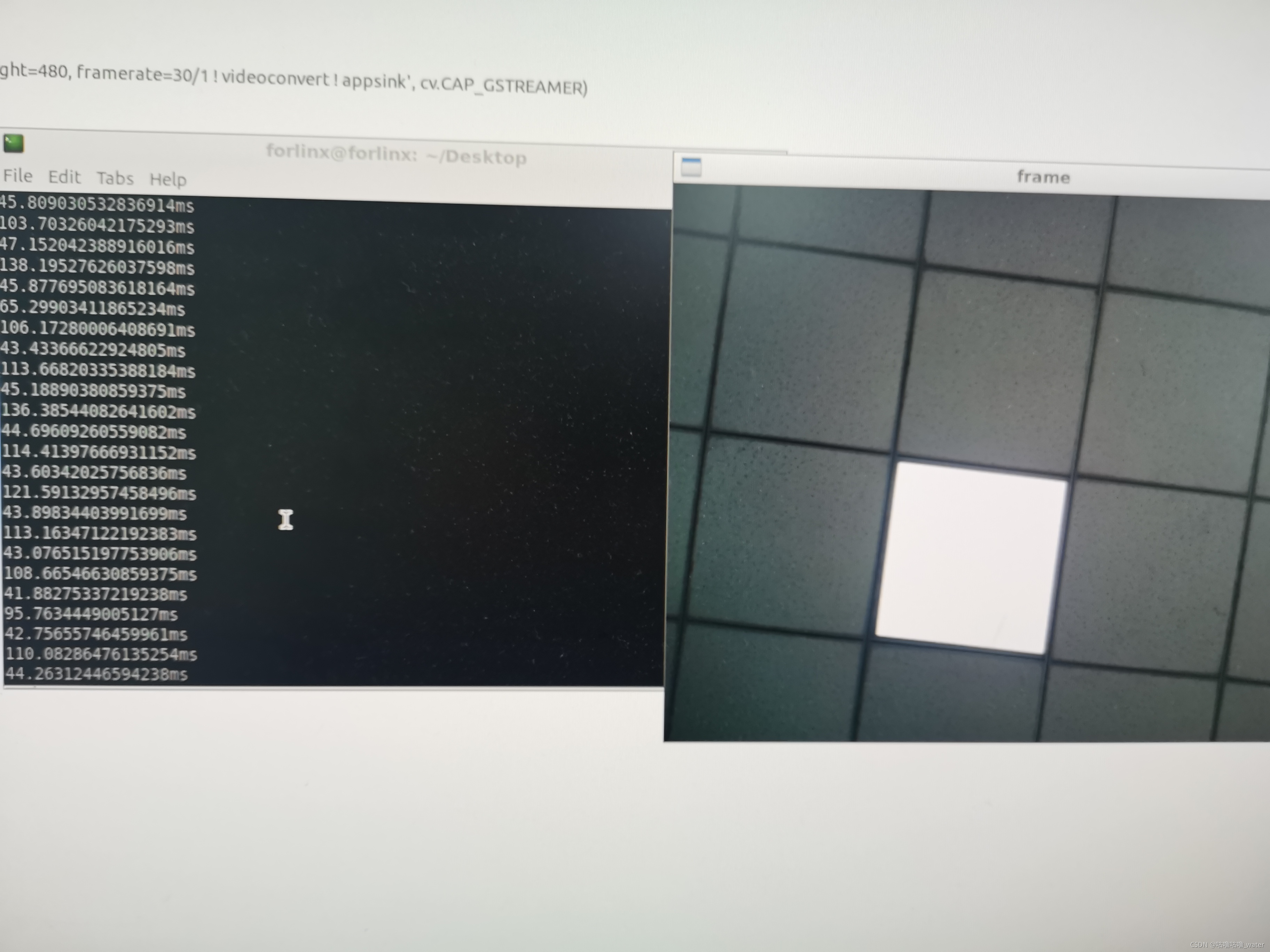

 举报
举报


