嗨,
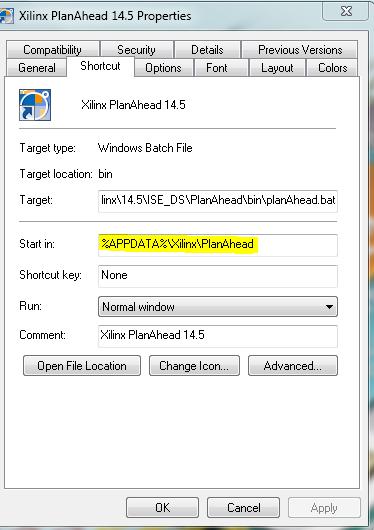
右键单击Planahead图标并选择属性。
现在将此处指定的“start in”位置更改为具有完全权限sayC: Users vemulad Documents test的目录,然后单击“确定”。
现在推出Planahead。
这将在上述目录中创建planahead.log和.jou文件。
(要么)
转到开始 - > ISE Design Suite - > Accesories - > 64位命令提示符
现在将目录更改为所需的位置
CDC:用户 vemulad 文档测试
现在输入命令planAhead
打开planahead,你可以在上面提到的位置看到planahead.log / .jou
谢谢,
迪皮卡。
谢谢,迪皮卡.----------------------------------------------
---------------------------------------------- Google之前的问题
张贴。
如果某人的帖子回答了您的问题,请将帖子标记为“接受为解决方案”。
如果你看到一个特别好的和信息丰富的帖子,考虑给它Kudos(左边的明星)
在原帖中查看解决方案
以上来自于谷歌翻译
以下为原文
Hi,
Right click on Planahead icon and select properties. Now change the "start in" location specified here to a directory with full permissions say C:UsersvemuladDocumentstest and click on OK. Now launch Planahead. This will create planahead.log and .jou files at the above mentioned directory.
(or)
- Go to start --> ISE Design Suite --> Accesories --> 64 bit command prompt
- Now change the directory to desired location
cd C:UsersvemuladDocumentstest
- Now type the command planAhead
- This opens planahead and you can see planahead.log/.jou created at the above mentioned location
Thanks,
Deepika.
Thanks,
Deepika.
--------------------------------------------------------------------------------------------
Google your question before posting. If someone's post answers your question, mark the post as answer with "Accept as solution". If you see a particularly good and informative post, consider giving it Kudos (the star on the left)View solution in original post
嗨,
右键单击Planahead图标并选择属性。
现在将此处指定的“start in”位置更改为具有完全权限sayC: Users vemulad Documents test的目录,然后单击“确定”。
现在推出Planahead。
这将在上述目录中创建planahead.log和.jou文件。
(要么)
转到开始 - > ISE Design Suite - > Accesories - > 64位命令提示符
现在将目录更改为所需的位置
CDC:用户 vemulad 文档测试
现在输入命令planAhead
打开planahead,你可以在上面提到的位置看到planahead.log / .jou
谢谢,
迪皮卡。
谢谢,迪皮卡.----------------------------------------------
---------------------------------------------- Google之前的问题
张贴。
如果某人的帖子回答了您的问题,请将帖子标记为“接受为解决方案”。
如果你看到一个特别好的和信息丰富的帖子,考虑给它Kudos(左边的明星)
在原帖中查看解决方案
以上来自于谷歌翻译
以下为原文
Hi,
Right click on Planahead icon and select properties. Now change the "start in" location specified here to a directory with full permissions say C:UsersvemuladDocumentstest and click on OK. Now launch Planahead. This will create planahead.log and .jou files at the above mentioned directory.
(or)
- Go to start --> ISE Design Suite --> Accesories --> 64 bit command prompt
- Now change the directory to desired location
cd C:UsersvemuladDocumentstest
- Now type the command planAhead
- This opens planahead and you can see planahead.log/.jou created at the above mentioned location
Thanks,
Deepika.
Thanks,
Deepika.
--------------------------------------------------------------------------------------------
Google your question before posting. If someone's post answers your question, mark the post as answer with "Accept as solution". If you see a particularly good and informative post, consider giving it Kudos (the star on the left)View solution in original post

 举报
举报


