
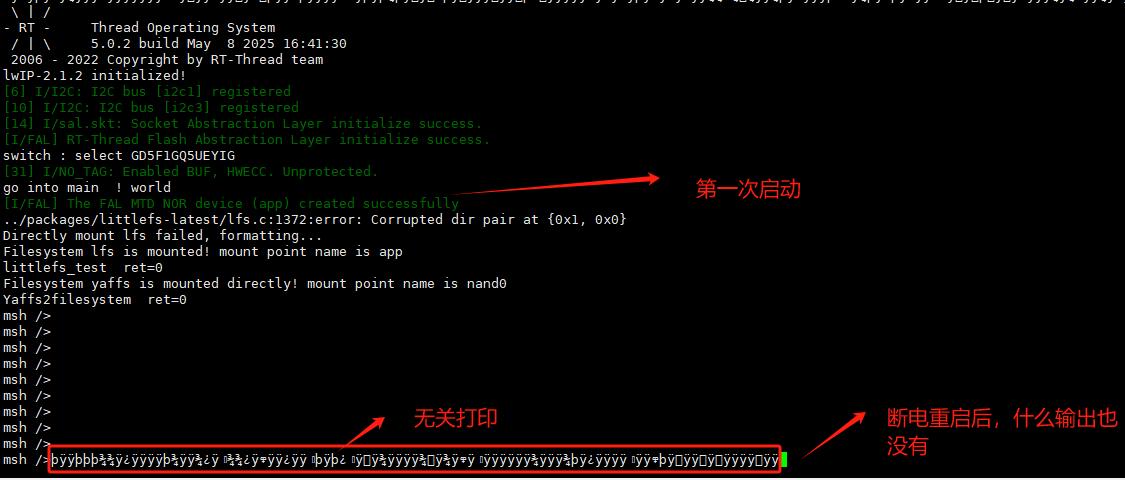

当NOR Flash挂载LittleFS文件系统后,设备断电重启无法运行,可能由以下原因导致:
解决方案:
启动时添加自动修复逻辑:
#include


struct lfs_config cfg = {

   .read  = nor_read,

   .prog  = nor_prog,

   .erase = nor_erase,

   .sync  = nor_sync,

   .read_size = 256,

   .prog_size = 256,

   .block_size = 4096,    // 需匹配Flash擦除块大小

   .block_count = 2048,   // 8MB / 4096

   .block_cycles = 500,   // 磨损均衡周期

};


lfs_t lfs;

int err = lfs_mount(&lfs, &cfg);

if (err) {

   // 自动修复文件系统

   lfs_format(&lfs, &cfg);

   lfs_mount(&lfs, &cfg); // 重新挂载

}block_size:必须等于NOR Flash的物理擦除块大小(如4KB/64KB)。block_count:需精确计算(len / block_size)。 struct fal_flash_dev nor_flash0 = {
.name = "nor0",
.addr = 0x8000000, // 确认地址与硬件匹配
.len = 8 * 1024 * 1024, // 需与NOR实际容量一致
};cfg.block_size 与其一致。 if (dfs_mount("nor0", "/", "lfs", 0, 0) != 0) {
rt_kprintf("Mount failed! Formatting...n");
dfs_mkfs("lfs", "nor0"); // 格式化文件系统
dfs_mount("nor0", "/", "lfs", 0, 0); // 重新挂载
}sync()sync函数确保断电安全。 int nor_sync(const struct lfs_config *cfg) {
// 确保数据写入物理Flash(如执行写缓存刷新)
nor_flash_sync(); // 自定义Flash同步函数
return 0;
}输出错误日志:
int err = lfs_mount(&lfs, &cfg);

if (err) {

   rt_kprintf("LittleFS mount error: %dn", err);

}LFS_ERR_IO(驱动错误)、LFS_ERR_CORRUPT(文件系统损坏)。Flash读写验证:
uint8_t buf[256];

nor_read(0, buf, sizeof(buf)); // 读取首块数据

nor_prog(0, "test", 4); // 写入测试数据使用FAL检查Flash:
#include

fal_init(); // 初始化FAL

const struct fal_flash_dev *flash = fal_flash_find("nor0");

if (flash) {

   uint8_t temp[4];

   fal_read(flash, 0, temp, 4); // 读取前4字节

}| 序号 | 问题类型 | 解决措施 |
|---|---|---|
| 1 | 文件系统损坏 | 添加lfs_format()自动修复逻辑 |
| 2 | 配置参数错误 | 校正block_size/block_count匹配物理特性 |
| 3 | 挂载流程无容错 | 增加挂载失败时的格式化重试 |
| 4 | Flash驱动不完整 | 实现sync()并验证原子操作 |
| 5 | 硬件初始化失败 | 检查复位时序和时钟配置 |
关键建议:在首次启动时格式化NOR Flash(如使用
lfs_format()),确保文件系统结构正确初始化。同时在产品设计中增加后备电池或超级电容,保障关键写操作完成。

 举报
举报
更多回帖


