
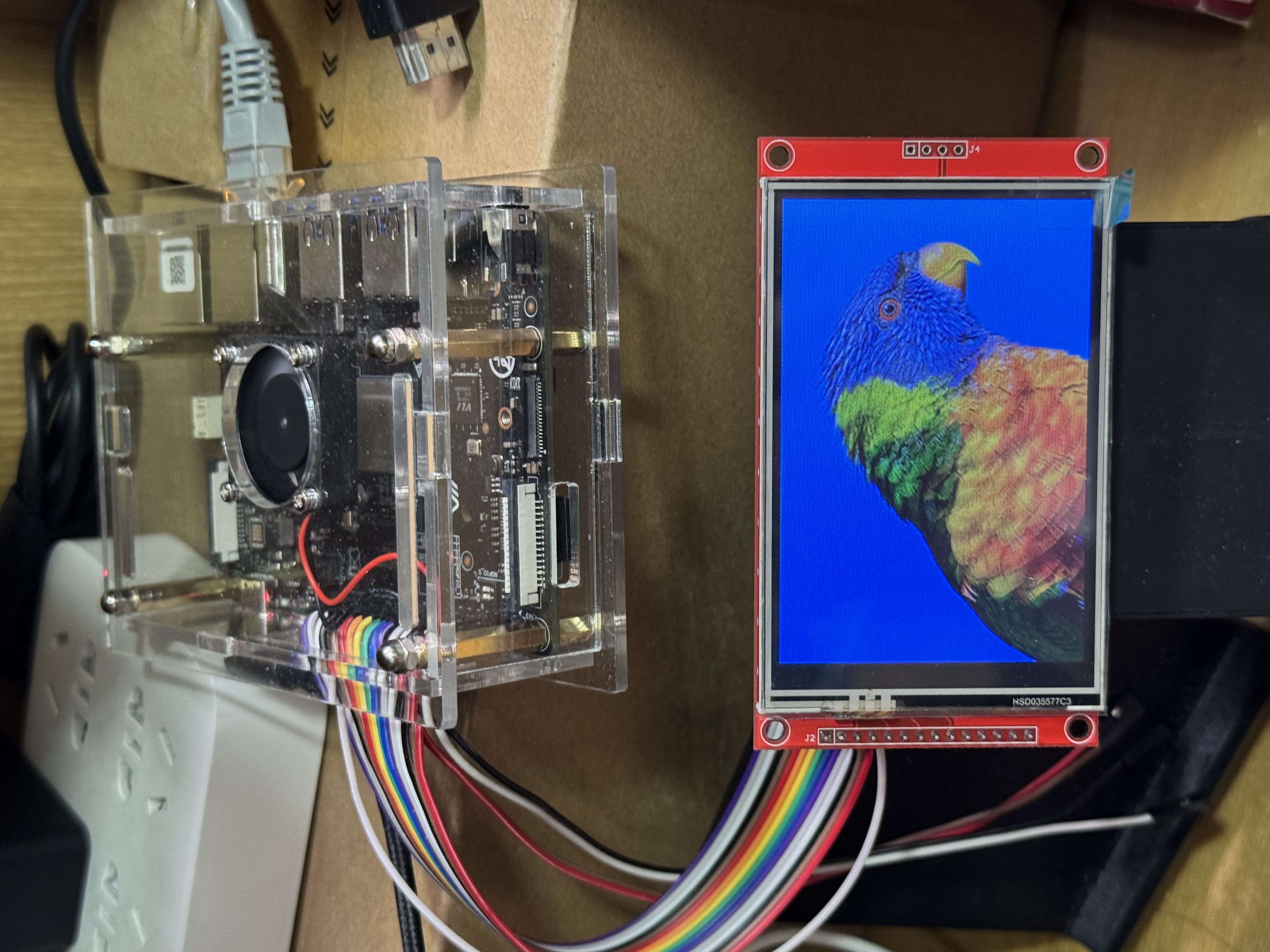
本章整理下我适配的三款lcd。
前两款ST7735|GC9306相对简单。
ILI9488由于色彩位深RGB666,需要从RGB888转为RGB666,同时需要注意采用比例计算颜色,如果采用
LCD_demo.py
#!/usr/bin/python
"""
Please make sure the 2.4inch LCD Moudle is connected to the correct pins.
The following table describes how to connect the 2.4inch LCD Module to the 40-pin header.
-------------------------------------------------
__2.4inch LCD Module___Pin Number_____Pin Name
    VCC                  17           3.3 V Power
    GND                  39             GND
    DIN                  19           SPI MOSI
    CLK                  23           SPI SCLK
    CS                   13            GPIO43   y
    DC                   11            GPIO42   y   -
    RST                  07            GPIO55   y   -
    BL                   15            GPIO47   y
-------------------------------------------------
"""

import os
import sys
import time
import logging
from PIL import Image

sys.path.append("..")

import VisionFive.boardtype as board_t
# from lib import LCD2inch4_lib
from lib import LCD_ST7735_lib
from lib import LCD_GC9306_lib
from lib import LCD_ILI9488_lib

"""
--------------------------------------------------------------- {
                            Init
"""
WHITE = 0xffffff
# WHITE = 0x0000
BLUE = 0xFF0000

lcd_num = 3
# 1 st7735, 2 gc9306, 3 ili9488

pin_res = 7
pin_dc = 11

# 初始化lcd
# Determining cpu Type: 1 means visionfive1; 2 means visionfive 2
vf_t = board_t.boardtype()

print("vf_t ",vf_t)

if vf_t == 1:
    SPI_DEVICE = "/dev/spidev0.0"
elif vf_t == 2:
    SPI_DEVICE = "/dev/spidev1.0"
else:
    print("This module can only be run on a VisionFive board!")

"""The initialization settings of 2inch and 2.4inch are distinguished"""
# pin_res, pin_dc
match lcd_num:
    case 1:
        print("lcd st7735")
        disp = LCD_ST7735_lib.LCD_ST7735(7, 11, SPI_DEVICE)
        disp.lcd_init_st7735()
    case 2:
        print("lcd gc9306")
        disp = LCD_GC9306_lib.LCD_GC9306(7, 11, SPI_DEVICE)
        disp.lcd_init_gc9306()
    case 3:
        print("lcd ili9488")
        disp = LCD_ILI9488_lib.LCD_ILI9488(7, 11, SPI_DEVICE)
        disp.lcd_init_ili9488()
    case _:
        print("unknown lcd")


# 获取文件夹中图片名称
folder_path = "./picture"
# folder_path = "./tmp"
items = os.listdir(folder_path)
file_paths = []
for item in items:
    item_path = os.path.join(folder_path, item)
    if os.path.isfile(item_path) and "._" not in item and ".DS_Store" not in item:
        # if os.path.isfile(item_path):  # 只保留文件
        file_paths.append(item_path)
"""
} ---------------------------------------------------------------
"""

def show_img(image_path):
    image = Image.open(image_path)
    disp.lcd_ShowImage(image, 0, 0)
    time.sleep(2)

def test_clear():
    # print("clear write")
    # time.sleep(2)

    print("clear screen -- White")
    disp.lcd_clear(WHITE)
    time.sleep(2)

    print("clear screen -- Blue")

    if lcd_num == 3:
        # Blue=0x03F0000
        # Blue=0xFC0000
        # Blue=0x3F0000
        Blue=0x03F000
    else:
        Blue=0x001f

    disp.lcd_clear(Blue)
    time.sleep(2)

def main():
    print("-----------lcd demo-------------")

    # """add the part of displaying pictures circularly"""
    # while True:
    #     try:

    # test_clear()

    # test picture and lcd xy direction
    # show_img("./tmp/line.jpg")
    # show_img("./tmp/line2.jpg")

    # show_img("./tmp/line320.jpg")
    # show_img("./tmp/line480.jpg")

    # show_img("./picture/parrot.bmp")
    # show_img("./picture/code.jpg")
    # show_img("./picture/IMG_4512.jpeg")

    # show_img("./picture/visionfive2.png")


    for path in file_paths:

        print(time.strftime("%Y-%m-%d %H:%M:%S", time.localtime(time.time())))
        path_tmp = path
        print(path_tmp)
        show_img(path_tmp)
        time.sleep(2)

        # except KeyboardInterrupt:
        #     break

    print("Exit demo!")

if __name__ == '__main__':
    main()
LCD_ILI9488_lib.py
import os
import sys
import time
import logging
import VisionFive.spi as spi
import VisionFive.gpio as gpio
import numpy as np
from PIL import Image, ImageDraw, ImageFont


class LCD_ILI9488:
    width = 320
    height = 480

    def __init__(self, rst_pin, dc_pin, dev):
        gpio.setmode(gpio.BOARD)

        self.pin_rst = rst_pin
        self.pin_dc = dc_pin

        self.pin_bl = 15

        self.spidev = dev
        spi.getdev(self.spidev)

        """Reset the maximum clock frequency of communication"""
        """The display speed of the picture is positively correlated with the clock frequency"""
        # spi.setmode(500000, 0, 8)
        spi.setmode(40000000, 0, 8)
        gpio.setup(self.pin_rst, gpio.OUT)
        gpio.setup(self.pin_dc, gpio.OUT)

        gpio.setup(self.pin_bl, gpio.OUT)

    def __del__(self):
        spi.freedev()

    """add a short delay for each change of electrical level"""

    def lcd_reset(self):
        gpio.output(self.pin_bl, gpio.HIGH)
        # time.sleep(0.120)
        # gpio.output(self.pin_rst, gpio.HIGH)
        # time.sleep(0.20)
        gpio.output(self.pin_rst, gpio.LOW)
        time.sleep(0.100)
        gpio.output(self.pin_rst, gpio.HIGH)
        time.sleep(0.100)

        gpio.output(self.pin_bl, gpio.HIGH)

        # self.lcd_sendcmd(0x01)

    def lcd_spisend(self, data):
        spi.transfer(data)

    def lcd_sendcmd(self, cmd):
        gpio.output(self.pin_dc, gpio.LOW)
        spi.transfer(cmd)

    def lcd_senddata(self, data):
        gpio.output(self.pin_dc, gpio.HIGH)
        spi.transfer(data)

    """write multiple bytes"""

    def lcd_sendnbytes(self, data):
        gpio.output(self.pin_dc, gpio.HIGH)
        spi.write(data)

    """common registers' initialization of 2.4inch LCD module"""
    def lcd_init_ili9488(self):
        self.lcd_reset()

        # self.lcd_sendcmd(0x11)
        # self.lcd_senddata(0x00)
        # time.sleep(0.200)

        self.lcd_sendcmd(0xE0)
        self.lcd_senddata(0x00)
        self.lcd_senddata(0x03)
        self.lcd_senddata(0x09)
        self.lcd_senddata(0x08)
        self.lcd_senddata(0x16)
        self.lcd_senddata(0x0A)
        self.lcd_senddata(0x3F)
        self.lcd_senddata(0x78)
        self.lcd_senddata(0x4C)
        self.lcd_senddata(0x09)
        self.lcd_senddata(0x0A)
        self.lcd_senddata(0x08)
        self.lcd_senddata(0x16)
        self.lcd_senddata(0x1A)
        self.lcd_senddata(0x0F)

        self.lcd_sendcmd(0xE1)
        self.lcd_senddata(0x00)
        self.lcd_senddata(0x16)
        self.lcd_senddata(0x19)
        self.lcd_senddata(0x03)
        self.lcd_senddata(0x0F)
        self.lcd_senddata(0x05)
        self.lcd_senddata(0x32)
        self.lcd_senddata(0x45)
        self.lcd_senddata(0x46)
        self.lcd_senddata(0x04)
        self.lcd_senddata(0x0E)
        self.lcd_senddata(0x0D)
        self.lcd_senddata(0x35)
        self.lcd_senddata(0x37)
        self.lcd_senddata(0x0F)

        self.lcd_sendcmd(0xC0)
        self.lcd_sendcmd(0x17)
        self.lcd_senddata(0x15)

        self.lcd_sendcmd(0xC1)
        self.lcd_senddata(0x41)

        self.lcd_sendcmd(0xC5)
        self.lcd_sendcmd(0x00)
        self.lcd_senddata(0x12)
        self.lcd_senddata(0x80)

        self.lcd_sendcmd(0x36)
        # self.lcd_sendcmd(0x48)
        # self.lcd_sendcmd(0x40)
        # self.lcd_sendcmd(0x88)
        # self.lcd_sendcmd(0x28)
        self.lcd_sendcmd(0x88)

        self.lcd_sendcmd(0x3A)
        self.lcd_senddata(0x66) # color bit : 0x66 18bit, 0x77 24bit, 0x55 16bit

        self.lcd_sendcmd(0xC8)
        self.lcd_senddata(0xB1)

        self.lcd_sendcmd(0xB0)
        self.lcd_sendcmd(0x80)

        self.lcd_sendcmd(0xB1)
        self.lcd_sendcmd(0x80)
        # SDA_EN = 0, DIN and SDO pins are used for 3/4 wire serial interface.
        # SDA_EN = 1, DIN/SDA pin is used for 3/4 wire serial interface and SDO pin is not used.

        self.lcd_sendcmd(0xB4)
        self.lcd_sendcmd(0x02)

        self.lcd_sendcmd(0xB6)
        self.lcd_sendcmd(0x02)
        self.lcd_senddata(0x02)

        self.lcd_sendcmd(0xE9)
        self.lcd_senddata(0x00)

        self.lcd_sendcmd(0x53)
        self.lcd_senddata(0x28)

        self.lcd_sendcmd(0x51)
        self.lcd_senddata(0x7F)

        self.lcd_sendcmd(0xF7)
        self.lcd_senddata(0xA9)
        self.lcd_senddata(0x51)
        self.lcd_senddata(0x2C)
        self.lcd_senddata(0x02)

        self.lcd_sendcmd(0x11)
        # self.lcd_senddata(0x00)
        time.sleep(0.100)

        self.lcd_sendcmd(0x29)

    def lcd_setPos(self, Xstart, Ystart, Xend, Yend):
        self.lcd_sendcmd(0x2A)
        self.lcd_senddata(Xstart >> 8)
        self.lcd_senddata(Xstart & 0xFF)
        self.lcd_senddata((Xend - 1) >> 8)
        self.lcd_senddata((Xend - 1) & 0xFF)

        self.lcd_sendcmd(0x2B)
        self.lcd_senddata(Ystart >> 8)
        self.lcd_senddata(Ystart & 0xFF)
        self.lcd_senddata((Yend - 1) >> 8)
        self.lcd_senddata((Yend - 1) & 0xFF)
        self.lcd_sendcmd(0x2C)

    def lcd_clear(self, color):
        """Clear contents of image buffer"""

        _buffer = [color] * (self.width * self.height * 3)  # * 3

        print(_buffer[0],_buffer[1],_buffer[2])

        # self.lcd_setPos(0, 0, self.width, self.height)
        self.lcd_setPos(0, 0, self.width, self.height)
        gpio.output(self.pin_dc, gpio.HIGH)

        """modify the original single byte write to multi byte write"""
        # for i in range(0,len(_buffer)):
        #    self.lcd_spisend(_buffer[i])
        self.lcd_sendnbytes(_buffer)
        # self.lcd_sendcmd(0x29)

    def Image_to_RGB565(self, Image):

        img = np.asarray(Image)
        pix = np.zeros((self.width, self.height, 3), dtype=np.uint8)
        # RGB888 >> RGB565
        pix[..., [0]] = np.add(
            np.bitwise_and(img[..., [0]], 0xF8), np.right_shift(img[..., [1]], 5)
        )
        pix[..., [1]] = np.add(
            np.bitwise_and(np.left_shift(img[..., [1]], 3), 0xE0),
            np.right_shift(img[..., [2]], 3),
        )

        pix = pix.flatten().tolist()
        # return pix.flatten().tolist()

        return pix

    def Image_to_RGB666(self, Image):
        # 将RGB888转换为RGB666
        img = np.asarray(Image)
        # 创建一个(宽度, 高度, 3)的数组,每个通道6位,用uint8存储
        pix = np.zeros((self.width, self.height, 3), dtype=np.uint8)

        # RGB888 >> RGB666转换
        # 每个通道保留高6位(右移2位丢弃最低2位)
        pix[..., 0] = np.right_shift(img[..., 0], 2)  # 红色通道(6位)
        pix[..., 1] = np.right_shift(img[..., 1], 2)  # 绿色通道(6位)
        pix[..., 2] = np.right_shift(img[..., 2], 2)  # 蓝色通道(6位)

        return pix

    def Image_RGB888_to_RGB666(self, Image):
        img = np.asarray(Image)
        pix = np.zeros((self.height, self.width, 3), dtype=np.uint8)

        pix[..., [0]] = np.left_shift(np.left_shift(img[..., [0]], 2), 2)
        pix[..., [1]] = np.left_shift(np.left_shift(img[..., [1]], 2), 2)
        pix[..., [2]] = np.left_shift(np.left_shift(img[..., [2]], 2), 2)

        return pix.flatten().tolist()

    def lcd_ShowImage(self, Image, Xstart, Ystart):
        """Set buffer to value of Python Imaging Library image."""
        """Write display buffer to physical display"""

        print("image.mode", Image.mode)

        tmp_width, tmp_height = Image.size
        print("sss",tmp_width,tmp_height)

        if tmp_width > tmp_height:
            print("change width to height")
            new_size = (self.height, self.width)
        else:
            new_size = (self.width, self.height)

        Image = Image.resize(new_size)

        print("new_size",new_size)

        imwidth, imheight = Image.size

        print("image: width = ", imwidth, ", height = ", imheight)

        if Image.mode == "RGBA":
            Image = Image.convert("RGB")

        if imwidth == self.height and imheight == self.width:

            img_array = np.asarray(Image, dtype=np.uint8)  # 形状为 (height, width, 3),值范围[0,255]

            # 创建存储6位数据的数组
            pix = np.zeros((self.width, self.height, 3), dtype=np.uint8)

            # 比例缩放:将8位值[0,255]映射到6位值[0,63]
            # 公式:6位值 = 8位值 × (63/255),四舍五入取整
            scale_factor = 63 * 4 / 255  # 缩放因子
            pix = np.round(img_array * scale_factor).astype(np.uint8)

            pix = pix.flatten().tolist()

            self.lcd_sendcmd(
                0x36
            )  # define read/write scanning direction of frame memory
            self.lcd_senddata(0x68)
            self.lcd_setPos(0, 0, self.height, self.width)

            gpio.output(self.pin_dc, gpio.HIGH)

            """modify the original single byte write to multi byte write"""
            # for i in range(0,len(pix),1):
            #   self.lcd_spisend(pix[i])
            self.lcd_sendnbytes(pix)
        else:
            print("same direction")

            img_array = np.asarray(Image, dtype=np.uint8)  # 形状为 (height, width, 3),值范围[0,255]

            # 创建存储6位数据的数组
            pix = np.zeros((self.height, self.width, 3), dtype=np.uint8)

            # 比例缩放:将8位值[0,255]映射到6位值[0,63]
            # 公式:6位值 = 8位值 × (63/255),四舍五入取整
            scale_factor = 63 * 4 / 255  # 缩放因子
            pix = np.round(img_array * scale_factor).astype(np.uint8)

            pix = pix.flatten().tolist()

            self.lcd_sendcmd(0x36)
            # self.lcd_senddata(0xC8)
            self.lcd_senddata(0x88)
            self.lcd_setPos(0, 0, self.width, self.height)

            gpio.output(self.pin_dc, gpio.HIGH)

            """modify the original single byte write to multi byte write"""
            # for i in range(0,len(pix)):
            #    self.lcd_spisend(pix[i])
            self.lcd_sendnbytes(pix)
LCD_GC9306_lib.py
import os
import sys
import time
import logging
import VisionFive.spi as spi
import VisionFive.gpio as gpio
import numpy as np
from PIL import Image, ImageDraw, ImageFont


class LCD_GC9306:
    width = 240
    height = 320
    # width = 320
    # height = 240

    def __init__(self, rst_pin, dc_pin, dev):
        gpio.setmode(gpio.BOARD)

        self.rstpin = rst_pin
        self.dcpin = dc_pin
        self.spidev = dev
        spi.getdev(self.spidev)

        """Reset the maximum clock frequency of communication"""
        """The display speed of the picture is positively correlated with the clock frequency"""
        # spi.setmode(500000, 0, 8)
        spi.setmode(40000000, 0, 8)
        gpio.setup(self.rstpin, gpio.OUT)
        gpio.setup(self.dcpin, gpio.OUT)

    def __del__(self):
        spi.freedev()

    """add a short delay for each change of electrical level"""

    def lcd_reset(self):
        gpio.output(self.rstpin, gpio.HIGH)
        time.sleep(0.500)
        gpio.output(self.rstpin, gpio.LOW)
        time.sleep(0.500)
        gpio.output(self.rstpin, gpio.HIGH)
        time.sleep(0.500)

    def lcd_spisend(self, data):
        spi.transfer(data)

    def lcd_sendcmd(self, cmd):
        gpio.output(self.dcpin, gpio.LOW)
        spi.transfer(cmd)

    def lcd_senddata(self, data):
        gpio.output(self.dcpin, gpio.HIGH)
        spi.transfer(data)

    """write multiple bytes"""

    def lcd_sendnbytes(self, data):
        gpio.output(self.dcpin, gpio.HIGH)
        spi.write(data)

    """common registers' initialization of 2.4inch LCD module"""

    def lcd_init_gc9306(self):
        self.lcd_reset()

        # self.lcd_sendcmd(0x01)  # Software reset
        # time.sleep(0.150)
        self.lcd_sendcmd(0x11)
        time.sleep(0.150)

        time.sleep(0.50)

        #display control setting
        self.lcd_sendcmd(0xfe)
        self.lcd_sendcmd(0xef)

        self.lcd_sendcmd(0x36)
        self.lcd_senddata(0x48)

        self.lcd_sendcmd(0x3A)
        self.lcd_senddata(0x05)

        self.lcd_sendcmd(0xad)
        self.lcd_senddata(0x33)

        self.lcd_sendcmd(0xaf)
        self.lcd_senddata(0x55)

        self.lcd_sendcmd(0xae)
        self.lcd_senddata(0x2b)

        #GC9306 Power Sequence
        self.lcd_sendcmd(0xa4)
        self.lcd_senddata(0x44)
        self.lcd_senddata(0x44)

        self.lcd_sendcmd(0xa5)
        self.lcd_senddata(0x42)
        self.lcd_senddata(0x42)

        self.lcd_sendcmd(0xaa)
        self.lcd_senddata(0x88)
        self.lcd_senddata(0x88)

        self.lcd_sendcmd(0xae)
        self.lcd_senddata(0x2b)

        self.lcd_sendcmd(0xe8)
        self.lcd_senddata(0x11)
        self.lcd_senddata(0x0b)

        self.lcd_sendcmd(0xe3)
        self.lcd_senddata(0x01)
        self.lcd_senddata(0x10)

        self.lcd_sendcmd(0xff)
        self.lcd_senddata(0x61)

        self.lcd_sendcmd(0xac)
        self.lcd_senddata(0x00)

        self.lcd_sendcmd(0xaf)
        self.lcd_senddata(0x67)

        self.lcd_sendcmd(0xa6)
        self.lcd_senddata(0x2a)
        self.lcd_senddata(0x2a)

        self.lcd_sendcmd(0xa7)
        self.lcd_senddata(0x2b)
        self.lcd_senddata(0x2b)

        self.lcd_sendcmd(0xa8)
        self.lcd_senddata(0x18)
        self.lcd_senddata(0x18)

        self.lcd_sendcmd(0xa9)
        self.lcd_senddata(0x2a)
        self.lcd_senddata(0x2a)

        #display window 240X320 匹配mode
        self.lcd_sendcmd(0x2a)
        self.lcd_senddata(0x00)
        self.lcd_senddata(0x00)
        self.lcd_senddata(0x00)
        self.lcd_senddata(0xef)   #MIPI_DCS_SET_COLUMN_ADDRESS - 240

        self.lcd_sendcmd(0x2b)
        self.lcd_senddata(0x00)
        self.lcd_senddata(0x00)
        self.lcd_senddata(0x01)
        self.lcd_senddata(0x3f)   #MIPI_DCS_SET_PAGE_ADDRESS - 320

        self.lcd_sendcmd(0x2c)     #MIPI_DCS_WRITE_MEMORY_START

        #GC9306 Gamma Sequence
        self.lcd_sendcmd(0xF0)
        self.lcd_senddata(0x02)
        self.lcd_senddata(0x00)
        self.lcd_senddata(0x00)
        self.lcd_senddata(0x1b)
        self.lcd_senddata(0x1f)
        self.lcd_senddata(0x0b)

        self.lcd_sendcmd(0xF1)
        self.lcd_senddata(0x01)
        self.lcd_senddata(0x03)
        self.lcd_senddata(0x00)
        self.lcd_senddata(0x28)
        self.lcd_senddata(0x2b)
        self.lcd_senddata(0x0e)

        self.lcd_sendcmd(0xF2)
        self.lcd_senddata(0x0b)
        self.lcd_senddata(0x08)
        self.lcd_senddata(0x3b)
        self.lcd_senddata(0x04)
        self.lcd_senddata(0x03)
        self.lcd_senddata(0x4c)

        self.lcd_sendcmd(0xF3)
        self.lcd_senddata(0x0e)
        self.lcd_senddata(0x07)
        self.lcd_senddata(0x46)
        self.lcd_senddata(0x04)
        self.lcd_senddata(0x05)
        self.lcd_senddata(0x51)

        self.lcd_sendcmd(0xF4)
        self.lcd_senddata(0x08)
        self.lcd_senddata(0x15)
        self.lcd_senddata(0x15)
        self.lcd_senddata(0x1f)
        self.lcd_senddata(0x22)
        self.lcd_senddata(0x0F)

        self.lcd_sendcmd(0xF5)
        self.lcd_senddata(0x0b)
        self.lcd_senddata(0x13)
        self.lcd_senddata(0x11)
        self.lcd_senddata(0x1f)
        self.lcd_senddata(0x21)
        self.lcd_senddata(0x0F)

        # Sleep Out
        self.lcd_sendcmd(0x11)                       #MIPI_DCS_EXIT_SLEEP_MODE
        time.sleep(0.100)

        self.lcd_sendcmd(0x2c)                       #MIPI_DCS_WRITE_MEMORY_START

        self.lcd_sendcmd(0x20)                       #MIPI_DCS_EXIT_INVERT_MODE

        # display on
        self.lcd_sendcmd(0x29)                       #MIPI_DCS_SET_DISPLAY_ON - 29
        time.sleep(0.100)

    def lcd_setPos(self, Xstart, Ystart, Xend, Yend):
        self.lcd_sendcmd(0x2A)
        self.lcd_senddata(Xstart >> 8)
        self.lcd_senddata(Xstart & 0xFF)
        self.lcd_senddata((Xend - 1) >> 8)
        self.lcd_senddata((Xend - 1) & 0xFF)

        self.lcd_sendcmd(0x2B)
        self.lcd_senddata(Ystart >> 8)
        self.lcd_senddata(Ystart & 0xFF)
        self.lcd_senddata((Yend - 1) >> 8)
        self.lcd_senddata((Yend - 1) & 0xFF)
        self.lcd_sendcmd(0x2C)

    def lcd_clear(self, color):
        """Clear contents of image buffer"""

        _buffer = [color] * (self.width * self.height * 2)

        # self.lcd_setPos(0, 0, self.width, self.height)
        self.lcd_setPos(0, 0, self.height, self.width)
        gpio.output(self.dcpin, gpio.HIGH)

        """modify the original single byte write to multi byte write"""
        # for i in range(0,len(_buffer)):
        #    self.lcd_spisend(_buffer[i])
        self.lcd_sendnbytes(_buffer)

    def Image_to_RGB565(self, Image):

        img = np.asarray(Image)
        pix = np.zeros((self.width, self.height, 2), dtype=np.uint8)
        # RGB888 >> RGB565
        pix[..., [0]] = np.add(
            np.bitwise_and(img[..., [0]], 0xF8), np.right_shift(img[..., [1]], 5)
        )
        pix[..., [1]] = np.add(
            np.bitwise_and(np.left_shift(img[..., [1]], 3), 0xE0),
            np.right_shift(img[..., [2]], 3),
        )
        pix = pix.flatten().tolist()
        # return pix.flatten().tolist()

        return pix

    def lcd_ShowImage(self, Image, Xstart, Ystart):
        """Set buffer to value of Python Imaging Library image."""
        """Write display buffer to physical display"""

        tmp_width, tmp_height = Image.size
        print("sss",tmp_width,tmp_height)

        if tmp_width > tmp_height:
            new_size = (self.height, self.width)
        else:
            new_size = (self.width, self.height)

        Image = Image.resize(new_size)

        print("new_size",new_size)

        imwidth, imheight = Image.size

        print("image: width = ", imwidth, ", height = ", imheight)

        if imwidth == self.height and imheight == self.width:
            img = np.asarray(Image)
            pix = np.zeros((self.width, self.height, 2), dtype=np.uint8)
            pix[..., [0]] = np.add(
                np.bitwise_and(img[..., [0]], 0xF8), np.right_shift(img[..., [1]], 5)
            )
            pix[..., [1]] = np.add(
                np.bitwise_and(np.left_shift(img[..., [1]], 3), 0xE0),
                np.right_shift(img[..., [2]], 3),
            )
            pix = pix.flatten().tolist()

            self.lcd_sendcmd(
                0x36
            )  # define read/write scanning direction of frame memory
            self.lcd_senddata(0x38)
            self.lcd_setPos(0, 0, self.height, self.width)

            gpio.output(self.dcpin, gpio.HIGH)

            """modify the original single byte write to multi byte write"""
            # for i in range(0,len(pix),1):
            #   self.lcd_spisend(pix[i])
            self.lcd_sendnbytes(pix)
        else:
            print("same direction")
            img = np.asarray(Image)
            pix = np.zeros((self.height, self.width, 2), dtype=np.uint8)

            pix[..., [0]] = np.add(
                np.bitwise_and(img[..., [0]], 0xF8), np.right_shift(img[..., [1]], 5)
            )
            pix[..., [1]] = np.add(
                np.bitwise_and(np.left_shift(img[..., [1]], 3), 0xE0),
                np.right_shift(img[..., [2]], 3),
            )
            pix = pix.flatten().tolist()

            self.lcd_sendcmd(0x36)
            # self.lcd_senddata(0xC8)
            self.lcd_senddata(0x48)
            self.lcd_setPos(0, 0, self.width, self.height)

            gpio.output(self.dcpin, gpio.HIGH)

            """modify the original single byte write to multi byte write"""
            # for i in range(0,len(pix)):
            #    self.lcd_spisend(pix[i])
            self.lcd_sendnbytes(pix)
LCD_ST7735_lib.py
import os
import sys
import time
import logging
import VisionFive.spi as spi
import VisionFive.gpio as gpio
import numpy as np
from PIL import Image, ImageDraw, ImageFont


class LCD_ST7735:
    width = 128
    height = 160

    def __init__(self, rst_pin, dc_pin, dev):
        gpio.setmode(gpio.BOARD)

        self.rstpin = rst_pin
        self.dcpin = dc_pin
        self.spidev = dev
        spi.getdev(self.spidev)

        """Reset the maximum clock frequency of communication"""
        """The display speed of the picture is positively correlated with the clock frequency"""
        # spi.setmode(500000, 0, 8)
        spi.setmode(40000000, 0, 8)
        gpio.setup(self.rstpin, gpio.OUT)
        gpio.setup(self.dcpin, gpio.OUT)

    def __del__(self):
        spi.freedev()

    """add a short delay for each change of electrical level"""

    def lcd_reset(self):
        gpio.output(self.rstpin, gpio.HIGH)
        time.sleep(0.500)
        gpio.output(self.rstpin, gpio.LOW)
        time.sleep(0.500)
        gpio.output(self.rstpin, gpio.HIGH)
        time.sleep(0.500)

    def lcd_spisend(self, data):
        spi.transfer(data)

    def lcd_sendcmd(self, cmd):
        gpio.output(self.dcpin, gpio.LOW)
        spi.transfer(cmd)

    def lcd_senddata(self, data):
        gpio.output(self.dcpin, gpio.HIGH)
        spi.transfer(data)

    """write multiple bytes"""

    def lcd_sendnbytes(self, data):
        gpio.output(self.dcpin, gpio.HIGH)
        spi.write(data)

    """common registers' initialization of 2.4inch LCD module"""

    def lcd_init_st7735(self):
        self.lcd_reset()

        self.lcd_sendcmd(0x01)  # sw reset
        time.sleep(0.150)

        self.lcd_sendcmd(0x11)  # sw reset
        time.sleep(0.500)

        self.lcd_sendcmd(0xB1)
        self.lcd_senddata(0x05)
        self.lcd_senddata(0x3C)
        self.lcd_senddata(0x3C)

        self.lcd_sendcmd(0xB2)
        self.lcd_senddata(0x05)
        self.lcd_senddata(0x3C)
        self.lcd_senddata(0x3C)

        self.lcd_sendcmd(0xB3)
        self.lcd_senddata(0x05)
        self.lcd_senddata(0x3C)
        self.lcd_senddata(0x3C)
        self.lcd_senddata(0x05)
        self.lcd_senddata(0x3C)
        self.lcd_senddata(0x3C)

        self.lcd_sendcmd(0xB4)
        self.lcd_senddata(0x03)

        # ST7735s Power Sequence
        self.lcd_sendcmd(0xC0)
        self.lcd_senddata(0x28)
        self.lcd_senddata(0x08)
        self.lcd_senddata(0x04)

        self.lcd_sendcmd(0xC1)
        self.lcd_senddata(0xC0)

        self.lcd_sendcmd(0xC2)
        self.lcd_senddata(0x0D)
        self.lcd_senddata(0x00)

        self.lcd_sendcmd(0xC3)
        self.lcd_senddata(0x8D)
        self.lcd_senddata(0x2A)

        self.lcd_sendcmd(0xC4)
        self.lcd_senddata(0x8D)
        self.lcd_senddata(0xEE)

        self.lcd_sendcmd(0xC5)
        self.lcd_senddata(0x1A)

        self.lcd_sendcmd(0x36)
        self.lcd_senddata(0xC0)

        # gamma
        self.lcd_sendcmd(0xE0)
        self.lcd_senddata(0x04)
        self.lcd_senddata(0x22)
        self.lcd_senddata(0x07)
        self.lcd_senddata(0x0A)
        self.lcd_senddata(0x2E)
        self.lcd_senddata(0x30)
        self.lcd_senddata(0x25)
        self.lcd_senddata(0x2A)
        self.lcd_senddata(0x28)
        self.lcd_senddata(0x26)
        self.lcd_senddata(0x2E)
        self.lcd_senddata(0x3A)
        self.lcd_senddata(0x00)
        self.lcd_senddata(0x01)
        self.lcd_senddata(0x03)
        self.lcd_senddata(0x13)

        self.lcd_sendcmd(0xE1)
        self.lcd_senddata(0x04)
        self.lcd_senddata(0x16)
        self.lcd_senddata(0x06)
        self.lcd_senddata(0x0D)
        self.lcd_senddata(0x2D)
        self.lcd_senddata(0x26)
        self.lcd_senddata(0x23)
        self.lcd_senddata(0x27)
        self.lcd_senddata(0x27)
        self.lcd_senddata(0x25)
        self.lcd_senddata(0x2D)
        self.lcd_senddata(0x3B)
        self.lcd_senddata(0x00)
        self.lcd_senddata(0x01)
        self.lcd_senddata(0x04)
        self.lcd_senddata(0x13)

        self.lcd_sendcmd(0x3A)
        self.lcd_senddata(0x05)

        self.lcd_sendcmd(0x29)  # Display on


    def lcd_setPos(self, Xstart, Ystart, Xend, Yend):
        self.lcd_sendcmd(0x2A)  # Column
        self.lcd_senddata(Xstart >> 8)
        self.lcd_senddata(Xstart & 0xFF)
        self.lcd_senddata((Xend - 1) >> 8)
        self.lcd_senddata((Xend - 1) & 0xFF)

        self.lcd_sendcmd(0x2B)  # Row
        self.lcd_senddata(Ystart >> 8)
        self.lcd_senddata(Ystart & 0xFF)
        self.lcd_senddata((Yend - 1) >> 8)
        self.lcd_senddata((Yend - 1) & 0xFF)
        self.lcd_sendcmd(0x2C)  # memory write

    def lcd_clear(self, color):
        """Clear contents of image buffer"""

        _buffer = [color] * (self.width * self.height * 2)

        # self.lcd_setPos(0, 0, self.width, self.height)
        self.lcd_setPos(0, 0, self.height, self.width)
        gpio.output(self.dcpin, gpio.HIGH)

        """modify the original single byte write to multi byte write"""
        # for i in range(0,len(_buffer)):
        #    self.lcd_spisend(_buffer[i])
        self.lcd_sendnbytes(_buffer)

    def Image_to_RGB565(self, Image):

        img = np.asarray(Image)
        pix = np.zeros((self.width, self.height, 2), dtype=np.uint8)
        # RGB888 >> RGB565
        pix[..., [0]] = np.add(
            np.bitwise_and(img[..., [0]], 0xF8), np.right_shift(img[..., [1]], 5)
        )
        pix[..., [1]] = np.add(
            np.bitwise_and(np.left_shift(img[..., [1]], 3), 0xE0),
            np.right_shift(img[..., [2]], 3),
        )
        pix = pix.flatten().tolist()
        # return pix.flatten().tolist()

        return pix

    def lcd_ShowImage(self, Image, Xstart, Ystart):
        """Set buffer to value of Python Imaging Library image."""
        """Write display buffer to physical display"""

        tmp_width, tmp_height = Image.size
        print("sss",tmp_width,tmp_height)

        if tmp_width > tmp_height:
            new_size = (self.height, self.width)
        else:
            new_size = (self.width, self.height)

        Image = Image.resize(new_size)

        print("new_size",new_size)

        imwidth, imheight = Image.size

        print("image: width = ", imwidth, ", height = ", imheight)

        if imwidth == self.height and imheight == self.width:
            img = np.asarray(Image)
            pix = np.zeros((self.width, self.height, 2), dtype=np.uint8)
            pix[..., [0]] = np.add(
                np.bitwise_and(img[..., [0]], 0xF8), np.right_shift(img[..., [1]], 5)
            )
            pix[..., [1]] = np.add(
                np.bitwise_and(np.left_shift(img[..., [1]], 3), 0xE0),
                np.right_shift(img[..., [2]], 3),
            )
            pix = pix.flatten().tolist()

            self.lcd_sendcmd(
                0x36
            )  # define read/write scanning direction of frame memory
            self.lcd_senddata(0xA0)
            self.lcd_setPos(0, 0, self.height, self.width)

            gpio.output(self.dcpin, gpio.HIGH)

            """modify the original single byte write to multi byte write"""
            # for i in range(0,len(pix),1):
            #   self.lcd_spisend(pix[i])
            self.lcd_sendnbytes(pix)
        else:
            print("same direction")
            img = np.asarray(Image)
            pix = np.zeros((self.height, self.width, 2), dtype=np.uint8)

            pix[..., [0]] = np.add(
                np.bitwise_and(img[..., [0]], 0xF8), np.right_shift(img[..., [1]], 5)
            )
            pix[..., [1]] = np.add(
                np.bitwise_and(np.left_shift(img[..., [1]], 3), 0xE0),
                np.right_shift(img[..., [2]], 3),
            )
            pix = pix.flatten().tolist()

            self.lcd_sendcmd(0x36)
            # self.lcd_senddata(0xC8)
            self.lcd_senddata(0xC0)
            self.lcd_setPos(0, 0, self.width, self.height)

            gpio.output(self.dcpin, gpio.HIGH)

            """modify the original single byte write to multi byte write"""
            # for i in range(0,len(pix)):
            #    self.lcd_spisend(pix[i])
            self.lcd_sendnbytes(pix)
效果我就放ILI9488的了,st7735见上一篇。
更多回帖


