
STM32MPU生态对ST官方提供的MPU开发工具以及拓展包进行介绍,从入门的示例镜像烧录、应用程序开发以及Yoto构建系统使用。最近尝试利用其中的X-LINUX-AZURE_Distribution_Package指南
https://wiki.stmicroelectronics.cn/stm32mpu/wiki/X-LINUX-AZURE_Distribution_Package
快速编译可以使用Docker的镜像。
首先,参考下面链接,创建编译Yocto镜像的编译环境。
https://wiki.stmicroelectronics.cn/stm32mpu/wiki/STM32MPU_Distribution_Package

图片中的'<MyProxyLogin>:<MyProxyPassword>'如果是在本地部署的网络代理工具,这里设置为空,下列脚本是这种情况中的示例脚本。
sudo apt-get update
sudo apt-get install corkscrew

git config --replace-all --global core.gitproxy "$HOME/bin/git-proxy.sh"
echo 'exec corkscrew 127.0.0.1 10808 $* $HOME/.git-proxy.auth' > $HOME/bin/git-proxy.sh
chmod 700 $HOME/bin/git-proxy.sh
echo '' > $HOME/.git-proxy.auth
chmod 600 $HOME/.git-proxy.auth
其他部分根据指南中的介绍操作,完成开发环境的搭建。
接下来根据OpenSTLinux distribution 指南中的介绍,下载STM32MPU的Yocto开发所需的meta数据库(其中包含构建的一系列配置)
https://wiki.stmicroelectronics.cn/stm32mpu/wiki/STM32MPU_Distribution_Package#Installing_the_OpenSTLinux_distribution
主要运行的脚本如下
cd <working directory path>/Distribution-Package
repo init -u https://github.com/STMicroelectronics/oe-manifest.git -b refs/tags/openstlinux-6.6-yocto-scarthgap-mpu-v24.11.06
repo sync
根据下列指南中的说明,拉取所需的mainfest仓库。
https://wiki.stmicroelectronics.cn/stm32mpu/wiki/X-LINUX-AZURE_Distribution_Package#Install_X-LINUX-AZURE_environment
相关的指令如下
cd <Distribution Package installation directory>/layers/meta-st
git clone https://github.com/STMicroelectronics/meta-st-x-linux-azure.git -b v6.0.1

cd <Distribution Package installation directory>/layers/meta-st
git clone https://github.com/STMicroelectronics/meta-st-x-linux-tpm.git -b 6.0.0

cd <Distribution Package installation directory>/layers
git clone https://github.com/Azure/meta-iotedge.git -b main

cd <Distribution Package installation directory>/layers
git clone https://git.yoctoproject.org/meta-virtualization -b scarthgap

cd <Distribution Package installation directory>/layers
git clone https://git.yoctoproject.org/meta-security -b scarthgap

cd <Distribution Package installation directory>/layers
git clone https://github.com/kraj/meta-clang.git -b scarthgap
所需的manifest仓库拉取完成。在实际编译过程中,由于/layers/meta-st/meta-st-stm32mp/recipes-devtools/openocd/openocd-stm32mp.inc中的git2cl文件的url在拉取时失效。造成编译过程出错。
修改其中的git2cl的url链接为可用的链接,修改后的脚本为
SRC_URI:append = " \
    https://repo.or.cz/git2cl.git;protocol=https;protocol=https;destsuffix=git/tools/git2cl;nobranch=1;name=git2cl         \
通过下列指令完成Yocto编译环境的配置
cd <Distribution Package installation directory>

MACHINE=stm32mp2 DISTRO=openstlinux-weston BSP_DEPENDENCY='layers/meta-openembedded/meta-filesystems layers/meta-security layers/meta-security/meta-tpm layers/meta-st/meta-st-x-linux-tpm layers/meta-st/meta-st-x-linux-azure layers/meta-iotedge layers/meta-virtualization layers/meta-clang' source layers/meta-st/scripts/envsetup.sh
接下来执行编译镜像的指令
bitbake st-image-azure
编译过程耗时比较长,根据电脑的性能决定耗时长短。完成编译后,根据文档中指南,烧录编译出来的镜像到开发板上,这里选择烧录到STM32MP257F-DK开发板上。
cd <Distribution Package installation directory>/build-openstlinuxweston-stm32mp2/tmp-glibc/deploy/images/stm32mp2

STM32_Programmer_CLI -c port=usb1 -w flashlayout_st-image-azure/optee/FlashLayout_sdcard_stm32mp257f-dk-optee.tsv
烧录完成后,连接开发板后,参考HomeAssistant的Container安装方式,安装HomeAssistant容器。
https://www.home-assistant.io/installation/linux#install-home-assistant-container
通过运行docker指令来查看docker当前的运行状态。

登录HomeAssistant的控制台,添加HACS插件后,可以下载相关的插件,扩展HA的功能。
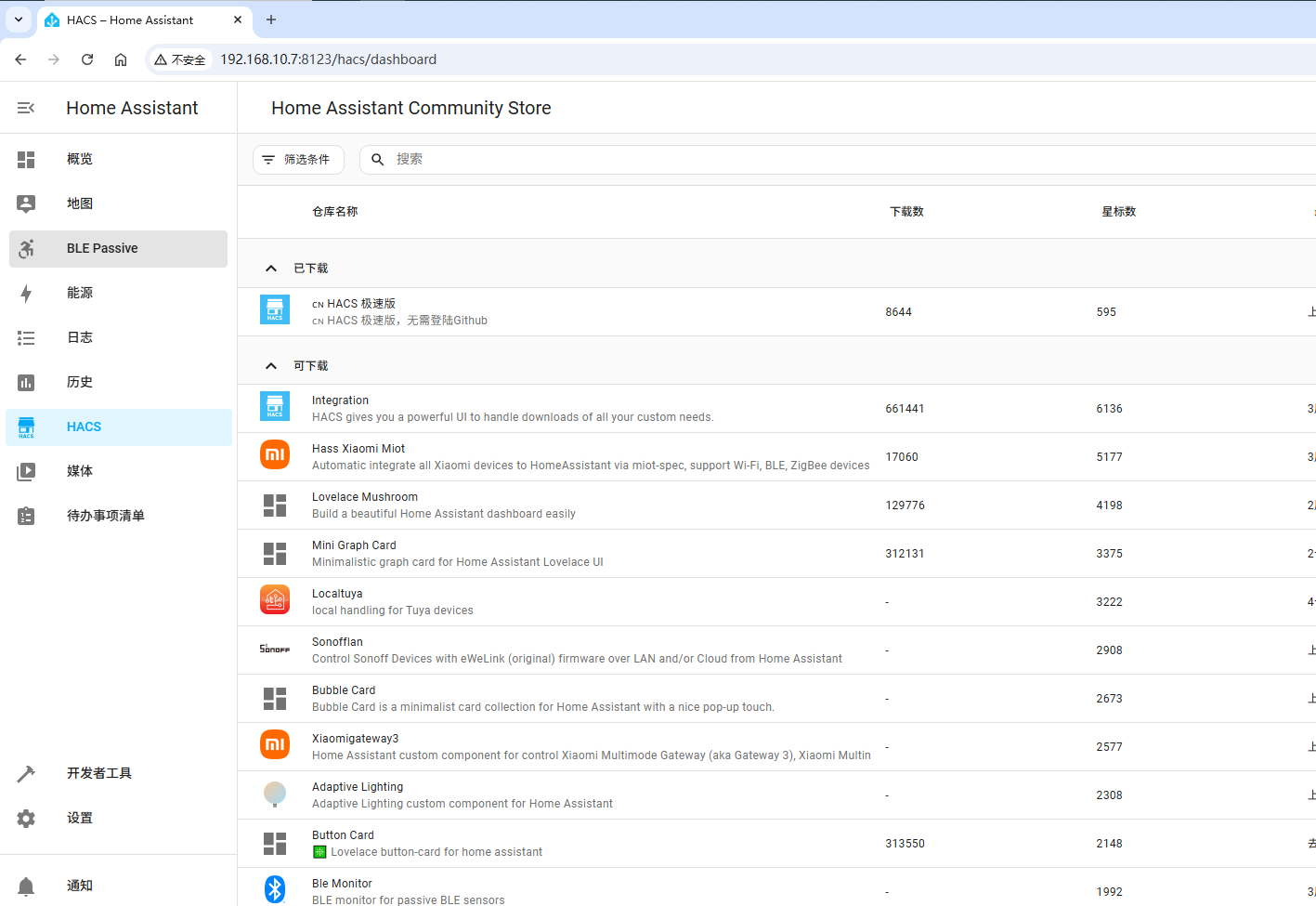
本文演示一种可用的部署Docker到STM32MP2上的快捷方式,在此基础上,可以修改Yocto的配方文件,用于开发STM32MP2应用程序。

 举报
举报
举报
举报
更多回帖


