
KaihongOS
写一个弹窗组件
KaihongOS框架提供了弹窗的API接口,开发者可直接使用,详情请参考@ohos.promptAction (弹窗)。但在开发过程中当提供的弹窗接口无法满足需求时,则需要自定义弹窗。
创建自定义弹窗
- 使用@CustomDialog装饰器装饰自定义弹窗。
- @CustomDialog装饰器用于装饰自定义弹框,此装饰器内进行自定义内容(也就是弹框内容)。
@CustomDialogstruct CustomDialogExample { controller: CustomDialogController = new CustomDialogController({ builder: CustomDialogExample({}), }) build() { Column() { Text('我是内容') .fontSize(20) .margin({ top: 10, bottom: 10 }) } }}
- 创建构造器,与装饰器呼应相连。
@Entry @Component struct CustomDialogUser { dialogController: CustomDialogController = new CustomDialogController({ builder: CustomDialogExample(), }) }
- 点击与onClick事件绑定的组件使弹窗弹出。
@Entry@Componentstruct CustomDialogUser { dialogController: CustomDialogController = new CustomDialogController({ builder: CustomDialogExample(), }) build() { Column() { Button('click me') .onClick(() => { this.dialogController.open() }) }.width('100%').margin({ top: 5 }) }}
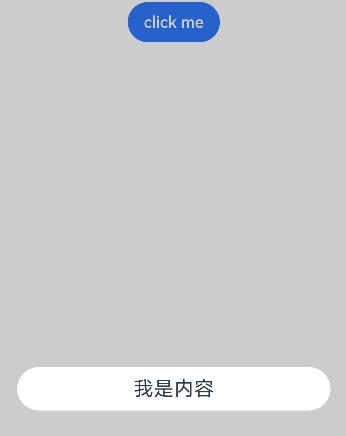 完整示例
@CustomDialogstruct CustomDialogExample { cancel?: () => void confirm?: () => void controller: CustomDialogController build() { Column() { Text('我是内容').fontSize(20).margin({ top: 10, bottom: 10 }) Flex({ justifyContent: FlexAlign.SpaceAround }) { Button('cancel') .onClick(() => { this.controller.close() if (this.cancel) { this.cancel() } }).backgroundColor(0xffffff).fontColor(Color.Black) Button('confirm') .onClick(() => { this.controller.close() if (this.confirm) { this.confirm() } }).backgroundColor(0xffffff).fontColor(Color.Red) }.margin({ bottom: 10 }) } }}@Entry@Componentstruct CustomDialogUser { dialogController: CustomDialogController = new CustomDialogController({ builder: CustomDialogExample({ cancel: ()=> { this.onCancel() }, confirm: ()=> { this.onAccept() }, }), }) onCancel() { console.info('Callback when the first button is clicked') } onAccept() { console.info('Callback when the second button is clicked') } build() { Column() { Button('click me') .onClick(() => { this.dialogController.open() }) }.width('100%').margin({ top: 5 }) }}
完整示例
@CustomDialogstruct CustomDialogExample { cancel?: () => void confirm?: () => void controller: CustomDialogController build() { Column() { Text('我是内容').fontSize(20).margin({ top: 10, bottom: 10 }) Flex({ justifyContent: FlexAlign.SpaceAround }) { Button('cancel') .onClick(() => { this.controller.close() if (this.cancel) { this.cancel() } }).backgroundColor(0xffffff).fontColor(Color.Black) Button('confirm') .onClick(() => { this.controller.close() if (this.confirm) { this.confirm() } }).backgroundColor(0xffffff).fontColor(Color.Red) }.margin({ bottom: 10 }) } }}@Entry@Componentstruct CustomDialogUser { dialogController: CustomDialogController = new CustomDialogController({ builder: CustomDialogExample({ cancel: ()=> { this.onCancel() }, confirm: ()=> { this.onAccept() }, }), }) onCancel() { console.info('Callback when the first button is clicked') } onAccept() { console.info('Callback when the second button is clicked') } build() { Column() { Button('click me') .onClick(() => { this.dialogController.open() }) }.width('100%').margin({ top: 5 }) }}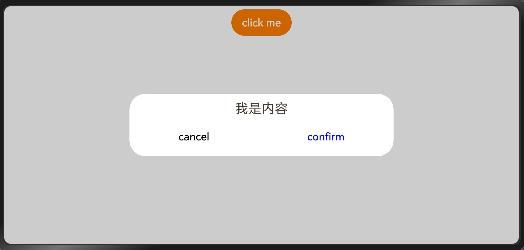
更多回帖

长按上方图片保存到相册


 复制链接
复制链接