
KaihongOS
层叠布局 (Stack)
层叠布局(StackLayout)用于在屏幕上预留一块区域来显示组件中的元素,提供元素可以重叠的布局。层叠布局通过Stack容器组件实现位置的固定定位与层叠,容器中的子元素依次入栈,后一个子元素覆盖前一个子元素,子元素可以叠加,也可以设置位置。
开发布局
Stack组件为容器组件,容器内可包含各种子元素。其中子元素默认进行居中堆叠。子元素被约束在Stack下,进行自己的样式定义以及排列。
let MTop:Record = { 'top': 50 }Column(){ Stack({ }) { Column(){}.width('90%').height('100%').backgroundColor('#ff58b87c') Text('text').width('60%').height('60%').backgroundColor('#ffc3f6aa') Button('button').width('30%').height('30%').backgroundColor('#ff8ff3eb').fontColor('#000') }.width('100%').height(150).margin(MTop)}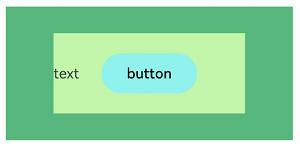
场景示例
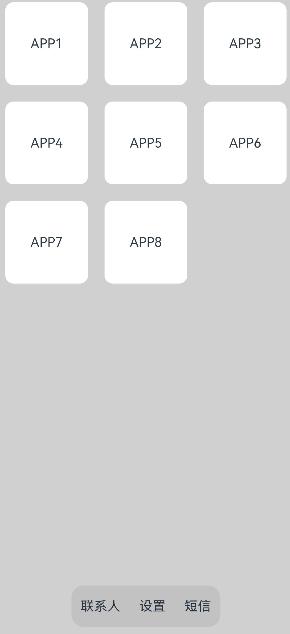
使用层叠布局快速搭建页面。
@Entry@Componentstruct StackSample { private arr: string[] = ['APP1', 'APP2', 'APP3', 'APP4', 'APP5', 'APP6', 'APP7', 'APP8']; build() { Stack({ alignContent: Alignment.Bottom }) { Flex({ wrap: FlexWrap.Wrap }) { ForEach(this.arr, (item:string) => { Text(item) .width(100) .height(100) .fontSize(16) .margin(10) .textAlign(TextAlign.Center) .borderRadius(10) .backgroundColor(0xFFFFFF) }, (item:string):string => item) }.width('100%').height('100%') Flex({ justifyContent: FlexAlign.SpaceAround, alignItems: ItemAlign.Center }) { Text('联系人').fontSize(16) Text('设置').fontSize(16) Text('短信').fontSize(16) } .width('50%') .height(50) .backgroundColor('#16302e2e') .margin({ bottom: 15 }) .borderRadius(15) }.width('100%').height('100%').backgroundColor('#CFD0CF') }}
更多回帖

长按上方图片保存到相册


 复制链接
复制链接