
本文介绍了单片机开发过程中常用的 SD 卡的读写相关功能,以及使用正点原子STM32H7R3开发套件实现 SD 卡音频文件读取和播放。
SD 卡 (Secure Digital MemoryCard) 是由日本松下、东芝及美国 SanDisk 公司于 1999 年 8 月在 MMCMulti MediaCard) 基础上共同研制出来的一种多功能存储卡。
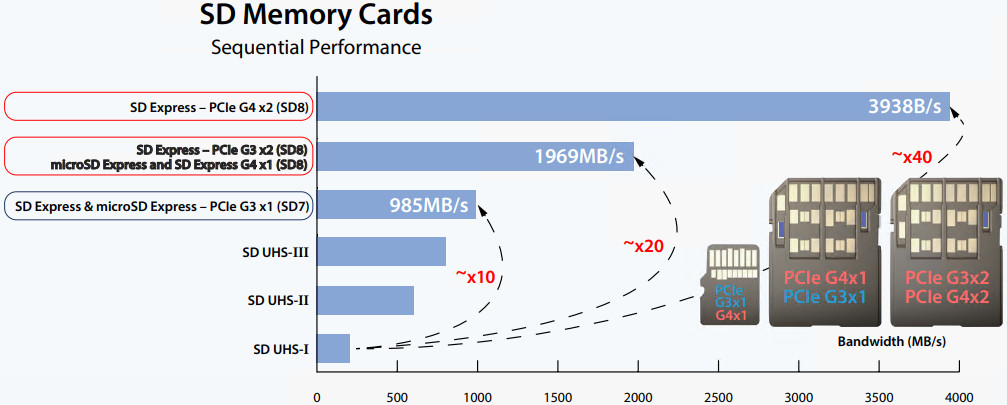
SD 卡 3.0 规范中,理论最大容量可达 2TB,理论最大读写速度可达104MB/s;在最新的 4.10 规范中,理论最大读写速度已提高到 312MB/s
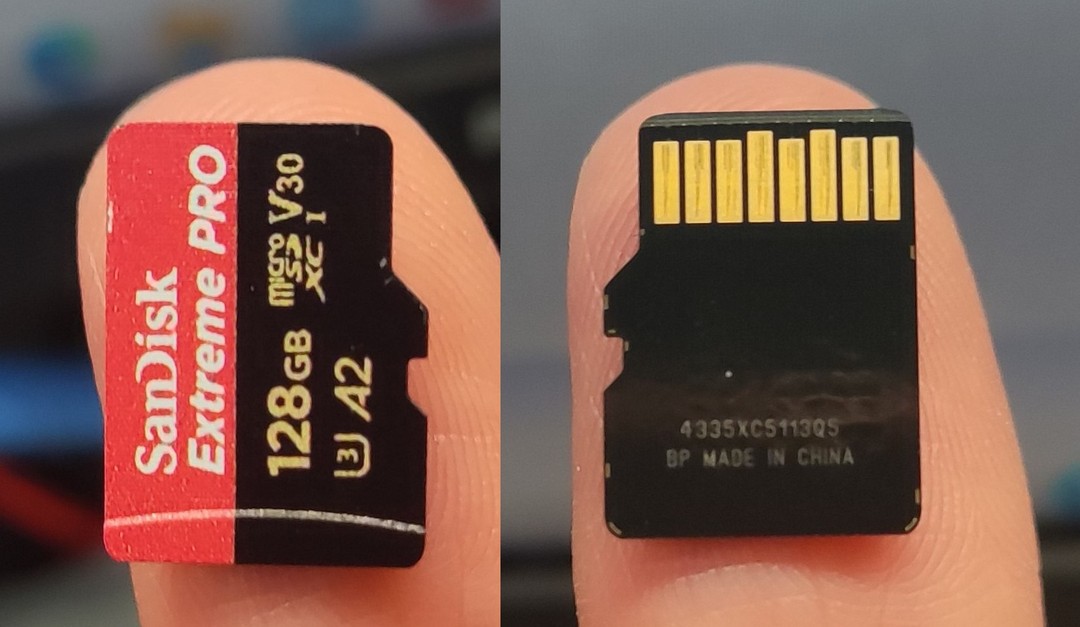
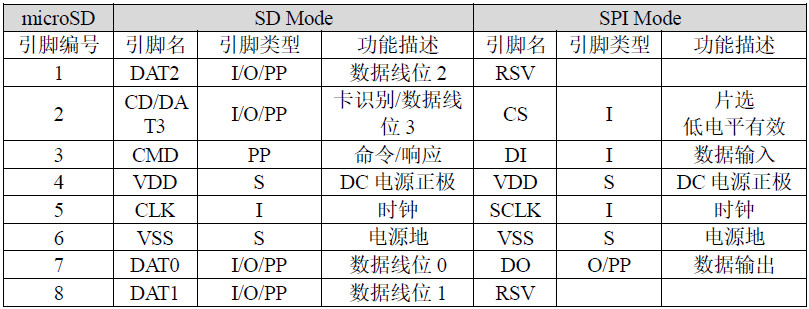
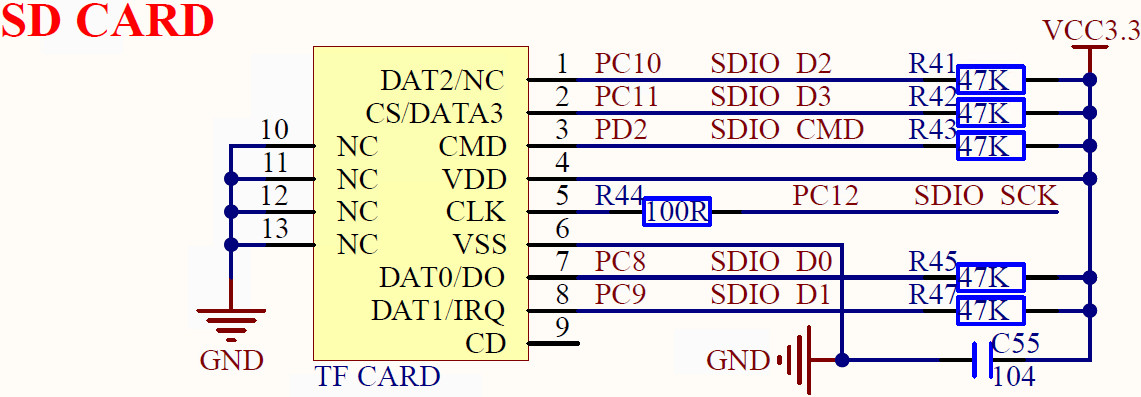
SD 卡允许不同的接口访问其内部存储单元。 最常见的是 SDIO 模式和 SPI 模式。
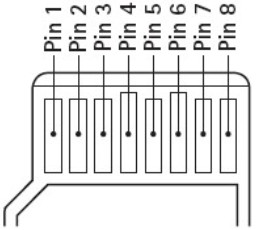
两种通信协议的引脚模式如下表所示
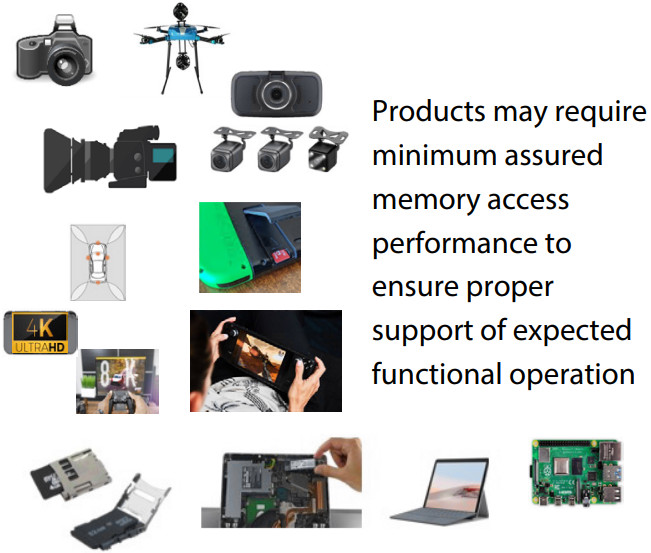
SD 卡作为新一代记忆存储设备,借助其体积小、数据传输速度快、可热插拔、大容量等优良特性,广泛应用于便携式设备,如电子词典、移动电话、监控摄像机、数码相机、嵌入式开发、行车记录仪等。
#include "./SYSTEM/sys/sys.h"
#include "./SYSTEM/delay/delay.h"
#include "./SYSTEM/usart/usart.h"
#include "./MALLOC/malloc.h"
#include "./BSP/LED/led.h"
#include "./BSP/KEY/key.h"
#include "./BSP/LCD/lcd.h"
#include "./BSP/HYPERRAM/hyperram.h"
#include "./BSP/SDMMC/sdmmc_sdcard.h"
static HAL_SD_CardCIDTypeDef sd_card_cid_struct = {0};
static void show_sdcard_info(void)
{
HAL_SD_GetCardInfo(&g_sd_handle, &g_sd_card_info_struct);
HAL_SD_GetCardCID(&g_sd_handle, &sd_card_cid_struct);
printf("Card Type: %s\r\n", (g_sd_card_info_struct.CardType == CARD_SDSC) ? ((g_sd_card_info_struct.CardVersion == CARD_V1_X) ? ("SDSC V1") :
((g_sd_card_info_struct.CardVersion == CARD_V1_X) ? ("SDSC V2") :
(""))) :
((g_sd_card_info_struct.CardType == CARD_SDHC_SDXC) ? ("SDHC") :
((g_sd_card_info_struct.CardType == CARD_SECURED) ? ("SECURE") :
(""))));
printf("Card ManufacturerID: %d\r\n", sd_card_cid_struct.ManufacturerID);
printf("Card RCA: %d\r\n", g_sd_card_info_struct.RelCardAdd);
printf("LogBlockNbr: %d \r\n", g_sd_card_info_struct.LogBlockNbr);
printf("LogBlockSize: %d \r\n", g_sd_card_info_struct.LogBlockSize);
printf("Card Capacity: %d MB\r\n", (uint32_t)(((uint64_t)g_sd_card_info_struct.LogBlockNbr * g_sd_card_info_struct.LogBlockSize) >> 20));
printf("Card BlockSize: %d\r\n\r\n", g_sd_card_info_struct.BlockSize);
lcd_show_string(30, 130, 200, 16, 16, "SD Card Size: MB", BLUE);
lcd_show_num(30 + 13 * 8, 130, (uint32_t)(((uint64_t)g_sd_card_info_struct.LogBlockNbr * g_sd_card_info_struct.LogBlockSize) >> 20), 5, 16, BLUE);
}
static void sd_read_test(void)
{
uint8_t *buf;
uint16_t i;
buf = (uint8_t *)mymalloc(SRAMIN, g_sd_card_info_struct.BlockSize);
if (buf == NULL)
{
return;
}
/* 读取并打印SD卡第0个块的数据 */
if (sd_read_disk(buf, 0, 1) == 0)
{
lcd_show_string(30, 150, 200, 16, 16, "USART1 Sending Data...", BLUE);
printf("Block 0 Data:\r\n");
for (i=0; i<g_sd_card_info_struct.BlockSize; i++)
{
printf("%02X ", buf[i]);
}
printf("\r\nData End\r\n");
lcd_show_string(30, 150, 200, 16, 16, "USART1 Send Data Over!", BLUE);
}
else
{
printf("SD read Failure!\r\n");
lcd_show_string(30, 150, 200, 16, 16, "SD read Failure! ", BLUE);
}
myfree(SRAMIN, buf);
}
int main(void)
{
uint8_t t = 0;
uint8_t key;
sys_mpu_config(); /* 配置MPU */
sys_cache_enable(); /* 使能Cache */
HAL_Init(); /* 初始化HAL库 */
sys_stm32_clock_init(300, 6, 2); /* 配置时钟,600MHz */
delay_init(600); /* 初始化延时 */
usart_init(115200); /* 初始化串口 */
led_init(); /* 初始化LED */
key_init(); /* 初始化按键 */
hyperram_init(); /* 初始化HyperRAM */
lcd_init(); /* 初始化LCD */
my_mem_init(SRAMIN); /* 初始化AXI-SRAM1~4内存池 */
my_mem_init(SRAMEX); /* 初始化XSPI2 HyperRAM内存池 */
my_mem_init(SRAM12); /* 初始化AHB-SRAM1~2内存池 */
my_mem_init(SRAMDTCM); /* 初始化DTCM内存池 */
my_mem_init(SRAMITCM); /* 初始化ITCM内存池 */
lcd_show_string(30, 50, 200, 16, 16, "STM32", RED);
lcd_show_string(30, 70, 200, 16, 16, "SD TEST", RED);
lcd_show_string(30, 90, 200, 16, 16, "ATOM@ALIENTEK", RED);
while (sd_init() != 0) /* SD卡初始化 */
{
lcd_show_string(30, 110, 200, 16, 16, "SD Card Error!", RED);
delay_ms(500);
lcd_show_string(30, 110, 200, 16, 16, "Please Check! ", RED);
delay_ms(500);
LED0_TOGGLE();
}
lcd_show_string(30, 110, 200, 16, 16, "SD Card OK! ", RED);
/* 显示SD卡信息 */
show_sdcard_info();
while (1)
{
key = key_scan(0);
if (key == KEY0_PRES)
{
/* SD卡读测试 */
sd_read_test();
}
if (++t == 20)
{
t = 0;
LED0_TOGGLE();
}
delay_ms(10);
}
}
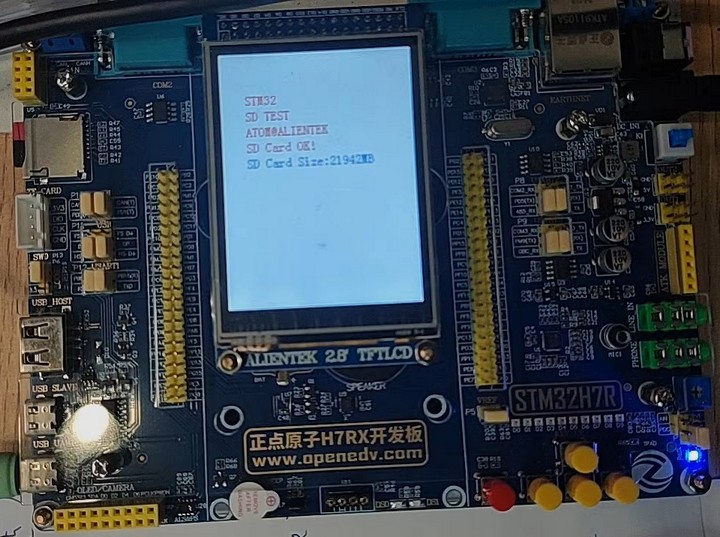
若检测 SD 卡失败,则需要考虑更换 SD 卡,

这里使用的品牌是闪迪 SanDisk
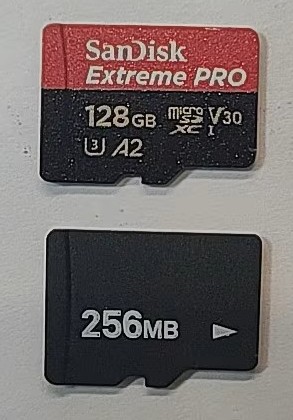
经测试,若使用其他品牌或杂牌 SD 卡,可能由于存储颗粒质量等兼容性问题,导致无法成功识别。
在测试音乐播放器之前,需要测试字库是否存在。
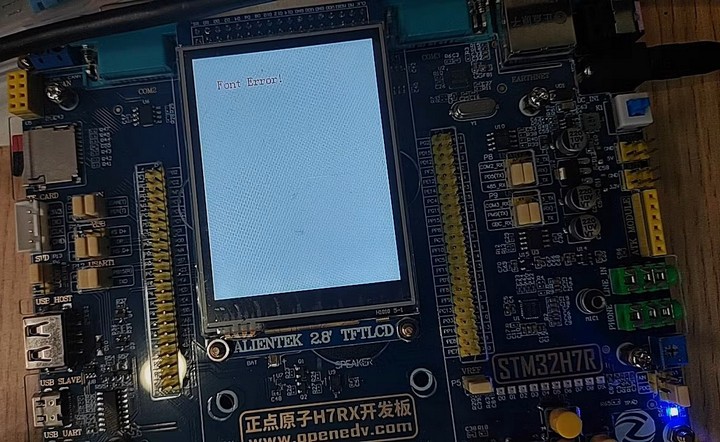
若插入 SD 卡,提示字体加载错误,表明板载 SD NAND 未包含字体文件,需要先运行 汉字显示实验,将字库下载进 SD NAND 存储器。
#include "./SYSTEM/sys/sys.h"
#include "./SYSTEM/delay/delay.h"
#include "./SYSTEM/usart/usart.h"
#include "./MALLOC/malloc.h"
#include "./FATFS/exfuns/exfuns.h"
#include "./TEXT/text.h"
#include "./BSP/LED/led.h"
#include "./BSP/KEY/key.h"
#include "./BSP/LCD/lcd.h"
#include "./BSP/HYPERRAM/hyperram.h"
#include "./BSP/SDNAND/spi_sdnand.h"
#include "./BSP/SDMMC/sdmmc_sdcard.h"
int main(void)
{
uint8_t t = 0;
uint8_t key;
uint8_t res;
uint32_t fontcnt;
uint8_t i;
uint8_t j;
uint8_t fontx[2];
sys_mpu_config(); /* 配置MPU */
sys_cache_enable(); /* 使能Cache */
HAL_Init(); /* 初始化HAL库 */
sys_stm32_clock_init(300, 6, 2); /* 配置时钟,600MHz */
delay_init(600); /* 初始化延时 */
usart_init(115200); /* 初始化串口 */
led_init(); /* 初始化LED */
key_init(); /* 初始化按键 */
hyperram_init(); /* 初始化HyperRAM */
lcd_init(); /* 初始化LCD */
my_mem_init(SRAMIN); /* 初始化AXI-SRAM1~4内存池 */
my_mem_init(SRAMEX); /* 初始化XSPI2 HyperRAM内存池 */
my_mem_init(SRAM12); /* 初始化AHB-SRAM1~2内存池 */
my_mem_init(SRAMDTCM); /* 初始化DTCM内存池 */
my_mem_init(SRAMITCM); /* 初始化ITCM内存池 */
exfuns_init(); /* 为exfuns申请内存 */
f_mount(fs[0], "0:", 1); /* 挂载SD卡 */
f_mount(fs[1], "1:", 1); /* 挂载NOR Flash */
f_mount(fs[2], "2:", 1); /* 挂载NAND Flash */
/* 检查字库 */
while (fonts_init() != 0)
{
UPD:
lcd_clear(WHITE);
lcd_show_string(30, 30, 200, 16, 16, "STM32", RED);
/* 初始化SD卡 */
while (sd_init() != 0)
{
lcd_show_string(30, 30, 200, 16, 16, "SD Card Error!", RED);
delay_ms(500);
lcd_show_string(30, 30, 200, 16, 16, "Please Check! ", RED);
delay_ms(500);
LED0_TOGGLE();
}
lcd_show_string(30, 50, 200, 16, 16, "SD Card OK", RED);
lcd_show_string(30, 70, 200, 16, 16, "Font Updating...", RED);
/* 更新字库 */
res = fonts_update_font(30, 90, 16, (uint8_t *)"0:", RED);
while (res != 0)
{
lcd_show_string(30, 90, 200, 16, 16, "Font Update Failed!", RED);
delay_ms(200);
lcd_show_string(30, 90, 200, 16, 16, "Please Check! ", RED);
delay_ms(200);
}
lcd_show_string(30, 90, 200, 16, 16, "Font Update Success! ", RED);
delay_ms(1500);
lcd_clear(WHITE);
}
text_show_string(30, 30, 200, 16, "正点原子STM32开发板", 16, 0, RED);
text_show_string(30, 50, 200, 16, "GBK字库测试程序", 16, 0, RED);
text_show_string(30, 70, 200, 16, "ATOM@ALIENTEK", 16, 0, RED);
text_show_string(30, 90, 200, 16, "WKUP: 更新字库", 16, 0, RED);
text_show_string(30, 110, 200, 16, "内码高字节:", 16, 0, BLUE);
text_show_string(30, 130, 200, 16, "内码低字节:", 16, 0, BLUE);
text_show_string(30, 150, 200, 16, "汉字计数器:", 16, 0, BLUE);
text_show_string(30, 180, 200, 32, "对应汉字为:", 32, 0, BLUE);
text_show_string(30, 212, 200, 24, "对应汉字为:", 24, 0, BLUE);
text_show_string(30, 236, 200, 16, "对应汉字(16*16)为:", 16, 0, BLUE);
text_show_string(30, 252, 200, 12, "对应汉字(12*12)为:", 12, 0, BLUE);
while (1)
{
fontcnt = 0;
/* GBK内码高字节范围为0x81~0xFE */
for (i=0x81; i<0xFF; i++)
{
fontx[0] = i;
lcd_show_num(118, 110, i, 3, 16, BLUE);
/* GBK内码低字节范围为0x40~0x7E、0x80~0xFE) */
for (j=0x40; j<0xFE; j++)
{
if (j == 0x7F)
{
continue;
}
fontcnt++;
lcd_show_num(118, 130, j, 3, 16, BLUE);
lcd_show_num(118, 150, fontcnt, 5, 16, BLUE);
fontx[1] = j;
text_show_font(30 + 176, 180, fontx, 32, 0, BLUE);
text_show_font(30 + 132, 212, fontx, 24, 0, BLUE);
text_show_font(30 + 144, 236, fontx, 16, 0, BLUE);
text_show_font(30 + 108, 252, fontx, 12, 0, BLUE);
t = 200;
while ((t--) != 0)
{
delay_ms(1);
key = key_scan(0);
if (key == WKUP_PRES)
{
/* 更新字库 */
goto UPD;
}
}
LED0_TOGGLE();
}
}
}
}
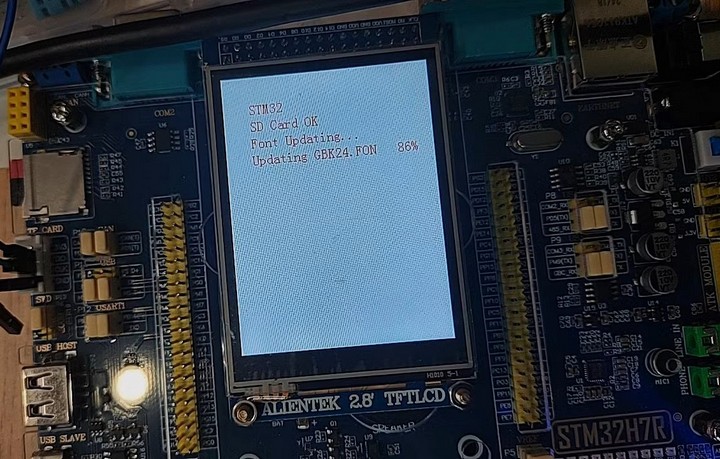
下载或升级、更新字库
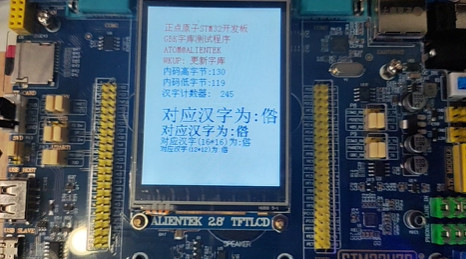
汉字字体显示
这里我们利用正点原子STM32H7R3开发套件的板载元器件制作并测试了音乐播放器功能。
需要确保 SD 卡能够正确识别,且 SD NAND 字库已录入。
MUSIC 文件夹,并置入 *.wav 格式音频文件)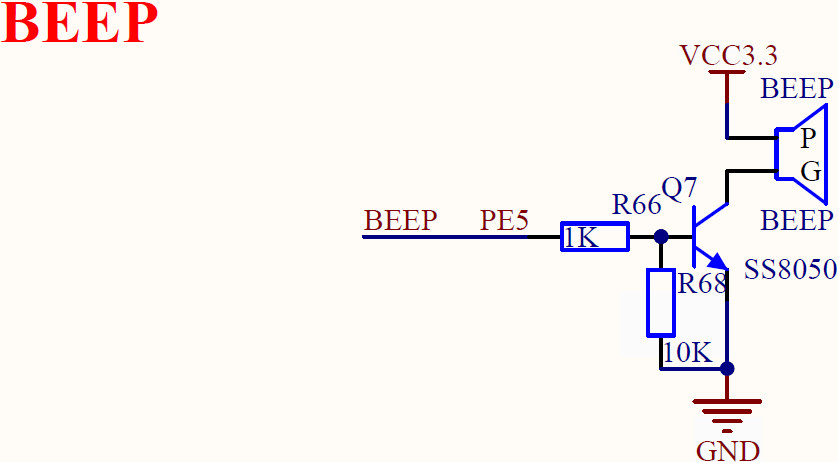
#include "./SYSTEM/sys/sys.h"
#include "./SYSTEM/delay/delay.h"
#include "./SYSTEM/usart/usart.h"
#include "./MALLOC/malloc.h"
#include "./FATFS/exfuns/exfuns.h"
#include "./TEXT/text.h"
#include "./BSP/LED/led.h"
#include "./BSP/KEY/key.h"
#include "./BSP/LCD/lcd.h"
#include "./BSP/HYPERRAM/hyperram.h"
#include "./BSP/SDNAND/spi_sdnand.h"
#include "./BSP/SDMMC/sdmmc_sdcard.h"
#include "./BSP/ES8388/es8388.h"
#include "./APP/audioplay.h"
int main(void)
{
sys_mpu_config(); /* 配置MPU */
sys_cache_enable(); /* 使能Cache */
HAL_Init(); /* 初始化HAL库 */
sys_stm32_clock_init(300, 6, 2); /* 配置时钟,600MHz */
delay_init(600); /* 初始化延时 */
usart_init(115200); /* 初始化串口 */
led_init(); /* 初始化LED */
key_init(); /* 初始化按键 */
hyperram_init(); /* 初始化HyperRAM */
lcd_init(); /* 初始化LCD */
my_mem_init(SRAMIN); /* 初始化AXI-SRAM1~4内存池 */
my_mem_init(SRAMEX); /* 初始化XSPI2 HyperRAM内存池 */
my_mem_init(SRAM12); /* 初始化AHB-SRAM1~2内存池 */
my_mem_init(SRAMDTCM); /* 初始化DTCM内存池 */
my_mem_init(SRAMITCM); /* 初始化ITCM内存池 */
exfuns_init(); /* 为exfuns申请内存 */
f_mount(fs[0], "0:", 1); /* 挂载SD卡 */
f_mount(fs[1], "1:", 1); /* 挂载NOR Flash */
f_mount(fs[2], "2:", 1); /* 挂载NAND Flash */
/* 初始化SD卡 */
while (sd_init() != 0)
{
lcd_show_string(30, 30, 200, 16, 16, "SD Card Error!", RED);
delay_ms(500);
lcd_show_string(30, 30, 200, 16, 16, "Please Check! ", RED);
delay_ms(500);
}
lcd_fill(30, 30, 30 + 200, 30 + 16, WHITE);
/* 检查字库 */
while (fonts_init() != 0)
{
lcd_show_string(30, 30, 200, 16, 16, "Font Error! ", RED);
delay_ms(500);
lcd_show_string(30, 30, 200, 16, 16, "Please Check!", RED);
delay_ms(500);
}
lcd_fill(30, 30, 30 + 200, 30 + 16, WHITE);
text_show_string(30, 50, 200, 16, "正点原子STM32开发板",16,0, RED);
text_show_string(30, 70, 200, 16, "音乐播放器实验", 16, 0, RED);
text_show_string(30, 90, 200, 16, "正点原子@ALIENTEK", 16, 0, RED);
text_show_string(30, 110, 200, 16, "KEY0: Next", 16, 0, RED);
text_show_string(30, 130, 200, 16, "KEY1: Prev", 16, 0, RED);
text_show_string(30, 150, 200, 16, "KWY_UP: Play/Pause", 16, 0, RED);
es8388_init(); /* ES8388初始化 */
es8388_adda_cfg(1, 0); /* 开启DAC关闭ADC */
es8388_output_cfg(1, 1); /* DAC选择通道输出 */
es8388_hpvol_set(25); /* 设置耳机音量 */
es8388_spkvol_set(25); /* 设置喇叭音量 */
while (1)
{
audio_play();
}
}
音乐播放
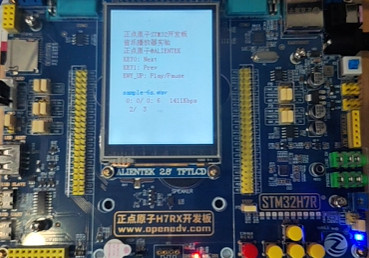
通过按键切换播放的音频文件,以及播放的开始和暂停等功能。
本文介绍了 SD 卡在嵌入式开发中的应用,使用 正点原子STM32H7R3开发套件 实现了读取 SD 卡音频文件,并通过板载扬声器进行播放。SD 卡作为工业和消费级电子产品中常见的存储器件,由于其小巧便携、安全可靠、适应性强等优点,在芯片开发和设计以及应用中扮演着重要角色。本文为深入学习和开发 SD 卡相关功能提供了有价值的参考。
更多回帖


