赛灵思
直播中

李巍

8年用户 1532经验值
私信 关注
[问答]

无法在产品许可网站中选择Vivado WebPack许可证

你好。
在发布这个问题之前,我曾在谷歌和本论坛上寻找可能的答案。
关于这件事似乎还有一个主题。
我已经执行了该线程中描述的步骤,但我仍然无法在产品许可网站中选择“Vivado WebPack许可证”来使用我所做的Vivado安装来生成比特流。
我总结了到目前为止执行的步骤:
1.从以下链接下载Linux许可证管理工具:http://www.xilinx.com/support/download/index.htm,以root身份执行install_fnp.sh脚本。
2.执行以下命令:./ xlicsrvrmgr -v“format = long”
并获得以下输出:
查看服务器可信存储。
可信存储中没有履行记录。
3.执行以下命令:./ xlicclientmgr -cr create_request.xml
并获得以下输出
重新使用相同的存储请求,序列号1写入create_request.xml的请求请求(html)写入create_request.html
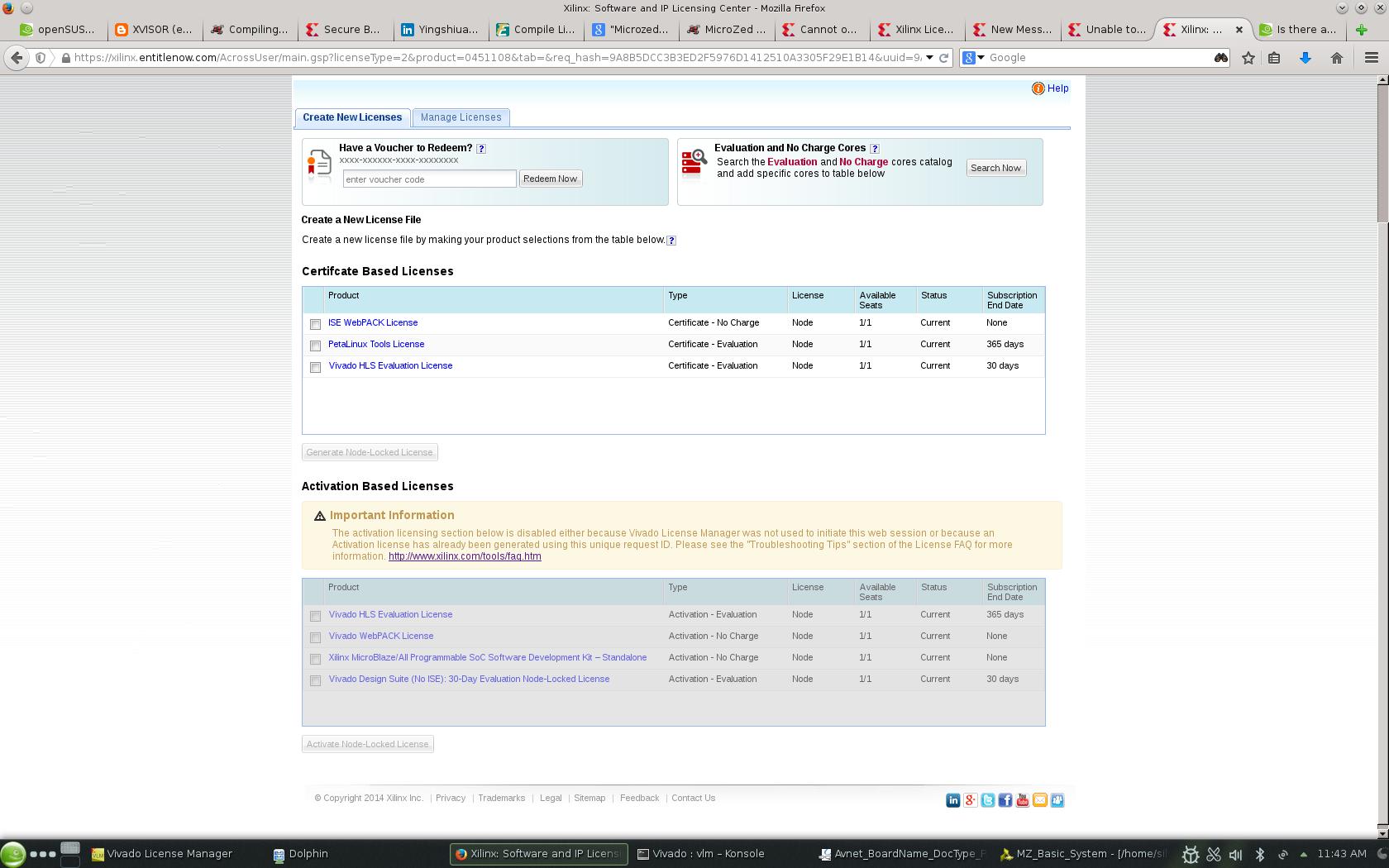
4.我尝试使用以下命令访问create_request.html:firefox -new-window create_request.html,我仍然得到我在此消息末尾附加的屏幕。
我正在使用openSUSE 13.1(x86_64)。
希望能从你那听到答复。
美好的一天。

以上来自于谷歌翻译


以下为原文

Hello.

Before posting this question, I had looked in google and this forums for possible answers. There seems to be one thread ongoing regarding this matter. I've executed the steps described in that thread, but I am still not able to select "Vivado WebPack License" in the Product Licensing Website to enable bitstream generation with the Vivado installation I've made.

I summarize the steps executed so far:

1. Downloaded the linux license management tools from the link: http://www.xilinx.com/support/download/index.htm, Executed the install_fnp.sh script as root.

2. Ran the following command: ./xlicsrvrmgr -v "format=long"
And got the following output:

                                        Viewing server trusted storage.

                                        No fulfillment records in trusted storage.


3. Ran the following command: ./xlicclientmgr -cr create_request.xml

And got the following output


                                        Re-using identical stored request, sequence number 1
                                        Request written to create_request.xml
                                        Request (html) written to create_request.html

4. I try to access the create_request.html, with the following command: firefox -new-window create_request.html, and I still get the screen that I attach at the end of this message.


I am using openSUSE 13.1 (x86_64).


Hope to hear from you.


Good day.


回帖(11)

王慕涛

2018-12-11 11:39:27
嗨,
你可以附加创建的create_request.xml文件吗?
我怀疑这可能是原因,因为您使用的是不受支持的操作系统。
或者因为create_request.xml文件中没有UMN2字段。
检查此答复记录。
http://www.xilinx.com/support/answers/61574.html

以上来自于谷歌翻译


以下为原文

Hi,
 
Can you attach the created create_request.xml file?
 
I suspect this could be reason because you are using unsupported OS.
or because of the UMN2 field not present in the create_request.xml file.
Check this answer record.
http://www.xilinx.com/support/answers/61574.html
 
 
举报

章伟

2018-12-11 11:49:30
你好,pulim。
我按要求附上了文件。
这是create_request.html
重定向...
这是create_request.xml: 
6 6 COMPOSITE 10035968 11.11.001DefaultOneSRVC7E87E7B5B965FF0EA6CAB92BDD748251DF056FBOKx64_l***none1241 0B43643C7C5772CDF32DE8A2732CF49D91E26B9773663EA67ADC13579B5D533D 2014-10-24T11:25:49 + 02:00 PM8B5DCC3B3ED2F5976D1412510A3305F29E1B141
让我知道。
美好的一天。

以上来自于谷歌翻译


以下为原文

Hello, pulim.
 
I attach the file as requested.
 
This is the create_request.html


6
6
COMPOSITE
10035968


11.11.001DefaultOneSRVC7E87E7B5B965FF0EA6CAB92BDD748251DF056FBOK

x64_l***
none


1
2
4

1
0B43643C7C5772CDF32DE8A2732CF49D91E26B9773663EA67ADC13579B5D533D
2014-10-24T11:25:49+02:00


9A8B5DCC3B3ED2F5976D1412510A3305F29E1B14
1


Let me know.
 
Good day.


举报

王慕涛

2018-12-11 11:55:06
嗨,
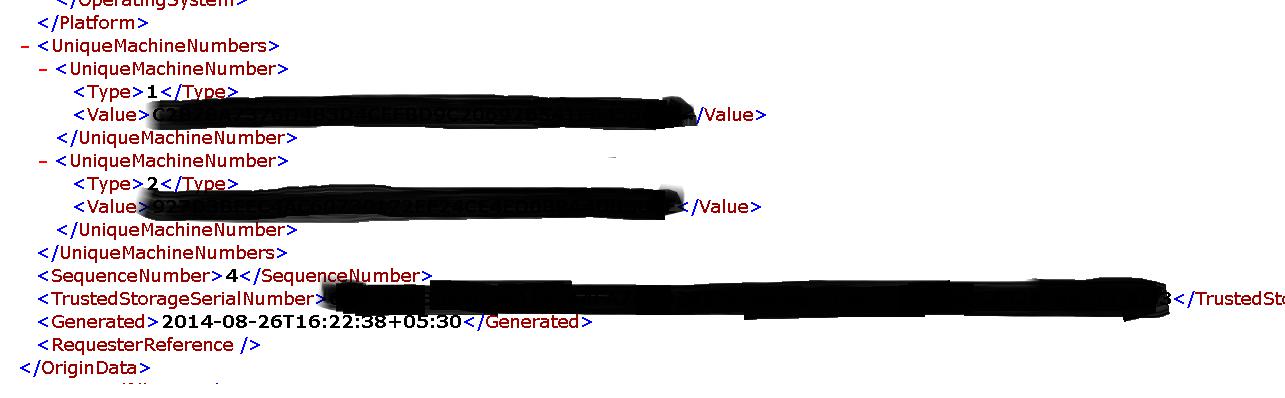
在请求字段中,我可以看到唯一的机器号1和2字段为空。
这些字段应如下所示存在于要突出显示的基于激活的许可证中。

以上来自于谷歌翻译


以下为原文

 
Hi,
 
From the request fiel I can see that Unique machine Number1 and 2 fields are empty.
These fields should be present as shown below to the activation based licenses to be highlighted.
举报

章伟

2018-12-11 12:11:00
好。
如何让它们非空?
有没有办法做到这一点?
美好的一天。

以上来自于谷歌翻译


以下为原文

Ok.
 
How do I make them non-empty?
 
Is there a way to do that?
 
Good day.
举报

更多回帖

发帖
×
20
完善资料,
赚取积分