前言
本章介绍如何制作电子相册。
通过samba将图片从mac上传到vf2,并用lcd循环显示图片。
功能
1. 同局域网可以访问vf2并存放图片
2. 使用lcd循环播放相册内的图片
使用场所:
1. 户外广告屏幕
2. 家庭电子相册
3. 场馆收集观众照片
参考资料
官方lcd源码:https://doc.rvspace.org/VisionFive2/Application_Notes/VisionFive2_AN_P_Using_SPI_LCD/VisionFive_Using_GPIO_LED_AN/demo_source_code_spi_lcd.html
部分依赖库安装:
https://bbs.elecfans.com/jishu_2493562_1_1.html
前期准备
1. 刷vf2的img到sd卡并开机
2. 将vf2插入网线接入局域网
3. 连接上lcd屏st7735
3.1改时区及samba配置
sudo ln -sf /usr/share/zoneinfo/Asia/Shanghai /etc/localtime
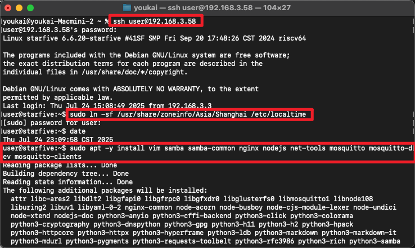
sudo apt -y install vim samba samba-common nginx nodejs net-tools mosquitto mosquitto-dev mosquitto-clients

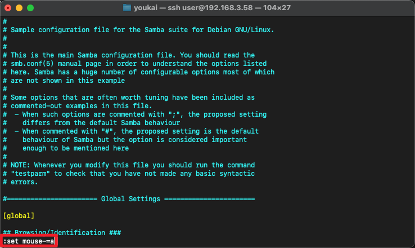
# vim需要右键输入
:set mouse-=a

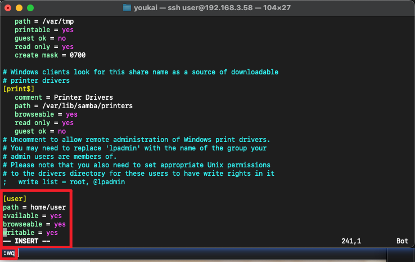
sudo vim /etc/samba/smb.conf

[user]
path = home/user
available = yes
browseable = yes
writable = yes

sudo smbpasswd -a user

sudo service smbd restart

3.2 安装python库
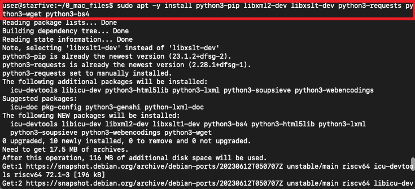
sudo apt -y install python3-pip libxml2-dev libxslt-dev python3-requests python3-wget python3-bs4 python3-pillow python3-numpy
wget https://files.pythonhosted.org/packages/2e/00/16326e8e01a268ce997b72e70240d7249a550222af82955d9b4a52f8a320/VisionFive.gpio-1.3.3-cp311-cp311-any.whl
mv VisionFive.gpio-1.3.3-cp311-cp311-any.whl VisionFive.gpio-1.3.3-cp311-cp311-linux_riscv64.whl
sudo python3 -m pip install VisionFive.gpio-1.3.3-cp311-cp311-linux_riscv64.whl --break-system-packages
pip show VisionFive.gpio

3.3 运行
创建1.8inch_LCD_demo.py文件、lib/LCD2inch4_lib.py库文件以及picture文件夹。
代码在下一章节
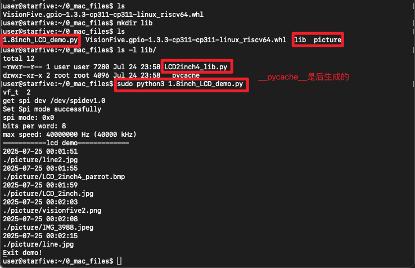
代码
1.8inch_LCD_demo.py
"""
Please make sure the 2.4inch LCD Moudle is connected to the correct pins.
The following table describes how to connect the 2.4inch LCD Module to the 40-pin header.
-------------------------------------------------
__2.4inch LCD Module___Pin Number_____Pin Name
VCC 17 3.3 V Power
GND 39 GND
DIN 19 SPI MOSI
CLK 23 SPI SCLK
CS 13 GPIO43 y
DC 11 GPIO42 y -
RST 07 GPIO55 y -
BL 15 GPIO47 y
-------------------------------------------------
"""
import os
import sys
import time
import logging
from PIL import Image
sys.path.append("..")
import VisionFive.boardtype as board_t
from lib import LCD2inch4_lib
"""
Demo modification ans new function description
------------------------------------------------------------
I. add the clear() function to fill LCD screen with white
II. give a hexadecimal value of white
III. cycle through multiple pictures
---------------------------------------------------------------
"""
"""
--------------------------------------------------------------- {
Init
"""
WHITE = 0xffff
vf_t = board_t.boardtype()
print("vf_t ",vf_t)
if vf_t == 1:
SPI_DEVICE = "/dev/spidev0.0"
elif vf_t == 2:
SPI_DEVICE = "/dev/spidev1.0"
else:
print("This module can only be run on a VisionFive board!")
"""The initialization settings of 2inch and 2.4inch are distinguished"""
disp = LCD2inch4_lib.LCD_2inch4(7, 11, SPI_DEVICE)
disp.lcd_init_2inch4()
folder_path = "./picture"
items = os.listdir(folder_path)
file_paths = []
for item in items:
item_path = os.path.join(folder_path, item)
if os.path.isfile(item_path) and "._" not in item:
file_paths.append(item_path)
"""
} ---------------------------------------------------------------
"""
def show_img(image_path):
image = Image.open(image_path)
new_size = (128, 160)
resized_image = image.resize(new_size)
disp.lcd_ShowImage(resized_image, 0, 0)
time.sleep(2)
def test_clear():
disp.lcd_clear(WHITE)
print("clear screen")
time.sleep(2)
Black=0x001f
disp.lcd_clear(Black)
print("clear screen")
time.sleep(2)
def main():
print("-----------lcd demo-------------")
for path in file_paths:
print(time.strftime("%Y-%m-%d %H:%M:%S", time.localtime(time.time())))
path_tmp = path
print(path_tmp)
show_img(path_tmp)
time.sleep(2)
print("Exit demo!")
if __name__ == '__main__':
main()
LCD2inch4_lib.py
import os
import sys
import time
import logging
import VisionFive.spi as spi
import VisionFive.gpio as gpio
import numpy as np
from PIL import Image, ImageDraw, ImageFont
class LCD_2inch4:
width = 160
height = 128
def __init__(self, rst_pin, dc_pin, dev):
gpio.setmode(gpio.BOARD)
self.rstpin = rst_pin
self.dcpin = dc_pin
self.spidev = dev
print("get spi dev", self.spidev)
spi.getdev(self.spidev)
"""Reset the maximum clock frequency of communication"""
"""The display speed of the picture is positively correlated with the clock frequency"""
spi.setmode(40000000, 0, 8)
gpio.setup(self.rstpin, gpio.OUT)
gpio.setup(self.dcpin, gpio.OUT)
def __del__(self):
spi.freedev()
"""add a short delay for each change of electrical level"""
def lcd_reset(self):
gpio.output(self.rstpin, gpio.HIGH)
time.sleep(0.500)
gpio.output(self.rstpin, gpio.LOW)
time.sleep(0.500)
gpio.output(self.rstpin, gpio.HIGH)
time.sleep(0.500)
def lcd_spisend(self, data):
spi.transfer(data)
def lcd_sendcmd(self, cmd):
gpio.output(self.dcpin, gpio.LOW)
spi.transfer(cmd)
def lcd_senddata(self, data):
gpio.output(self.dcpin, gpio.HIGH)
spi.transfer(data)
"""write multiple bytes"""
def lcd_sendnbytes(self, data):
gpio.output(self.dcpin, gpio.HIGH)
spi.write(data)
"""common registers' initialization of 2.4inch LCD module"""
def lcd_init_2inch4(self):
self.lcd_reset()
self.lcd_sendcmd(0x01)
time.sleep(0.150)
self.lcd_sendcmd(0x11)
time.sleep(0.500)
self.lcd_sendcmd(0xB1)
self.lcd_senddata(0x05)
self.lcd_senddata(0x3C)
self.lcd_senddata(0x3C)
self.lcd_sendcmd(0xB2)
self.lcd_senddata(0x05)
self.lcd_senddata(0x3C)
self.lcd_senddata(0x3C)
self.lcd_sendcmd(0xB3)
self.lcd_senddata(0x05)
self.lcd_senddata(0x3C)
self.lcd_senddata(0x3C)
self.lcd_senddata(0x05)
self.lcd_senddata(0x3C)
self.lcd_senddata(0x3C)
self.lcd_sendcmd(0xB4)
self.lcd_senddata(0x03)
self.lcd_sendcmd(0xC0)
self.lcd_senddata(0x28)
self.lcd_senddata(0x08)
self.lcd_senddata(0x04)
self.lcd_sendcmd(0xC1)
self.lcd_senddata(0xC0)
self.lcd_sendcmd(0xC2)
self.lcd_senddata(0x0D)
self.lcd_senddata(0x00)
self.lcd_sendcmd(0xC3)
self.lcd_senddata(0x8D)
self.lcd_senddata(0x2A)
self.lcd_sendcmd(0xC4)
self.lcd_senddata(0x8D)
self.lcd_senddata(0xEE)
self.lcd_sendcmd(0xC5)
self.lcd_senddata(0x1A)
self.lcd_sendcmd(0x36)
self.lcd_senddata(0xC0)
self.lcd_sendcmd(0xE0)
self.lcd_senddata(0x04)
self.lcd_senddata(0x22)
self.lcd_senddata(0x07)
self.lcd_senddata(0x0A)
self.lcd_senddata(0x2E)
self.lcd_senddata(0x30)
self.lcd_senddata(0x25)
self.lcd_senddata(0x2A)
self.lcd_senddata(0x28)
self.lcd_senddata(0x26)
self.lcd_senddata(0x2E)
self.lcd_senddata(0x3A)
self.lcd_senddata(0x00)
self.lcd_senddata(0x01)
self.lcd_senddata(0x03)
self.lcd_senddata(0x13)
self.lcd_sendcmd(0xE1)
self.lcd_senddata(0x04)
self.lcd_senddata(0x16)
self.lcd_senddata(0x06)
self.lcd_senddata(0x0D)
self.lcd_senddata(0x2D)
self.lcd_senddata(0x26)
self.lcd_senddata(0x23)
self.lcd_senddata(0x27)
self.lcd_senddata(0x27)
self.lcd_senddata(0x25)
self.lcd_senddata(0x2D)
self.lcd_senddata(0x3B)
self.lcd_senddata(0x00)
self.lcd_senddata(0x01)
self.lcd_senddata(0x04)
self.lcd_senddata(0x13)
self.lcd_sendcmd(0x3A)
self.lcd_senddata(0x05)
self.lcd_sendcmd(0x29)
def lcd_setPos(self, Xstart, Ystart, Xend, Yend):
self.lcd_sendcmd(0x2A)
self.lcd_senddata(Xstart >> 8)
self.lcd_senddata(Xstart & 0xFF)
self.lcd_senddata((Xend - 1) >> 8)
self.lcd_senddata((Xend - 1) & 0xFF)
self.lcd_sendcmd(0x2B)
self.lcd_senddata(Ystart >> 8)
self.lcd_senddata(Ystart & 0xFF)
self.lcd_senddata((Yend - 1) >> 8)
self.lcd_senddata((Yend - 1) & 0xFF)
self.lcd_sendcmd(0x2C)
def lcd_clear(self, color):
"""Clear contents of image buffer"""
_buffer = [color] * (self.width * self.height * 2)
self.lcd_setPos(0, 0, self.height, self.width)
gpio.output(self.dcpin, gpio.HIGH)
"""modify the original single byte write to multi byte write"""
self.lcd_sendnbytes(_buffer)
def lcd_ShowImage(self, Image, Xstart, Ystart):
"""Set buffer to value of Python Imaging Library image."""
"""Write display buffer to physical display"""
imwidth, imheight = Image.size
if imwidth == self.height and imheight == self.width:
img = np.asarray(Image)
pix = np.zeros((self.width, self.height, 2), dtype=np.uint8)
pix[..., [0]] = np.add(np.bitwise_and(img[..., [0]], 0xF8), np.right_shift(img[..., [1]], 5))
pix[..., [1]] = np.add(np.bitwise_and(np.left_shift(img[..., [1]], 3), 0xE0), np.right_shift(img[..., [2]], 3), )
pix = pix.flatten().tolist()
self.lcd_sendcmd(0x36)
self.lcd_senddata(0xC0)
self.lcd_setPos(0, 0, self.height, self.width)
gpio.output(self.dcpin, gpio.HIGH)
"""modify the original single byte write to multi byte write"""
self.lcd_sendnbytes(pix)
else:
img = np.asarray(Image)
pix = np.zeros((imheight, imwidth, 3), dtype=np.uint8)
pix[..., [0]] = np.add(np.bitwise_and(img[..., [0]], 0xF8), np.right_shift(img[..., [1]], 5))
pix[..., [1]] = np.add(np.bitwise_and(np.left_shift(img[..., [1]], 3), 0xE0), np.right_shift(img[..., [2]], 3), )
pix = pix.flatten().tolist()
self.lcd_sendcmd(0x36)
self.lcd_senddata(0xC0)
self.lcd_setPos(0, 0, self.width, self.height)
gpio.output(self.dcpin, gpio.HIGH)
"""modify the original single byte write to multi byte write"""
self.lcd_sendnbytes(pix)

 0
0
 /9
/9 



 工商网监
湘ICP备2023018690号
工商网监
湘ICP备2023018690号


 719
719

 淘帖
淘帖









