学习在板卡上测试SPI接口LCD显示屏,在官网的例程基础上,根据手上的显示屏,修改显示驱动初始化的配置。
LCD显示屏驱动芯片:ST7789
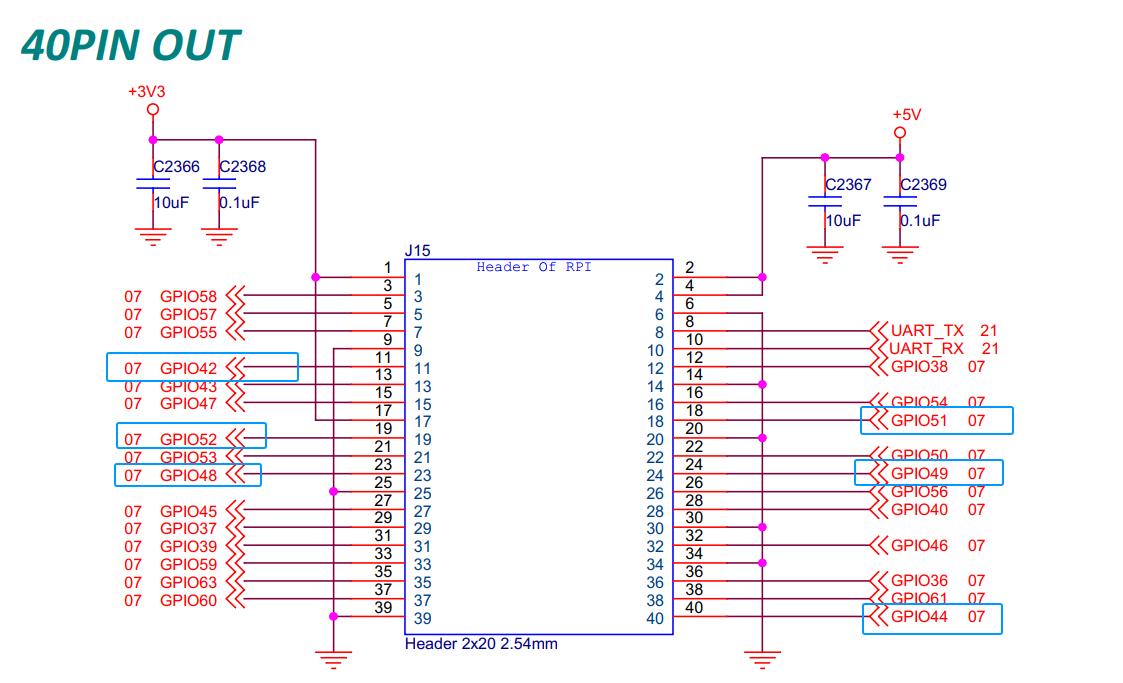
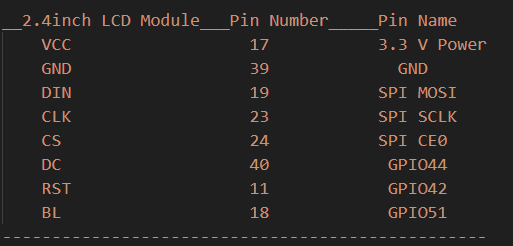
一、硬件连接
显示屏连接板卡的引脚
二、安装依赖的软件包
root@starfive:~
三、测试代码
3.1、LCD2inch4_lib.py
import os
import sys
import time
import logging
import VisionFive.spi as spi
import VisionFive.gpio as gpio
import numpy as np
from PIL import Image, ImageDraw, ImageFont
class LCD_2inch4:
width = 240
height = 320
def __init__(self, rst_pin, dc_pin, dev):
gpio.setmode(gpio.BOARD)
self.rstpin = rst_pin
self.dcpin = dc_pin
self.spidev = dev
spi.getdev(self.spidev)
"""Reset the maximum clock frequency of communication"""
"""The display speed of the picture is positively correlated with the clock frequency"""
spi.setmode(40000000, 0, 8)
gpio.setup(self.rstpin, gpio.OUT)
gpio.setup(self.dcpin, gpio.OUT)
def __del__(self):
spi.freedev()
"""add a short delay for each change of electrical level"""
def lcd_reset(self):
gpio.output(self.rstpin, gpio.HIGH)
time.sleep(0.01)
gpio.output(self.rstpin, gpio.LOW)
time.sleep(0.01)
gpio.output(self.rstpin, gpio.HIGH)
time.sleep(0.01)
def lcd_spisend(self, data):
spi.transfer(data)
def lcd_sendcmd(self, cmd):
gpio.output(self.dcpin, gpio.LOW)
spi.transfer(cmd)
def lcd_senddata(self, data):
gpio.output(self.dcpin, gpio.HIGH)
spi.transfer(data)
"""write multiple bytes"""
def lcd_sendnbytes(self, data):
gpio.output(self.dcpin, gpio.HIGH)
spi.write(data)
"""common registers' initialization of 2.4inch LCD module"""
def lcd_init_2inch4(self):
self.lcd_reset()
self.lcd_sendcmd(0x3A)
self.lcd_senddata(0x05)
self.lcd_sendcmd(0x36)
self.lcd_senddata(0x00)
self.lcd_sendcmd(0x21)
self.lcd_sendcmd(0x2A)
self.lcd_senddata(0x00)
self.lcd_senddata(0x00)
self.lcd_senddata(0x01)
self.lcd_senddata(0x3F)
self.lcd_sendcmd(0x2B)
self.lcd_senddata(0x00)
self.lcd_senddata(0x00)
self.lcd_senddata(0x00)
self.lcd_senddata(0xEF)
self.lcd_sendcmd(0xB2)
self.lcd_senddata(0x0C)
self.lcd_senddata(0x0C)
self.lcd_senddata(0x00)
self.lcd_senddata(0x33)
self.lcd_senddata(0x33)
self.lcd_sendcmd(0xB7)
self.lcd_senddata(0x35)
self.lcd_sendcmd(0xBB)
self.lcd_senddata(0x1F)
self.lcd_sendcmd(0xC0)
self.lcd_senddata(0x2C)
self.lcd_sendcmd(0xC2)
self.lcd_senddata(0x01)
self.lcd_sendcmd(0xC3)
self.lcd_senddata(0x12)
self.lcd_sendcmd(0xC4)
self.lcd_senddata(0x20)
self.lcd_sendcmd(0xC6)
self.lcd_senddata(0x0F)
self.lcd_sendcmd(0xD0)
self.lcd_senddata(0xA4)
self.lcd_senddata(0xA1)
self.lcd_sendcmd(0xE0)
self.lcd_senddata(0xD0)
self.lcd_senddata(0x08)
self.lcd_senddata(0x11)
self.lcd_senddata(0x08)
self.lcd_senddata(0x0C)
self.lcd_senddata(0x15)
self.lcd_senddata(0x39)
self.lcd_senddata(0x33)
self.lcd_senddata(0x50)
self.lcd_senddata(0x36)
self.lcd_senddata(0x13)
self.lcd_senddata(0x14)
self.lcd_senddata(0x29)
self.lcd_senddata(0x2D)
self.lcd_sendcmd(0xE1)
self.lcd_senddata(0xD0)
self.lcd_senddata(0x08)
self.lcd_senddata(0x10)
self.lcd_senddata(0x08)
self.lcd_senddata(0x06)
self.lcd_senddata(0x06)
self.lcd_senddata(0x39)
self.lcd_senddata(0x44)
self.lcd_senddata(0x51)
self.lcd_senddata(0x0B)
self.lcd_senddata(0x16)
self.lcd_senddata(0x14)
self.lcd_senddata(0x2F)
self.lcd_senddata(0x31)
self.lcd_sendcmd(0x21)
self.lcd_sendcmd(0x11)
self.lcd_sendcmd(0x29)
def lcd_setPos(self, Xstart, Ystart, Xend, Yend):
self.lcd_sendcmd(0x2A)
self.lcd_senddata(Xstart >> 8)
self.lcd_senddata(Xstart & 0xFF)
self.lcd_senddata((Xend - 1) >> 8)
self.lcd_senddata((Xend - 1) & 0xFF)
self.lcd_sendcmd(0x2B)
self.lcd_senddata(Ystart >> 8)
self.lcd_senddata(Ystart & 0xFF)
self.lcd_senddata((Yend - 1) >> 8)
self.lcd_senddata((Yend - 1) & 0xFF)
self.lcd_sendcmd(0x2C)
def lcd_clear(self, color):
"""Clear contents of image buffer"""
_buffer = [color] * (self.width * self.height * 2)
self.lcd_setPos(0, 0, self.width, self.height)
gpio.output(self.dcpin, gpio.HIGH)
"""modify the original single byte write to multi byte write"""
self.lcd_sendnbytes(_buffer)
def lcd_ShowImage(self, Image, Xstart, Ystart):
"""Set buffer to value of Python Imaging Library image."""
"""Write display buffer to physical display"""
imwidth, imheight = Image.size
if imwidth == self.height and imheight == self.width:
img = np.asarray(Image)
pix = np.zeros((self.width, self.height, 2), dtype=np.uint8)
pix[..., [0]] = np.add(np.bitwise_and(img[..., [0]], 0xF8), np.right_shift(img[..., [1]], 5))
pix[..., [1]] = np.add(np.bitwise_and(np.left_shift(img[..., [1]], 3), 0xE0), np.right_shift(img[..., [2]], 3), )
pix = pix.flatten().tolist()
self.lcd_sendcmd(0x36)
self.lcd_senddata(0x70)
self.lcd_setPos(0, 0, self.height, self.width)
gpio.output(self.dcpin, gpio.HIGH)
"""modify the original single byte write to multi byte write"""
self.lcd_sendnbytes(pix)
else:
img = np.asarray(Image)
pix = np.zeros((imheight, imwidth, 2), dtype=np.uint8)
pix[..., [0]] = np.add(np.bitwise_and(img[..., [0]], 0xF8), np.right_shift(img[..., [1]], 5))
pix[..., [1]] = np.add(np.bitwise_and(np.left_shift(img[..., [1]], 3), 0xE0), np.right_shift(img[..., [2]], 3), )
pix = pix.flatten().tolist()
self.lcd_sendcmd(0x36)
self.lcd_senddata(0x00)
self.lcd_setPos(0, 0, self.width, self.height)
gpio.output(self.dcpin, gpio.HIGH)
"""modify the original single byte write to multi byte write"""
self.lcd_sendnbytes(pix)
3.2、2.4inch_LCD_demo.py
"""
Please make sure the 2.4inch LCD Moudle is connected to the correct pins.
The following table describes how to connect the 2.4inch LCD Module to the 40-pin header.
-------------------------------------------------
__2.4inch LCD Module___Pin Number_____Pin Name
VCC 17 3.3 V Power
GND 39 GND
DIN 19 SPI MOSI
CLK 23 SPI SCLK
CS 24 SPI CE0
DC 40 GPIO44
RST 11 GPIO42
BL 18 GPIO51
-------------------------------------------------
"""
import os
import sys
import time
import logging
from PIL import Image
sys.path.append("..")
import VisionFive.boardtype as board_t
from lib import LCD2inch4_lib
"""
Demo modification ans new function description
------------------------------------------------------------
I. add the clear() function to fill LCD screen with white
II. give a hexadecimal value of white
III. cycle through multiple pictures
---------------------------------------------------------------
"""
WHITE = 0xFF
def main():
print("-----------lcd demo-------------")
vf_t = board_t.boardtype()
if vf_t == 1:
SPI_DEVICE = "/dev/spidev0.0"
elif vf_t == 2:
SPI_DEVICE = "/dev/spidev1.0"
else:
print("This module can only be run on a VisionFive board!")
return 0
"""The initialization settings of 2inch and 2.4inch are distinguished"""
disp = LCD2inch4_lib.LCD_2inch4(11, 40, SPI_DEVICE)
disp.lcd_init_2inch4()
disp.lcd_clear(WHITE)
if vf_t == 1:
image = Image.open("./visionfive.bmp")
elif vf_t == 2:
image = Image.open("./visionfive2.png")
else:
return
disp.lcd_ShowImage(image, 0, 0)
time.sleep(2)
"""add the part of displaying pictures circularly"""
while True:
try:
print(time.strftime("%Y-%m-%d %H:%M:%S", time.localtime(time.time())))
"""rotate the picture 90 degrees anticlockwise"""
"""to keep consistent with the display direction of other pictures"""
image = Image.open("./LCD_2inch4_parrot.bmp")
image = image.transpose(Image.Transpose.ROTATE_90)
disp.lcd_ShowImage(image, 0, 0)
time.sleep(0.5)
image = Image.open("./LCD_2inch.jpg")
disp.lcd_ShowImage(image, 0, 0)
time.sleep(0.5)
if vf_t == 1:
image = Image.open("./visionfive.bmp")
elif vf_t == 2:
image = Image.open("./visionfive2.png")
else:
return
disp.lcd_ShowImage(image, 0, 0)
time.sleep(0.5)
except KeyboardInterrupt:
break
print("Exit demo!")
if __name__ ==
四、运行结果
4.1、运行程序
root@starfive:/opt/test/lcddemo/example
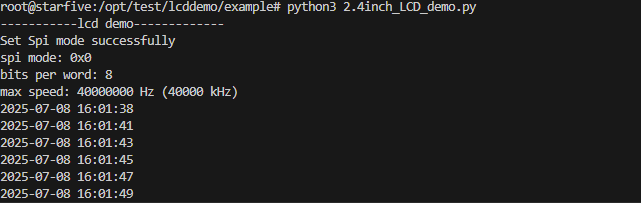
4.2、终端打印输出
4.3、LCD显示

 0
0
 /9
/9 



 工商网监
湘ICP备2023018690号
工商网监
湘ICP备2023018690号


 793
793

 淘帖
淘帖









