[文章]HarmonyOS应用开发JSAPI-js拨打电话call


0
0
前置:
Api:8
语言:js开发
需要权限:
ohos.permission.PLACE_CALL
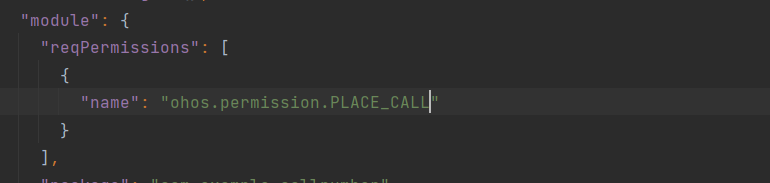
api参考地址:
https://developer.harmonyos.com/cn/docs/documentation/doc-references/js-apis-call-0000001333800413
开始:
1.创建项目:
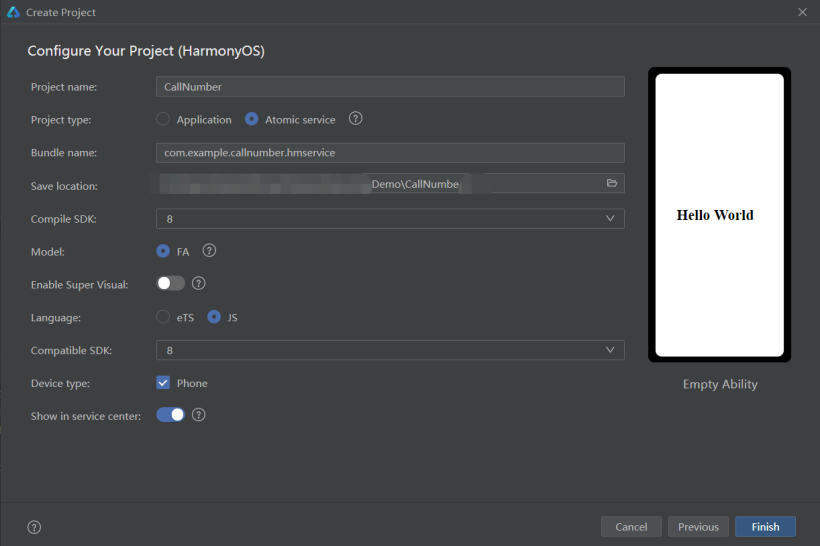
2.示例代码
test.hml
<div class="container">
    <input type="number" value="" on:change="getCallNumber" placeholder="请输入号码"></input>
    <button type="capsule" class="btn" onclick="call">拨打电话</button>
</div>
复制
test.css
.container {
    flex-direction: column;
    justify-content: center;
    align-items: center;
    width: 100%;
    height: 100%;
}

.btn {
    font-size: 50px;
    margin: 10px;
}
复制
test.js
import call from '@ohos.telephony.call';
import prompt from '@system.prompt';
export default {
    data: {
        num:null
    },
    getCallNumber(e){
        this.num = e.value
    },
    call() {
        // 调用查询能力接口
        let isSupport = call.hasVoiceCapability();
        if (isSupport) {
            if(this.num != null){
                // 如果设备支持呼叫能力,则继续跳转到拨号界面,并显示拨号的号码
                call.makeCall(this.num, (err) => {
                    if (!err) {
                        console.info("make call success");
                    } else {
                        console.info("make call fail, err is:" + JSON.stringify(err));
                    }
                });
            }else{
                prompt.showToast({
                    message:"您拨打的是空号"
                })
            }
        } else {
            console.info("NOT SUPPORT")
        }
    }
}
复制
4.代码地址
(https://gitee.com/jltfcloudcn/jump_to/tree/master/CallNumber)
回帖高级模式
声明:本文内容及配图由入驻作者撰写或者入驻合作网站授权转载。文章观点仅代表作者本人,不代表电子发烧友网立场。文章及其配图仅供工程师学习之用,如有内容图片侵权或者其他问题,请联系本站作侵删。 侵权投诉