[]【HarmonyOS HiSpark Wi-Fi IoT 套件试用连载】串口发送字符串


0
0
修改源码目录结构先在./applications/sample/wifi-iot/app路径下新建一个目录(或一套目录结构),用于存放业务源码文件。
本例程:在app下新增业务chuankou,其中hello_world.c为业务代码,BUILD.gn为编译脚本,具体规划目录结构如下:
- .
- └── applications
- └── sample
- └── wifi-iot
- └── app
- │── chuankou
- │ │── hello_world.c
- │ └── BUILD.gn
- └── BUILD.gn

业务代码。
新建./applications/sample/wifi-iot/app/chuankou下的hello_world.c文件,在hello_world.c中新建业务入口函数HelloWorld,并实现业务逻辑。并在代码最下方,使用HarmonyOS启动恢复模块接口SYS_RUN()启动业务。(SYS_RUN定义在ohos_init.h文件中)
- BUILD.gn为编译脚本
- hello_world.c为业务逻辑代码所在文件
#include <stdio.h>#include "ohos_init.h"#include "ohos_types.h"void led(void){int i=0;for(i=0;i<4;i++)//输出四遍{printf("[DEMO] zhangyang.n");}}SYS_RUN(led);
BUILD.gn(app/BUILD.gn)
static_library("bahuyang") {sources = ["led.c"]include_dirs = ["//utils/native/lite/include"]}
- “bahuyang”:是生成静态库名称,可随意更改
- “led.c”:代码文件
# Copyright (c) 2020 Huawei Device Co., Ltd.# Licensed under the Apache License, Version 2.0 (the "License");# you may not use this file except in compliance with the License.# You may obtain a copy of the License at## http://www.apache.org/licenses/LICENSE-2.0## Unless required by applicable law or agreed to in writing, software# distributed under the License is distributed on an "AS IS" BASIS,# WITHOUT WARRANTIES OR CONDITIONS OF ANY KIND, either express or implied.# See the License for the specific language governing permissions and# limitations under the License.
import("//build/lite/config/component/lite_component.gni")
lite_component("app") {features = [# "startup","chuankou:bahuyang"]}
- 将"startup"注释,运行我们自己的文件
- “chuankou”:工程目录
- bahuyang:静态库文件
我在以前的文章里,详细讲解了怎样编译。大家可以回头看看。
我们进入终端面板下,在对应工程目录下,输入python build.py wifiiot
进行编译,当出现编译成功时,就代表编译完成。
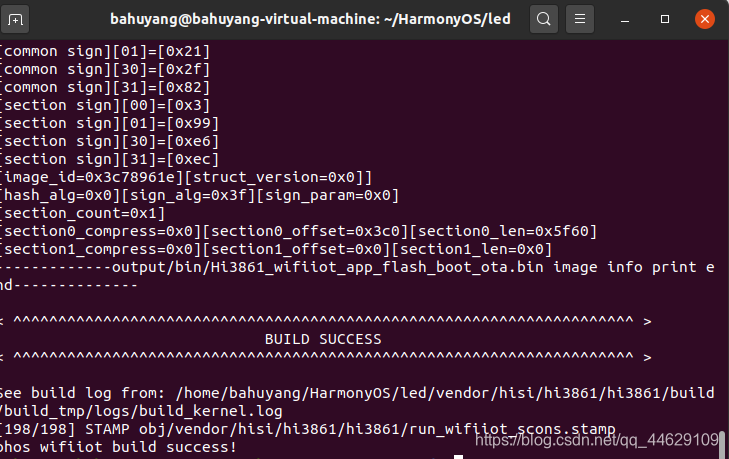
烧录利用HiBurn工具进行烧录,我在以前的文章里,详细讲过。

选定文件后,点击connect,按下开发板复位按钮,进行烧录。
烧录完成后,再次按下复位按键。
观察现象选择波特率115200,连接相应串口,观看串口调试助手的结果。

回帖高级模式
声明:本文内容及配图由入驻作者撰写或者入驻合作网站授权转载。文章观点仅代表作者本人,不代表电子发烧友网立场。文章及其配图仅供工程师学习之用,如有内容图片侵权或者其他问题,请联系本站作侵删。 侵权投诉