【上海晶珩睿莓1开发板试用体验】物联网窗帘——步进电机的网络远程控制
本文介绍了上海晶珩睿莓 1 开发板通过 GPIO 配置实现步进电机驱动,并进一步结合 HTTP 网络协议和板载无线模块,实现 Web 网页精确控制步进电机的旋转角度和速度,进而实现物联网窗帘的项目设计。
包括项目介绍、硬件连接、工程测试、网页设计和效果展示等部分。
项目介绍
- 硬件连接:步进电机驱动板和开发板对应引脚的连接方式等;
- 工程测试:驱动和控制步进电机,包括流程图、python 代码、转动控制效果等;
- 网页设计:通过调用 Flask 库实现网页控制终端设计,包括流程图、代码、网页设计等;
- 效果演示:包括步进电机的驱动和控制、旋转角度和速度控制、网页控制等。
硬件连接
步进电机与开发板连接方式如下
| ULN2003 驱动板 |
睿莓 40 PIN |
说明 |
|---|
| IN1 |
7 (GPIO83) |
步进脉冲 A |
| IN2 |
33 (GPIO82) |
步进脉冲 B |
| IN3 |
38 (GPIO81) |
步进脉冲 C |
| IN4 |
36 (GPIO80) |
步进脉冲 D |
| VCC |
5V |
驱动板电源 |
| GND |
GND |
共地 |
终端执行 gpioinfo 指令,获取可用的 GPIO 引脚
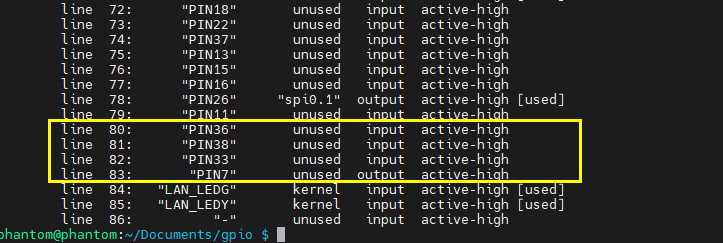
根据引脚复用表可知,对应 BCM 排针引脚编号如下
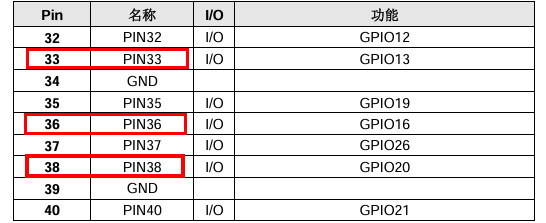
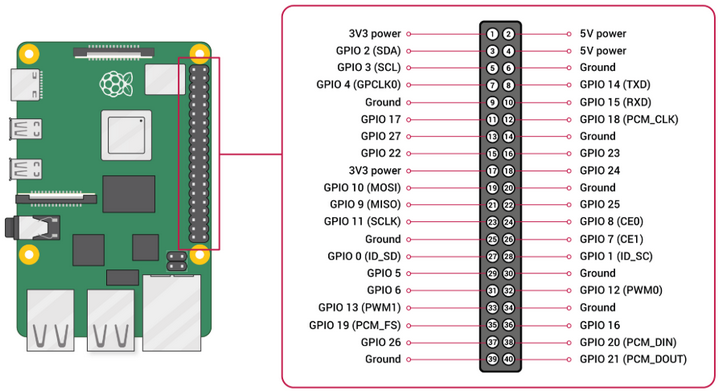
结合树莓派 40 pin 引脚定义,完成相应接线即可。
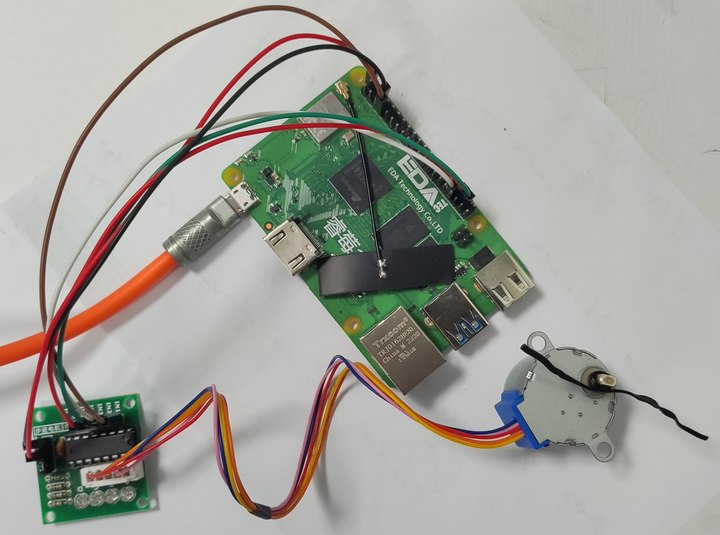
实物连接
工程测试
包括流程图、代码、效果等。
流程图
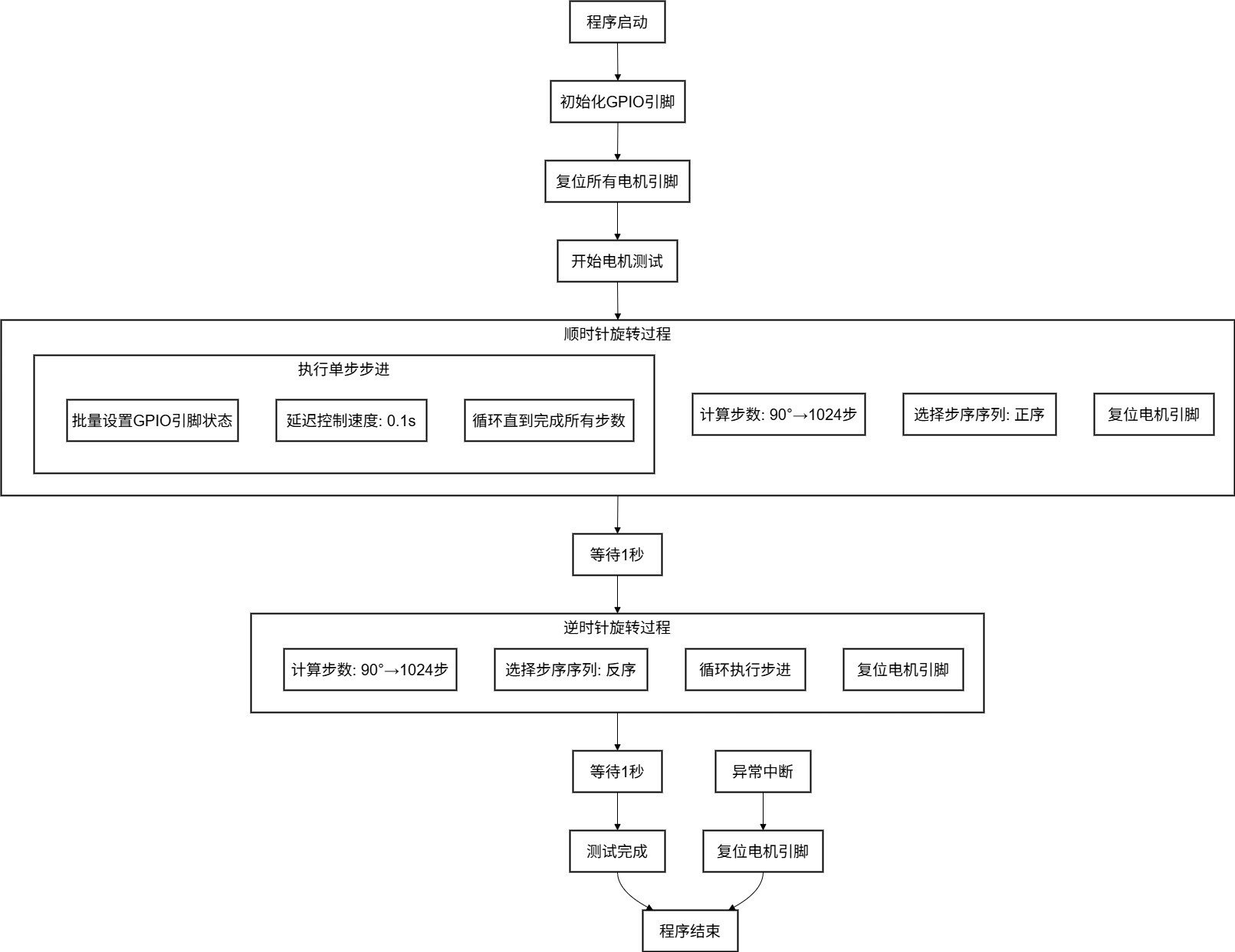
代码
终端执行 touch stepper_motor_run.py 新建文件,并添加如下代码
import subprocess
import time
GPIO_CHIP = "0"
MOTOR_PIN_1 = "83"
MOTOR_PIN_2 = "82"
MOTOR_PIN_3 = "81"
MOTOR_PIN_4 = "80"
STEP_SEQUENCE = [
[1, 0, 0, 1],
[1, 0, 0, 0],
[1, 1, 0, 0],
[0, 1, 0, 0],
[0, 1, 1, 0],
[0, 0, 1, 0],
[0, 0, 1, 1],
[0, 0, 0, 1]
]
def set_gpios_bulk(pin_states):
"""批量设置GPIO引脚状态"""
try:
cmd = ["gpioset", GPIO_CHIP]
for pin, state in pin_states:
cmd.append(f"{pin}={state}")
subprocess.run(
cmd,
check=True,
stderr=subprocess.PIPE,
stdout=subprocess.DEVNULL
)
return True
except subprocess.CalledProcessError as e:
print(f"GPIO控制错误: {e.stderr.decode().strip()}")
return False
except Exception as e:
print(f"设置GPIO时发生错误: {e}")
return False
def reset_motor_pins():
"""重置所有电机引脚为低电平"""
set_gpios_bulk([
(MOTOR_PIN_1, 0),
(MOTOR_PIN_2, 0),
(MOTOR_PIN_3, 0),
(MOTOR_PIN_4, 0)
])
def step_motor_controlled(step, delay_ms=5):
"""执行一步电机转动,带可控延迟"""
success = set_gpios_bulk([
(MOTOR_PIN_1, step[0]),
(MOTOR_PIN_2, step[1]),
(MOTOR_PIN_3, step[2]),
(MOTOR_PIN_4, step[3])
])
if success and delay_ms > 0:
time.sleep(delay_ms / 1000.0)
def rotate_angle_simple(angle, direction="cw", delay_ms=5):
"""简单旋转函数,固定速度"""
STEPS_PER_REV = 4096
steps = int(abs(angle) / 360 * STEPS_PER_REV)
sequence = STEP_SEQUENCE if direction == "cw" else list(reversed(STEP_SEQUENCE))
for i in range(steps):
step_index = i % len(sequence)
step_motor_controlled(sequence[step_index], delay_ms)
reset_motor_pins()
def setup_gpio():
"""初始化GPIO引脚"""
reset_motor_pins()
print("GPIO初始化完成")
if __name__ == "__main__":
try:
setup_gpio()
print("开始步进电机测试...")
print("注意:如果电机不转,请检查电源和接线")
print("顺时针旋转测试")
rotate_angle_simple(90, "cw", 0.1)
reset_motor_pins()
time.sleep(1)
print("逆时针旋转测试")
rotate_angle_simple(90, "ccw", 0.1)
time.sleep(1)
print("\n所有测试完成!")
except KeyboardInterrupt:
print("\n程序被用户中断")
except Exception as e:
print(f"发生异常: {e}")
import traceback
traceback.print_exc()
finally:
reset_motor_pins()
print("程序结束,电机已停止")
保存代码。
效果
终端执行如下指令,运行步进电机驱动程序
python stepper_motor_run.py
步进电机旋转,同时终端输出相应的测试状态
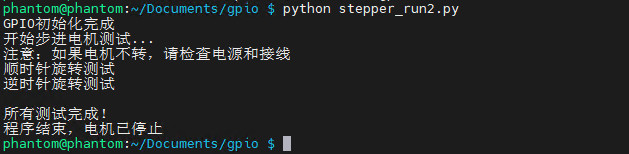
动态效果见顶部视频。
网页控制终端
包括流程图、代码、效果演示等。
流程图
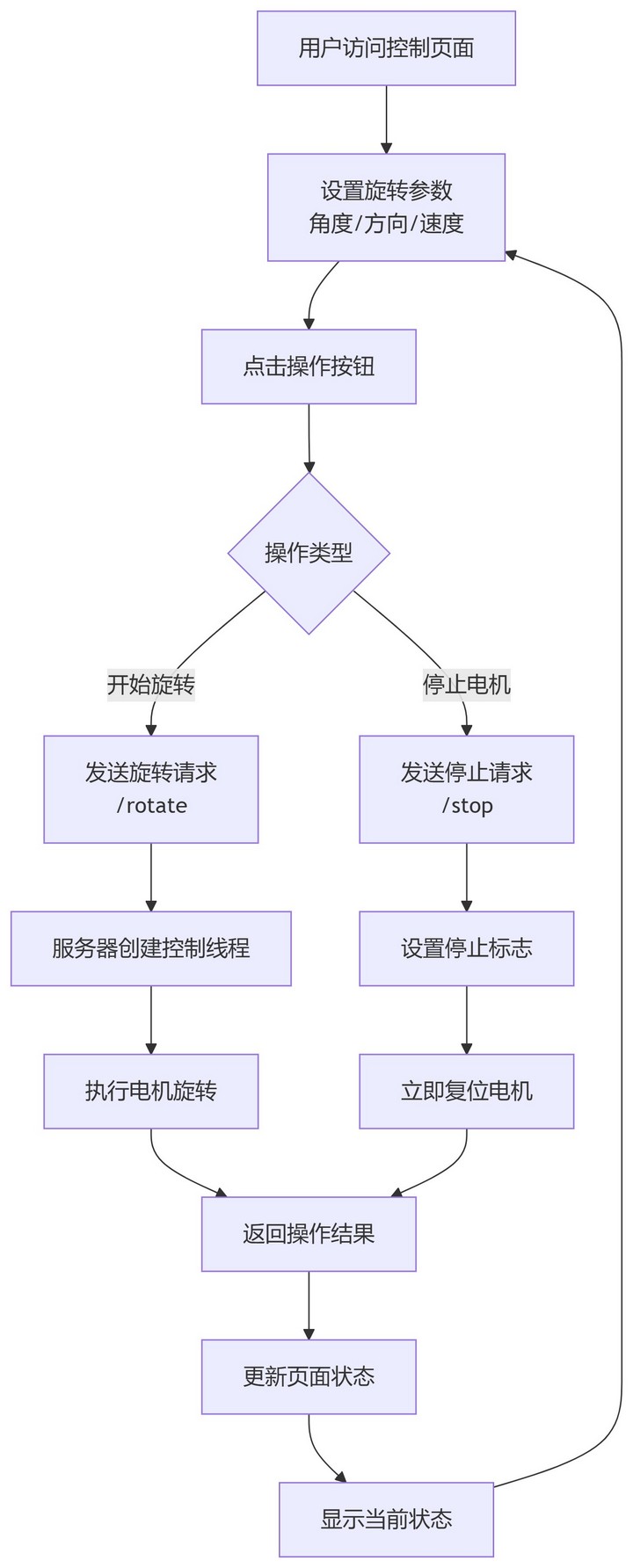
代码
终端执行 touch stepper_motor_http.py 新建文件,并添加如下代码
import subprocess
import time
import threading
from flask import Flask, render_template_string, request, jsonify
app = Flask(__name__)
GPIO_CHIP = "0"
MOTOR_PIN_1 = "83"
MOTOR_PIN_2 = "82"
MOTOR_PIN_3 = "81"
MOTOR_PIN_4 = "80"
STEP_SEQUENCE = [
[1, 0, 0, 1],
[1, 0, 0, 0],
[1, 1, 0, 0],
[0, 1, 0, 0],
[0, 1, 1, 0],
[0, 0, 1, 0],
[0, 0, 1, 1],
[0, 0, 0, 1]
]
REVERSE_STEP_SEQUENCE = list(reversed(STEP_SEQUENCE))
STEPS_PER_REVOLUTION = 4096
is_moving = False
current_task = None
def set_gpio(pin, state):
"""设置GPIO引脚状态"""
try:
subprocess.run(
["gpioset", GPIO_CHIP, f"{pin}={state}"],
check=True,
stderr=subprocess.PIPE,
stdout=subprocess.DEVNULL
)
return True
except subprocess.CalledProcessError as e:
print(f"错误:无法控制 GPIO {pin} (详细: {e.stderr.decode().strip()})")
return False
except Exception as e:
print(f"设置GPIO时发生错误: {e}")
return False
def reset_motor_pins():
"""重置所有电机引脚为低电平"""
for pin in [MOTOR_PIN_1, MOTOR_PIN_2, MOTOR_PIN_3, MOTOR_PIN_4]:
set_gpio(pin, 0)
def step_motor(step, delay=0.001):
"""执行一步电机转动"""
set_gpio(MOTOR_PIN_1, step[0])
set_gpio(MOTOR_PIN_2, step[1])
set_gpio(MOTOR_PIN_3, step[2])
set_gpio(MOTOR_PIN_4, step[3])
time.sleep(delay)
def speed_to_delay(speed_level):
"""将速度等级1-10转换为延迟时间"""
return 0.01 - (speed_level - 1) * 0.00099
def rotate_angle_thread(angle, speed_level=5, direction="cw"):
"""在单独线程中旋转指定角度"""
global is_moving
if is_moving:
return False
is_moving = True
try:
delay = speed_to_delay(speed_level)
steps = int((angle / 360) * STEPS_PER_REVOLUTION)
sequence = STEP_SEQUENCE if direction == "cw" else REVERSE_STEP_SEQUENCE
print(f"开始旋转: {angle}度, 方向: {direction}, 速度: {speed_level}, 延迟: {delay:.4f}s")
for i in range(steps):
if not is_moving:
break
step_index = i % len(sequence)
step_motor(sequence[step_index], delay)
reset_motor_pins()
return True
except Exception as e:
print(f"旋转过程中出错: {e}")
return False
finally:
is_moving = False
def stop_motor():
"""停止电机转动"""
global is_moving
is_moving = False
reset_motor_pins()
print("电机已停止")
HTML_TEMPLATE = '''
<!DOCTYPE html>
<html lang="zh-CN">
<head>
<meta charset="UTF-8">
<meta name="viewport" content="width=device-width, initial-scale=1.0">
<title>步进电机控制面板</title>
<style>
body {
font-family: Arial, sans-serif;
max-width: 600px;
margin: 0 auto;
padding: 20px;
background-color: #f5f5f5;
}
.container {
background: white;
padding: 20px;
border-radius: 10px;
box-shadow: 0 2px 10px rgba(0,0,0,0.1);
}
h1 {
color: #333;
text-align: center;
}
.control-group {
margin: 15px 0;
}
label {
display: block;
margin-bottom: 5px;
font-weight: bold;
}
input[type="number"], select {
width: 100%;
padding: 10px;
border: 1px solid #ddd;
border-radius: 5px;
font-size: 16px;
}
.speed-slider {
width: 100%;
margin: 10px 0;
}
.speed-labels {
display: flex;
justify-content: space-between;
margin-top: 5px;
}
.btn {
width: 100%;
padding: 12px;
margin: 5px 0;
border: none;
border-radius: 5px;
font-size: 16px;
cursor: pointer;
transition: background-color 0.3s;
}
.btn-primary {
background-color: #007bff;
color: white;
}
.btn-secondary {
background-color: #6c757d;
color: white;
}
.btn-danger {
background-color: #dc3545;
color: white;
}
.btn:disabled {
background-color: #ccc;
cursor: not-allowed;
}
.status {
margin-top: 20px;
padding: 10px;
border-radius: 5px;
text-align: center;
}
.status-moving {
background-color: #d4edda;
color: #155724;
}
.status-stopped {
background-color: #f8d7da;
color: #721c24;
}
</style>
</head>
<body>
<div class="container">
<h1>步进电机控制面板</h1>
<div class="control-group">
<label for="angle">旋转角度 (度):</label>
<input type="number" id="angle" min="1" max="3600" value="90">
</div>
<div class="control-group">
<label for="direction">旋转方向:</label>
<select id="direction">
<option value="cw">顺时针</option>
<option value="ccw">逆时针</option>
</select>
</div>
<div class="control-group">
<label>速度控制 (1-10):</label>
<input type="range" id="speed" class="speed-slider" min="1" max="10" value="5">
<div class="speed-labels">
<span>1 (慢)</span>
<span>5</span>
<span>10 (快)</span>
</div>
</div>
<div class="control-group">
<button class="btn btn-primary" onclick="rotateMotor()">开始旋转</button>
<button class="btn btn-danger" onclick="stopMotor()">停止电机</button>
<button class="btn btn-secondary" onclick="rotateFixed(90)">旋转90°</button>
<button class="btn btn-secondary" onclick="rotateFixed(180)">旋转180°</button>
<button class="btn btn-secondary" onclick="rotateFixed(360)">旋转360°</button>
</div>
<div id="status" class="status status-stopped">
电机状态: 停止
</div>
</div>
<script>
function updateStatus(moving) {
const statusDiv = document.getElementById('status');
if (moving) {
statusDiv.className = 'status status-moving';
statusDiv.textContent = '电机状态: 运行中...';
} else {
statusDiv.className = 'status status-stopped';
statusDiv.textContent = '电机状态: 停止';
}
}
function rotateMotor() {
const angle = document.getElementById('angle').value;
const direction = document.getElementById('direction').value;
const speed = document.getElementById('speed').value;
if (!angle || angle <= 0) {
alert('请输入有效的角度值');
return;
}
updateStatus(true);
fetch('/rotate', {
method: 'POST',
headers: {
'Content-Type': 'application/json',
},
body: JSON.stringify({
angle: parseFloat(angle),
direction: direction,
speed: parseInt(speed)
})
})
.then(response => response.json())
.then(data => {
if (data.success) {
setTimeout(() => updateStatus(false), 1000);
} else {
alert('旋转失败: ' + data.message);
updateStatus(false);
}
})
.catch(error => {
console.error('Error:', error);
alert('请求失败');
updateStatus(false);
});
}
function stopMotor() {
updateStatus(false);
fetch('/stop', { method: 'POST' })
.then(response => response.json())
.then(data => {
console.log('停止响应:', data);
});
}
function rotateFixed(angle) {
document.getElementById('angle').value = angle;
rotateMotor();
}
// 显示当前速度值
document.getElementById('speed').addEventListener('input', function() {
const speedValue = this.value;
const labels = document.querySelectorAll('.speed-labels span');
labels[1].textContent = speedValue;
});
</script>
</body>
</html>
'''
@app.route('/')
def index():
"""显示控制页面"""
return render_template_string(HTML_TEMPLATE)
@app.route('/rotate', methods=['POST'])
def rotate():
"""处理旋转请求"""
global current_task, is_moving
if is_moving:
return jsonify({'success': False, 'message': '电机正在运行中'})
data = request.get_json()
angle = data.get('angle', 90)
direction = data.get('direction', 'cw')
speed = data.get('speed', 5)
if angle <= 0:
return jsonify({'success': False, 'message': '角度必须大于0'})
if speed < 1 or speed > 10:
return jsonify({'success': False, 'message': '速度必须在1-10之间'})
def rotate_task():
rotate_angle_thread(angle, speed, direction)
current_task = threading.Thread(target=rotate_task)
current_task.daemon = True
current_task.start()
return jsonify({'success': True, 'message': '开始旋转'})
@app.route('/stop', methods=['POST'])
def stop():
"""处理停止请求"""
stop_motor()
return jsonify({'success': True, 'message': '已发送停止指令'})
@app.route('/status')
def status():
"""获取电机状态"""
return jsonify({'moving': is_moving})
def setup_gpio():
"""初始化GPIO引脚"""
reset_motor_pins()
print("GPIO引脚初始化完成")
if __name__ == '__main__':
try:
setup_gpio()
print("步进电机控制服务器启动中...")
print("请在浏览器中访问: http://127.0.0.1:5000")
app.run(host='0.0.0.0', port=5000, debug=True, threaded=True)
except KeyboardInterrupt:
print("\n服务器关闭中...")
except Exception as e:
print(f"启动错误: {e}")
finally:
stop_motor()
print("程序结束")
保存代码。
效果
终端执行如下指令,运行网页步进电机控制程序
python stepper_motor_http.py
终端输出服务器网址、步进电机运行状态等信息。
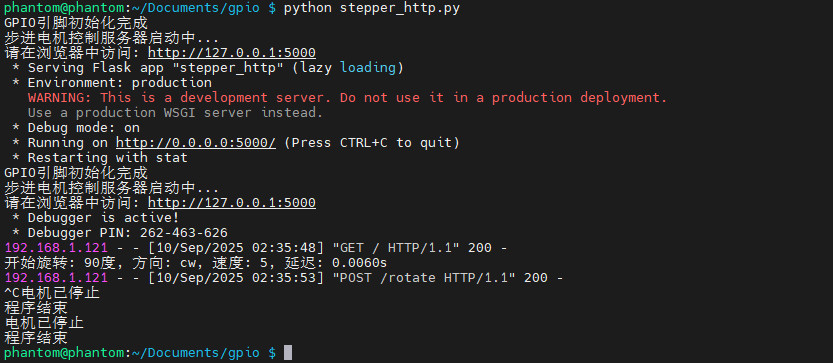
打开同一局域网内的浏览器软件,输入网页服务器链接 http://192.128.31.109:5000
注意开发版的 IP 地址 192.168.xx.xxx 及端口 5000 ;
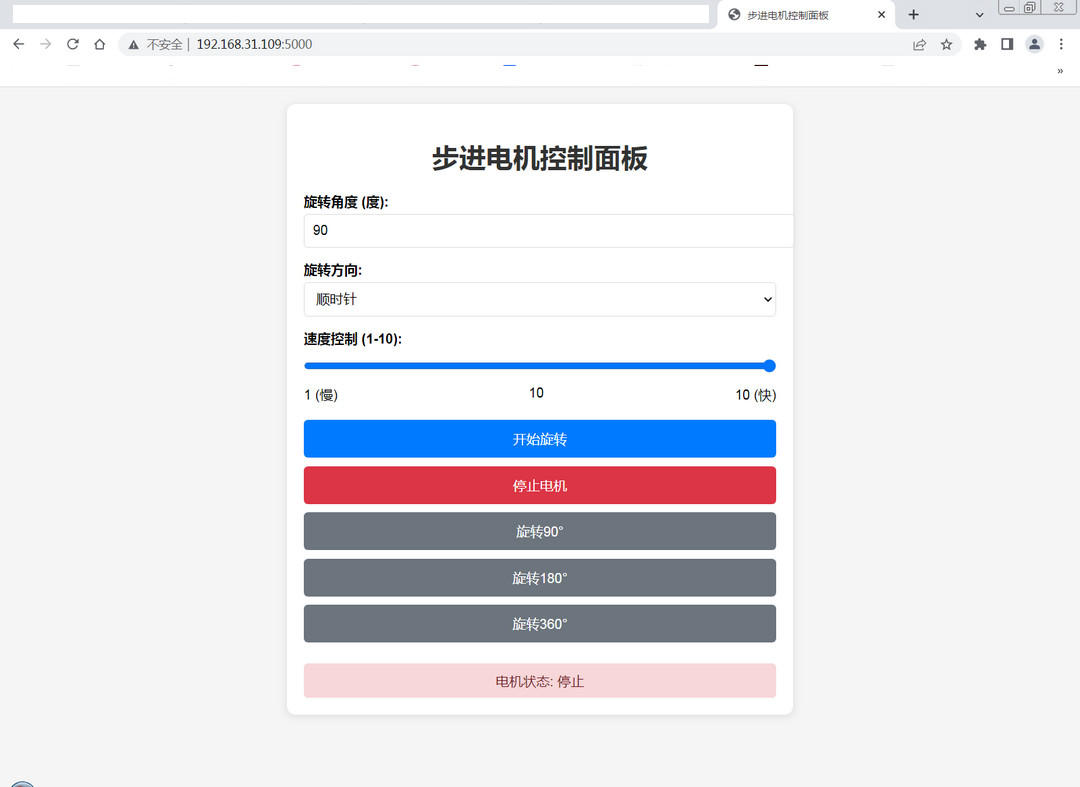
- 由此可实现步进电机的网络远程控制;
- 通过手机进入网页,可实现移动端远程控制。
结合机械传动,可实现物联网窗帘的项目设计。
动态效果见底部视频。
总结
本文介绍了上海晶珩睿莓 1 开发板通过 GPIO 配置实现步进电机驱动,并进一步结合 HTTP 网络协议和板载无线模块,实现 Web 网页精确控制步进电机的旋转角度和速度,进而实现物联网窗帘的项目设计,为该产品在物联网、工业和科研等精密控制领域的开发设计和应用提供了参考。

 电子发烧友论坛
 /9
/9 



 工商网监
湘ICP备2023018690号
工商网监
湘ICP备2023018690号


 1440
1440


 评论
评论
 淘帖
淘帖 2128
2128










